
1. Увод
This manual provides essential information for the safe and efficient use of your coocaa DOSHISHA 32Z65 32-inch Google TV. Please read these instructions thoroughly before operating the television and retain them for future reference. This smart TV integrates advanced features for an enhanced viewинг искуство.

Слика: Фронт view of the coocaa DOSHISHA 32Z65 32-inch Google TV.
2. Карактеристике производа
- Интегрисани тјунери: Equipped with terrestrial digital, BS, and CS tuners (two of each) for comprehensive broadcast reception.
- Унапред инсталиране апликације за стримовање: Access popular services like Netflix, YouTube, Prime Video, and Google Play directly. Additional applications can be downloaded from the Google Play Store.
- Гоогле помоћник: Utilize voice commands to search for movies, stream apps, play music, and control TV functions hands-free.
- Долби Висион: Experience superior HDR technology with stunning brightness, deep blacks, and vibrant colors for a cinematic visual experience.
- Долби Атмос: Enjoy three-dimensional, dynamic sound that complements the visuals, providing an immersive audio experience with clear detail.
- Dolby Audio + DTS: Delivers an immersive soundscape with precise audio detail for movies, music, and games.
- Chameleon Extreme: An advanced image processing engine that optimizes clarity, sharpness, and color accuracy at the pixel level for an exceptional visual experience.
- Режим филмаџија: Activates a mode that bypasses unnecessary image processing, reproducing content as the director intended for an authentic cinematic feel.
- Remote Search Function: A built-in speaker in the remote control allows for easy location with a simple 3-step operation. Note: Remote pairing is required for this feature.
- Без треперења: Reduces screen flicker to minimize eye strain and allow for focused viewing of movies and dramas.
- Слабо плаво светло: coocaa's proprietary blue light reduction technology ensures comfortable and eye-friendly viewing even during extended periods.
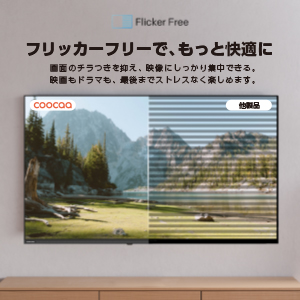
Image: Visual representation of Chameleon Extreme technology enhancing color and clarity.

Image: A television screen displaying a movie scene with palm trees, illustrating Filmmaker Mode.

Image: The Google TV home screen with various streaming app icons and content recommendations.

Image: Comparison showing a screen with and without blue light reduction, highlighting the Low Blue Light feature.
3. Подешавање
3.1 Распакивање и почетно постављање
Пажљиво извадите телевизор из паковања. Поставите телевизор на стабилну, равну површину или га монтирајте на зид помоћу компатибилног VESA носача (продаје се засебно). Обезбедите одговарајућу вентилацију око телевизора.
3.2 Повезивање периферних уређаја
- Прикључак за напајање: Прикључите кабл за напајање на телевизор, а затим на утичницу.
- Антенска/кабловска веза: Connect your antenna or cable TV source to the appropriate input on the TV.
- HDMI уређаји: Connect external devices such as Blu-ray players, game consoles, or soundbars to the HDMI ports.
- External HDD: For recording, connect a compatible external HDD to the USB port.

Слика: Позади view of the TV highlighting various input ports.
3.3 Чаробњак за почетно подешавање
При првом укључивању, телевизор ће вас водити кроз процес почетног подешавања. То укључује:
- Избор језика.
- Мрежна веза (Wi-Fi или Ethernet).
- Google account sign-in for Google TV features.
- Channel scanning for broadcast TV.
- Remote control pairing (if prompted).
4. Упутство за употребу
4.1 Функције даљинског управљача
The included remote control allows you to navigate the TV's interface, adjust settings, and access smart features. Familiarize yourself with the buttons for power, volume, channel, input selection, and dedicated app buttons.

Image: The remote control for the coocaa DOSHISHA 32Z65 TV.
4.2 Google TV Navigation
The Google TV interface organizes your content from various streaming services and live TV in one place. Use the remote's directional pad to browse recommendations, access your apps, and manage your library.
4.3 Коришћење Google асистента
Press the Google Assistant button on your remote and speak into the microphone to:
- Тражи филмови, ТВ емисије или глумци.
- Отворите апликације.
- Контролишите паметне кућне уређаје.
- Добијајте ажурирања временске прогнозе или постављајте општа питања.
4.4 External HDD Recording
To record broadcast programs, connect an external HDD to the TV's USB port. Follow the on-screen prompts to format the drive if necessary. You can schedule recordings or record the current program. The TV supports background recording, allowing you to watch one program while another is being recorded.
5. Одржавање
5.1 Чишћење телевизора
Да бисте очистили екран, нежно га обришите меком, сувом крпом која не оставља влакна. За тврдокорне мрље, благо обришитеampОперите крпу водом или средством за чишћење екрана. Избегавајте употребу јаких хемикалија или абразивних материјала. За кућиште телевизора користите меку, суву крпу.
5.2 Ажурирања софтвера
Ensure your TV's software is up to date for optimal performance and security. The TV may automatically prompt you for updates when connected to the internet. You can also manually check for updates in the settings menu.
КСНУМКС. Решавање проблема
Ако наиђете на проблеме са телевизором, погледајте следећа уобичајена решења:
- Нема напајања: Check if the power cord is securely connected to both the TV and the power outlet. Ensure the outlet is functioning.
- Нема слике/звука: Проверите да ли је изабран исправан улазни извор. Проверите све кабловске везе (HDMI, антена).
- Даљински не реагује: Replace the batteries in the remote control. Ensure there are no obstructions between the remote and the TV. If the remote search function is not working, ensure it is paired.
- Проблеми са мрежном везом: Рестартујте рутер и модем. Поново повежите телевизор са Wi-Fi мрежом или проверите везу Ethernet кабла.
- Апликација не ради: Try restarting the app. If the issue persists, clear the app's cache or reinstall it from the Google Play Store.
За сложеније проблеме, обратите се корисничкој подршци.
7. Спецификације
| Феатуре | Спецификација |
|---|---|
| Величина екрана | 32 инча |
| Дисплаи Типе | ЛЦД |
| Резолуција | Хигх-Дефинитион |
| Аспецт Ратио | 16:9 |
| Рефресх Рате | 60 Хз |
| Однос контраста | 1200:1 |
| ХДМИ портови | 2 |
| Мрежна повезаност | HDMI, Wireless (Infrared) |
| Карактеристике звучника | Built-in Speakers (Dolby Audio + DTS) |
| Димензије производа (Д x Ш x В) | 18.8 к 71.8 к 48 цм |
| Тежина производа | 3.4 кг |
| Годишња потрошња енергије | 39.9 кВх/год |
| Број модела | 32З65 |
8. Званични видео снимци производа
8.1 Google TV System Introduction
Video: An introduction to the Google TV system, showcasing its features and user interface. This video demonstrates how Google TV organizes content and provides personalized recommendations.
9. Гаранција и подршка
Your coocaa DOSHISHA 32Z65 TV comes with a manufacturer's warranty. Please refer to the warranty card included in the packaging for details on coverage and duration. For technical support, service, or warranty claims, please contact DOSHISHA customer service through their official channels. Contact information can typically be found on the warranty card or the manufacturer's webсајту.