
1. Водич за подешавање
This section provides instructions for the initial setup of your OPPO A6 Pro 5G CPH2781 smartphone.
1.1 Распакивање и почетни преглед
Пажљиво извадите све компоненте из паковања. Проверите да ли су присутне следеће ставке:
- OPPO A6 Pro 5G CPH2781 device
- 80W SUPERVOOC Flash Charge adapter
- УСБ Типе-Ц кабл
- Алат за избацивање СИМ картице
- Кратки водич и безбедносне информације
Пре него што наставите, проверите да ли има видљивих оштећења на уређају.
1.2 Инсталација SIM картице и меморије
The OPPO A6 Pro 5G supports Dual SIM functionality. Follow these steps to install your SIM cards:
- Пронађите лежиште за СИМ картицу са стране уређаја.
- Уметните алат за избацивање СИМ картице у мали отвор поред лежишта и лагано притисните док лежиште не искочи.
- Поставите своје Nano-SIM картице у предвиђене слотове на лежишту. Уверите се да су златни контакти окренути надоле.
- Пажљиво поново уметните лежиште СИМ картице у уређај док не кликне на своје место.
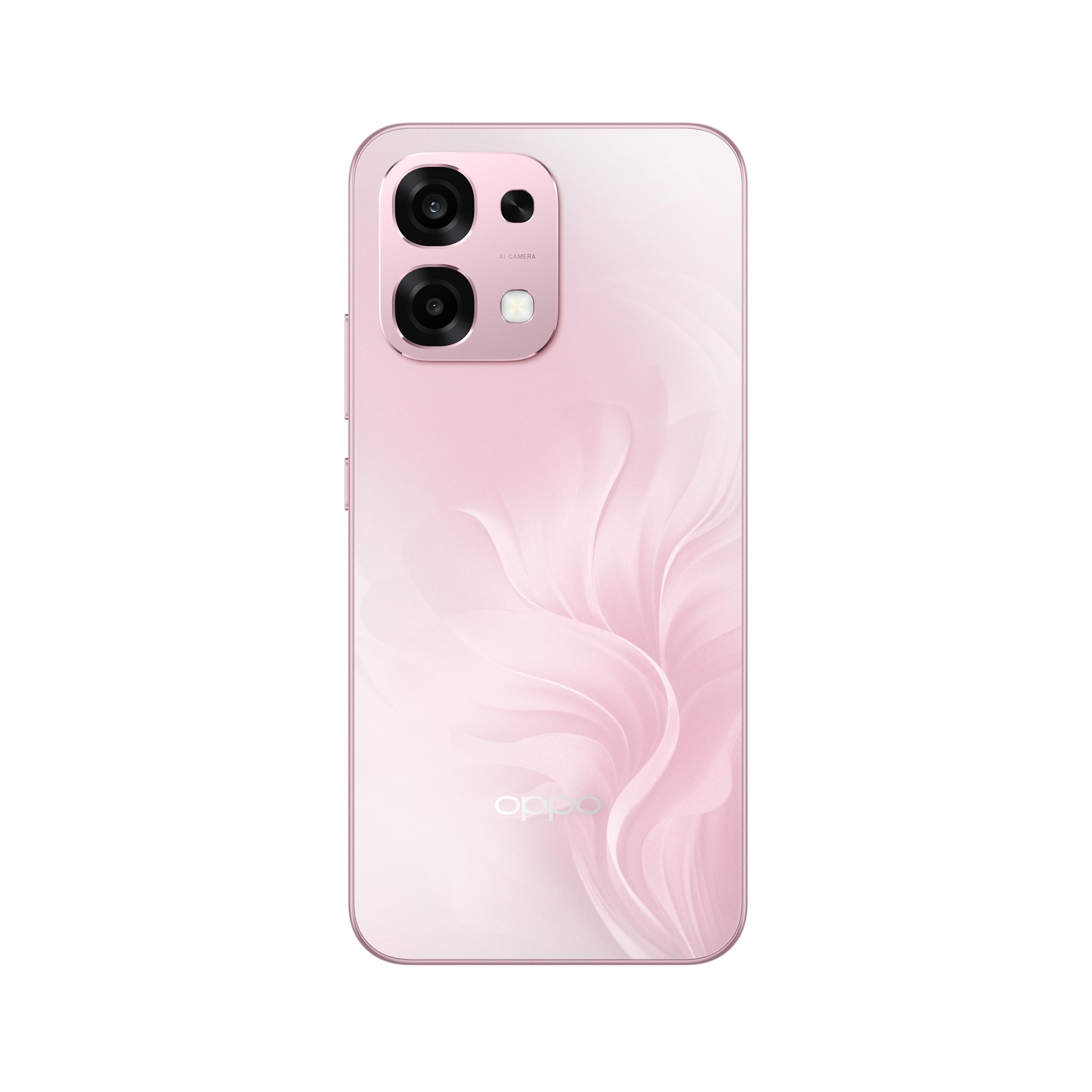
Слика 1: Задња страна view of the OPPO A6 Pro 5G CPH2781, highlighting the camera array and device color.
1.3 Укључивање и почетна конфигурација
Да бисте први пут укључили уређај:
- Press and hold the Power button (located on the right side) until the OPPO logo appears on the screen.
- Пратите упутства на екрану да бисте изабрали језик, регион и повезали се са Wi-Fi мрежом.
- Пријавите се помоћу свог Google налога или креирајте нови да бисте приступили Google услугама и Play продавници.
- Complete the setup wizard, including setting up screen lock methods (PIN, pattern, password, or Face Recognition).
1.4 Пуњење уређаја
Your OPPO A6 Pro 5G is equipped with 80W SUPERVOOC Flash Charge technology for rapid charging. Use the provided 80W SUPERVOOC adapter and USB Type-C cable for optimal charging performance.
- Повежите USB Type-C кабл са портом за пуњење на дну телефона.
- Connect the other end of the cable to the 80W SUPERVOOC adapter.
- Укључите адаптер у утичницу.
- Индикатор пуњења ће се појавити на екрану.
2. Упутство за употребу
This section covers the basic operation and key features of your OPPO A6 Pro 5G CPH2781.
2.1 Navigating ColorOS
Your device runs on ColorOS, OPPO's customized Android operating system. Common navigation gestures include:
- Провуче до: Access the app drawer (if enabled) or return to the home screen.
- Превуците доле: Отворите панел са обавештењима и брза подешавања.
- Превуците лево/десно: Navigate between home screen pages.
- Додирните: Изаберите ставку или отворите апликацију.
- Дуго притисните: Приступите контекстуалним менијима или преместите иконе апликација.
2.2 Карактеристике екрана
The OPPO A6 Pro 5G features a 6.57-inch 120Hz AMOLED Ultra Bright Display, providing vivid colors and smooth scrolling. You can adjust display settings such as brightness, color mode, and refresh rate in the Settings menu under "Display & Brightness".
2.3 Употреба камере
The device is equipped with an advanced camera system. To open the camera, tap the Camera app icon on your home screen or lock screen. Key features include:
- Режими фотографисања: Standard, Portrait, Night, Pro, Panorama.
- Видео снимак: Supports various resolutions and frame rates.
- АИ камера: Utilizes artificial intelligence for scene recognition and optimal photo settings.

Figure 2: Detail of the OPPO A6 Pro 5G CPH2781 camera module.
2.4 Карактеристике вештачке интелигенције
The OPPO A6 Pro 5G integrates several AI-powered features to enhance user experience:
- AI Eraser 2.0: For intelligent object removal in photos.
- AI Assistance for Documents: Helps in scanning and managing documents.
- AI Assistant for Notes: Enhances note-taking capabilities.
2.5 Повезивање
Your device supports 5G cellular technology, Bluetooth, and LTE. AI LinkBoost 3.0 automatically optimizes network performance for stable connections.
- Ви-Фи: Повежите се са бежичним мрежама преко Подешавања > Wi-Fi.
- Блуетоотх: Pair with other Bluetooth devices via Settings > Bluetooth.
- Мобилна мрежа: Manage 5G/LTE settings via Settings > Mobile Network.
3. Одржавање и њега
Proper maintenance ensures the longevity and optimal performance of your OPPO A6 Pro 5G CPH2781.
3.1 Одржавање батерије
The device is equipped with a 6500mAh battery. To maximize battery life:
- Избегавајте екстремне температуре.
- Use the provided 80W SUPERVOOC Flash Charge adapter and cable.
- Избегавајте често потпуно пражњење батерије.
- Enable power-saving modes when necessary.
3.2 Отпорност на воду и прашину
The OPPO A6 Pro 5G CPH2781 has an IP69 rating, indicating resistance to dust and high-pressure water jets. While resistant, it is not waterproof under all conditions. To maintain resistance:
- Ensure the SIM tray is fully closed and sealed.
- Избегавајте потапање уређаја у воду.
- Do not expose the device to saltwater, chlorinated water, or other liquids.
- If the device gets wet, wipe it dry with a clean, soft cloth before charging.
3.3 Physical Protection
The device is certified to military standards for durability. It also comes with a built-in screen protector. For additional protection:
- Consider using a protective case.
- Avoid dropping the device or exposing it to severe impacts.
- Clean the screen and body with a soft, lint-free cloth.
КСНУМКС. Решавање проблема
This section addresses common issues you might encounter with your OPPO A6 Pro 5G CPH2781.
4.1 Уређај се не укључује
- Уверите се да је батерија напуњена. Повежите уређај са пуњачем најмање 10 минута.
- Извршите присилно поновно покретање тако што ћете истовремено притиснути и држати дугме за напајање и дугме за појачавање јачине звука око 10-15 секунди.
4.2 Лоша мрежна повезаност
- Проверите да ли је ваша СИМ картица правилно уметнута.
- Verify that mobile data is enabled in Settings.
- Покушајте да поново покренете уређај.
- Reset network settings (Settings > System settings > Back up and reset > Reset phone > Reset network settings).
- Уверите се да сте у домету мреже.
4.3 Рушење или замрзавање апликација
- Затворите и поново отворите апликацију.
- Clear the app's cache and data (Settings > Apps > App management > [App Name] > Storage usage > Clear cache/Clear data).
- Ажурирајте апликацију на најновију верзију из Google Play продавнице.
- Ensure your ColorOS is up to date (Settings > About device > Up to date).
4.4 Брзо пражњење батерије
- Проверите потрошњу батерије у Подешавањима > Батерија да бисте идентификовали апликације које троше много енергије.
- Смањите осветљеност екрана и време чекања екрана.
- Онемогућите непотребне функције попут GPS-а, Bluetooth-а или Wi-Fi-ја када их не користите.
- Enable power-saving mode.
5. Спецификације
Below are the key technical specifications for the OPPO A6 Pro 5G CPH2781.
| Феатуре | Спецификација |
|---|---|
| Бранд | ОППО |
| Назив модела | A6 Pro (CPH2781) |
| Оперативни систем | ЦолорОС |
| РАМ меморија | 8 ГБ (прошириво до 16 ГБ) |
| Капацитет складиштења | 256 ГБ |
| ЦПУ модел | МедиаТек Хелио Г100 |
| Величина екрана | 6.57 инча |
| Дисплаи Типе | АМОЛЕД |
| Рефресх Рате | 120 Хз |
| Капацитет батерије | 6500 мАх |
| Технологија пуњења | 80W SUPERVOOC Flash Charge |
| Целлулар Тецхнологи | 5G |
| Број слотова за SIM картице | Дуал СИМ |
| Ниво отпорности на воду | ИПКСНУМКС (водоотпоран) |
| Биометријска безбедност | Препознавање лица |
| Тип конектора | УСБ тип Ц |
| Уграђени медији | Сцреен Протецтор |
6. Информације о гаранцији
Your OPPO A6 Pro 5G CPH2781 comes with a Двогодишња гаранција произвођачаОва гаранција покрива недостатке у материјалу и изради при нормалној употреби.
Please retain your proof of purchase for warranty claims. The warranty does not cover damage caused by misuse, accidents, unauthorized modifications, or normal wear and tear. For detailed terms and conditions, please refer to the warranty card included in your product packaging or visit the official OPPO webсајту.
7. Корисничка подршка
For further assistance, technical support, or service inquiries regarding your OPPO A6 Pro 5G CPH2781, please contact OPPO customer service through the following channels:
- Official OPPO Webсајт: Посетите OPPO подршка за често постављана питања, водиче за решавање проблема и контакт информације.
- OPPO Store: Такође можете посетити званичника OPPO продавница на Амазону за информације о производу и пратећој додатној опреми.
- Сервисни центри: Locate authorized OPPO service centers in your region for in-person support.
When contacting support, please have your device model (CPH2781) and serial number ready.