
1. Увод
This manual provides detailed instructions for the safe and efficient use of your Surfans F20 Pro Android Hi-Res Music Player. Please read this manual thoroughly before operating the device and retain it for future reference.
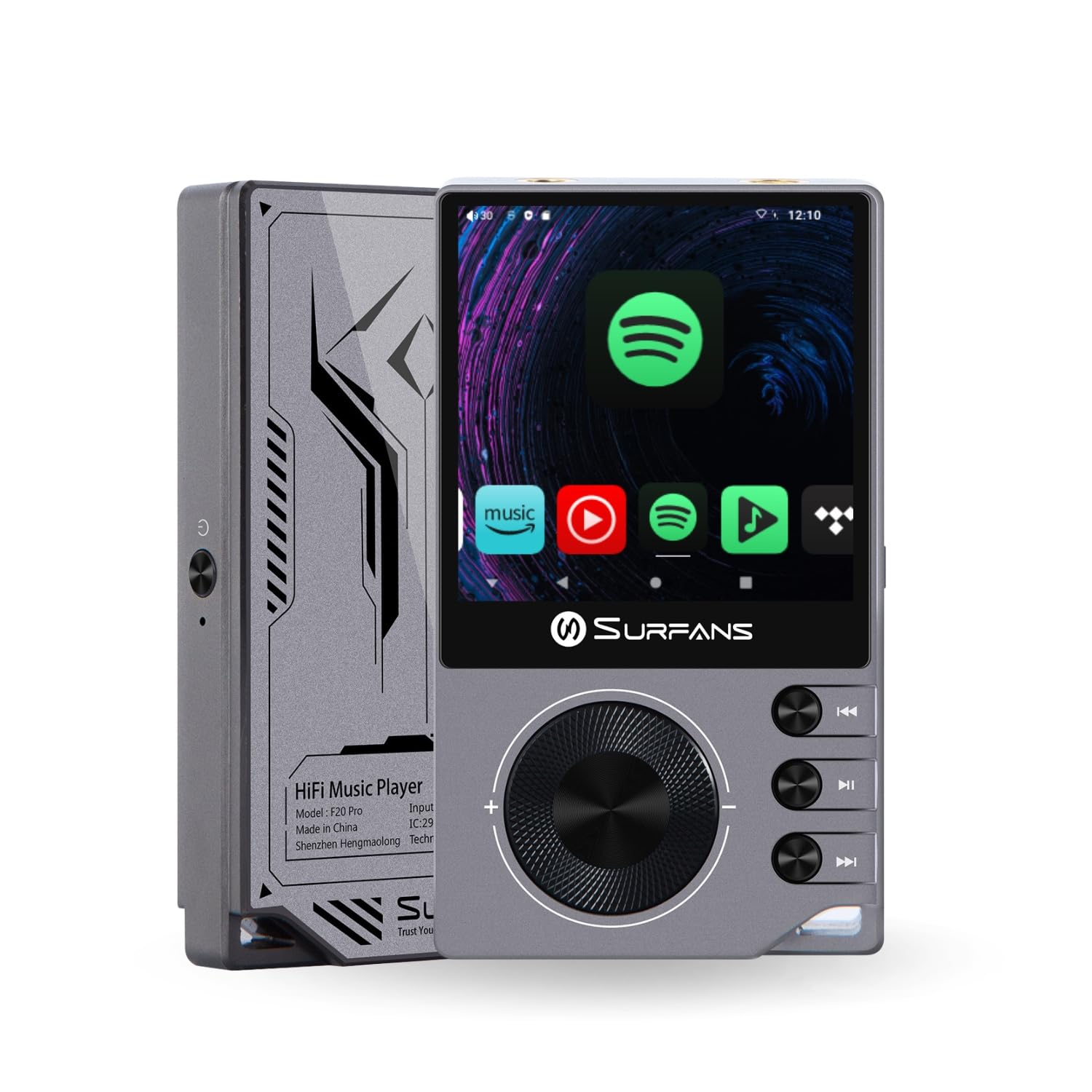
The Surfans F20 Pro Hi-Res Music Player, showcasing its compact design and touchscreen interface.
2. Садржај пакета
Проверите да ли су све ставке присутне у пакету:
- Surfans F20 Pro Hi-Res Music Player
- УСБ Типе-Ц кабл
- 32 GB MicroSD Memory Card (pre-installed or separate)
- Протецтиве Цасе
- Кориснички приручник (овај документ)
3. Девице Оверview
Familiarize yourself with the physical components and ports of your F20 Pro player.

Предње и задње view of the Surfans F20 Pro, highlighting its robust CNC metal chassis and button layout.
3.1. Кључне карактеристике
- Dual ESS9018Q2M DACs: For high-fidelity audio processing.
- Octa-Core Android 12 System: Enables streaming app compatibility and smooth operation.
- 3.5mm Single-Ended & 4.4mm Balanced Outputs: Versatile headphone connectivity.
- Bluetooth 5.0 with LDAC: High-quality wireless audio transmission.
- Dual-Band Wi-Fi (2.4GHz & 5GHz): For stable internet connectivity.
- Прошириво складиште: Supports up to 1TB via MicroSD card.
- 2.7-инчни екран осетљив на додир: Интуитиван кориснички интерфејс.
4. Подешавање
4.1. Пуњење уређаја
Before first use, fully charge the F20 Pro. Connect the included USB Type-C cable to the device's charging port and a compatible USB power adapter (not included) or computer USB port. The charging indicator will show the charging status.
4.2. Уметање MicroSD картице
The F20 Pro supports MicroSD cards up to 1TB for expanded storage. Locate the MicroSD card slot on the side of the device. Gently insert the card until it clicks into place. To remove, push the card in again until it springs out.
4.3. Прво укључивање
Press and hold the power button until the screen illuminates. Follow the on-screen prompts to complete the initial setup, including language selection and Wi-Fi connection.
4.4. Повезивање на Ви-Фи
Дођите до Подешавања > Мрежа и интернет > Wi-Fi. Select your desired network and enter the password if prompted. The F20 Pro supports both 2.4GHz and 5GHz Wi-Fi bands.

The Surfans F20 Pro demonstrating its dual-band Wi-Fi capability for fast and stable connections.
4.5. Блуетоотх упаривање
Да бисте повезали Bluetooth слушалице или звучнике:
- Уверите се да је ваш Bluetooth уређај у режиму упаривања.
- On the F20 Pro, go to Подешавања > Повезани уређаји > Упарите нови уређај.
- Select your device from the list and confirm pairing.

An illustration of the Bluetooth 5.0 chip, indicating support for high-resolution wireless audio codecs like LDAC.
5. Руковање уређајем
5.1. Основна навигација
The F20 Pro features a 2.7-inch touchscreen for navigation. Swipe to scroll, tap to select, and use the physical buttons for quick controls:
- Дугме за напајање: Power on/off, screen on/off.
- Точак јачине звука: Подешава јачину звука.
- Дугмад за контролу репродукције: Репродукција/пауза, следећа нумера, претходна нумера.
5.2. Репродукција музике
The F20 Pro supports various audio formats including DSD512, 192kHz/24bit, FLAC, WAV, WMA, M4A, MP3, MP2, and AAC.
5.2.1. Локални Files
Пренесите музику files to the device's internal storage or MicroSD card via USB connection to a computer. Use the pre-installed music player application to browse and play your library.
5.2.2. Апликације за стримовање
The Android 12 operating system allows installation of streaming apps like Spotify, Apple Music, Tidal, or YouTube. Connect to Wi-Fi and download apps from the Google Play Store or other compatible sources.

The Surfans F20 Pro's screen showing various streaming application icons, demonstrating its Android capabilities.
5.3. Прикључци за слушалице
The device offers both single-ended and balanced audio outputs.
- 3.5 мм једнострани излаз: Standard headphone jack (125mW/32Ω).
- 4.4 мм балансирани излаз: For enhanced audio performance with compatible headphones (500mW/32Ω).

Цлосе-уп view of the 3.5mm single-ended and 4.4mm balanced audio output ports on the Surfans F20 Pro.
6. Одржавање
6.1. Чишћење
Use a soft, dry, lint-free cloth to clean the device. Avoid using abrasive cleaners or solvents, which may damage the surface.
6.2. Ажурирања софтвера
Periodically check for software updates to ensure optimal performance and access to new features. Updates can typically be found in Подешавања > Систем > Ажурирање система.
6.3. Брига о батерији
Да бисте продужили век трајања батерије, избегавајте често потпуно пражњење уређаја. Чувајте уређај на хладном и сувом месту када га не користите дуже време.

Унутрашњи view of battery cells, representing the long-lasting battery capacity of the F20 Pro.
КСНУМКС. Решавање проблема
If you encounter issues with your F20 Pro, refer to the following common problems and solutions:
| Проблем | Могући узрок | Решење |
|---|---|---|
| Уређај се не укључује | Слаба батерија; Пад система | Charge the device; Press and hold the power button for 10-15 seconds to force restart. |
| Нема излаза звука | Volume too low; Incorrect output selected; Faulty headphones | Increase volume; Check headphone connection; Test with different headphones. |
| Повезивање на Ви-Фи није могуће | Incorrect password; Out of range; Router issue | Verify password; Move closer to router; Restart router. |
| Slow performance/App crashes | Превише апликација покрећено; Мало меморије; Застарели софтвер | Close background apps; Free up storage; Check for system updates. |
8. Спецификације
Detailed technical specifications for the Surfans F20 Pro:
| Феатуре | Детаљ |
|---|---|
| Бранд | Surfans |
| Назив модела | Ф20 ПРО |
| DAC чипови | Дуални ESS9018Q2M |
| Оп-Amps | Dual OPA1612 |
| Оперативни систем | Андроид 12 |
| РАМ | 3ГБ |
| Интерна меморија | 32ГБ |
| Екпандабле Стораге | До 1 ТБ преко MicroSD картице |
| Величина екрана | 2.73 инча |
| Повезивање | Aux, Bluetooth 5.0 (LDAC), USB Type-C, Wi-Fi (2.4GHz & 5GHz) |
| Аудио излази | 3.5mm Single-Ended (125mW/32Ω), 4.4mm Balanced (500mW/32Ω) |
| Подржани аудио формати | DSD512, 192kHz/24bit, FLAC, WAV, WMA, M4A, MP3, MP2, AAC |
| Боја | Греи |

An illustration of the dual ESS9018K2M DAC chips, central to the F20 Pro's high-resolution audio capabilities.
9. Информације о гаранцији
The Surfans F20 Pro comes with a 1-годишња гаранција од датума куповине. Ова гаранција покрива производне недостатке и недостатке у изради при нормалној употреби. Не покрива штету насталу услед злоупотребе, несрећа, неовлашћених модификација или нормалног хабања. Молимо вас да сачувате доказ о куповини за потребе подношења захтева за гаранцију.
10. Корисничка подршка
For further assistance, technical support, or warranty inquiries, please contact Surfans customer service through the official website or your retailer. You may also find additional resources and FAQs online.


