
Увод
The ACASIS TBU405 PRO MAX is a high-performance 40Gbps M.2 NVMe SSD enclosure designed for users requiring fast external storage and versatile connectivity. This aluminum dock features a built-in cooling fan, supports dual M.2 NVMe SSDs, and offers multiple ports including HDMI, USB-A, and dual USB-C 40Gbps. It is compatible with USB 4.0 and Thunderbolt devices, providing solutions for storage expansion, dual monitor display, and power delivery for M1/M2/Windows systems.
Video: ACASIS Dual-Bay 40Gbps M.2 NVMe SSD Enclosure Features. This video highlights the key features and design of the ACASIS TBU405 PRO MAX enclosure.
Садржај пакета
Молимо вас да се уверите да су све ставке присутне у пакету:
- ACASIS TBU405 PRO MAX 40Gbps M.2 NVMe SSD Enclosure
- Тхундерболт Цабле
- УСБ-Ц на УСБ-Ц кабл
- Повер Адаптер
- Thermal Pads (for SSD heat dissipation)
- Rubber Stoppers (for SSD secure mounting)
- Упутство за употребу
Сетуп
SSD Installation (Tool-Free)
- Open the SSD enclosure by gently sliding the top cover off.
- Insert the M.2 NVMe SSD into the slot at a 30-degree angle, ensuring the gold finger slot aligns correctly. Secure it with the provided rubber stopper.
- Attach the thermal pad on top of the SSD for optimal heat dissipation.
- Close the SSD enclosure by sliding the top cover back into place.

Image: Tool-Free Installation. This image illustrates the four steps for installing an M.2 NVMe SSD into the enclosure without tools.
Повезивање уређаја
Connect the ACASIS TBU405 PRO MAX enclosure to your computer using the provided Thunderbolt cable. Ensure your host device is compatible with 40Gbps / USB 4.0 for optimal performance. The device requires an external power supply to operate; connect the power adapter before use.
Important: INCOMPATIBLE WITH NON-40Gbps HOST DEVICES.
Упутство за употребу
РАИД конфигурације
This 40Gbps dual-bay enclosure supports software RAID configurations. Please configure the RAID on your PC or Mac using Disk Utility or similar software.
- RAID 0 (Striped): Combines two drives for increased speed (up to 2x 8TB, fast 40Gbps speed). For optimal performance, use identical drives.
- RAID 1 (Mirrored): Creates an exact copy of data on both drives for data protection (smallest drive capacity).
- JBOD (Concatenated): Combines multiple disks into one large volume, capacity is combined (macOS only).
Note: Data will be deleted when setting or changing the RAID array. Always back up your data first.
Video: Tutorial video for setting up RAID mode. This video provides a step-by-step guide on how to configure RAID settings.
Дуал Монитор Дисплаи
Expand your workspace with dual monitor support. The enclosure features 1 HDMI port and 2 USB-C 40Gbps ports for display output.
- Single-screen use: Up to 8K@60Hz resolution.
- Dual-screen use: Up to 4K@60Hz resolution per screen.
Please note that computers with M1, M2, or M3 chips can only output to a single display.
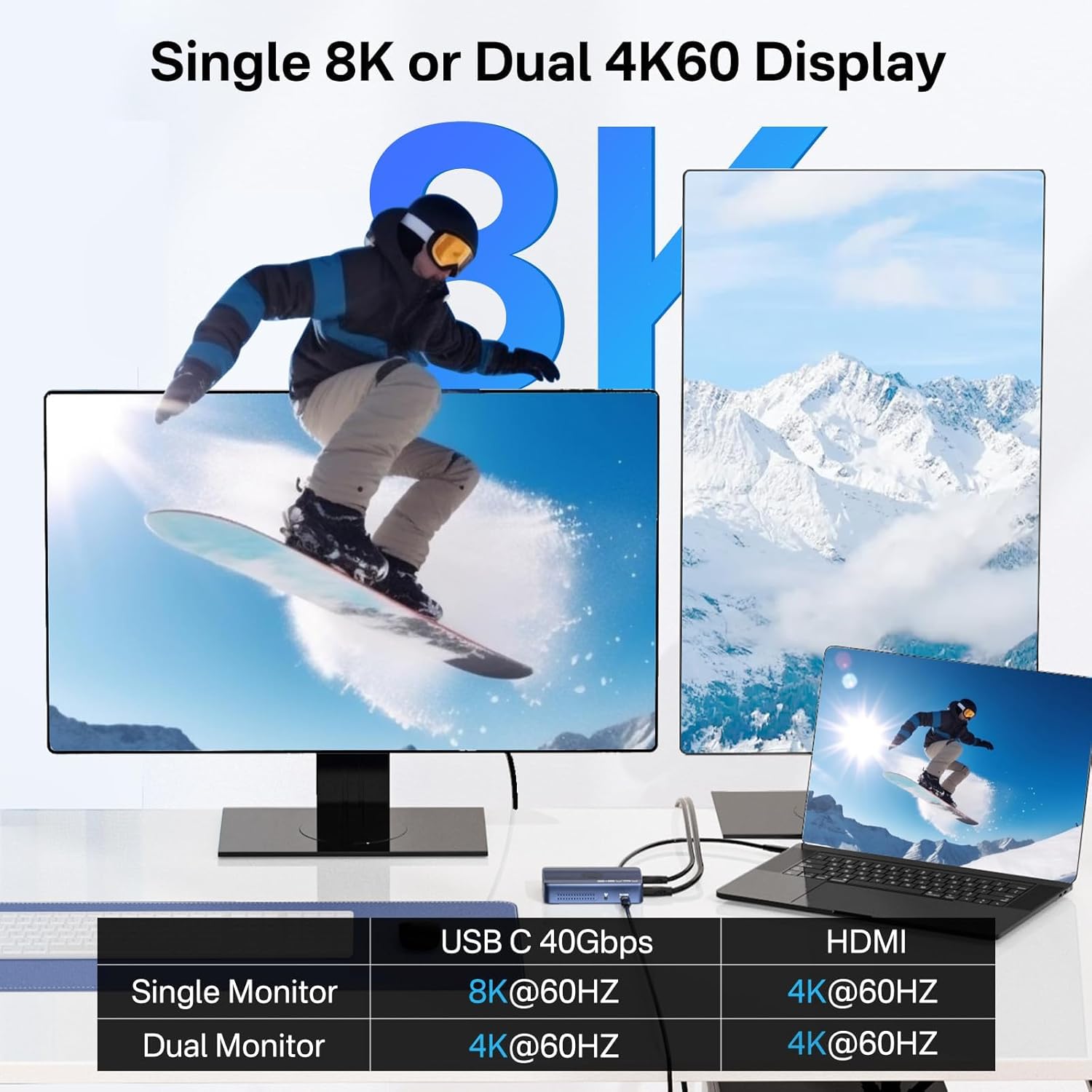
Image: Single 8K or Dual 4K60 Display. This image illustrates the various display configurations supported by the enclosure.
Повер Деливери
The enclosure supports 100W Power Delivery (PD) input and provides up to 60W fast charging for your host device. Ensure the power adapter is connected before use.
Контрола вентилатора
The built-in fan helps maintain optimal operating temperatures. Use the fan control button on the device to manage its operation.
Одржавање
Ефикасно одвођење топлоте
The aluminum alloy body with metal thermal conduction slots and built-in fans ensure optimal temperature control during operation, preventing overheating and maintaining stable performance.

Image: Multiple Heat Dissipation. This image shows the various cooling features of the enclosure.
ССД компатибилност
The enclosure supports M.2 NVMe SSDs in sizes 2230, 2242, 2260, and 2280. It is compatible with M Key NVMe/PCIe and M&B Key NVMe/PCIe SSDs. It is NOT compatible with M&B Key NGFF/SATA or B Key NGFF/SATA SSDs.
Avoid SSDs with heatsinks as they may not fit properly within the enclosure.

Image: Full NVMe Compatibility. This image details the supported M.2 SSD sizes and key types.
Решавање проблема
Често постављана питања (ФАК)
- Q1: Does it require an external power supply to operate?
A1: Yes, the TBU405ProMax requires an external power supply. Since this product requires sufficient power for your device, it must be used with a power supply. - Q2: Why won't my computer recognize anything plugged into USB?
A2: 1. Please check whether you connect the power supply to the TBU405ProMax. 2. Please check whether you use the original Thunderbolt 4 cable. 3. Please check whether you connect it to your device's Thunderbolt 3/4 or USB4 port. - Q3: Can two hard drives work independently in the hard drive enclosure?
A3: Yes! Two hard drives can work independently in the hard drive enclosure. - Q4: Why is my speed slow?
A4: Non-RAID 0 mode supports up to 20Gbps. RAID 0 mode supports 40Gbps – use two identical NVMe drives for best performance. In Windows, go to Disk Management, right-click the disk, select Properties > Policies, and enable write caching for better performance. Daisy-chaining will reduce M.2 drive speeds.
Спецификације
| Феатуре | Детаљ |
|---|---|
| Компатибилни уређаји | Desktop, Laptop, MacBook, MacBook Pro |
| Максимални број подржаних уређаја | 2 (M.2 NVMe SSDs) |
| Брзина преноса података | 40 гигабита у секунди |
| Произвођач | FREEGENE |
| УПЦ | 686585053961 |
| Димензије пакета | 6.14 к 5.71 к 2.83 инча |
| Тежина артикла | 1.43 фунти |
| Број модела ставке | TBU405 PRO MAX-US |
| Хардверски интерфејс | УСБ тип Ц |
| Хардверска платформа | ARM, x86_64 |
| Материјал | Алуминијум |
| Капацитет меморије | 8 TB (per drive, up to 16TB in RAID 0) |
Компатибилност
Компатибилни уређаји
The ACASIS TBU405 PRO MAX is compatible with a wide range of devices, including MacBook Pro, MacBook Air, Mac Mini, Surface Pro 8, Dell XPS 13/15, Dell Latitude 5540, HP ENVY x360, ASUS Zenbook 14X, and Acer Swift Go 14.
Incompatible with non-Thunderbolt 3/4 host devices.
Compatible Interfaces
Thunderbolt 4, Thunderbolt 3, USB 4.0, Thunderbolt 5.
Компатибилни системи
- Виндовс: Виндовс 7 и новији
- мацОС: мацОС 10.2 и новије верзије
- Линук: Линук 5.6 и новије верзије
Гаранција и подршка
For warranty information and technical support, please refer to the documentation included in your package or contact ACASIS customer service directly. If the product does not meet your expectations after use, please contact us immediately and give us the opportunity to assist you.