
1. Увод
The AITIAO DY-HV8F is an intelligent voice playback module designed for various electronic applications. It integrates multiple control methods including I/O triggering, UART serial port control, and ONE_line single bus serial port control. The module features an onboard 20W Class D amplifier, allowing direct connection to an 8ohm/10W or 4ohm/20W speaker. It supports MP3 and WAV decoding formats and includes 64Mbit (8Mbyte) Flash memory for audio file storage. Audio files can be updated via a Micro USB cable connected to a computer.
2. Карактеристике производа
- Supports MP3 and WAV decoding formats.
- Подржава сampling frequencies: 8/11.025/12/16/22.05/24/32/44.1/48 KHz.
- 24-bit DAC output with 90dB dynamic range and 85dB SNR.
- Integrated 64Mbit (8Mbyte) Flash memory.
- UART serial port control for playback, pause, next, previous, volume adjustment, and selection of up to 65535 songs. Baud rate: 9600 bit/s.
- I/O trigger function: 8-bit I/O ports can trigger 8 individual music files or 8 I/O combinations to trigger up to 255 songs.
- Three configurable I/O pins for selecting 7 different work modes.
- Built-in 20W Class D amplifier for direct speaker drive (8ohm/10W or 4ohm/20W).
- Micro USB interface for connecting to a computer to update audio files.
- 3.5мм аудио излазни интерфејс.
3. Производ је готовview
The DY-HV8F module features various components and connection points. Understanding these is crucial for proper setup and operation.

Слика 3.1: Предње и задње view of the DY-HV8F module. The front shows the main components, dip switches, and Micro USB port. The back shows speaker connections, power input, and I/O pins.

Слика 3.2: Detailed component and pinout diagram of the DY-HV8F module. This image highlights the input DC voltage range, I/O pins (IO0-IO7, BUSY, GND), speaker connections, 3.5mm AUX audio output, Micro USB download interface, volume adjustment potentiometer, and the 3-position DIP switch for mode selection.
4. Подешавање
4.1 Повезивање напајања
- Connect a DC power supply within the range of 6V to 35V to the DC 6-35V POWER terminals on the back of the module. Ensure correct polarity: + for positive, - for negative (GND).
4.2 Повезивање звучника
- Повежите звучник на СПЕАКЕР terminals on the back of the module. The module supports an 8ohm/10W speaker or a 4ohm/20W speaker. Ensure proper connection for optimal audio output.
4.3 Аудио File Менаџмент
- To update audio files, connect the module to a computer using a Micro USB data cable (not just a charging cable).
- The module will appear as a removable storage device on your computer.
- Copy your MP3 or WAV audio files directly to the module's storage.
- For I/O trigger modes, it is recommended to name files sequentially (e.g., 00001.mp3, 00002.mp3) to correspond with trigger inputs.
4.4 Подешавање јачине звука
- The module includes an onboard potentiometer for adjusting the output volume. Rotate the knob to increase or decrease the volume as needed.
5. Радни режими
The DY-HV8F module supports 7 different operating modes, configured using the 3-position DIP switch located on the front of the board. A switch position turned to the 'ON' side is considered '1', and to the digital side (opposite of 'ON') is considered '0'.
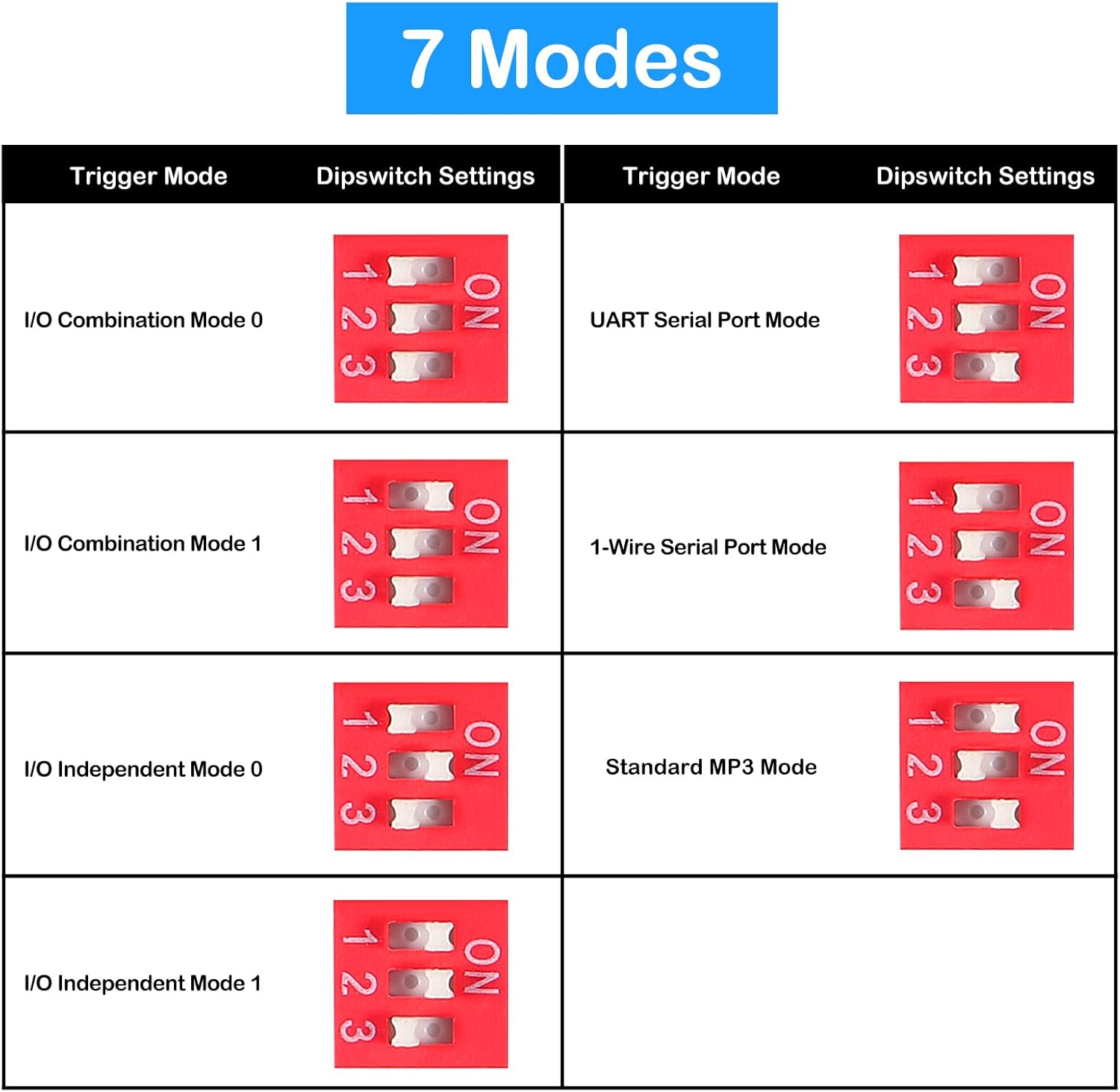
Слика 5.1: DIP switch settings for the 7 operating modes. Each mode corresponds to a specific combination of switch positions (1, 2, 3).
5.1 I/O Trigger Modes
These modes allow playback of audio files by triggering specific I/O pins. The module supports both independent and combination triggering.
- I/O Combination Mode 0 & 1: These modes use combinations of I/O pin states to trigger a larger number of audio files (up to 255). Refer to the module's technical documentation for specific combination mappings.
- I/O Independent Mode 0 & 1: In these modes, each I/O pin (IO0-IO7) can independently trigger a specific audio file (e.g., IO0 triggers 00001.mp3, IO1 triggers 00002.mp3). A momentary contact of the trigger pin to ground will initiate playback.
5.2 UART Serial Port Mode
This mode enables control of the module via a UART serial interface. Commands can be sent from a microcontroller or computer to control playback, pause, track selection, and volume. The baud rate is 9600 bit/s.
5.3 1-Wire Serial Port Mode (ONE_line)
This mode provides control over a single wire serial interface, simplifying wiring for certain applications. Refer to the module's technical documentation for the specific protocol and commands.
5.4 Standard MP3 Mode
This mode typically allows for basic playback functionality, often controlled by simple triggers or automatic cycling through files. Specific behavior may depend on the exact DIP switch configuration for this mode.
6. Одржавање
6.1 Општа нега
- Држите модул на сувом месту, даље од влаге и екстремних температура.
- Avoid exposing the module to static electricity.
- Do not apply excessive force to the components or connectors.
6.2 Updating Audio Files
- Regularly back up your audio files if they are critical.
- When updating, ensure the Micro USB cable is a data transfer cable, not just a charging cable.
- Safely eject the module from your computer after transferring files to prevent data corruption.
КСНУМКС. Решавање проблема
- Module not recognized by computer: Ensure you are using a Micro USB data cable. Some charging-only cables do not support data transfer. Try different cables and computer USB ports.
- Нема излаза звука:
- Verify the power supply is connected correctly and within the 6V-35V DC range.
- Проверите поларитет и безбедан контакт конекција звучника.
- Осигурајте звук files are correctly loaded onto the module and are in MP3 or WAV format.
- Adjust the onboard volume potentiometer.
- Confirm the DIP switch settings match the desired operating mode.
- I/O trigger not working:
- Ensure the module is in an I/O trigger mode (I/O Combination or I/O Independent).
- Verify that the trigger input is correctly connected and providing the expected signal (e.g., momentary contact to ground).
- Check if audio files are named according to the expected format for the selected I/O trigger mode (e.g., 00001.mp3).
- Module cycles through all clips without stopping: This behavior may occur in certain modes if specific DIP switch settings are engaged. Refer to the DIP switch settings diagram (Figure 5.1) and ensure the module is configured for your intended control method.
- Module does not play after USB connection: The module is not designed to be powered or operated for playback while connected to a computer via USB. Disconnect the USB cable after file transfer for normal operation.
8. Спецификације
| Параметар | Валуе |
|---|---|
| Назив производа | DY-HV8F Voice Playback Module |
| Ворк Волtage | ДЦ 6В~35В |
| Load (Speaker) | 8ohm/10W or 4ohm/20W (Not included) |
| Излазна снага | 20 Ваттс |
| Број канала | 1 (моно) |
| Формат декодирања | МПКСНУМКС, ВАВ |
| Фласх меморија | 64Mbit (8Mbyte) |
| Sampлинг Фрекуенци | 8/11.025/12/16/22.05/24/32/44.1/48 KHz |
| ДАЦ излаз | 24-bit, 90dB Dynamic Range, 85dB SNR |
| УАРТ брзина преноса | 9600 бит/с |
| Димензије (Д к Ш к В) | 50 мм к 50 мм к 13 мм (1.97 к 1.97 к 0.23 инча) |
| Тежина артикла | 0.705 унци |

Слика 8.1: Physical dimensions of the DY-HV8F module, measuring 50mm (1.97 inches) by 50mm (1.97 inches).
9. Безбедносне информације
- Увек проверите јачину напајањаtage is within the specified range (DC 6V-35V) to prevent damage to the module.
- Observe correct polarity when connecting the power supply.
- Avoid short-circuiting any pins or terminals.
- Handle the module with care to avoid damage to sensitive electronic components.
- If you are unsure about any connections or operations, consult a qualified electronics professional.
10. Подршка
For further assistance or technical inquiries regarding the AITIAO DY-HV8F Voice Playback Module, please refer to the manufacturer's official website or contact their customer support channels. Detailed technical documentation, including specific UART commands and I/O combination mappings, may be available from the manufacturer.