
1. Увод и крајview
This manual provides essential information for setting up, operating, maintaining, and troubleshooting your HP 17-inch Business Laptop. This device is designed for productivity and features a 13th Generation Intel Core i5 processor, a 17.3-inch HD+ anti-glare display, a backlit keyboard with a numeric keypad, and a fingerprint reader for enhanced security. It comes pre-installed with Windows 11 Home.
Кључне карактеристике укључују:
- процесор: 13th Gen Intel Core i5-1334U 10-core processor for efficient multitasking.
- Оперативни систем: Windows 11 Home for a modern and secure computing experience.
- Приказ: 17.3-inch HD+ (1366x768) anti-glare screen with micro-edge design.
- Меморија и складиштење: Up to 64GB DDR4 RAM and up to 2TB NVMe M.2 SSD for fast performance and ampле стораге.
- Повезивање: USB 3.2 Gen 1 Type-C, USB 3.2 Gen 1 Type-A, HDMI 1.4, and a headphone/microphone combo jack.
- безбедност: Integrated fingerprint reader.
- Погодност: Full-size backlit keyboard with numeric keypad and HP Fast Charge battery technology.
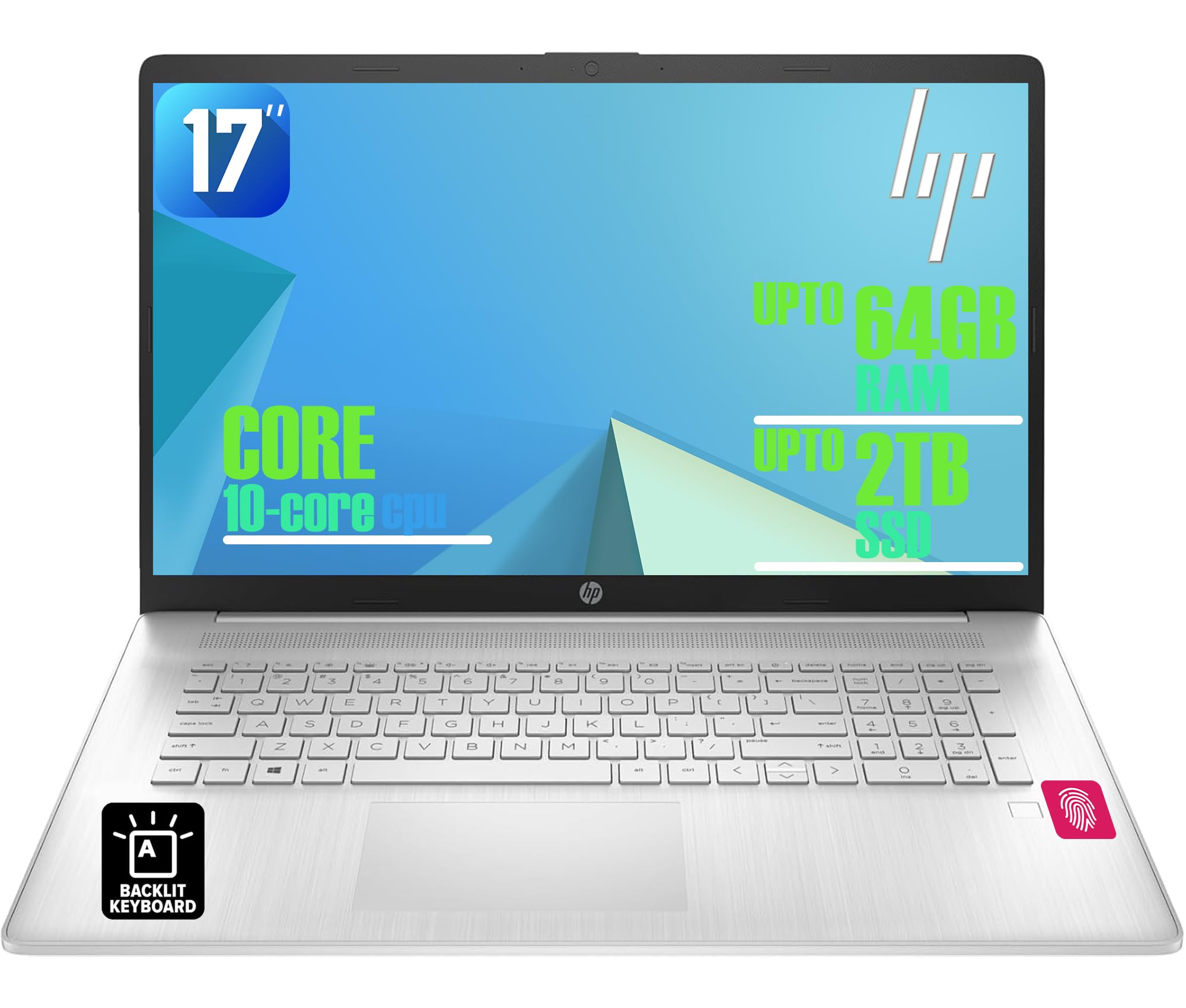
Figure 1: HP 17-inch Business Laptop (Silver)
2. Подешавање
2.1 Распакивање и почетни преглед
Carefully remove the laptop and all accessories from the packaging. Check for any visible damage. The package should include the HP 17-inch laptop, a power adapter, and documentation.
2.2 Повезивање на напајање
- Connect the power adapter to the AC smart pin port on the side of the laptop.
- Укључите адаптер за напајање у зидну утичницу.
- Оставите лаптоп да се пуни најмање 30 минута пре прве употребе или док индикатор батерије не покаже довољно напуњености.
2.3 Почетно покретање и подешавање Windows-а
- Отворите поклопац лаптопа и притисните дугме за напајање, које се обично налази у горњем десном углу тастатуре.
- Пратите упутства на екрану да бисте завршили процес подешавања система Windows 11 Home. То укључује избор региона, језика, повезивање са Wi-Fi мрежом и креирање корисничког налога.
2.4 Повезивање периферних уређаја
Your HP laptop offers various ports for connecting external devices:
- УСБ портови: Use the USB 3.2 Gen 1 Type-C port or the two USB 3.2 Gen 1 Type-A ports for connecting external drives, mice, keyboards, or other USB accessories.
- ДВИ: Connect an external monitor or projector using the HDMI 1.4 port.
- аудио: Plug headphones or an external microphone into the 3.5mm headphone/microphone combo jack.

Слика 2: Страна view illustrating available ports (USB Type-C, USB Type-A, HDMI, Headphone/microphone combo, AC smart pin)
3. Управљање лаптопом
3.1 Управљање напајањем
- Укључено: Притисните дугме за напајање.
- Режим спавања: Затворите поклопац или изаберите „Спавање“ из менија „Старт“.
- Искључи: Изаберите „Искључи“ из менија „Старт“.
- Поново покрени: Изаберите „Поново покрени“ из менија „Старт“.
3.2 Тастатура и тачпед
The laptop features a full-size backlit keyboard with a numeric keypad. Use the function keys (Fn) in combination with other keys for specific actions like adjusting screen brightness, volume, or toggling the keyboard backlight.
The integrated touchpad supports multi-touch gestures for navigation. Refer to Windows settings for customizing touchpad behavior.

Figure 3: Backlit keyboard with numeric keypad and integrated fingerprint reader
3.3 Читач отисака прстију
The integrated fingerprint reader allows for secure and quick login using Windows Hello. To set up, navigate to Подешавања > Налози > Опције пријављивања and follow the instructions to register your fingerprint.
3.4 Бежично повезивање
- Ви-Фи: The laptop supports Realtek Wi-Fi 6 (2x2). To connect to a wireless network, click the Wi-Fi icon in the taskbar, select your desired network, and enter the password if required.
- Блуетоотх: Bluetooth 5.3 is integrated for connecting wireless accessories like headphones or mice. Enable Bluetooth from Подешавања > Bluetooth и уређаји and pair your devices.
3.5 Display and Webцам
The 17.3-inch HD+ anti-glare display provides a clear viewing experience. The HP True Vision 720p HD webcam with dual microphones is suitable for video calls and online meetings.
3.6 HP QuickDrop
HP QuickDrop allows for wireless file transfer between your laptop and mobile devices without needing cables. Install the HP QuickDrop app on both your laptop and mobile device and follow the in-app instructions to pair and transfer files.

Figure 4: HP QuickDrop for wireless file transfer between laptop and phone
4. Одржавање
4.1 Чишћење лаптопа
- Екран: Лагано користите меку крпу која не оставља длачице дampводом или средством за чишћење екрана. Не прскајте течност директно на екран.
- Тастатура и кућиште: Користите меку, суву крпу. За тврдокорну прљавштину, благоamp cloth can be used, ensuring no liquid enters the device. Compressed air can help remove debris from between keys.
4.2 Одржавање батерије
The laptop is equipped with a 41Wh Lithium-Ion Battery. To maximize battery lifespan:
- Избегавајте екстремне температуре.
- Немојте редовно потпуно празнити батерију.
- Utilize HP Fast Charge, which can charge the battery from 0 to 50% in approximately 45 minutes.

Figure 5: Battery life indicator (Up to 8 hours wireless streaming)
4.3 Ажурирања софтвера
Редовно проверавајте и инсталирајте ажурирања за Windows како бисте били сигурни да ваш систем има најновије безбедносне закрпе и побољшања перформанси. Идите на Подешавања > Windows Update да управља ажурирањима.
КСНУМКС. Решавање проблема
Овај одељак се бави уобичајеним проблемима на које можете наићи са својим HP лаптопом.
5.1 Проблеми са напајањем
- Лаптоп се не укључује: Уверите се да је адаптер за напајање безбедно повезан и са лаптопом и са исправном утичницом. Проверите да ли је индикаторска лампица адаптера за напајање упаљена. Покушајте са другом утичницом.
- Батерија се не пуни: Проверите везу адаптера за напајање. Проверите стање батерије у подешавањима система Windows.
5.2 Проблеми са екраном
- Нема слике на екрану: Ensure the laptop is powered on. If an external monitor is connected, try disconnecting it or pressing Фн + Ф4 (or the corresponding display toggle key) to switch display output.
- Затамњени екран: Adjust brightness using the function keys (e.g., Фн + Ф2/Ф3) or through Windows settings.
5.3 Проблеми са повезивањем
- Ви-Фи се не повезује: Ensure Wi-Fi is enabled in Windows settings. Restart your router and the laptop. Check for updated network drivers.
- Блутут уређај се не упарује: Уверите се да је Bluetooth омогућен и на лаптопу и на уређају. Уверите се да је уређај у режиму упаривања.
5.4 Општи проблеми са перформансама
- Споре перформансе: Затворите непотребне апликације. Проверите да ли постоји злонамерни софтвер. Обезбедите довољно слободног простора на SSD-у.
- Систем се замрзава: Притисните Цтрл + Алт + Дел to open Task Manager and end unresponsive tasks. If unresponsive, perform a hard shutdown by holding the power button for several seconds.
6. Спецификације
The following table outlines the key technical specifications for the HP 17-inch Business Laptop (Model: HP laptop).
| Феатуре | Спецификација |
|---|---|
| Бранд | HP |
| Назив модела | HP laptop |
| Процесор | 13th Gen Intel Core i5-1334U (10 Cores, up to 4.6 GHz) |
| Оперативни систем | Виндовс 11 Хоме |
| Дисплаи | 17.3-inch HD+ (1366x768) Anti-glare, 250 nits |
| Графика | Intel Iris Xe графика (интегрисана) |
| РАМ меморија | До 64 ГБ DDR4 SDRAM меморије 3200 MHz |
| Складиштење | Up to 2TB NVMe M.2 SSD |
| Бежично повезивање | Realtek Wi-Fi 6 (2x2), Bluetooth 5.3 |
| Портс | 1x USB 3.2 Gen 1 Type-C, 2x USB 3.2 Gen 1 Type-A, 1x HDMI 1.4, 1x Headphone/microphone combo jack |
| Тастатура | Тастатура пуне величине са позадинским осветљењем и нумеричком тастатуром |
| Безбедност | Читач отиска прста |
| Камера | 720p HD камера са затварачем за приватност |
| Батерија | 41Wh Lithium-Ion (HP Fast Charge) |
| Димензије (Д к Ш к В) | 15.78 cm x 10.15 cm x 0.81 cm (приближно) |
| Тежина | 4.6 лбс (приближно) |
| Боја | Природно сребро |

Figure 6: Laptop dimensions (15.78" W x 10.15" D x 0.78" H) and weight (4.60 lbs)
7. Гаранција и подршка
7.1 Гаранција произвођача
Your HP laptop is covered by a manufacturer's warranty. Please refer to the warranty documentation included with your product for specific terms, conditions, and duration. Keep your proof of purchase for warranty claims.
7.2 Техничка подршка
За техничку помоћ, преузимање драјвера или додатну подршку, посетите званичну HP подршку website. You will typically need your product's serial number or model number to access specific support resources.
Подршка на мрежи: https://support.hp.com