
Увод
This manual provides essential information for setting up, operating, and maintaining your TCL 32S5K 32-inch HD QLED Google Smart TV. Please read this manual thoroughly before using your television to ensure safe and optimal performance. Keep this manual for future reference.
Безбедносне информације
Увек се придржавајте основних мера предострожности када користите овај телевизор како бисте смањили ризик од пожара, струјног удара и повреда. Не излажите телевизор киши или влази. Не отварајте поклопац телевизора.asing; refer all servicing to qualified personnel. Ensure proper ventilation and avoid placing the TV near heat sources. Use only the power cord and accessories specified by the manufacturer.
Садржај пакета
Проверите да ли су све ставке присутне у пакету:
- TCL 32S5K 32-inch HD QLED Google Smart TV
- Ремоте Цонтрол
- Повер Цорд
- ТВ сталак (2 комада) и шрафови
- Водич за брзи почетак
- Гарантни лист
Сетуп
Физичка инсталација
Инсталација постоља: Place the TV screen-down on a soft, flat surface. Attach the two stand pieces to the designated slots on the bottom of the TV using the provided screws. Ensure the stand is securely fastened.
Монтажа на зид: If wall-mounting, ensure you use a VESA-compatible wall mount (not included) and follow the wall mount manufacturer's instructions. Disconnect the power cord before mounting.
Повезивање уређаја
Connect your external devices to the appropriate ports on the TV. Refer to the image below for port locations and types.

Figure 1: Rear and Side Connectivity Ports. This image illustrates the various input and output ports available on the TCL 32S5K Smart TV, including USB 2.0, LAN, Antenna/Cable In, Digital Audio Out (Optical), HDMI 1, HDMI 2, and AV In adapter.
- HDMI Ports (1, 2): Повежите Блу-реј плејере, играчке конзоле, кабловске/сателитске пријемнике или друге уређаје који подржавају HDMI.
- УСБ 2.0 порт: Повежите УСБ уређаје за складиштење података за репродукцију медија.
- ЛАН порт: Повежите Етернет кабл за жичану интернет везу.
- Антенски/кабловски улаз: Повежите антену или кабловски ТВ сигнал.
- Дигитални аудио излаз (оптички): Connect to an external audio receiver or soundbar for digital audio.
- AV In Adapter: Use the provided adapter to connect older devices with composite video and stereo audio outputs.
Почетно укључивање и подешавање Google TV-а
After connecting all necessary cables, plug the power cord into an electrical outlet. Press the power button on the remote control or on the TV. Follow the on-screen instructions to complete the initial setup, which includes selecting your language, connecting to a Wi-Fi network, and signing in to your Google account to access Google TV features.
Оперативни
Функције даљинског управљача
The remote control allows you to navigate the Google TV interface, adjust volume, change channels, access apps, and control playback. Familiarize yourself with the button layout for easy operation.
Интерфејс за Google TV
Google TV organizes your favorite movies, shows, and live TV from across your apps and subscriptions. Use the remote to browse recommendations, search for content, and manage your watch list. Access the Google Play Store to download additional applications.
Могућности повезивања
- Ви-Фи: Connects your TV to your home wireless network for internet access and streaming.
- Блуетоотх: Pair Bluetooth-enabled devices such as headphones or game controllers for a personalized experience.
- Googlecast (Chromecast built-in): Cast content from your compatible mobile devices or computer directly to your TV screen.
Подешавања слике и звука
Your TCL 32S5K TV features QLED technology, Full HD resolution, HDR10 support, and Dolby Audio for an enhanced viewing and listening experience. Adjust picture modes (e.g., Standard, Vivid, Movie) and sound modes (e.g., Standard, Music, Movie) through the TV settings menu to suit your preferences.

Figure 2: Image Quality Features. This image highlights the key display technologies of the TCL 32S5K Smart TV, including QLED for vibrant colors, FHD (Full High Definition) for clear resolution, and HDR10 for enhanced contrast and brightness.
Одржавање
Чишћење ТВ-а
Увек искључите телевизор из струје пре чишћења. Користите меку, суву крпу да обришете екран и кућиште. За тврдокорне мрље, лагано дрхтајтеampen the cloth with water or a mild, non-abrasive screen cleaner. Never spray cleaner directly onto the screen or allow liquids to enter the TV's openings.
Ажурирања софтвера
Your Google TV may receive automatic software updates. Ensure your TV is connected to the internet to receive these updates, which can improve performance and add new features. You can also manually check for updates in the TV's settings menu.
Решавање проблема
Ако наиђете на проблеме са телевизором, погледајте следећа уобичајена решења:
- Нема напајања: Check if the power cord is securely plugged into both the TV and the electrical outlet. Try a different outlet.
- No Picture/Poor Picture: Ensure all cables are correctly connected. Check the input source. Adjust picture settings. If using an antenna, check signal strength.
- No Sound/Poor Sound: Check volume levels and mute settings. Ensure external audio devices are properly connected and selected as the audio output.
- Даљински управљач не ради: Замените батерије. Уверите се да нема препрека између даљинског управљача и инфрацрвеног сензора телевизора.
- Проблеми са мрежном везом: Restart your router and modem. Reconnect to the Wi-Fi network in the TV settings. For wired connections, ensure the Ethernet cable is properly connected.
- Google TV Slow/Unresponsive: Restart the TV by unplugging it for a few minutes and plugging it back in. Clear cache for problematic apps in settings.
For persistent issues, consult the TCL support webсајту или контактирајте корисничку подршку.
Спецификације
Below are the technical specifications for the TCL 32S5K Smart TV:
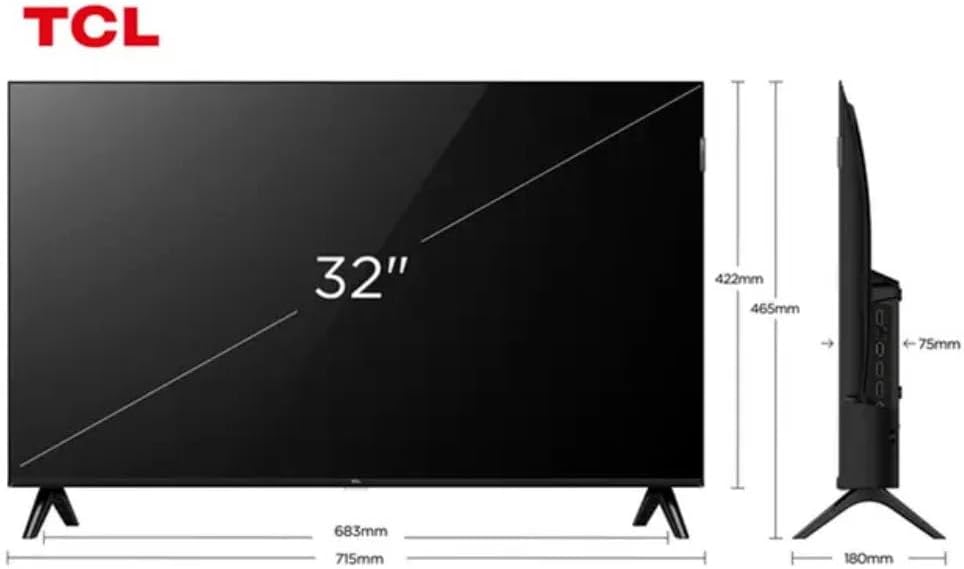
Figure 3: TV Dimensions. This image provides a detailed diagram of the TCL 32S5K Smart TV's physical dimensions, including screen size (32 inches), width (715mm), height (422mm without stand, 465mm with stand), and depth (75mm).
| Феатуре | Опис |
|---|---|
| Назив модела | 32С5К |
| Величина екрана | 32 инча |
| Дисплаи Тецхнологи | КЛЕД |
| Резолуција | 1080p (Full HD) |
| Рефресх Рате | 60 Хз |
| Повезивање | Блутут, Етернет, ХДМИ, УСБ, Ви-Фи |
| Укупни ХДМИ портови | 2 |
| Посебне карактеристике | Integrated Speaker, Google TV, Googlecast Integrated, HDR10, Dolby Audio |
| Димензије производа (Д x Ш x В) | 7.6P x 71.6L x 42.3A centimeters (approx. 3 x 28.2 x 16.7 inches) |
| Произвођач | ТЦЛ |
| Земља порекла | Бразил |
Гаранција и подршка
Информације о гаранцији
The TCL 32S5K Smart TV comes with a Двогодишња гаранција произвођача. This warranty covers defects in materials and workmanship under normal use. Please retain your proof of purchase for warranty claims. For specific terms and conditions, refer to the warranty card included in your package or visit the official TCL webсајту.
Корисничка подршка
If you require technical assistance, have questions about your product, or need to initiate a warranty claim, please contact TCL customer support. You can typically find contact information on the TCL official webсајту или у документацији вашег производа.
Before contacting support, please have your TV model number (32S5K) and serial number ready, along with a detailed description of the issue.