
Увод
The iLive Cinema Pop-up Movie Kit is a comprehensive portable entertainment solution designed to transform any space into a personal cinema. This kit includes a 720p projector, a 120-inch ultra-bright projector screen, an adjustable tripod, and a powerful Bluetooth 5.0 speaker system. Enjoy crisp images and rich audio for both indoor and outdoor movie nights.
Шта је укључено
- 720п пројектор
- 120-inch Anti-Wrinkle Polyester Projector Screen (16:9 aspect ratio, 1.3 gain)
- Professional-Grade Tripod with integrated bubble level (360-degree pan, ±180-degree tilt, 41.73-inch max height, 4 kg capacity)
- Bluetooth 5.0 Speaker System (dual 4-inch full-range speakers, 16W peak output, LED light effects, rechargeable battery)
- Ремоте Цонтрол
- Повер Цабле
- ХДМИ кабл
- 3.5 мм аудио кабл
- УСБ кабл
- Торбица за ношење
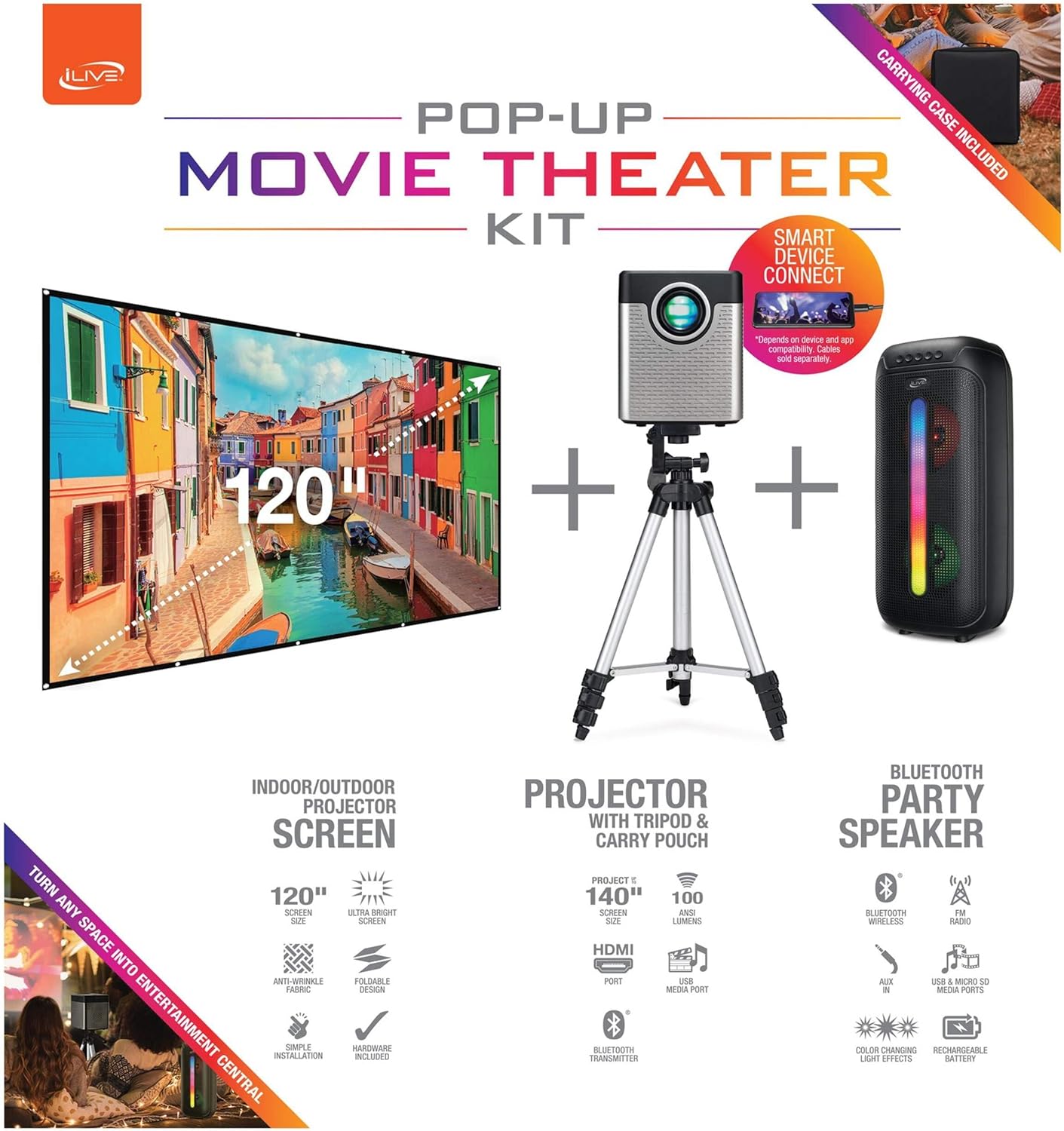
Figure 1: Diagram of the iLive Cinema Pop-up Movie Kit components.

Figure 2: The complete kit packed in its carrying case.
Сетуп
- Распакујте компоненте: Пажљиво извадите све предмете из торбе за ношење.
- Assemble Tripod: Extend the legs of the tripod and secure them. Adjust the height to your desired viewing level. The integrated bubble level assists in ensuring a stable and level base.
- Mount Projector: Securely attach the projector to the tripod mount. Ensure it is stable and facing the desired projection area.
- Set Up Screen: Unfold the 120-inch anti-wrinkle screen. If using the tripod, attach the screen to the tripod frame using the provided fasteners. Ensure the screen is taut and wrinkle-free for optimal viewing. For alternative mounting, use the grommets along the screen's edges with appropriate wall hooks (not included).
- Позиција говорника: Place the Bluetooth speaker in a location that provides optimal sound distribution for your viewинг ареа.
- Прикључите напајање: Повежите кабл за напајање са пројектором и одговарајућом утичницом.
- Повежите уређаје (опционо): Connect your media source (e.g., laptop, gaming console, Blu-ray player) to the projector using an HDMI or USB cable. For external audio, use the 3.5mm audio input or connect wirelessly via Bluetooth to the speaker.

Figure 3: Projector mounted on the tripod.

Слика 4: Прample outdoor setup with the projector and screen.
Упутство за употребу
Рад пројектора
- Укључивање/искључивање: Притисните дугме за напајање на пројектору или даљинском управљачу да бисте укључили или искључили уређај.
- Извор уноса: Use the remote control to select the desired input source (HDMI, USB, etc.).
- Подешавање фокуса: Подесите прстен за фокусирање на објективу пројектора док слика не буде јасна.
- Кеистоне Цоррецтион: If the projected image appears trapezoidal, use the keystone correction feature (manual or automatic, if available) to adjust the image to a rectangular shape. The projector supports vertical keystone correction.
- Размера: Select between 16:9 and 4:3 aspect ratios based on your content and preference.
- Удаљеност пројекције: The projector has a flexible projection range of 2.6 to 12.5 feet. Adjust the distance to achieve the desired screen size.
Рад Блуетоотх звучника
- Укључивање/искључивање: Притисните и држите дугме за напајање на звучнику да бисте га укључили или искључили.
- Блуетоотх упаривање: Activate Bluetooth on your device (e.g., smartphone, tablet). Тражи the iLive speaker in the list of available devices and pair.
- Контрола јачине звука: Подесите јачину звука помоћу контрола на звучнику или повезаном уређају.
- ЛЕД светлосни ефекти: The speaker features LED light effects. Refer to the speaker's specific controls for adjusting or disabling these effects.
- Прави бежични стерео (ТВС): If you have two iLive Bluetooth speakers, you can pair them together for a True Wireless Stereo experience. Follow the instructions provided with the speaker for TWS pairing.
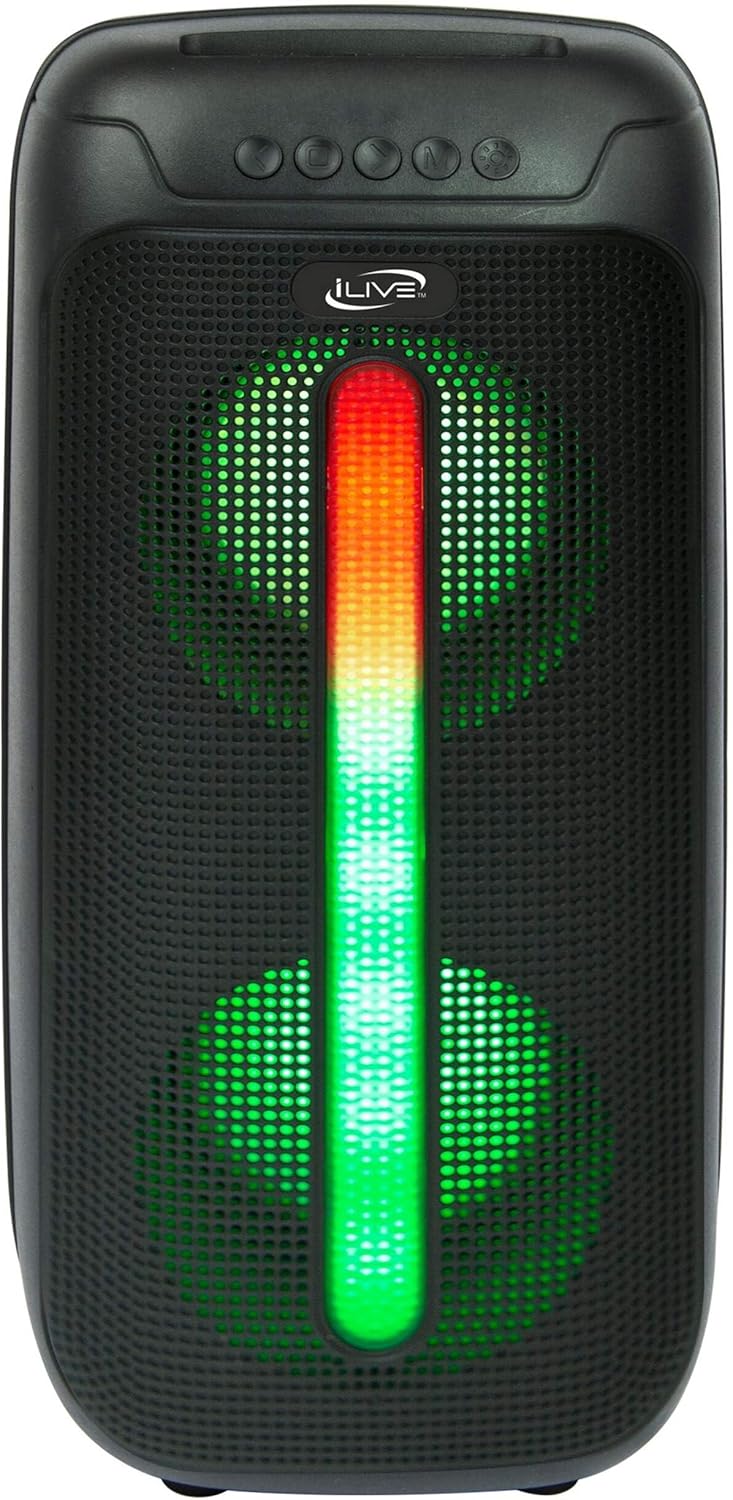
Figure 5: iLive Bluetooth 5.0 Speaker.
Одржавање
- Пројекционо сочиво: Use a soft, lint-free cloth to gently clean the projector lens. Avoid abrasive materials or harsh chemicals.
- Projector Vents: Ensure the projector's ventilation openings are clear of dust and debris to prevent overheating.
- Чишћење екрана: The anti-wrinkle polyester screen can be gently wiped with a damp cloth if necessary. Allow it to air dry completely before folding or storing.
- Брига о звучницима: Keep the speaker dry and clean. Avoid exposing it to extreme temperatures or direct sunlight.
- Складиштење: When not in use, store all components in the provided carrying case in a cool, dry place to protect them from dust and damage.
Решавање проблема
- Нема слике на екрану:
- Ensure the projector is powered on and the lens cap is removed.
- Verify the correct input source is selected on the projector.
- Check all cable connections (HDMI, USB) are secure.
- Замућена слика:
- Подесите фокусни прстен на сочиву пројектора.
- Ensure the projection distance is within the recommended range (2.6-12.5 ft).
- Distorted Image (Trapezoidal):
- Use the keystone correction feature to adjust the image geometry.
- Ensure the projector is placed on a level surface or the tripod is properly adjusted.
- Нема звука из звучника:
- Ensure the speaker is powered on and charged.
- Verify Bluetooth pairing or 3.5mm audio cable connection.
- Check volume levels on both the speaker and the connected device.
- Проблеми са Блуетоотх упаривањем:
- Уверите се да је звучник у режиму упаривања.
- Приближите звучник свом уређају.
- Disconnect and re-pair the device.
Спецификације
| Феатуре | Спецификација |
|---|---|
| Број модела | ТХЕ2024БДЛ |
| Резолуција екрана | 1280 к 720 (720п) |
| Дисплаи Типе | ЛЕД |
| Осветљеност | 3000 лумена |
| Однос контраста | 1000:1 |
| Аспецт Ратиос | 16:9, 4:3 |
| Живот извора светлости | 20,000 сата |
| Опсег пројекције | 2.6 - 12.5 стопе |
| Максимална величина слике | 120 инча |
| Повезивање | HDMI, USB, 3.5mm Audio, Bluetooth 5.0 |
| Излаз звучника | 16W Peak (Dual 4-inch drivers) |
| Трајање батерије звучника | До 4 сати (при 50% запремине) |
| Карактеристике статива | Integrated bubble level, 360-degree pan, ±180-degree tilt, 41.73-inch max height, 4 kg capacity |
| Подршка за видео кодирање | Х.264, Х.265 |
| Контролни метод | Ремоте Цонтрол |
Званични видео снимци производа
Тренутно нема званичних видео снимака продаваца за овај производ.
Гаранција и подршка
For warranty information or technical support, please contact iLive customer service at 1-888-999-4215. Please have your model number (THE2024BDL) and proof of purchase ready when contacting support.