
1. Увод
The Skyking WORKZONE 36TRMS Digital Clamp Meter is a portable, stable, and versatile instrument designed for accurate electrical measurements. Featuring a 6000-count LCD display, auto-ranging capabilities, and overload protection, this meter is suitable for a wide range of applications, from home electrical needs to professional use. It can measure AC/DC Voltage, AC/DC Current, Resistance, Capacitance, Frequency, Duty Cycle, Temperature, and includes Non-Contact AC Voltage (NCV) detection, diode, and continuity test functions.
2. Безбедносне информације
Always adhere to safety precautions when using electrical testing equipment. Failure to do so may result in electric shock, injury, or damage to the meter or equipment under test.
- Пре употребе уверите се да је мерач у добром радном стању.
- Не прекорачујте максималне улазне вредности за било који опсег.
- Use appropriate personal protective equipment (PPE), such as safety glasses and insulated gloves.
- Disconnect power to the circuit before making resistance, capacitance, or continuity measurements.
- Be cautious when working with live circuits. Avoid contact with bare conductors.
- Не користите мерач ако изгледа оштећено или ако поклопац батерије није правилно затворен.
3. Садржај пакета
Проверите да ли су све ставке присутне у пакету:
- WORKZONE 36TRMS Digital Clamp Метер
- Тест каблови (црвени и црни)
- Температуре Пробе
- AAA Batteries (Pre-installed or separate)
- Упутство за употребу (овај документ)

This image displays the Skyking WORKZONE 36TRMS Digital Clamp Meter along with its included test leads (red and black) and a white temperature probe. The clamp meter itself is red and black, showing the rotary dial, LCD screen, and input jacks.
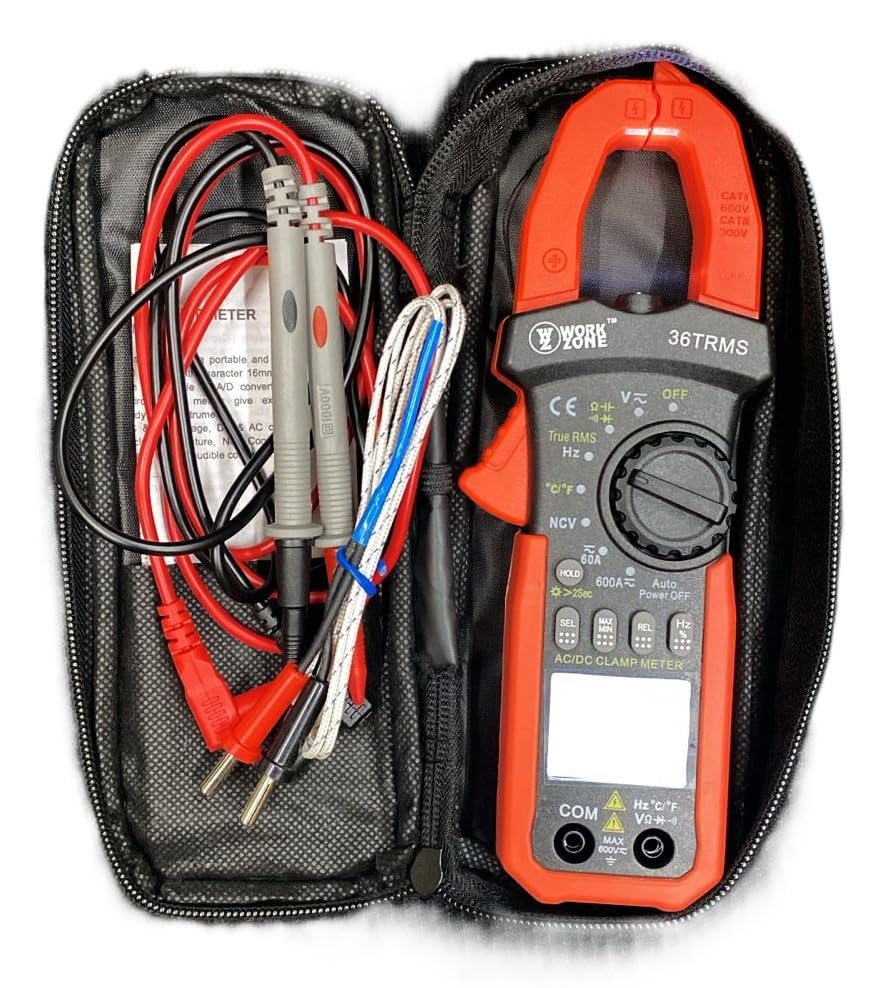
The Skyking WORKZONE 36TRMS Digital Clamp Meter, test leads, and temperature probe neatly organized within a black zippered carrying case. This illustrates how the product and its accessories are stored and transported.
4. Производ је готовview
The WORKZONE 36TRMS Digital Clamp Meter offers a range of features for comprehensive electrical testing:
- 6000 counts digit LCD monitor with 16mm character height.
- Auto-range and auto power-off function (after 15 minutes of inactivity).
- Clamp opening size: 26mm for non-invasive current measurement.
- Мере DC Voltage (600mV~600V) and AC Voltage (6V~600V).
- Measures DC Current (60A~600A) and AC Current (True RMS) (60A~600A).
- Measures Resistance (600Ω~60MΩ) and Capacitance (6nF~60mF).
- Measures Frequency (9.999Hz~9.999MHz) and Duty Cycle (0.1%~99.9%).
- Temperature measurement: -20~1000°C / -4~1832°F.
- Нон-Цонтацт АЦ Волtage (NCV) detection for safety.
- Diode and audible continuity test functions.
- Data hold function to freeze readings.
- Backlight for easy reading in dark environments.
- Relative measurement (REL) function for zeroing readings.

A detailed close-up of the Skyking WORKZONE 36TRMS Digital Clamp Meter. The image highlights the rotary switch with various measurement functions, the LCD display showing '0.000', function buttons (HOLD, SEL, MAX/MIN, REL, Hz), and the input jacks at the bottom.
5. Подешавање
5.1 Инсталација батерије
- The meter requires 2x 1.5V 'AAA' batteries.
- Пронађите поклопац одељка за батерије на задњој страни мерача.
- Open the cover, insert the batteries observing correct polarity (+ and - markings).
- Добро затворите поклопац одељка за батерије.
5.2 Укључивање/искључивање
- To power on the meter, rotate the rotary switch from the 'OFF' position to any desired measurement function.
- To power off, rotate the switch back to the 'OFF' position.
- The meter features an auto power-off function after approximately 15 minutes of inactivity to conserve battery life.
5.3 Повезивање мерног кабла
- Фор волtage, resistance, capacitance, frequency, duty cycle, diode, and continuity measurements, insert the red test lead into the 'VΩHz°C' input jack.
- Уметните црни мерни кабл у улазни прикључак 'COM'.
- Ensure test leads are fully inserted and securely connected.
6. Упутство за употребу
6.1 ДЦ/АЦ Волtagе Мерење
- Rotate the rotary switch to 'V~' for AC Voltage or 'V-' for DC Voltage.
- Повежите мерне каблове паралелно са колом или компонентом која се тестира.
- Прочитајте књtagе вредност на ЛЦД екрану.
6.2 Мерење наизменичне/једносмерне струје (Clamp вилица)
- Rotate the rotary switch to '60A~' or '600A~' for AC Current, or '60A-' or '600A-' for DC Current.
- Притисните цлamp trigger to open the jaws and clamp around a single conductor. Ensure the conductor is centered within the jaws.
- Прочитајте тренутну вредност на ЛЦД екрану.
6.3 Мерење отпора
- Rotate the rotary switch to 'Ω'.
- Пре мерења се уверите да је коло или компонента искључена из струје.
- Повежите мерне каблове преко компоненте коју треба мерити.
- Очитајте вредност отпора на ЛЦД екрану.
6.4 Мерење капацитивности
- Rotate the rotary switch to 'F'.
- Ensure the capacitor is fully discharged before testing to prevent damage to the meter.
- Спојите мерне каблове преко кондензаторских терминала.
- Прочитајте вредност капацитивности на ЛЦД екрану.
6.5 Frequency/Duty Cycle Measurement
- Rotate the rotary switch to 'Hz'.
- Повежите мерне каблове са извором сигнала.
- Press the 'Hz' button to toggle between Frequency (Hz) and Duty Cycle (%) display.
6.6 Мерење температуре
- Rotate the rotary switch to '°C/°F'.
- Спојите температурну сонду на улазне прикључке.
- Place the probe tip on the object whose temperature is to be measured.
- Притисните дугме „°C/°F“ да бисте прелазили између јединица Целзијуса и Фаренхајта.
6.7 Тест диоде
- Rotate the rotary switch to 'Diode/Continuity'.
- Спојите црвени мерни кабл на аноду, а црни мерни кабл на катоду диоде.
- На екрану ће се приказати јачина звука унапредtage drop. Reverse the leads; the display should show 'OL' for an open circuit.
6.8 Тест континуитета
- Rotate the rotary switch to 'Diode/Continuity'.
- Повежите мерне каблове преко кола или компоненте.
- An audible buzzer will sound if continuity is detected (typically resistance below approximately 50Ω).
6.9 Нон-Цонтацт АЦ Волtagе (НЦВ) Детекција
- Rotate the rotary switch to 'NCV'.
- Bring the NCV sensor (located at the top of the clamp meter) close to an AC voltagе извор.
- The meter will emit an audible beep and the NCV indicator light will flash if AC voltagе је откривено.
6.10 Функција задржавања података
- Press the 'HOLD' button to freeze the current reading on the display. Press again to release the hold.
- Long press the 'HOLD' button to activate the backlight for improved visibility in low-light conditions.
6.11 Relative Measurement (REL)
- In a measurement mode, press the 'REL' button to zero the current reading. Subsequent measurements will be displayed relative to this zero point.
- Press the 'REL' button again to exit relative mode.
7. Одржавање
7.1 Чишћење
- Обришите мерач casinг са меким, дamp тканина.
- Do not use abrasive cleaners, solvents, or harsh chemicals, as these may damage the casinг или приказ.
7.2 Замена батерије
- When the low battery indicator appears on the LCD, replace the batteries promptly to ensure accurate readings.
- Пратите кораке за инсталацију батерије наведене у одељку 5.1.
- Истрошене батерије одложите у складу са локалним прописима.
7.3 Складиштење
- When not in use for extended periods, store the meter in a cool, dry place.
- Избегавајте директну сунчеву светлост, екстремне температуре и високу влажност.
- It is recommended to remove batteries if storing for a very long time to prevent leakage.
КСНУМКС. Решавање проблема
- Нема дисплеја или бледи дисплеј: Check battery installation. If the low battery indicator is on, replace the batteries.
- Нетачна очитавања: Ensure the correct function is selected for the measurement. Verify test lead connections are secure and in the correct input jacks. For resistance or capacitance, ensure the circuit is de-energized. For current, ensure only a single conductor is clamped within the jaws.
- „OL“ дисплеј: This indicates an over-range condition or an open circuit. If measuring resistance, it means the resistance is too high or the circuit is open. If measuring voltage or current, the value exceeds the selected range; switch to a higher range if available.
- Нема звучног сигнала континуитета: The resistance of the circuit or component is too high, or there is an open circuit.
9. Спецификације
| Параметар | Валуе |
|---|---|
| Бранд | Skyking |
| Број модела | Workzone 36 TRMS |
| Меасуремент Типе | Дигитал Цлamp Метер |
| Дисплаи | 6000 counts digit LCD |
| Clamp Величина отварања | 26мм |
| ДЦ Волtagе Распон | 600мВ ~ 600В |
| АЦ Волtagе Распон | КСНУМКСВ ~ КСНУМКСВ |
| Опсег једносмерне струје | 60А ~ 600А |
| AC Current Range (True RMS) | 60А ~ 600А |
| Опсег отпора | 600Ω ~ 60МΩ |
| Опсег капацитивности | 6нФ ~ 60мФ |
| Фреквенцијски опсег | 9.999Хз ~ 9.999МХз |
| Дути Цицле | 0.1% ~ 99.9% |
| Температурни опсег | -20°Ц ~ 1000°Ц / -4°Ф ~ 1832°Ф |
| Индикација прекорачења | "ОЛ" |
| Индикација негативног поларитета | Automatic "-" display |
| Индикација слабе батерије | Да |
| Аутоматско искључивање | Прибл. 15 минута |
| Повер Суппли | 2 x 1.5V "AAA" batteries |
| Радна температура | 0°C ~ 40°C (relative humidity <85%) |
| Температура складиштења | -10°C ~ 50°C (relative humidity <85%) |
| Guaranteed Precision Temp. | 23±5°C (relative humidity <70%) |
| Димензије (В к Ш к Д) | 207 к 75 к 37 мм |
| Тежина | Прибл. 280 г (укључујући батерију) |
| Сафети Ратинг | CAT II 600V or CAT III 300V |
10. Гаранција и подршка
For warranty information or technical support regarding your Skyking WORKZONE 36TRMS Digital Clamp Meter, please contact Skyking Instruments directly. Refer to your purchase documentation or the manufacturer's official website for specific warranty terms, conditions, and contact details.