
1. Производ је готовview
The DOOMAY Digital Alarm Clock Model 6221 is designed for bedside use, featuring a clear VA LCD display. It includes dual alarm settings, a 9-minute snooze function, and a weekend mode. The clock displays time, date, day of the week, and indoor temperature. It offers adjustable brightness, multiple alarm sounds, and volume levels. Power options include a Type-C adapter and battery backup.

Слика: Фронт view of the DOOMAY Digital Alarm Clock Model 6221, displaying time, date, and temperature.
2. Садржај пакета
- DOOMAY Digital Alarm Clock Model 6221
- Тип-Ц УСБ кабл
- Адаптер за напајање (зидна утичница)
- 2 x AAA Batteries (for backup)
- Кориснички приручник (овај документ)
3. Подешавање
3.1 Напајање сата
The clock can be powered via the included Type-C adapter for continuous operation or by batteries for backup during power outages. For optimal performance and continuous display, it is recommended to keep the clock plugged in.
- Primary Power (Adapter): Connect the Type-C USB cable to the clock's DC 5V port and the other end to the power adapter. Plug the adapter into a wall outlet.
- Резервна батерија: Open the battery compartment on the back of the clock. Insert 2 AAA batteries (included), ensuring correct polarity. These batteries will preserve your settings during power interruptions and allow the alarm to function, but the display will not be continuously lit when running on battery power alone.

Image: Illustration showing the clock powered by a wall adapter for continuous use and the battery compartment for backup power.
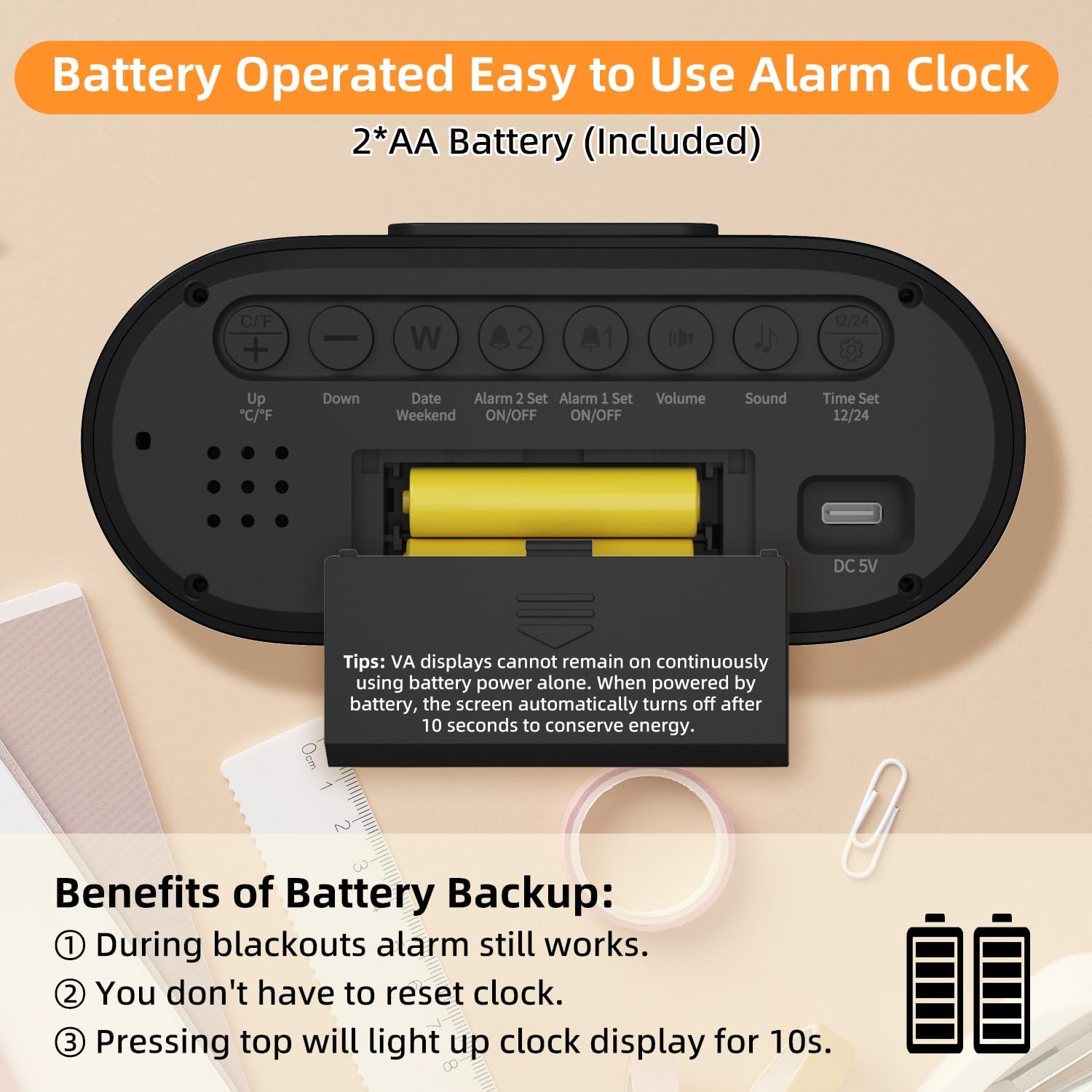
Слика: Позади view of the alarm clock, highlighting the battery compartment and labeled control buttons for setup.
4. Упутство за употребу
4.1 Подешавање времена и датума
To set the current time and date:
- Притисните тастер "Time Set 12/24" button on the back of the clock to enter time setting mode.
- Користите "Up °C/°F" и „Доле“ дугмад за подешавање сата.
- Притисните "Time Set 12/24" again to move to minute adjustment, then use "Горе" и „Доле“ дугмад.
- Наставите да притискате "Time Set 12/24" да бисте се кретали кроз подешавања године, месеца и дана, подешавајући свако помоћу "Горе" и „Доле“ дугмад.
- Притисните "Time Set 12/24" још једном да бисте изашли из режима подешавања.
- Да бисте прелазили између 12-часовног и 24-часовног формата, притисните "Time Set 12/24" button outside of setting mode.

Image: The clock display showing both 12-hour (AM/PM) and 24-hour time formats.
4.2 Подешавање аларма
The clock features two independent alarms (Alarm 1 and Alarm 2).
- Подешавање аларма:
- Притисните тастер "Alarm 1 Set ON/OFF" or "Alarm 2 Set ON/OFF" button to select the alarm you wish to set. The alarm icon will flash.
- Користите "Up °C/°F" и „Доле“ дугмад за подешавање сата.
- Press the respective alarm set button again to move to minute adjustment, then use "Горе" и „Доле“ дугмад.
- Press the alarm set button one last time to confirm and exit setting mode.
- Активирање/деактивирање аларма: Притисните тастер "Alarm 1 Set ON/OFF" or "Alarm 2 Set ON/OFF" button briefly outside of setting mode to toggle the alarm on or off. An alarm icon will appear on the display when active.
- Викенд режим: Притисните тастер "Date Weekend" button to activate or deactivate weekend mode. When active, alarms will only sound from Monday to Friday.
- Одгода функција: Када се огласи аларм, притисните велико „ОДРЕМАЊЕ/СВЕТЛО“ дугме на врху сата да бисте активирали одлагање будилника од 9 минута. Аларм ће се поново огласити након 9 минута.
- Заустављање аларма: To stop an alarm completely, press any button on the back of the clock. If no button is pressed, the alarm will sound for 2 minutes, snooze for 9 minutes, and repeat this cycle 3 times before turning off automatically.

Image: The clock displaying two separate alarm times, indicating its dual alarm capability.

Image: A hand pressing the top snooze button on the clock, illustrating the 9-minute snooze feature.

Image: The clock display indicating "WEEKEND" mode is active, meaning alarms are suspended for the weekend.
4.3 Подешавања екрана
Adjust the display to your preference:
- Подешавање осветљености: When the clock is plugged in, press the large „ОДРЕМАЊЕ/СВЕТЛО“ button on top to cycle through 4 brightness levels (Off, Dim, Medium, Bright). The display will remain continuously lit at the selected brightness. When operating on battery power, pressing this button will illuminate the display for 10 seconds.
- Јединица температуре: Притисните тастер "Up °C/°F" button on the back to switch the temperature display between Celsius (°C) and Fahrenheit (°F).

Image: Four panels illustrating the different brightness levels (Off, Dim, Medium, Bright) of the clock display when plugged in.

Image: The clock display showing temperature in both Celsius and Fahrenheit, with an icon indicating the switch function.
4.4 Подешавања звука
Customize your alarm experience:
- Подешавање јачине звука: Притисните тастер "Volume" button on the back to cycle through 3 alarm volume levels (Low: 65dB, Medium: 75dB, High: 85dB).
- Избор мелодије звона: Притисните тастер "Sound" button on the back to choose from 4 available alarm sounds (standard beeps and 3 music ringtones).

Image: The clock display alongside graphics illustrating three volume levels and four distinct alarm sound options.
5. Одржавање
- Чишћење: Обришите сат меком, сувом крпом. Не користите абразивна средства за чишћење или раствараче.
- Замена батерије: Replace AAA batteries when the low battery indicator appears on the display or if the clock fails to maintain settings during a power outage.
- Складиштење: Ако складиштите сат дуже време, извадите батерије да бисте спречили цурење.
КСНУМКС. Решавање проблема
| Проблем | Могући узрок | Решење |
|---|---|---|
| Display is blank or intermittent. | Није укључено, искључено је напајањеtage, low batteries. | Ensure Type-C adapter is securely plugged in. Check power outlet. Replace AAA batteries. Note: Display is not continuously lit on battery power alone. |
| Аларм се не оглашава. | Alarm not activated, volume too low, weekend mode active. | Verify alarm icon is displayed. Adjust alarm volume. Deactivate weekend mode if necessary. |
| Време/датум је нетачан. | Incorrectly set, battery backup failed. | Follow instructions in Section 4.1 to reset time and date. Ensure backup batteries are fresh. |
| Екран је превише светао/таман. | Потребно је подесити ниво осветљености. | Притисните тастер „ОДРЕМАЊЕ/СВЕТЛО“ button to cycle through brightness levels (when plugged in). |
7. Спецификације
- Модел: 6221
- Тип приказа: VA LCD Digital
- Величина екрана: 4.55 инча
- Димензије: 5.58" Ш x 2.56" В
- Извор напајања: Type-C USB (DC 5V) / 2 x AAA Batteries (backup)
- Alarm Features: Dual Alarms, 9-Minute Snooze, Weekend Mode
- Нивои јачине звука: 3 (65dB, 75dB, 85dB)
- Мелодије звона: 4 врсте
- Нивои осветљености: 4 (Off, Dim, Medium, Bright - when plugged in)
- Додатне карактеристике: Time (12H/24H), Date, Day of Week, Indoor Temperature (°C/°F)
- Материјал: Пластика
8. Гаранција и подршка
For warranty information or technical support, please refer to the contact details provided on the product packaging or visit the official DOOMAY webсајту. Сачувајте рачун о куповини за гаранције.