
1. Увод
Thank you for choosing the KAIWEETS KC200D Digital Clamp Meter. This device is a compact, high-precision instrument designed for electrical measurements in various settings, including home, commercial, and industrial environments. It features True RMS technology for accurate readings of complex waveforms, Non-Contact Voltage (NCV) detection for enhanced safety, and a clear backlit LCD for easy readability. This manual provides essential information for safe and effective use of your clamp метар.
2. Безбедносне информације
To ensure safe operation, please read and understand all safety warnings and operating instructions before using this instrument. Failure to observe these warnings can result in serious injury or death.
- Увек се придржавајте локалних и националних безбедносних кодекса.
- Не користите мерач ако изгледа оштећено или ако је изолација на мерним кабловима оштећена.
- Немојте примењивати више од оцењеног волtage, as marked on the meter, between terminals or between any terminal and ground. The maximum operating voltagе је 600В.
- Будите изузетно опрезни када радите са волtagизнад 60V једносмерне струје или 30V наизменичне струје RMS. Ови напониtagпредстављају опасност од удара.
- Keep your fingers behind the finger guards on the test leads during use.
- Не користите мерач у окружењу са експлозивним гасом, паром или прашином.
- Уклоните мерне каблове из кола пре промене функција.
- Always turn off the power to the circuit under test before connecting or disconnecting the test leads.
- Ensure the battery cover is securely closed before operating the meter.
3. Садржај пакета
Проверите да ли су све ставке наведене у наставку присутне и да нису оштећене:
- 1 x KAIWEETS KC200D Digital Clamp Метер
- 1 к Упутство за употребу
- 1 к торба за складиштење
- 2 x мерне каблове (црвени и црни)
- 2 к ААА 1.5В батерије
4. Производ је готовview
The KAIWEETS KC200D is designed for ease of use and durability. Familiarize yourself with the main components:
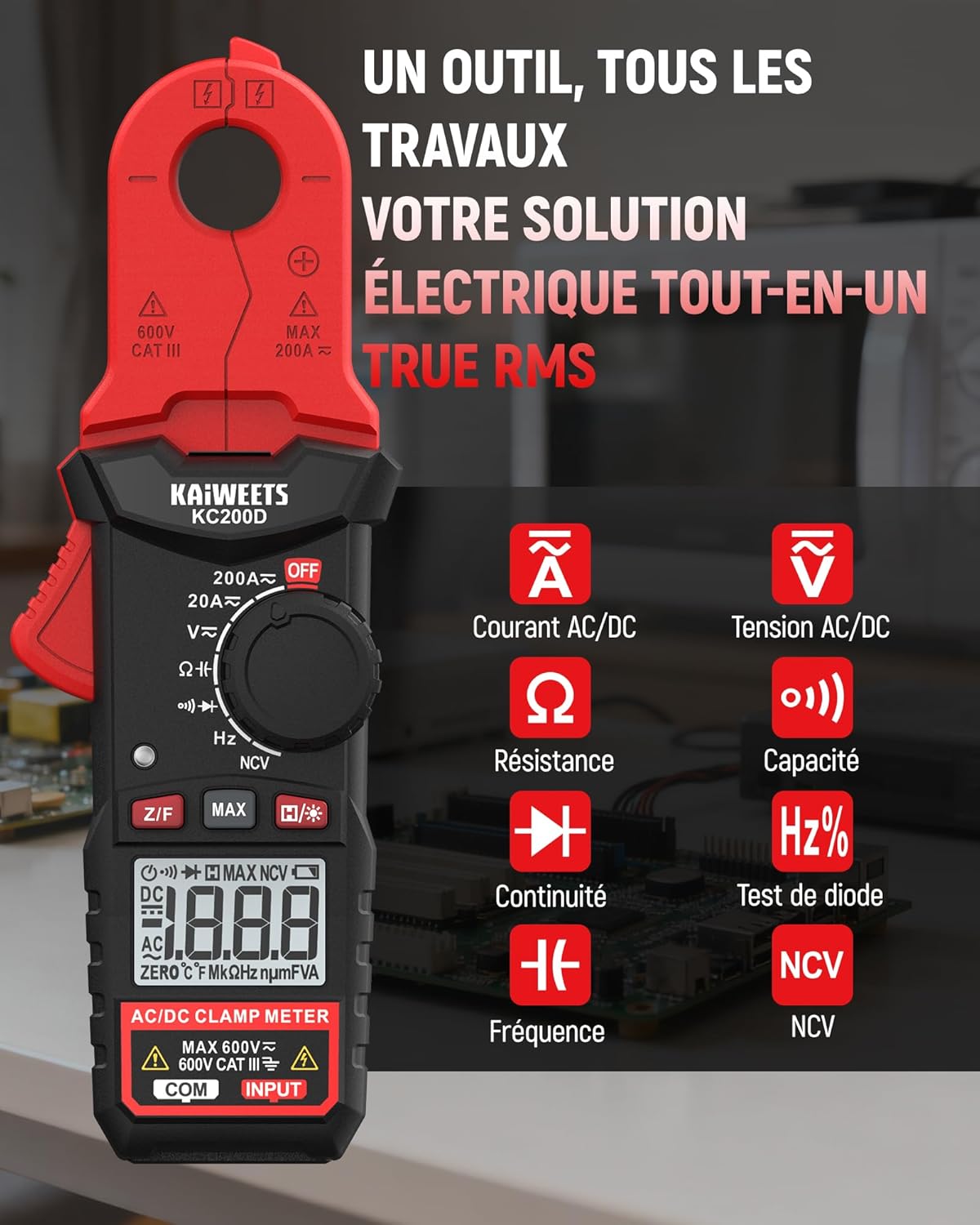
Слика 4.1: KAIWEETS KC200D Clamp Meter with its various measurement functions highlighted, including AC/DC Current, AC/DC Voltage, Resistance, Capacitance, Frequency, Diode Test, Continuity, and NCV.
4.1 кључне компоненте
- Clamp вилица: Користи се за бесконтактно мерење наизменичне/једносмерне струје.
- Точкић функција: Ротациони прекидач за избор режима мерења.
- ЛЦД екран: Приказује очитавања мерења, јединице и индикаторе.
- Дугмад: For special functions like Data Hold, MAX/MIN, DC Zero, Backlight, and NCV.
- Улазни прикључци: За повезивање мерних каблова за волуменtagе, мерења отпора, капацитета, фреквенције, диоде и континуитета.
5. Подешавање
5.1 Инсталација батерије
The KC200D requires two AAA 1.5V batteries (included).
- Уверите се да је мерач ИСКЉУЧЕН.
- Пронађите одељак за батерије на задњој страни мерача.
- Користите одвијач да бисте отворили поклопац одељка за батерију.
- Insert the two AAA batteries, observing the correct polarity (+ and -).
- Вратите поклопац одељка за батерије и причврстите га завртњем.
5.2 Повезивање мерних каблова
За мерења која захтевају мерне каблове (волtage, resistance, capacitance, frequency, diode, continuity):
- Уметните црвени мерни кабл у терминал "INPUT".
- Уметните црни мерни кабл у "COM" (Common) терминал.
6. Упутство за употребу
Always select the appropriate function before making any measurement. Turn the function dial to the desired measurement mode.
6.1 Мерење наизменичне/једносмерне струје (Clamp)
Користите цлamp jaw for non-contact current measurement. This method is ideal for safely measuring current without breaking the circuit.

Слика 6.1: Тхе цлamp jaw of the KC200D measuring current on a single electrical wire, demonstrating its compact design and precision.
- Окрените дугме за избор функције на 20А~ or 200А~ position for AC current, or 20А= or 200А= за једносмерну струју.
- Притисните цлamp окидач за отварање вилице.
- Encircle only један conductor with the clamp вилица. Не затварајтеamp around multiple wires, as this will result in an inaccurate reading.
- For DC current measurement, press the З/Ф дугме за нулирање дисплеја пре кл.ampинг.
- Прочитајте тренутну вредност на ЛЦД екрану.
6.2 АЦ/ДЦ Волtagе Мерење
За мерење волtage, use the test leads.
- Окрените дугме за избор функције на V~ (AC Voltagд) или V= (ДЦ Волtagд) положај.
- Connect the red test lead to the positive side of the circuit and the black test lead to the negative side (or ground).
- Прочитајте књtagе вредност на ЛЦД екрану.
6.3 Мерење отпора
Пре мерења отпора, уверите се да је коло без напона.
- Окрените дугме за избор функције на Ω положај.
- Повежите мерне каблове преко компоненте коју треба мерити.
- Очитајте вредност отпора на ЛЦД екрану.
6.4 Мерење капацитивности
Discharge capacitors completely before measurement to avoid damage to the meter or injury.
- Окрените дугме за избор функције на Капацитет position (often shared with Diode/Continuity, press FUNC to cycle).
- Спојите мерне каблове преко кондензатора.
- Прочитајте вредност капацитивности на ЛЦД екрану.
6.5 Мерење фреквенције
Да бисте измерили фреквенцију:
- Окрените дугме за избор функције на Хз% положај.
- Connect the test leads across the circuit where frequency is to be measured.
- Прочитајте вредност фреквенције на ЛЦД екрану.
6.6 Тест диоде
Уверите се да је диода искључена из кола.
- Окрените дугме за избор функције на Диоде position (often shared with Capacitance/Continuity, press FUNC to cycle).
- Connect the red test lead to the anode and the black test lead to the cathode.
- A forward voltage drop will be displayed for a good diode. Reverse the leads; the display should show OL (Open Loop).
6.7 Тест континуитета
Уверите се да је коло без напона.
- Окрените дугме за избор функције на Континуитет position (often shared with Diode/Capacitance, press FUNC to cycle).
- Повежите мерне каблове преко компоненте или жице.
- If there is continuity (low resistance), the meter will emit an audible beep.
6.8 Нон-Цонтацт Волtagе (НЦВ) Детекција
The NCV function allows for quick and safe detection of live AC voltagе без директног контакта.

Слика 6.2: The KC200D performing Non-Contact Voltage (NCV) detection near an electrical outlet, showing visual indicators for low and high voltagе присуство.
- Окрените дугме за избор функције на НЦВ положај.
- Bring the top end of the meter near the conductor or outlet.
- The meter will emit an audible beep and illuminate LED indicators, with frequency increasing as voltagснага се повећава.
6.9 Посебне функције

Слика 6.3: The KC200D highlighting its user-friendly functions: MAX for peak value, Z/F for DC current zeroing, H for data hold, backlight for low-light conditions, and auto-off for battery saving.
- Data Hold (H/* button): Притисните да замрзнете тренутно очитавање на екрану. Притисните поново да бисте отпустили.
- MAX/MIN (MAX button): Press to display the maximum or minimum measured value. Press again to cycle.
- DC Current Zero (Z/F button): For DC current measurements, press this button before clamping to zero out any residual readings.
- Backlight (H/* long press): Long press the H/* button to turn the display backlight ON or OFF for improved visibility in low-light conditions.
- аутоматско искључивање: The meter automatically powers off after approximately 15 minutes of inactivity to conserve battery life. Press any button or rotate the function dial to wake it up.
7. Одржавање
7.1 Чишћење
Обришите мерач сувом, меком крпом. Не користите абразивна средства или раствараче.
7.2 Замена батерије
When the battery indicator appears on the LCD, replace the batteries as described in the Setup section (5.1 Battery Installation).
7.3 Складиштење
If the meter is not used for an extended period, remove the batteries to prevent leakage and damage. Store the meter in its carrying bag in a cool, dry place.
КСНУМКС. Решавање проблема
| Проблем | Могући узрок | Решење |
|---|---|---|
| Мерач се не укључује | Dead batteries; Incorrect battery installation | Замените батерије; Проверите поларитет батерија |
| Inaccurate current reading | Више проводника у clamp jaw; DC current not zeroed | Уверите се да је само један проводник затворенamped; Press Z/F button for DC current |
| Приказано је „OL“ (преоптерећење) | Measurement exceeds range; Open circuit (for continuity/resistance) | Select a higher range (if available); Check circuit connections |
| Нема детекције NCV-а | Нема АЦ волtage present; Meter not close enough to source | Проверите јачину звука клима уређајаtage presence; Move meter closer to the live conductor |
9. Спецификације
Technical specifications for the KAIWEETS KC200D Digital Clamp метар:
| Феатуре | Спецификација |
|---|---|
| Број модела | КЦ200Д |
| Дисплаи | 2000 Counts, Backlit LCD |
| АЦ Цуррент | 20A/200A (±(2.5% + 5 digits)) |
| ДЦ Цуррент | 20A/200A (±(2.5% + 5 digits)) |
| АЦ Волtage | 2V/20V/200V/600V (±(1.0% + 5 digits)) |
| ДЦ Волtage | 200mV/2V/20V/200V/600V (±(0.5% + 5 digits)) |
| Отпор | 200Ω/2kΩ/20kΩ/200kΩ/2MΩ/20MΩ (±(1.0% + 5 digits)) |
| Капацитет | 2nF/20nF/200nF/2µF/20µF/200µF/2mF/20mF (±(4.0% + 5 digits)) |
| Фреквенција | 2Hz/20Hz/200Hz/2kHz/20kHz/200kHz/2MHz/20MHz (±(1.0% + 3 digits)) |
| Диодни тест | Да |
| Тест континуитета | Да |
| НЦВ Детецтион | Да |
| Повер Суппли | 2 к ААА 1.5В батерије |
| Сафети Ратинг | CAT III 600V, Pollution Level: 2 |
| Димензије | 20.7 x 11.3 x 4.7 цм (паковање) |
| Тежина | 308 grams (Package) |
10. Гаранција и подршка
KAIWEETS products are designed for reliability and performance. For warranty information, technical support, or service inquiries, please refer to the contact information provided on the KAIWEETS official website or contact your local distributor. Please retain your purchase receipt as proof of purchase for warranty claims.