
1. Увод
This manual provides essential information for the safe and efficient use of your Haier H55C95EUX 55-inch OLED 4K HDR Smart TV. Please read these instructions thoroughly before operating your television and retain them for future reference.
The Haier H55C95EUX features a 55-inch OLED display for deep blacks and vibrant colors, 4K HDR resolution, a 144Hz refresh rate for smooth motion, integrated Harman Kardon sound, and the Google TV operating system for smart functionality and voice control.

Слика 1.1: Готовоview of Haier C95 Series OLED TV features, highlighting Harman Kardon audio, 144Hz gaming, Dolby Vision IQ, Dolby Atmos, HDR10+, Google TV, and 3GB RAM with 32GB storage.
2. Безбедносне информације
Увек се придржавајте основних мера безбедности када користите овај телевизор како бисте смањили ризик од пожара, струјног удара и повреда.
- Извор напајања: Повежите телевизор само на напајање наизменичне струје од 220-240V, 50/60Hz.
- вентилација: Обезбедите одговарајућу вентилацију око телевизора. Не блокирајте вентилационе отворе.
- Вода и влага: Не излажите телевизор киши или влази. Не стављајте предмете напуњене течношћу, као што су вазе, на телевизор.
- Чишћење: Искључите телевизор из зидне утичнице пре чишћења. Користите меку, суву крпу. Не користите течна средства за чишћење или аеросолна средства за чишћење.
- Монтажа: If wall-mounting, ensure the wall mount is compatible with the VESA standard (100 x 100 mm) and can support the TV's weight.
- деца: Supervise children to ensure they do not play with the television.
3. Шта је у кутији
Carefully unpack the box and ensure all items are present and undamaged.
- Haier H55C95EUX 55-inch OLED 4K HDR Smart TV
- Ремоте Цонтрол
- Кориснички приручник (овај документ)
- Повер Цабле
- Компоненте ТВ постоља (ако је применљиво)
4. Подешавање
4.1 Физичка инсталација
Before installation, consider the TV's dimensions to ensure proper placement.

Слика 4.1: Предња страна view dimensions of the 55-inch Haier TV, indicating a width of 1225mm and a height of 749mm.

Image 4.2: Detailed dimensions of the Haier 55-inch TV, showing measurements with and without the stand.
Инсталација постоља
- Поставите телевизор лицем надоле на меку, равну површину да бисте спречили оштећење екрана.
- Attach the stand components to the designated slots on the bottom of the TV using the provided screws.
- Уверите се да је постоље безбедно причвршћено пре него што поставите телевизор усправно.
Валл Моунтинг
If wall-mounting, use a VESA-compatible mount (100 x 100 mm) and follow the mount manufacturer's instructions. Ensure the wall can support the TV's weight.
4.2 Повезивање уређаја
Ваш телевизор је опремљен са више портова за повезивање екстерних уређаја.
- ДВИ: Connect Blu-ray players, game consoles, or set-top boxes to the HDMI 2.1 ports for high-quality audio and video.
- УСБ: Повежите УСБ уређаје за складиштење података за репродукцију медија.
- Етхернет: За стабилну жичану интернет везу.
- Блуетоотх: Connect wireless headphones or other Bluetooth devices.
4.3 Почетно укључивање и подешавање
- Прикључите кабл за напајање на телевизор и зидну утичницу.
- Притисните дугме за напајање на даљинском управљачу или на телевизору.
- Follow the on-screen instructions to complete the initial setup, including language selection, network connection (Wi-Fi or Ethernet), and Google TV account login.
5. Управљање телевизором
5.1 Даљински управљач
The included remote control allows you to navigate the TV's features. It may feature a solar cell for eco-friendly charging and USB-C for backup charging.

Image 5.1: The Haier TV remote control, featuring navigation, volume, and app access buttons.
5.2 Интерфејс Google TV-а
Your TV runs on Google TV, providing access to a wide range of streaming services, apps, and personalized content.

Image 5.2: The Google TV home screen, showcasing various streaming applications and content recommendations.
Воице Цонтрол
Use the built-in voice control feature to search for content, launch apps, and control your TV hands-free. Simply say "Hey Google" or press the voice assistant button on your remote.

Image 5.3: Demonstrating voice control functionality with the Haier TV and Google TV.
5.3 Подешавања слике и звука
ОЛЕД технологија
The OLED display provides absolute blacks and infinite contrast for a lifelike viewинг искуство.

Image 5.4: Visual representation of OLED technology, showcasinг дубоке црне и живе боје.
Harman Kardon Sound
Experience immersive audio with clear dialogues and cinematic depth, delivered by the integrated Harman Kardon sound system.

Image 5.5: Depiction of the Harman Kardon sound system, emphasizing clear and powerful audio.
Долби Атмос
Enjoy three-dimensional, immersive sound that moves around you, enhancing your audio experience.
Брзина освежавања од 144Хз
The 144Hz refresh rate ensures smooth and fluid motion, ideal for fast-paced content like gaming and sports.

Image 5.6: Visual comparison illustrating the fluidity of 144Hz motion compared to 60Hz, particularly beneficial for gaming.
6. Одржавање
6.1 Чишћење ТВ-а
- Увек искључите телевизор из струје пре чишћења.
- Користите меку, суву крпу која не оставља влакна да бисте обрисали екран и кућиште.
- За тврдокорне трагове, лагано дampОбришите крпу водом или специјализованим средством за чишћење екрана. Никада не прскајте средство за чишћење директно на екран.
- Избегавајте употребу абразивних средстава за чишћење, воскова или растварача.
6.2 Ажурирања софтвера
Your Haier TV may receive software updates to improve performance and add new features. Ensure your TV is connected to the internet to receive these updates automatically or check for them manually through the settings menu.
КСНУМКС. Решавање проблема
Ако наиђете на проблеме са телевизором, погледајте следећа уобичајена решења:
| Проблем | Могуће решење |
|---|---|
| Но Повер | Check if the power cable is securely connected to the TV and the wall outlet. Ensure the outlet is functioning. Try pressing the power button on the TV itself. |
| Нема слике, али је звук присутан | Проверите извор улаза. Уверите се да је повезани уређај укључен и да исправно функционише. Покушајте са другим HDMI каблом или портом. |
| Нема звука, али је слика присутна | Check the volume level. Ensure the TV is not muted. Verify audio output settings (e.g., internal speakers, external sound system). Check audio cables if using external speakers. |
| Даљински управљач не ради | Check the remote control's battery level. Ensure there are no obstructions between the remote and the TV's IR sensor. If it's a solar remote, ensure it has sufficient light exposure. |
| Проблеми са мрежном везом | Рестартујте рутер и модем. Проверите лозинку за Wi-Fi. Ако користите Ethernet, уверите се да је кабл правилно повезан. Покушајте да се повежете на другу мрежу ако је доступна. |
8. Спецификације
| Феатуре | Детаљ |
|---|---|
| Назив модела | H55C95EUX |
| Величина екрана | 55 инча |
| Дисплаи Тецхнологи | ОЛЕД |
| Резолуција | 4К (3840 к 2160) |
| Рефресх Рате | 120 Hz (Motion Enhancement: 144Hz) |
| Подржан ХДР формат | Долби Висион |
| Оперативни систем | Гоогле ТВ |
| Интерна меморија | 32 ГБ |
| Аудио систем | Harman Kardon 2.1 Sound System |
| Surround Sound Format | Долби Атмос |
| Повезивање | Bluetooth, Ethernet, HDMI (x4), USB (x1) |
| Бежична технологија | Блуетоотх, Ви-Фи |
| Контролни метод | Даљинско управљање, глас |
| Димензије производа (ДкШкВ) | 29.5P x 122.5l x 76.8H cm (with stand) |
| ВЕСА стандард за монтажу | 100 к 100 мм |
| Класа енергетске ефикасности (СДР) | F (77 kWh/1000h) |
| Класа енергетске ефикасности (ХДР) | Г (70 kWh/1000h) |
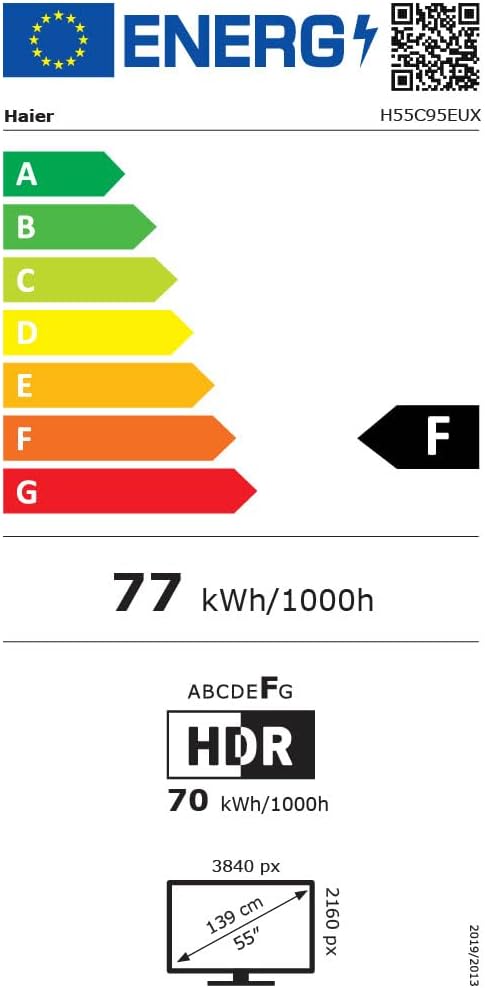
Image 8.1: EU Energy Label for the Haier H55C95EUX TV. For more details, visit the ЕПРЕЛ база података.
9. Гаранција и подршка
Your Haier H55C95EUX television comes with a Двогодишња гаранција произвођачаМолимо вас да сачувате доказ о куповини за потребе гаранције.
For technical support, service, or further inquiries, please refer to the contact information provided on the official Haier webсајт или ваш локални овлашћени сервисни центар.


