
Toputure TP6
Упутство за употребу склопиве траке за трчање Toputure TP6
Модел: ТП6
Увод
Thank you for choosing the Toputure TP6 Folding Treadmill. This manual provides essential information for the safe and efficient operation, maintenance, and troubleshooting of your new fitness equipment. Please read it thoroughly before initial use and keep it for future reference.
Важна безбедносна упутства
To reduce the risk of serious injury, read all instructions before using the Toputure TP6 treadmill. Keep this manual in a safe place for future reference.
- Увек постављајте траку за трчање на равну површину.
- Ensure adequate clearance around the treadmill (at least 2 meters behind and 0.6 meters on each side).
- Држите децу и кућне љубимце подаље од траке за трчање током рада.
- Do not use the treadmill if you weigh more than 130 KG.
- Always attach the safety key clip to your clothing before starting the treadmill.
- Консултујте се са лекаром пре него што започнете било који програм вежбања.
- Не користите траку за трчање ако је кабл или утикач оштећен или ако не ради исправно.
- Носите одговарајућу спортску одећу и обућу.
Подешавање и монтажа
The Toputure TP6 treadmill is designed for easy setup and does not require complex installation. It is ready to use out of the box.
Развијање траке за трчање
- Пажљиво извадите траку за трчање из паковања.
- Place the folded treadmill on a flat, stable surface.
- Lift the handrail assembly until it locks into the upright position.
- Secure the handrail assembly using the adjustment knobs.

Слика 1: Unfolding and securing the handrails of the Toputure TP6 treadmill.
Adjusting Handrails and Incline
The telescopic handrails can be adjusted in height from 82 cm to 115 cm and in angle from 95° to 105° to suit various user heights and exercise preferences.
- To adjust height: Loosen the adjustment knobs on the handrails, slide to the desired height, and tighten securely.
- To adjust angle: Use the angle adjustment mechanism at the base of the handrails to select between 95° and 105° positions.

Слика 2: Adjustable handrails for personalized comfort and support.
The treadmill also features three incline levels: 1%, 6%, and 12%. These can be manually adjusted to simulate different terrains and increase workout intensity.

Слика 3: Three incline levels for varied workout intensity.
Упутство за употребу
Геттинг Стартед
- Укључите кабл за напајање у уземљену електричну утичницу.
- Attach the safety key to the designated area on the console and clip the other end to your clothing. The treadmill will not operate without the safety key in place.
- Станите на траку за трчање, држећи се за рукохвате ради равнотеже.
- Press the START button on the console or remote control to begin your workout.

Слика 4: LED display and magnetic remote control for easy operation.
Adjusting Speed and Monitoring Progress
The treadmill offers a speed range of 1 to 12 KM/H. You can adjust the speed using the '+' and '-' buttons on the console or the remote control.
The multifunction LED display shows real-time data including time, calories burned, speed, and distance. This allows you to monitor your exercise status at a glance.
Smart APP Integration
Connect your treadmill to the sports APP via Bluetooth. The intelligent APP control allows you to record all your exercise data and share it. The enhanced device holder securely holds your phone or tablet, allowing you to enjoy media during your workout.
Режими вежбања
The 6-in-1 folding treadmill supports various scenarios:
- Режим ходања: Ideal for light exercise or warm-ups.
- Fat Burning Mode: Optimized for calorie expenditure.
- Office Work Mode: Use with a standing desk for active work.
- Pet Training Mode: Suitable for exercising pets.
- Начин рада: For moderate to intense cardio workouts.
- Rehabilitation Mode: Gentle exercise for recovery.

Слика 5: Versatile 6-in-1 functionality for various exercise needs.
Stopping the Treadmill
To stop the treadmill, press the STOP button on the console or remote control. If the safety key is removed, the treadmill will stop immediately.
Одржавање
Regular maintenance ensures the longevity and optimal performance of your Toputure TP6 treadmill.
Чишћење
- Обришите траку за трчање након сваке употребе рекламомamp крпа за уклањање зноја и прашине.
- Немојте користити абразивна средства за чишћење или раствараче.
Подмазивање
The treadmill features lubrication holes for easy maintenance. Regular lubrication of the running belt is crucial for smooth operation and to prevent wear.
- Refer to the specific lubrication instructions provided with your treadmill for the correct type and amount of lubricant, and frequency of application.
- The unique design of the lubrication holes allows for easy identification of the lubrication position.
Слика 6: Lubrication holes for simplified maintenance of the running belt.
Подешавање појаса
If the running belt becomes misaligned or too loose/tight, it may need adjustment. Consult the detailed instructions in the full user manual for proper belt tensioning and centering procedures.
Решавање проблема
This section addresses common issues you might encounter with your Toputure TP6 treadmill.
| Проблем | Могући узрок | Решење |
|---|---|---|
| Трака за трчање се не покреће. | Кабл за напајање није укључен; Безбедносни кључ није на месту; Прекидач за напајање је искључен. | Ensure power cord is securely plugged in; Insert safety key; Turn on power switch. |
| Каиш за трчање клизи или оклева. | Ремен превише лабав; недовољно подмазивање. | Adjust belt tension (refer to full manual); Lubricate the running belt. |
| Необична бука током рада. | Loose components; Belt misalignment; Motor issue. | Check and tighten all visible bolts and screws; Adjust belt alignment; If noise persists, contact customer support. |
| Нетачна очитавања на дисплеју. | Sensor malfunction; Calibration needed. | Ensure all connections are secure; Refer to the full manual for calibration steps or contact support. |
For issues not listed here or if solutions do not resolve the problem, please contact Toputure customer support.
Спецификације
| Феатуре | Детаљ |
|---|---|
| Бранд | Топутура |
| Број модела | ТП6 |
| Моторна коњска снага | 2.5 ХП |
| Спеед Ранге | 1 - 12 км/х |
| Нивои нагиба | 1%, 6%, 12% (manual adjustment) |
| Руннинг Сурфаце | 40 к 100 цм |
| Максимална тежина корисника | 130 КГ |
| Handrail Height Adjustment | 82 цм до 115 цм |
| Handrail Angle Adjustment | 95° до 105° |
| Дисплаи | Multifunction LED (Time, Calories, Speed, Distance) |
| Повезивање | Bluetooth for APP integration |
| Систем амортизације | 7-layer anti-slip belt, 8 silicone shock absorbers, 2 soft rubber pads |
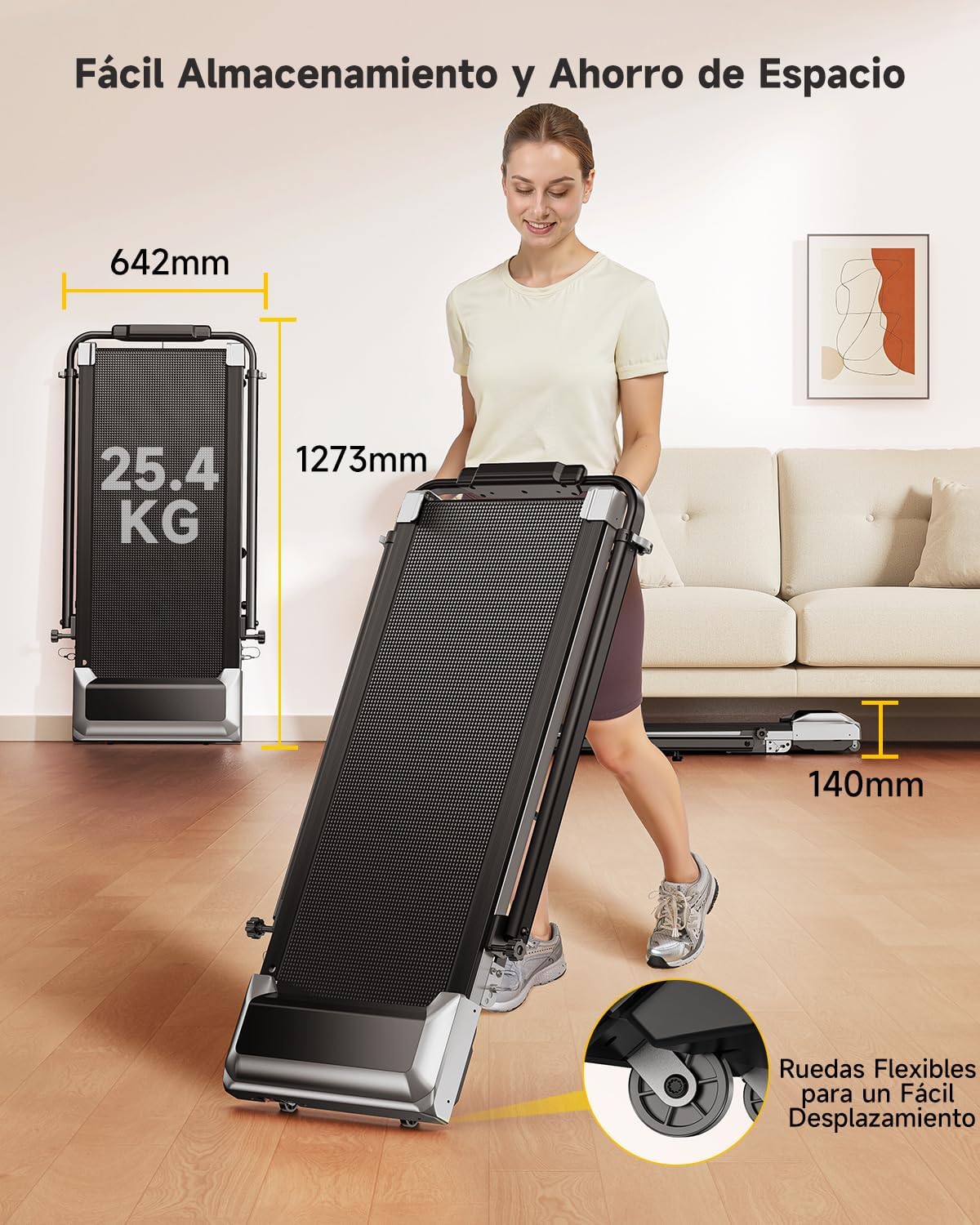
| Димензије производа (Д к Ш к В) | 127.3 к 64.2 к 13 цм (преклопљено) |
| Тежина производа | 25.4 кг |
| Материјал | легирани челик |

Слика 7: Compact design and transport wheels for easy storage and movement.
Видео снимци производа
Treadmill Setup and Usage
This video demonstrates the setup process and general usage of a similar treadmill model, including unfolding, securing the handrails, and starting a workout. Note: This video features the FITFIU Fitness MC-160, which shares similar operational principles with the Toputure TP6.
Treadmill Features Overview
Овај видео пружа крајview of the features and benefits of a similar treadmill model, showcasing its compact design, ease of use, and various exercise capabilities. Note: This video features the FITFIU Fitness MC-160, which shares similar operational principles with the Toputure TP6.
Гаранција и подршка
For warranty information, product support, or to purchase replacement parts, please contact Toputure customer service. Keep your purchase receipt and model number (TP6) handy when contacting support.
The product includes a user manual in the box. Additional warranty information may be available upon product registration with the manufacturer.
Ask a question about this manual
Ask about setup, troubleshooting, compatibility, parts, safety, or missing instructions. Manuals+ will review the question and use this page’s manual context to help answer it.