
1. Увод
The ZTE U60 Pro MU5250 is a portable 5G Wi-Fi 7 router designed to provide high-speed internet connectivity on the go. It features an ultra-high-speed 5G-A network, the flagship Snapdragon X75 chip platform, and advanced Wi-Fi 7 technology. This device is equipped with a 10,000 mAh high-capacity battery, offering extended usage and the ability to function as a power bank for other electronic devices. Its 3.5-inch HD touchscreen allows for easy network management and traffic monitoring. The U60 Pro supports up to 64 simultaneous device connections and offers convenient NFC one-touch connectivity, intelligent AI scenes, and AI voice management for a fast, stable, and efficient internet experience.

Слика 1.1: Предња страна view of the ZTE U60 Pro MU5250, showing its 3.5-inch display with network information.
2. Подешавање
2.1 Садржај пакета
Пре почетка рада, уверите се да су све компоненте присутне:
- ZTE U60 Pro MU5250 5G Pocket Wi-Fi 7 Router
- АЦ адаптер
- Кориснички приручник (овај документ)
2.2 Инсталација СИМ картице
To enable 5G connectivity, a compatible SIM card must be installed.
- Пронађите слот за СИМ картицу са стране уређаја.
- Using the provided SIM ejector tool (if applicable) or a small pin, gently press into the small hole next to the SIM tray to eject it.
- Place your 5G-enabled Nano-SIM card into the tray, ensuring proper orientation.
- Пажљиво поново уметните лежиште за СИМ картицу у уређај док не кликне на своје место.
2.3 Укључивање/искључивање
To power on the device, press and hold the power button located on the side until the screen illuminates. To power off, press and hold the power button until the power-off options appear on the screen, then select 'Power Off'.
2.4 Почетна Wi-Fi веза
After powering on, the device will automatically search for a 5G network. You can connect to the Wi-Fi network using one of the following methods:
- Ручно повезивање: On your device (phone, laptop, etc.), search for available Wi-Fi networks. Select the network name (SSID) displayed on the U60 Pro's screen and enter the password (also displayed on the screen).
- NFC веза једним додиром: For Android phones with NFC enabled, tap your phone against the NFC area on the U60 Pro. Your phone will automatically connect to the Wi-Fi network without requiring a password.

Image 2.1: Illustrates the NFC one-touch connection process for quick Wi-Fi access.
3. Упутство за употребу
3.1 Интерфејс екрана осетљивог на додир
The 3.5-inch HD touchscreen provides a minimalist user interface for managing the device. You can view network status, data usage, signal strength, battery level, and adjust basic settings directly from the screen. Swipe and tap gestures are used for navigation.
3.2 Повезивање више уређаја
The ZTE U60 Pro supports simultaneous connections for up to 64 devices, allowing multiple users to share the 5G network. Connect devices using the standard Wi-Fi connection method as described in Section 2.4.
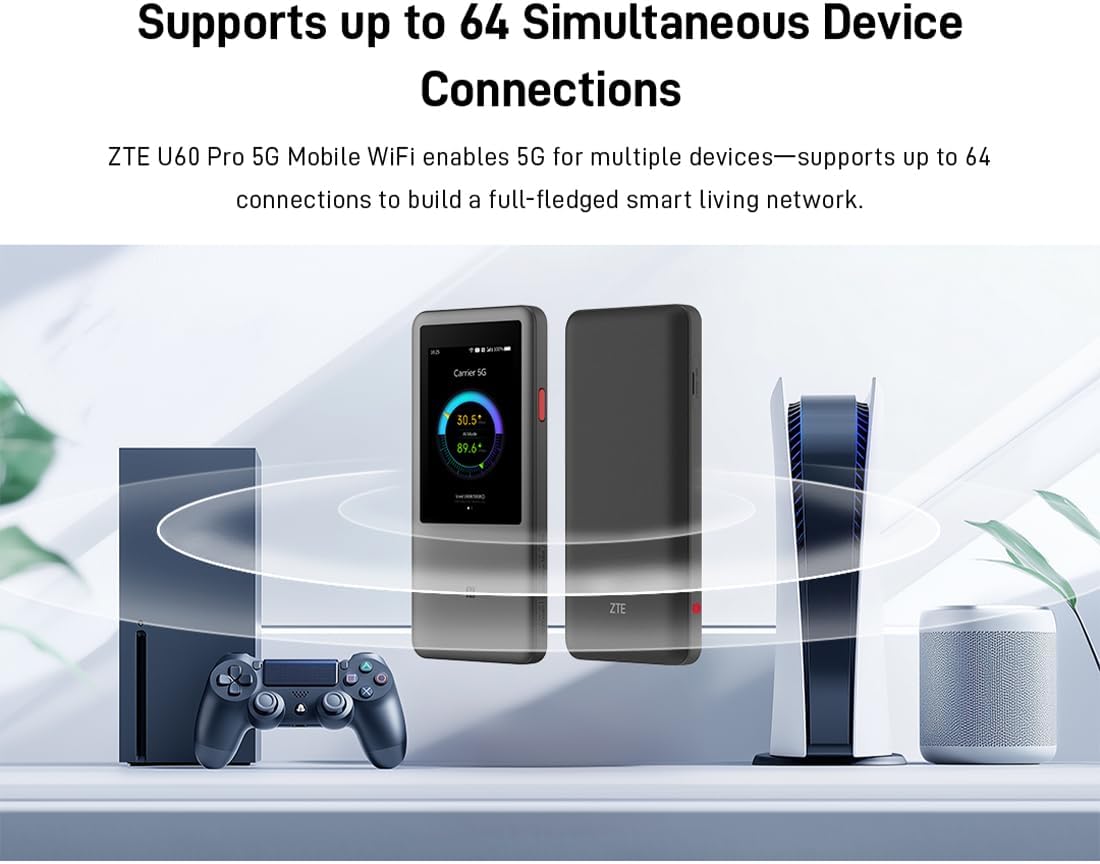
Image 3.1: The ZTE U60 Pro providing 5G Wi-Fi connectivity to various electronic devices.
3.3 AI Smart Scene Modes
The device features intelligent AI Scene technology with dynamic bandwidth allocation. It adjusts bandwidth and priority for applications based on user usage patterns to ensure smooth operation. Available modes include:
- Anchor Mode: Optimized for live streaming.
- Режим конференције: Prioritizes video conferencing applications.
- Видео режим: Enhances video playback and streaming.
- Брзински режим: Maximizes overall network speed.
- Режим игре: Reduces latency for online gaming.
3.4 AI Voice Management (via ZTE Smart Life APP)
The ZTE Smart Life APP enables effortless device management, including AI voice control. This feature allows for intelligent management of the router through voice commands. Download the ZTE Smart Life APP from your device's app store.

Image 3.2: The ZTE Smart Life APP interface demonstrating AI voice management capabilities.
3.5 Функционалност преносне батерије
The U60 Pro can also serve as a power bank. With its 10,000 mAh battery and 18W reverse fast charging, you can charge other electronic devices by connecting them to the router's appropriate port (e.g., USB-C).
4. Одржавање
4.1 Одржавање батерије
The device is equipped with a 10,000 mAh battery. To maximize battery life:
- Избегавајте екстремне температуре.
- За оптимално пуњење користите приложени брзи пуњач од 27 W.
- За дуготрајно складиштење, напуните батерију до приближно 50% и чувајте је на хладном и сувом месту.
4.2 Општа нега уређаја
To ensure the longevity and optimal performance of your ZTE U60 Pro:
- Одржавајте уређај чистим и без прашине. Користите меку, суву крпу за чишћење.
- Избегавајте излагање уређаја води или прекомерној влажности.
- Немојте испуштати уређај или га излагати јаким ударима.
- Обезбедите одговарајућу вентилацију током употребе како бисте спречили прегревање.
КСНУМКС. Решавање проблема
If you encounter issues with your ZTE U60 Pro, refer to the following common solutions:
5.1 Нема мрежне везе
- Проверите СИМ картицу: Ensure the SIM card is correctly inserted and activated with a 5G data plan.
- Јачина сигнала: Verify the signal strength indicator on the device's screen. Move to an area with better 5G coverage if the signal is weak.
- Поново покрените уређај: Power off and then power on the U60 Pro.
- Подешавања мреже: Check network settings via the touchscreen or ZTE Smart Life APP to ensure APN settings are correct (usually automatic).
5.2 Проблеми са Wi-Fi повезивањем
- Нетачна лозинка: Double-check the Wi-Fi password displayed on the U60 Pro's screen.
- Ограничење уређаја: Ensure you have not exceeded the maximum of 64 connected devices.
- Restart Connected Device: Restart the device attempting to connect to the Wi-Fi.
- Рестартовање рутера: Restart the ZTE U60 Pro.
5.3 Спора брзина интернета
- Јачина сигнала: A weak 5G signal will result in slower speeds.
- Ограничење података: Check if your data plan has a fair usage policy or if you have exceeded a data cap, which might throttle speeds.
- AI Scene Mode: Ensure the appropriate AI Scene mode (e.g., Speed Mode) is selected for your activity.
- сметње: Move the device away from other electronic devices that might cause interference.
6. Спецификације
The following table details the technical specifications of the ZTE U60 Pro MU5250:

Image 6.1: The Snapdragon X75 Flagship Chip-set Platform, central to the router's performance.
| Феатуре | Детаљ |
|---|---|
| Бранд | ЗТЕ |
| Назив модела | МУКСНУМКС |
| Број модела ставке | МУКСНУМКС |
| Произвођач | ЗТЕ |
| Посебна карактеристика | 5G Connection, Wi-Fi 7, AI Scenes, Voice Control, Power Bank |
| Технологија повезивања | 5Г, Ви-Фи |
| Ви-Фи генерација | Ви-Фи 7 |
| Стандард бежичне комуникације | 802.11a, 802.11ac, 802.11b, 802.11g, 802.11n |
| Класа фреквенцијског опсега | Дуал Банд |
| Фреквенција | 5 ГХз |
| Брзина преноса података | 4.29 Gigabits per second (Download) |
| Maximum Upstream Data Transfer Rate | 3600 Megabits per second (Wi-Fi 7 Peak Throughput) |
| Број антена | 9 (Omnidirectional 5G Array) |
| Покривеност | Wide and complete (360° full-band coverage) |
| Контролни метод | Додирните |
| Оперативни систем | ЗиНОС |
| Сигурносни протокол | ВПА3 |
| Router Firewall Security Level | Басиц |
| Батерија(е) | 1 AAA - included (Note: Product description mentions 10,000 mAh, likely internal) |
| Тежина артикла | 435 грама |
| Укључене компоненте | АЦ адаптер |
| Компатибилни уређаји | Game Console, various Wi-Fi enabled devices |
| Препоручена употреба производа | Streaming, Gaming, Outdoor/Travel, Small Office |
| Интернет Цоннецтивити | Да |
| Modem Compatible | No (Functions as a standalone 5G router) |
| Компатибилност паметног дома | Not Smart Home Compatible |
| Доступност резервних делова | Информације нису доступне |
| Ажурирања софтвера гарантована до | Информације нису доступне |

Image 6.2: Highlighting the 5G ultra-high-speed network of the ZTE U60 Pro MU5250.

Image 6.3: Illustration of the 9 omnidirectional 5G antennas providing 360° full-band coverage.
7. Подршка и гаранција
7.1 Корисничка подршка
For further assistance, technical support, or inquiries not covered in this manual, please refer to the official ZTE support channels or contact your retailer.
7.2 Информације о гаранцији
Warranty terms and conditions may vary by region and retailer. Please refer to the warranty card included with your product or consult your point of purchase for detailed warranty information.