
1. Увод
The SINOTIMER SVP912 is an advanced adjustable voltage surge protector relay designed to safeguard electrical appliances and systems from overvoltagе, ундерволtage, and overcurrent conditions. This device features a dual LED display for real-time voltage and current monitoring and offers adjustable protection parameters. It is suitable for DIN rail installation in domestic and industrial distribution boxes, providing automatic recovery of power supply once voltage returns to normal operating ranges.

Слика 1: Предња страна view of the SINOTIMER SVP912 Adjustable Voltage Protector Relay, showing the LED display and control buttons.
2. Карактеристике производа
- Овер/Ундерволtagе Заштита: Automatically disconnects power when voltage exceeds or falls below set thresholds.
- Прекострујна заштита: Disconnects power if the current draw exceeds the configured limit.
- Аутоматски опоравак: Restores power supply automatically once the circuit voltage and current return to normal operating parameters after a fault.
- Двоструки ЛЕД екран: Provides real-time display of measured voltagе и струја.
- Adjustable Protection Values: Оверволtagе, ундерволtage, overcurrent, and fault recovery delay times are user-adjustable.
- Визуелни индикатори: Dedicated LED indicators (Over(V) and Under(V)) provide immediate visual feedback on protection status.
- Монтажа на ДИН шину: Designed for easy mounting within standard distribution boxes.
3. Спецификације
| Спецификација | Валуе |
|---|---|
| Број модела | SVP912-1-80A DLR |
| Називна струја | 80 Amps |
| Цоил Волtage | 120 волти (АЦ) |
| Минимум Свитцхинг Волtage | 120 волти (АЦ) |
| Оперативни режим | Аутоматски |
| Тип монтаже | Монтажа на ДИН шину |
| Тип конектора | Сцрев |
| Контакт материјал | Бакар |
| Тип контакта | Нормално отворен |
| Гаранција | 1 година произвођача |

Figure 2: Dimensional drawing of the SVP912, showing measurements such as 85mm height, 35mm width, and 65mm depth.
4. Инсталација и подешавање
The SVP912 is designed for DIN rail mounting. Ensure all power is disconnected before beginning installation to prevent electrical shock.
- Монтажа: Securely attach the SVP912 to a standard 35mm DIN rail within your distribution box.
- Ожичење: Connect the incoming power supply (Line 'L' and Neutral 'N') to the 'IN' terminals of the protector. Connect the load (outgoing power) to the 'OUT' terminals. Ensure correct polarity.
- Circuit Breaker Integration: It is recommended to install an appropriate circuit breaker (e.g., an air circuit breaker) upstream of the voltage protector for additional safety and circuit protection.
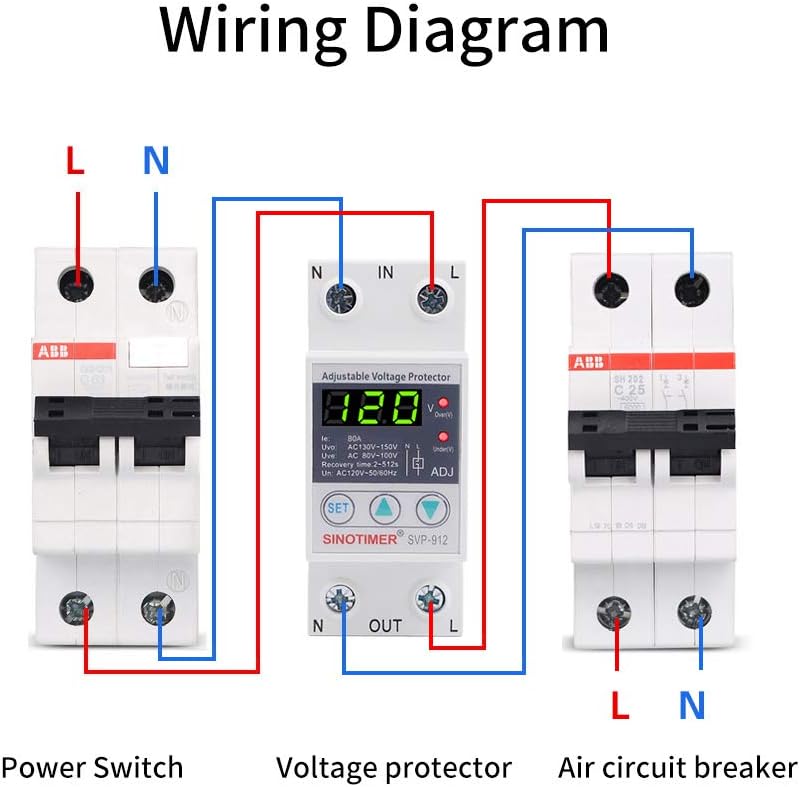
Figure 3: Wiring diagram illustrating the connection of the SVP912 between a power switch and an air circuit breaker, showing input (IN) and output (OUT) terminals for Line (L) and Neutral (N).
After wiring, double-check all connections for tightness and correctness before restoring power.
5. Операција
Upon power-up, the SVP912 will display the current voltage and current readings. The device is pre-configured with default protection values, which can be adjusted as needed.
5.1 Display and Indicators
- The main LED display shows the real-time voltagе (В) и струја (А).
- The 'Over(V)' LED illuminates when an overvoltagdetektovano je stanje.
- The 'Under(V)' LED illuminates when an undervoltagdetektovano je stanje.

Слика 4: Крупни план view of the SVP912's control panel, highlighting the 'SET' button, adjustment arrows, and LED indicators for Over(V) and Under(V).
5.2 Adjusting Protection Parameters
To adjust the protection values:
- Притисните тастер СЕТ button to enter the parameter setting mode. The display will show the first adjustable parameter (e.g., overvoltagе праг).
- Користите Горе (▲) и Доле (▼) arrow buttons to increase or decrease the value.
- Притисните СЕТ again to confirm the current parameter and move to the next adjustable parameter (e.g., undervoltage threshold, overcurrent limit, recovery delay time).
- Repeat steps 2 and 3 for all desired parameters.
- After setting the last parameter, the device will automatically save the settings and return to normal operation mode.
Refer to the labels on the device (e.g., Uvo: AC130V-150V, Uve: AC80V-100V, Recovery time: 2-512s) for the default ranges and units of adjustable parameters.
6. Одржавање
The SINOTIMER SVP912 is designed for reliable, long-term operation with minimal maintenance. Periodically inspect the device and its connections for any signs of wear, damage, or loose wiring. Ensure the area around the protector is clean and free from dust or debris to maintain proper ventilation.
КСНУМКС. Решавање проблема
Ако уређај не функционише како се очекује, размотрите следеће:
- Нема дисплеја/Нема напајања: Check the incoming power supply and ensure all wiring connections are secure. Verify the upstream circuit breaker is not tripped.
- Честа путовања: Review your set overvoltagе, ундерволtage, and overcurrent thresholds. They might be set too sensitively for your application. Check for actual voltage fluctuations or excessive current draw from connected appliances.
- Device Not Recovering: Ensure the fault condition (over/undervoltage, overcurrent) has genuinely cleared and remained stable for the set recovery delay time.
- Нетачна очитавања: Ако је приказана волtage or current seems inaccurate, ensure proper wiring and contact a qualified electrician for verification.
For persistent issues, consult a qualified electrician or contact SINOTIMER customer support.
8. Гаранција и подршка
The SINOTIMER SVP912 comes with a 1-годишња гаранција произвођачаОва гаранција покрива недостатке у материјалу и изради при нормалној употреби. Молимо вас да сачувате доказ о куповини за потребе подношења захтева за гаранцију.
For technical support, warranty service, or further inquiries, please contact SINOTIMER directly through their official channels or visit their brand store for more information.
You can find more information about SINOTIMER products and support at the SINOTIMER Store.