
ROCAM CR1030DAB
ROCAM CR1030DAB Solar DAB+/FM Emergency Radio User Manual
Model: CR1030DAB
Увод
Хвала вам на куповиниasing the ROCAM CR1030DAB Solar DAB+/FM Emergency Radio. This portable radio is designed for reliable communication and power in various situations, from daily use to outdoor adventures and emergencies. It features DAB+/FM radio reception, Bluetooth connectivity, multiple charging options including solar and hand crank, a powerful 12000 mAh battery, and integrated lighting functions. Please read this manual thoroughly before use to ensure proper operation and to maximize the product's lifespan.
Безбедносна упутства
- Do not expose the device to extreme temperatures, direct sunlight for prolonged periods (beyond charging), or high humidity.
- Избегавајте испуштање или излагање радија јаким ударцима.
- Не растављајте нити покушавајте сами да поправите уређај. Све сервисирање препустите квалификованом особљу.
- Keep the device away from water and other liquids, except for its IPX6 water resistance which protects against strong jets of water. Do not submerge.
- Ensure the USB-C port cover is securely closed when not in use, especially in wet conditions.
- Када користите ручну курблу, окрећите је равномерном, умереном брзином. Прекомерна сила или брзина могу оштетити механизам.
- The SOS alarm is very loud. Avoid activating it unnecessarily or near sensitive ears.
- Батерије одложите у складу са локалним прописима.
Садржај пакета
Проверите да ли су све ставке присутне у пакету:
- 1 × ROCAM CR1030DAB Radio
- 1 × УСБ-Ц кабл за пуњење
- 1 × Portable Strap
- 1 × Упутство за употребу
Производ је завршенview
Упознајте се са компонентама и контролама радија.

слика: Фронт view of the ROCAM CR1030DAB radio, highlighting its display, control buttons, and extended antenna. The radio is shown in an outdoor setting, emphasizing its portable and robust design.
Кључне компоненте:
- 2.4-инчни екран у боји: Shows station information, battery level, time, and menu options.
- Контролна дугмад: Power, Mode, Menu, Scan, Volume, Navigation (Up/Down/Left/Right/OK), SOS.
- Телескопска антена: For optimal DAB+/FM signal reception.
- Соларни панел: Налази се на врху за соларно пуњење.
- ручна ручица: On the side for manual power generation.
- Лампа: Integrated LED light on one end.
- Читање Лamp: Foldable panel with 12 LEDs.
- USB-C улазно/излазни порт: For charging the radio and charging external devices.
- Утичница за слушалице (3.5 мм): За приватно слушање.
- Одељак за батерије: For AAA backup batteries.

слика: Детаљно view of the radio's 2.4-inch color display, illustrating its clarity and the information presented, such as station name and signal strength.
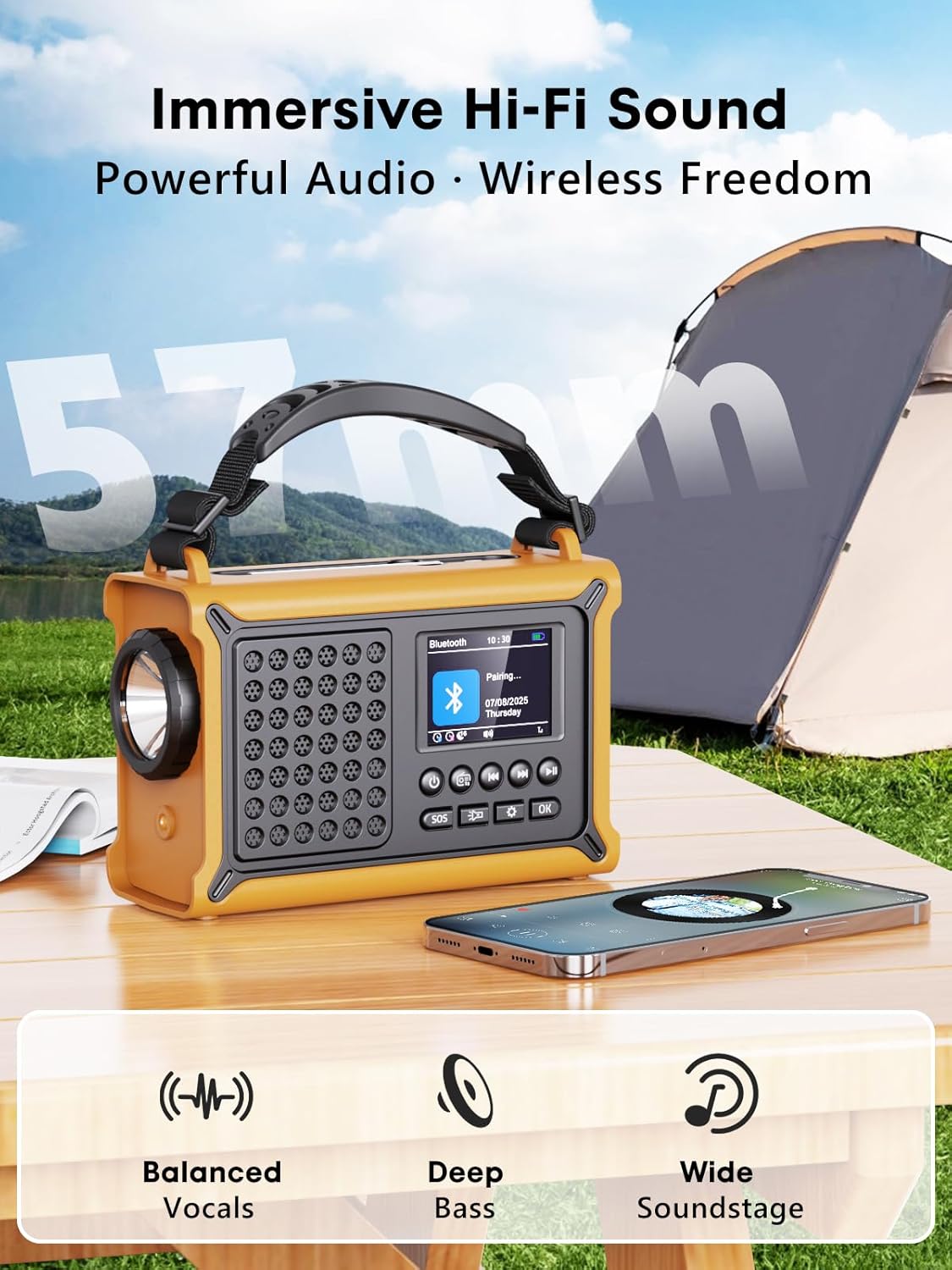
слика: The radio highlighting its audio capabilities, featuring 57mm speakers designed for clear, powerful sound with balanced vocals and deep bass.

слика: The radio held in hand, illustrating its ultra-portable design and compact dimensions (17.3 cm length, 12.1 cm height, 7.4 cm width), along with its IPX6 water resistance.
Сетуп
1. Почетно пуњење
Before first use, it is recommended to fully charge the radio's internal 12000 mAh battery using the supplied USB-C cable. Connect the USB-C cable to the radio's USB-C input port and the other end to a standard USB power adapter (not included) or a computer USB port. The charging indicator on the display will show the charging status. A full charge ensures maximum battery life and optimal performance.
2. Inserting AAA Batteries (Optional Backup)
For an additional power backup, you can insert 3 AAA batteries (not included) into the battery compartment. This provides an alternative power source if the internal rechargeable battery is depleted and other charging methods are unavailable.
3. Укључивање и избор језика
Притисните и држите Повер button to turn on the radio. Upon first power-on, you may be prompted to select your preferred language from the 12 available options. Use the navigation buttons to select and the OK дугме за потврду.
Упутство за употребу
Укључивање/искључивање
- Да бисте укључили: Притисните и држите Повер дугме.
- Да бисте искључили: Притисните и држите Повер дугме поново.
DAB+/FM Radio Operation
- Изаберите режим: Притисните тастер Режим button to switch between DAB+ and FM radio modes.
- Продужна антена: Потпуно извуците телескопску антену за најбољи пријем.
- Аутоматско скенирање: У DAB+ или FM режиму, притисните Скенирај button to automatically search for available stations. The radio will store up to 40 DAB+ and 40 FM stations.
- Ручно подешавање/избор станице: Користите Горе/Доле navigation buttons to browse through scanned stations or manually tune frequencies.
- Контрола јачине звука: Користите Волуме +/- дугмад за подешавање нивоа звука.
- Пресетс: To save a station, tune to the desired station, then press and hold the OK button. Use navigation buttons to select a preset number and press OK to save. To recall a preset, briefly press the OK button, then use navigation to select the preset.
Блуетоотх повезивање
- Уђите у Блуетоотх режим: Притисните тастер Режим button until "Bluetooth" appears on the display. The radio will enter pairing mode, indicated by a blinking Bluetooth icon.
- Упаривање: On your smartphone or other Bluetooth device, enable Bluetooth and search for available devices. Select "ROCAM CR1030DAB" from the list.
- Повезано: Once paired, the radio will emit a confirmation sound, and the Bluetooth icon will stop blinking. You can now play audio from your device through the radio.
Пуњење радија
The radio offers multiple charging methods for its internal 12000 mAh battery:

слика: The radio demonstrating its versatile charging capabilities, including the solar panel, USB-C input, hand crank, and the option for AAA batteries.
- УСБ-Ц пуњење: Connect the supplied USB-C cable to a 5V/2A (or higher) USB power source. This is the fastest charging method.
- Соларно пуњење: Place the radio with the solar panel facing direct sunlight. The solar charging indicator will illuminate. This method is ideal for maintaining charge or slow charging in emergencies. The 8500 mm² panel provides 350 mA.
- Ручно пуњење: Rotate the hand crank clockwise or counter-clockwise at a steady pace (approx. 120-150 RPM). Cranking for 1 minute can provide several minutes of radio playback. The hand crank generates 650 mA.
- ААА батерије: If the internal battery is depleted, the radio can operate using 3 AAA batteries (not included) inserted into the battery compartment.
External Device Charging (Power Bank Function)
The radio can act as a power bank to charge external devices like smartphones. Connect your device's charging cable to the radio's USB-C output port. The radio's 12000 mAh battery provides a 5V/1A output.
Функције осветљења

слика: A composite image illustrating the radio's versatile lighting options: a powerful 5W flashlight, the SOS red flashing light, and a soft 12-LED reading lamp.
- Лампа: Притисните тастер Лампица button once to turn on the 5W LED flashlight. Press again to cycle through brightness levels (if available) or turn off.
- Читање Лamp: Lift the reading lamp panel. Press the Читање Лamp button (often combined with flashlight button or a separate one) to activate the 12-LED reading lamp. Press again to cycle through brightness levels or turn off.
Функција SOS аларма
In an emergency, press and hold the СОС button. The radio will emit a loud 120 dB siren and flash a red light to attract attention. Press the СОС button again to deactivate the alarm.
Одржавање
- Чишћење: Обришите радио меком, дamp тканина. Немојте користити абразивна средства за чишћење или раствараче.
- Складиштење: When not in use for extended periods, store the radio in a cool, dry place. It is recommended to fully charge the internal battery every 3-6 months to maintain its health.
- Одржавање батерије: Avoid completely draining the internal battery frequently. Recharge it as soon as possible when the low battery indicator appears.
Решавање проблема
| Проблем | Могући узрок | Решење |
|---|---|---|
| Радио се не укључује. | Батерија је празна. | Charge the radio via USB-C, solar, or hand crank. Ensure AAA batteries are inserted correctly if using them. |
| Лош радио пријем. | Антена није испружена, подручје слабог сигнала, сметње. | Fully extend the telescopic antenna. Reposition the radio to a location with better signal. Perform an auto scan again. |
| Блутут уређај не може да се повеже. | Radio not in pairing mode, device too far, already connected to another device. | Ensure the radio is in Bluetooth pairing mode. Move the device closer to the radio. Disconnect from other Bluetooth devices. |
| External device not charging. | Radio battery too low, incorrect cable, device not compatible. | Ensure the radio has sufficient charge. Use a compatible USB-C cable. Some devices may draw too much power. |
| Ручна курбла је крута или се не пуни. | Mechanism obstruction, incorrect cranking speed. | Check for any obstructions. Rotate the crank at a steady, moderate pace. Do not force it. |
Спецификације
| Модел | CR1030DAB |
| Радио Бандс | ДАБ+, ФМ |
| Блуетоотх верзија | 5.0 |
| Капацитет батерије | 12000 mAh (литијум) |
| Методе пуњења | USB-C, Solar, Hand Crank, 3x AAA Batteries (backup) |
| Величина соларног панела | 8500 mm² (350 mA output) |
| Hand Crank Output | 650 мА |
| УСБ излаз | 5В/1А |
| Дисплаи | 2.4-инчни ЛЦД екран у боји |
| Пресетс | 80 (40 ДАБ+, 40 ФМ) |
| Отпорност на воду | ИПКС6 |
| СОС аларм | 120 дБ |
| Лампица | 5В ЛЕД |
| Читање Лamp | 12-ЛЕД |
| Димензије | 12L x 17.2W x 7.3H cm (approx.) |
| Тежина | 820 грама (приближно) |

слика: A comparison chart detailing the specifications of the ROCAM CR1030DAB against generic alternatives, emphasizing its advanced features like a larger color display, higher battery capacity, and more efficient charging.
Гаранција и подршка
ROCAM products are designed for reliability and performance. This product comes with a standard manufacturer's warranty. For specific warranty details, please refer to the documentation provided with your purchase or contact ROCAM customer support.
If you encounter any issues or have questions regarding the operation or maintenance of your ROCAM CR1030DAB radio, please contact our customer support team.
- Корисничка подршка: Refer to your product packaging or the ROCAM official webсајт за контакт информације.
- Онлине ресурси: Visit the ROCAM webсајт за често постављана питања, регистрацију производа и додатне материјале за подршку.
Ask a question about this manual
Ask about setup, troubleshooting, compatibility, parts, safety, or missing instructions. Manuals+ will review the question and use this page’s manual context to help answer it.