
Увод
This manual provides essential information for setting up, operating, maintaining, and troubleshooting your HP 15.6-inch FHD IPS Touchscreen Laptop. Please read this guide thoroughly to ensure optimal performance and longevity of your device. This laptop features an AMD Ryzen 7 7730U processor, 64GB DDR4 RAM, 2.28TB storage (2TB SSD + 288GB Docking Station Set), AMD Radeon Graphics, and runs on Windows 11 Pro.
Сетуп
Unpacking and Initial Power-On
Carefully remove all components from the packaging. Connect the power adapter to the laptop and a power outlet. Press the power button to turn on the laptop. Follow the on-screen instructions to complete the initial Windows 11 Pro setup.
Укључена додатна опрема
Your laptop package includes the following accessories:
- 1x 7-in-1 Docking Station with 256GB Storage
- 1x 32GB MicroSD картица са адаптером
- 1x кабл за пренос података типа C
- 1x 3-у-1 кабл за пуњење
- 1x крпа за чишћење антилопа
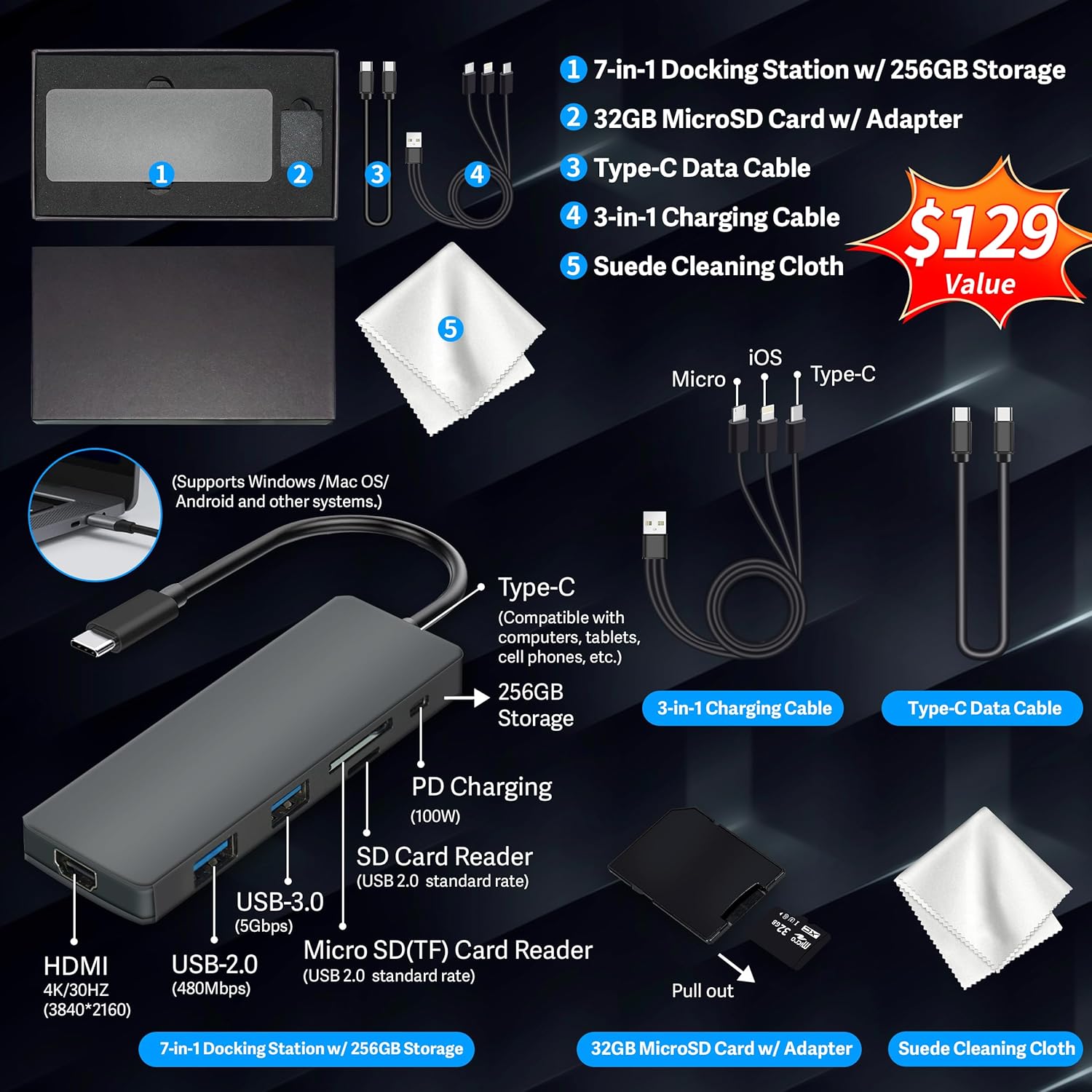
Figure 1: Included accessories, including the 7-in-1 docking station, various cables, and a cleaning cloth.
Управљање лаптопом
Дисплаи Феатурес
The HP 15.6-inch laptop features an FHD IPS touchscreen display with a resolution of 1920 x 1080 pixels and an anti-glare coating. This display provides clear and vibrant visuals from various viewинг углова.

Figure 2: The 15.6-inch FHD IPS display offers crisp and vivid details.
Повезивање и периферни уређаји
Your laptop is equipped with various connectivity options and integrated features to enhance your user experience.
- 720p HD камера: For video calls and online meetings.
- Ви-Фи 6: For high-speed wireless internet connectivity.
- Блуетоотх: За повезивање бежичних периферних уређаја као што су мишеви, тастатуре и слушалице.
- Нумеричка тастатура: A full numeric keypad is integrated for efficient data entry and calculations.

Figure 3: Key features for staying connected and productive, including the numeric keypad.
The laptop includes multiple ports for connecting external devices:
- 2x USB Type-A ports
- 1x USB Type-C порт
- 1к ХДМИ порт
- 1x Headphone/Microphone Combo jack

Figure 4: Multi-port configuration on the laptop for various connections.
Перформансе и мултитаскинг
Equipped with an AMD Ryzen 7 7730U processor, 64GB DDR4 RAM, and AMD Radeon Graphics, this laptop is designed for efficient multitasking and demanding applications. The 2.28TB storage (2TB SSD + 288GB Docking Station Set) provides ample space and fast access to your files.

Figure 5: Core specifications for performance and storage.

Figure 6: Laptop demonstrating effortless multitasking with several applications running simultaneously.
The laptop is designed for extended use, offering reliable battery life to support your daily tasks.

Figure 7: The laptop supports continuous work throughout the day with its battery performance.
Одржавање
To ensure the longevity and optimal performance of your HP laptop, follow these maintenance guidelines:
- Чишћење: Use the provided suede cleaning cloth or a soft, lint-free cloth to clean the screen and exterior. Avoid harsh chemicals.
- Ажурирања софтвера: Regularly update your Windows 11 Pro operating system and drivers to ensure security and performance.
- Одржавање батерије: Избегавајте често потпуно пражњење батерије. За дуготрајно складиштење, напуните батерију на око 50-70%.
- вентилација: Уверите се да вентилациони отвори лаптопа нису блокирани како бисте спречили прегревање. Користите лаптоп на тврдој, равној површини.
- Складиштење: Чувајте лаптоп на хладном и сувом месту, даље од директне сунчеве светлости и екстремних температура.
Решавање проблема
Овај одељак се бави уобичајеним проблемима са којима се можете сусрести са лаптопом.
Лаптоп се не укључује
- Уверите се да је адаптер за напајање безбедно повезан и са лаптопом и са исправном утичницом.
- Проверите да ли је утичница функционална тако што ћете укључити други уређај.
- Ако је батерија потпуно испражњена, оставите је да се пуни најмање 15-30 минута пре него што покушате да је укључите.
Screen Remains Blank
- Проверите да ли је лаптоп укључен (индикаторска лампица за напајање светли).
- Try connecting an external monitor to see if display output is available.
- Adjust screen brightness using the function keys.
Проблеми са Wi-Fi повезивањем
- Уверите се да је Wi-Fi омогућен у подешавањима система Windows.
- Рестартујте рутер и модем.
- Ажурирајте драјвере за Ви-Фи преко Управитеља уређаја.
- Check for any physical obstructions or interference.
Споро перформансе
- Затворите непотребне апликације које раде у позадини.
- Проверите менаџер задатака за процесе који троше много процесора или РАМ-а.
- Уверите се да су ваш оперативни систем и драјвери ажурирани.
- Покрените чишћење и дефрагментацију диска (за HDD дискове, није неопходно за SSD дискове).
- Скенирајте за злонамерни софтвер или вирусе.
Спецификације
Below are the detailed technical specifications for your HP 15.6-inch FHD IPS Touchscreen Laptop.

Figure 8: Laptop dimensions and weight for portability.
| Феатуре | Детаљ |
|---|---|
| Бранд | HP |
| Назив модела | HP 15.6" FHD IPS Touchscreen Laptop |
| Величина екрана | 15.6 инча |
| Резолуција екрана | 1920 x 1080 пиксела (FHD) |
| Дисплаи Типе | LED IPS Touchscreen |
| Процесор | AMD Ryzen 7 7730U (8 Cores, 2 GHz base) |
| Грапхицс Цопроцессор | AMD Radeon графика (интегрисана) |
| РАМ меморија | 64 GB DDR4 (3200 MHz) |
| Складиштење | 2 TB SSD + 288 GB Docking Station Set (Total 2.28 TB) |
| Оперативни систем | Виндовс 11 Про |
| Повезивање | Wi-Fi 6 (802.11ax), Bluetooth, HDMI, USB |
| Портс | 2x USB Type-A, 1x USB Type-C, 1x HDMI, 1x Headphone/Microphone Combo |
| Webцам | 720p HD камера |
| Тастатура | Пуна величина са нумеричком тастатуром |
| Димензије (Д x Ш x Дебљина) | 14.17 cm x 9.29 cm x 0.73 cm |
| Тежина артикла | 3.52 фунте (приближно 1.6 кг) |
| Боја | Сребро |
| УПЦ | 196188514924 |
| ASIN | B0FX2NR2WN |
Информације о гаранцији
Your HP laptop comes with a manufacturer's warranty. For upgraded components (RAM/SSD), a 1-year warranty is provided by SnowBell. The original 1-year manufacturer warranty applies to all other components of the laptop. Please retain your proof of purchase for warranty claims. For detailed terms and conditions, refer to the warranty documentation included with your product or visit the official HP support webсајту.
Подршка
For further assistance, technical support, or service inquiries, please refer to the following resources:
- Званична HP подршка Webсајт: Посетите суппорт.хп.цом за драјвере, упутства и водиче за решавање проблема.
- Помоћ на мрежи: Utilize the built-in Windows 11 Pro help features for software-related questions.
- Contact Retailer: For issues related to upgraded components or purchase, contact SnowBell or your point of purchase.