
1. Увод
Thank you for choosing the GOLOZA Digital Alarm Clock. This manual provides detailed instructions for setting up and operating your new alarm clock. Please read it thoroughly to ensure proper use and to enjoy all the features this product offers.
This digital alarm clock features a large, clear display, customizable brightness and night mode, multiple alarm tones and volume levels, a convenient snooze function, and a USB charging port. Its modern curved design makes it a stylish addition to any bedroom.
2. Шта је у кутији
Приликом распакивања, молимо вас да се уверите да су све доле наведене ставке присутне и у добром стању:
- GOLOZA Digital Alarm Clock
- USB Charging Cable (71in/1.8m)
- Повер Адаптер
- Упутство за употребу

Image: Contents of the product packaging, showing the digital alarm clock, charging cable, adapter, and user manual.
3. Подешавање
3.1 Почетно укључивање
- Remove the insulating paper from the battery compartment on the back of the clock. This battery provides power-off memory for settings.
- Connect the USB charging cable to the clock's USB port.
- Plug the power adapter into a standard wall outlet. The clock display will light up.

Image: A person removing the insulating paper from the battery compartment and plugging in the USB cable to power the clock.
4. Упутство за употребу
4.1 Time Setting and 12/24H Switch
- Дуго притисните ДСТ дугме за улазак у режим подешавања времена. Цифре за сате ће трептати.
- Притисните тастер +/- button to switch between 12-hour and 24-hour format.
- Притисните тастер ДСТ button again to confirm the format. The hour digits will flash.
- Притисните тастер +/- button to adjust the hour. Long press for quick adjustment.
- Притисните тастер ДСТ button to confirm the hour. The minute digits will flash.
- Притисните тастер +/- button to adjust the minute. Long press for quick adjustment.
- Притисните тастер ДСТ button to confirm the minute and exit time setting.
Video: Instructions on how to set the time and switch between 12-hour and 24-hour display formats on the GOLOZA Digital Alarm Clock.

Image: The alarm clock displaying time in 12-hour, 24-hour, and DST formats.
4.2 DST (Daylight Saving Time) Switch
- Притисните тастер ДСТ button to enter DST switch mode. The display will show "ON" or "OFF".
- Притисните тастер +/- button to toggle between "ON" and "OFF".
- Притисните тастер ДСТ button to confirm your selection and exit.
Video: Demonstration of how to set the DST (Daylight Saving Time) mode on the digital alarm clock.
4.3 Подешавање аларма
- Дуго притисните Alarm (bell icon) дугме за улазак у режим подешавања аларма. Цифре за сате ће трептати.
- Притисните тастер +/- button to adjust the alarm hour. Long press for quick adjustment.
- Притисните тастер Аларм button to confirm the hour. The minute digits will flash.
- Притисните тастер +/- button to adjust the alarm minute. Long press for quick adjustment.
- Притисните тастер Аларм button to confirm the minute and exit alarm time setting.
Video: Step-by-step guide on how to set the alarm time on the GOLOZA Digital Alarm Clock.
4.4 Alarm Tones and Volume
- To change the alarm volume, press the Јачина звука (-/+) button. There are 2 levels of alarm volume (75-85dB). The last selected volume will be saved automatically.
- To change the alarm ringtone, press the Ringtone (-/+) button. Choose from 3 fixed ringing music sounds: Birdsongs, Beep, and Chording. The last selected ringtone will be saved automatically.

Image: The alarm clock showing two alarm volume levels (75dB and 85dB) and the snooze button.

Image: Icons illustrating the three available alarm sounds: Beep, Chording, and Bird Song.
5. Карактеристике
5.1 Подешавање осветљености
The clock offers 5 adjustable brightness levels (including OFF) to suit your preference.
- Притисните тастер Snooze/Light (Zzz/sun icon) дугме да бисте се пребацивали кроз 5 нивоа осветљености.
- The display can be set from sleep-friendly dim to a soothing glow, or completely off.
Video: Demonstration of how to adjust the display brightness of the GOLOZA Digital Alarm Clock through its five levels.

Image: The alarm clock on a nightstand, showing its adjustable brightness for peaceful sleep.
5.2 Customizable Night Mode
The Night Mode feature allows you to set specific times for the display brightness to automatically adjust to a lower level.
- Дуго притисните Snooze/Light (Zzz/sun icon) button to enter Night Mode setting. The start hour will flash.
- Притисните тастер +/- button to adjust the start hour for Night Mode.
- Притисните тастер Сноозе/Лигхт button to confirm the start hour. The start minute will flash.
- Притисните тастер +/- button to adjust the start minute.
- Притисните тастер Сноозе/Лигхт button to confirm the start minute. The end hour will flash.
- Repeat the steps to set the end hour and minute for Night Mode.
- Once set, the clock will automatically dim during the specified period.
Video: Guide on how to set the customizable night mode, allowing the clock to automatically adjust brightness during specific hours.

Image: The alarm clock demonstrating its customizable night mode, with a visual representation of time-based brightness adjustment.
5.3 Функција одлагања
When the alarm rings, press the raised Snooze (Zzz) button to activate the 9-minute snooze function. The alarm will ring again after 9 minutes. To turn off the alarm completely for the day, press any other button except the Snooze button.
5.4 УСБ прикључак за пуњење
The clock includes a USB charging port (Type-C) for convenient charging of your mobile devices. Simply connect your device's charging cable to the USB port on the back of the alarm clock.
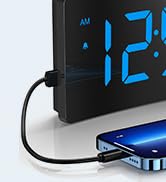
Image: The digital alarm clock with a smartphone connected to its USB port for charging.
6. Одржавање
- Очистите сат меком, сувом крпом. Не користите абразивна средства за чишћење или раствараче.
- Keep the clock away from direct sunlight, high temperatures, and humid environments.
- Избегавајте испуштање сата или његово излагање јаким ударцима.
- Ensure the non-slip rubber sticker at the bottom is clean and intact for stability.

Image: The alarm clock on a surface, showing its non-slip design with a bottom rubber sticker.
КСНУМКС. Решавање проблема
| Проблем | Решење |
|---|---|
| Clock display is blank | Ensure the USB cable is securely connected and the power adapter is plugged into a working outlet. Check if the display brightness is set to OFF. |
| Аларм се не оглашава | Verify the alarm is set and activated (bell icon visible). Check alarm volume settings. |
| Време/подешавања изгубљена након нестанка струјеtage | Ensure the insulating paper has been removed from the backup battery compartment. The battery retains settings but does not power the display or alarm during an outage. |
| Екран је превише светао/там | Adjust brightness using the Snooze/Light button. Check Night Mode settings if applicable. |
8. Спецификације
| Феатуре | Детаљ |
|---|---|
| Бранд | ГОЛОЗА |
| Број модела | ТЦА-245 |
| Дисплаи Типе | ЛЕД |
| Бригхтнесс Левелс | 5 (including OFF) |
| Аларм Тонес | 3 (Birdsongs, Beep, Chording) |
| Јачина звука аларма | 2 levels (75-85dB) |
| Трајање одлагања | КСНУМКС минута |
| Формат времена | 12H/24H/DST |
| Извор напајања | Електрични са каблом (УСБ) |
| Функција меморије | Yes (battery backup for settings) |
| Димензије производа | 5.05" Ш x 3.03" В |
| Тежина артикла | 0.28 килограма |
9. Гаранција и подршка
GOLOZA provides a 24-month safeguard and 24-hour fast support for this product.
If you have any questions or require assistance, please contact us via the following path:
- Your Account > Orders > Order Detail > Sold by: GOLOZA > Ask a question
Image: GOLOZA Support information, highlighting 24-month warranty and contact method.