
1. Увод
This manual provides essential information for setting up, operating, and maintaining your ASUS NUC 15 Pro Mini Desktop Computer. This compact and powerful AI Mini PC features an Intel Series 2 Core Ultra 7 255H processor, Intel Arc 140T GPU, 32GB DDR5 RAM, and a 1TB PCIe SSD, running on Windows 11 Pro. It is designed for demanding tasks such as AI computing, video editing, 3D rendering, and gaming, offering 8K/Quad 4K HDR display support and advanced connectivity options like Thunderbolt 4 and WiFi 7.
2. Садржај пакета
Проверите да ли су све ставке присутне у вашем пакету:
- ASUS NUC 15 Pro Mini PC
- АЦ адаптер и кабл за напајање
- ВЕСА Моунт
- Бежична тастатура
- Бежични миш
- Кориснички приручник (овај документ)
3. Производ је готовview
3.1 Кључне карактеристике
- процесор: Intel Series 2 Core Ultra 7 255H (16 cores, 16 threads, up to 5.1 GHz, 24 MB Intel Smart Cache)
- Графика: Integrated Intel Arc 140T GPU
- Меморија: 32GB DDR5 RAM (upgradeable to 128GB)
- Складиштење: 1TB PCIe 4.0 SSD (upgradeable to 48TB)
- Оперативни систем: Виндовс 11 Про
- Дисплаи Суппорт: Up to 8K or Quad 4K HDR via HDMI 2.1 and Thunderbolt 4
- Повезивање: Wi-Fi 7, Bluetooth 5.4, 2.5G Gigabit Ethernet
- Портови: 1x USB 3.2 Gen2 x 2 Type-C, 3x USB 3.2 Gen2 Type-A, 1x USB 2.0 Gen2 Type-A, 2x HDMI 2.1, 2x Thunderbolt 4, 1x 2.5G Gigabit Ethernet
3.2 Processor and AI Capabilities
The Intel Series 2 Core Ultra 7 255H processor, with its 16 cores and 16 threads, provides robust performance for demanding applications. The integrated Intel Arc 140T GPU and built-in AI Acceleration Engine enhance AI computing, video editing, and 3D rendering tasks.

Слика 3.2.1: Готовоview of the Intel Core Ultra 7 255H processor specifications, highlighting 16 cores, 16 threads, 24 MB cache, 96 TOPS, and 5.1 GHz max turbo frequency.

Слика 3.2.2: Illustration of the Neural Processing Unit (NPU) for on-device AI acceleration, supporting applications like Midjourney, DeepSeek, Photoshop, and Premiere Pro.
3.3 Портови и повезивање
The ASUS NUC 15 Pro offers a comprehensive array of ports for connecting various peripherals and displays.

Слика 3.3.1: Diagram illustrating the various ports on the ASUS NUC 15 Pro, including USB 3.2 Gen2 x 2 Type-C, USB 3.2 Gen2 Type-A, USB 2.0 Type-A, HDMI 2.1, Thunderbolt 4, and 2.5G Ethernet.
4. Водич за подешавање
4.1 Почетно повезивање
- Повежи екран: Connect your monitor(s) to the HDMI 2.1 or Thunderbolt 4 ports. The system supports up to four 4K HDR displays or one 8K display.
- Повежите периферне уређаје: Plug in the wireless keyboard and mouse receiver into an available USB port. Connect any other USB devices as needed.
- Прикључите напајање: Connect the AC adapter to the DC-In port on the mini PC, then plug the power cord into an electrical outlet.
- Мрежна конекција: For wired internet, connect an Ethernet cable to the 2.5G Gigabit Ethernet port. For wireless internet, ensure your Wi-Fi network is available.
- Укључено: Press the power button located on the front of the device.

Слика 4.1.1: Visual representation of the ASUS NUC 15 Pro connected to multiple displays, demonstrating its support for quad 4K or 8K display configurations via HDMI and Thunderbolt ports.
4.2 Подешавање оперативног система
Upon first boot, the Windows 11 Pro operating system will guide you through the initial setup process, including language selection, network configuration, and user account creation. Follow the on-screen instructions to complete the setup.
5. Упутство за употребу
5.1 Општа употреба
Your ASUS NUC 15 Pro is ready for a wide range of applications, from everyday computing to intensive tasks.
- Мултитаскинг: Leverage the powerful Intel Core Ultra 7 processor for seamless multitasking across various applications.
- AI Computing: Utilize the integrated AI capabilities for enhanced performance in AI-driven software.
- Дисплеји високе резолуције: Connect multiple high-resolution monitors for an expansive workspace or immersive entertainment.
5.2 Повезивање
The mini PC offers advanced connectivity options for fast and reliable data transfer and network access.
- Ви-Фи 7: За приступ бежичном интернету велике брзине.
- Блуетоотх КСНУМКС: For connecting wireless peripherals such as headphones, speakers, and game controllers.
- Тхундерболт 4: Provides high-bandwidth connections for external GPUs, high-speed storage, and display output.
- 2.5G Ethernet: For ultra-fast wired network connections.

Слика 5.2.1: Diagram highlighting the advanced connectivity features of the ASUS NUC 15 Pro, including Wi-Fi 7, Bluetooth 5.4, and 2.5G LAN for uninterrupted network performance.
5.3 Сценарији коришћења
The ASUS NUC 15 Pro is versatile and suitable for various applications:
- Graphic Design / Video Processing: Utilize the powerful CPU and GPU for demanding creative tasks.
- Играње: Enjoy a smooth gaming experience with the Intel Arc 140T GPU.
- NAS (мрежно складиштење података): Its compact size and connectivity make it suitable for home server applications.
- Кућни биоскоп: Connect to your TV for 8K or 4K HDR media playback.

Слика 5.3.1: Examples of how the ASUS NUC 15 Pro can be used, including graphic design, video processing, gaming, network attached storage (NAS), and as a home theater PC.
6. Одржавање и надоградње
6.1 Надоградње меморије и складишта
The ASUS NUC 15 Pro features a tool-free design for easy upgrades of RAM and SSD.
- РАМ: Supports 16GB–64GB DDR5 RAM, upgradeable to 128GB.
- ССД: Supports 512GB–2TB PCIe 4.0 SSDs, upgradeable to 48TB.
- Процедура: Refer to the detailed instructions in the physical user manual for safe access and installation of components.
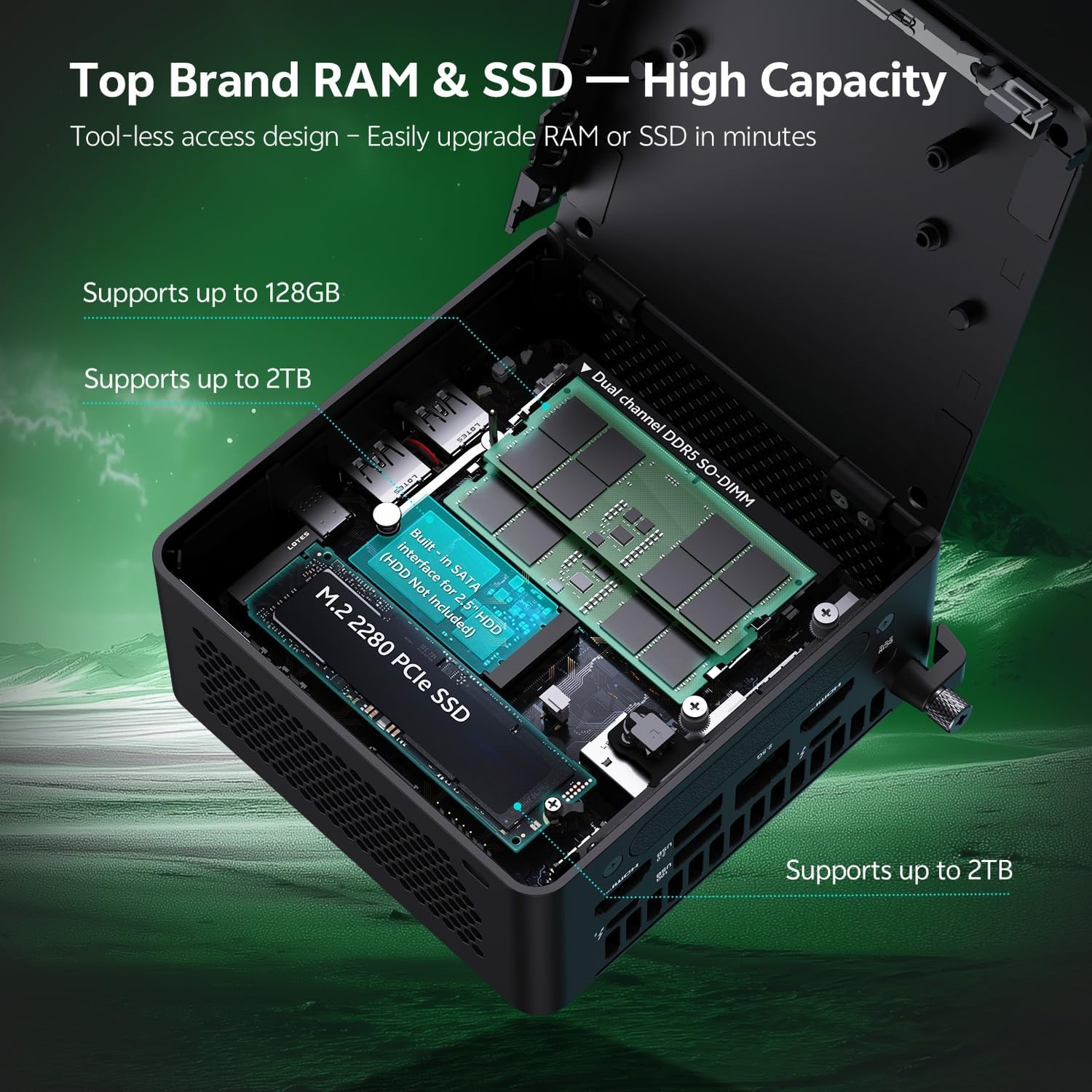
Слика 6.1.1: Internal layout of the ASUS NUC 15 Pro, illustrating the dual-channel DDR5 SO-DIMM slots for RAM and the M.2 2280 PCIe SSD slot, both designed for tool-less access and upgrades.
6.2 Систем хлађења
The device incorporates a Smart Silent Cooling System with dual heat pipes and a large fan to ensure efficient heat dissipation and stable performance.
- Обезбедите одговарајућу вентилацију око мини рачунара да бисте спречили прегревање.
- Periodically clean dust from the vents using compressed air to maintain optimal cooling efficiency.

Слика 6.2.1: Експлодирао view diagram of the ASUS NUC 15 Pro's Smart Silent Cooling System, showing dual heat pipes and a large fan designed for efficient thermal management and multi-ventilation.
КСНУМКС. Решавање проблема
If you encounter issues with your ASUS NUC 15 Pro, refer to the following common troubleshooting steps:
- Нема напајања:
- Ensure the AC adapter is securely connected to both the mini PC and a working power outlet.
- Verify the power cord is not damaged.
- Без приказа:
- Check that the display cable (HDMI or Thunderbolt) is firmly connected to both the mini PC and the monitor.
- Уверите се да је монитор укључен и подешен на исправан улазни извор.
- Пробајте други кабл за дисплеј или монитор ако је доступан.
- Нема интернет везе:
- За жично повезивање, проверите статус етернет кабла и рутера.
- For Wi-Fi, ensure Wi-Fi is enabled in Windows settings and you are connected to the correct network.
- Restart your router/modem and the mini PC.
- Периферни уређаји не реагују:
- Ensure wireless keyboard/mouse receivers are properly inserted into a USB port.
- Check battery levels for wireless peripherals.
- Покушајте да повежете периферне уређаје на различите УСБ портове.
8. Спецификације
| Феатуре | Детаљ |
|---|---|
| Бранд | АСУС |
| Назив модела | RNUC15HU7 |
| Оперативни систем | Виндовс 11 Про |
| ЦПУ модел | Интел Цоре Ултра 7 255Х |
| Брзина процесора | До 5.1 ГХз |
| Грапхицс Цопроцессор | Intel Arc 140T GPU |
| Величина инсталиране РАМ меморије | 32 GB DDR5 (Upgradeable to 128 GB) |
| Капацитет меморије | 1 TB PCIe SSD (Upgradeable to 48 TB) |
| Хардверски интерфејс | HDMI, Thunderbolt 4, USB 2.0 Type A, USB 3.2 Gen 2 |
| Технологија повезивања | Bluetooth 5.4, Wi-Fi 7, Ethernet (2.5G) |
| Видео излазни интерфејс | HDMI 2.1, Thunderbolt 4 |
| Димензије артикла (Д к Ш к В) | 4.6 к 4.4 к 2.1 инча |
| Тежина | 1.36 лбс |
| Боја | Црно |
| УПЦ | 197105156340 |
9. Гаранција и подршка
9.1 Информације о гаранцији
Your ASUS NUC 15 Pro Mini Desktop Computer comes with a 12-month warranty. This warranty covers manufacturing defects and issues arising from normal use. Please retain your proof of purchase for warranty claims.
Note: The manufacturer box is opened by professional engineers for customizing and testing. Factory defects and blemishes are significantly reduced by this in-depth inspection and testing process.
9.2 Техничка подршка
For technical assistance, troubleshooting beyond this manual, or warranty inquiries, please contact ASUS customer support.
- Посетите званичну ASUS подршку webсајт за драјвере, често постављана питања и контакт информације.
- Have your product model (RNUC15HU7) and serial number ready when contacting support.