
Увод
This manual provides comprehensive instructions for the safe and effective use of your AMPBANK M256 Thermal Camera. The M256 is a compact thermal imager designed for use with Android smartphones, tablets, and PCs, offering a 256x192 IR resolution and a temperature range of -4°F to 842°F (-20°C to 450°C). Please read this manual thoroughly before operating the device.
Безбедносне информације
Увек се придржавајте следећих мера предострожности како бисте спречили повреде или оштећење уређаја:
- Do not point the camera directly at intense heat sources, such as the sun or lasers, as this may damage the sensor.
- Не излажите уређај екстремним температурама, влази или корозивним срединама.
- Избегавајте испуштање или излагање уређаја јаким ударима.
- Use only the provided accessories or those approved by AMPBANK.
- Држите уређај ван домашаја деце.
- Refer to local regulations for proper disposal of electronic devices.
Садржај пакета
Проверите да ли су све ставке присутне у вашем пакету:
- 1 к AMPТермовизијска камера BANK M256
- 1 x Multifunctional Adapter Cable (19.7-inch / 50cm USB extension cable)
- 1 к крпа за чишћење
- КСНУМКС к Куицк Усер Гуиде
- 1 к торба за ношење
- 1 к кутија за паковање

Слика: Садржај AMPBANK M256 Thermal Camera package, including the camera, adapter cable, cleaning cloth, quick user guide, carrying bag, and packing box.
Производ је завршенview
Тхе AMPBANK M256 is a compact, plug-and-play thermal imaging camera designed to extend the capabilities of your Android smartphone or PC. It features a USB-C connector for direct attachment to compatible devices.

Слика: Фронт view оф тхе AMPBANK M256 Thermal Camera, showing its compact green and black design with a USB-C connector.
Кључне карактеристике:
- висока резолуција: 256x192 IR resolution for clear thermal images.
- Широк температурни опсег: Measures from -4°F to 842°F (-20°C to 450°C).
- Мала потрошња енергије: Operates efficiently at 0.35W.
- Компактан и преносив: Weighs only 30g, easily fits in a pocket.
- Свестрано повезивање: Compatible with Android smartphones/tablets and PCs via USB-C.
Сетуп
1. App Installation (Android)
- Locate the "ThermCam" application on the Google Play Store.
- Download and install the application on your Android smartphone or tablet.
- Ensure your device supports OTG (On-The-Go) functionality for external device connection.

Image: Screenshot showing the ThermCam app available on Google Play, indicating where to download the required software for the thermal camera.
2. Повезивање уређаја
- For direct connection: Plug the USB-C connector of the M256 thermal camera directly into the USB-C port of your Android smartphone or tablet.
- For extended connection: Use the provided 19.7-inch (50cm) USB extension cable. Connect one end to your smartphone/tablet and the other end to the M256 camera. This offers greater flexibility during use.
- Once connected, open the "ThermCam" app. The app should automatically detect the camera and display the thermal image.

Image: A hand holding a smartphone with the AMPBANK M256 Thermal Camera connected to its USB-C port, displaying a thermal image on the phone screen.

Слика: Тхе AMPBANK M256 Thermal Camera connected to a laptop and a tablet using the 19.7-inch USB extension cable, demonstrating its versatility.
3. Инсталација ПЦ софтвера
- For PC usage, download the "TCView 2.0" software from the official AMPБАНКА webсајту.
- Install the software on your Windows PC.
- Connect the M256 camera to your PC using the USB-C extension cable.
- Launch the TCView 2.0 software to begin thermal imaging on your PC.
Операција
1. Basic Temperature Measurement
- Once the app is open and the camera is connected, the thermal image will appear on your screen.
- The app displays real-time temperature readings.
- Adjust the camera's position to focus on the area of interest.

Image: A person using the AMPBANK M256 Thermal Camera with a smartphone to inspect a wall, showing the thermal image and temperature readings on the phone screen.
2. Measurement Modes and Color Palettes
- The ThermCam app offers various measurement modes, including Дот, Линија, и Авион, for precise temperature monitoring.
- Select from 10 different color palettes to visualize temperature changes. Different palettes can highlight specific temperature variations more clearly.

Image: A smartphone screen displaying various color palettes and measurement settings within the ThermCam app, demonstrating customization options for thermal imaging.
3. 3D Thermal Analysis
- Utilize the advanced 3D editing features within the app or PC software for detailed temperature analysis from multiple perspectives.
- This feature assists in identifying subtle temperature anomalies and patterns.
4. Паметна упозорења
- Configure smart alerts for high and low temperatures. The app will notify you when temperatures exceed or fall below predefined thresholds.
- This is useful for monitoring critical equipment or areas.
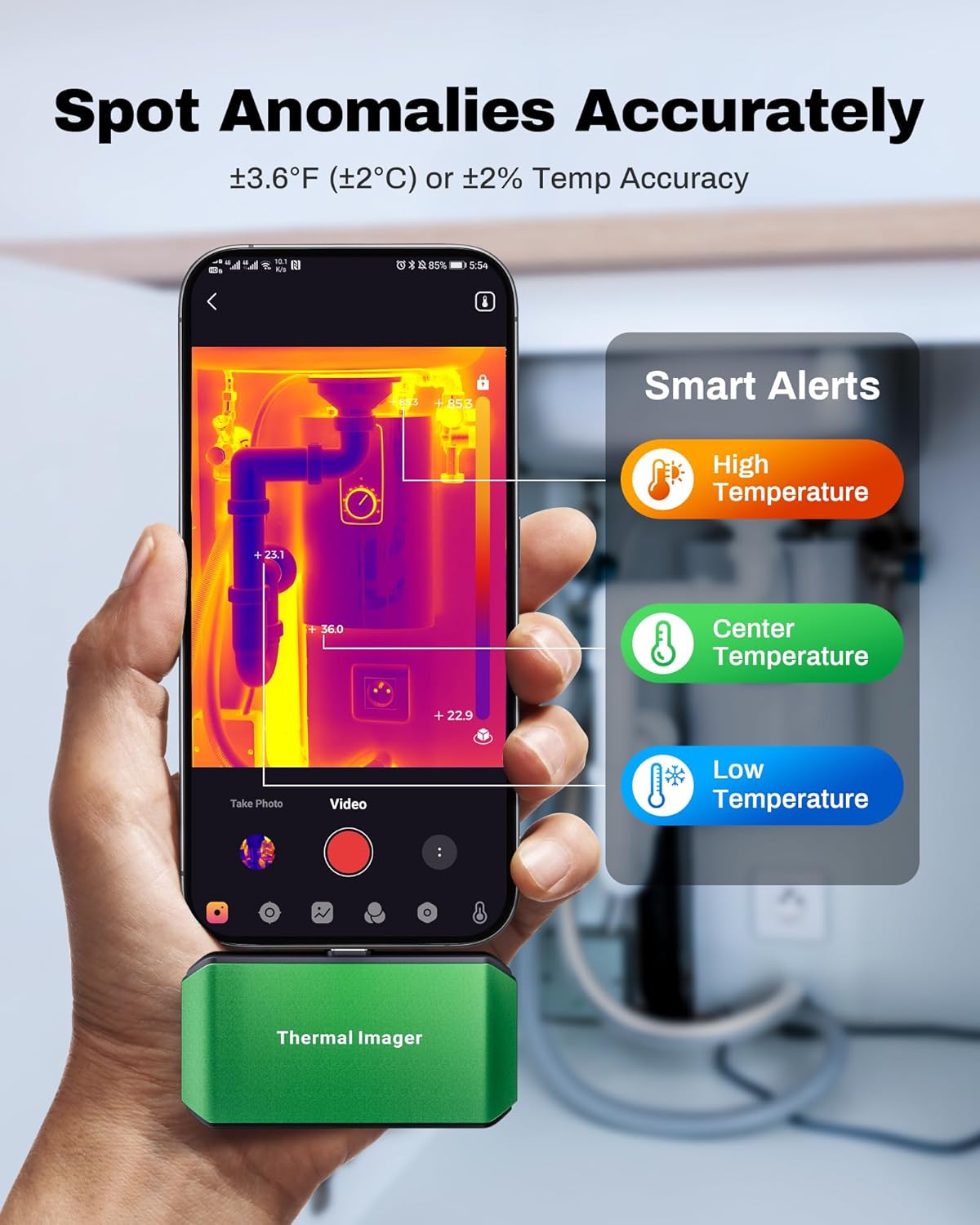
Image: A smartphone screen showing the ThermCam app with "Smart Alerts" for high, center, and low temperatures, indicating the camera's ability to detect anomalies.
5. Снимање фотографија и видеа
- Capture still thermal images or record thermal videos directly through the app.
- These captures can be used for documentation, analysis, or sharing.

Image: Screenshots from the ThermCam app demonstrating options for video recording and photo capturing of thermal images.
6. Generating Professional Reports
- The ThermCam app and TCView 2.0 software allow you to generate professional field reports.
- Customize data, add watermarks, and adjust settings for seamless sharing of your thermal analysis.

Image: A smartphone screen displaying the ThermCam app's interface for generating professional reports, including options to customize data and share.
Одржавање
- Чишћење: Use the provided cleaning cloth to gently wipe the camera lens and body. Do not use abrasive cleaners or solvents.
- Складиштење: When not in use, store the thermal camera in its protective carrying bag to prevent dust and damage. Store in a cool, dry place away from direct sunlight.
- Ажурирања софтвера: Regularly check the Google Play Store or AMPБАНКА website for updates to the ThermCam app or TCView 2.0 software to ensure optimal performance and access to new features.
Решавање проблема
| Проблем | Могући узрок | Решење |
|---|---|---|
| Camera not detected by smartphone/PC. |
|
|
| Нетачна очитавања температуре. |
|
|
| Апликација се руши или замрзава. |
|
|
Спецификације
| Феатуре | Детаљ |
|---|---|
| Модел | М256 |
| ИЦ резолуција | 256x192 пиксела |
| Температурни опсег | -4°Ф до 842°Ф (-20°Ц до 450°Ц) |
| Прецизност температуре | ±3.6°F (±2°C) or ±2% |
| Термичка осетљивост (НЕТД) | <40мК |
| Рефресх Рате | 25Хз |
| Потрошња енергије | 0.35В |
| Повезивање | УСБ-Ц |
| Компатибилност | Android Smartphones/Tablets, Windows PC |
| Димензије | 2.8 к 1.65 к 0.55 инча (70 к 44 к 14 мм) |
| Тежина | 30 г (0.07 лб) |
| Произвођач | AMPБАНКА |

Image: A visual summary of the AMPBANK M256 Thermal Camera's key features and specifications, including resolution, temperature range, and power consumption.
Гаранција и подршка
AMPBANK products are designed for reliability and performance. For warranty information, technical support, or service inquiries, please refer to the official AMPБАНКА webсајту или се обратите њиховом одељењу за корисничку подршку.
Сачувајте доказ о куповини за гаранцијске захтеве.
Онлине ресурси: Посетите AMPBANK Store on Amazon за додатне информације о производу и подршку.