
1. Увод
Thank you for choosing the Dexnor Keyboard Case. This manual provides essential information for setting up, operating, and maintaining your keyboard case to ensure optimal performance and longevity.
Шта је у кутији
- Slim Folio Magnetic Keyboard Case
- УСБ кабл
- Водич за брзи почетак
- Упутство за употребу
Компатибилност
This keyboard case is designed for the following iPad models:
- iPad Air 11-inch 2025 M3 (Models: A3266/A3267/A3270)
- iPad Air 11-inch 2024 M2 (Models: A2902/A2903/A2904)
- iPad Pro 11-inch 2022 4th Gen (Models: A2435/A2759/A2761/A2762)
- iPad Pro 11-inch 2021 3rd Gen (Models: A2377/A2301/A2459/A2460)
- iPad Pro 11-inch 2020 2nd Gen (Models: A2228/A2068/A2231)
- iPad Pro 11-inch 2018 1st Gen (Models: A1980/A2013/A1934/A1979)
- iPad Air 5th Gen 2022 (Models: A2588/A2589/A2591)
- iPad Air 4th Gen 2020 (Models: A2072/A2316/A2324/A2325)
Please double-check the 'A' code on the back of your device for compatibility. This case is NOT compatible with iPad Pro 11 M4/M5 2024/2025 or iPad (A16) 11th/10th Gen. iPad and Apple Pencil are not included.

Image: Compatibility chart for Dexnor Keyboard Case.
2. Подешавање
2.1 Повезивање iPad-а
- Отворите кућиште тастатуре.
- Align your compatible iPad with the magnetic back cover of the case. The strong magnets will securely attach the iPad.
- Position the bottom edge of your iPad into the designated slot on the keyboard for a stable viewing angle. The ergonomic 120-degree viewing angle is designed for comfort during study, work, and entertainment.
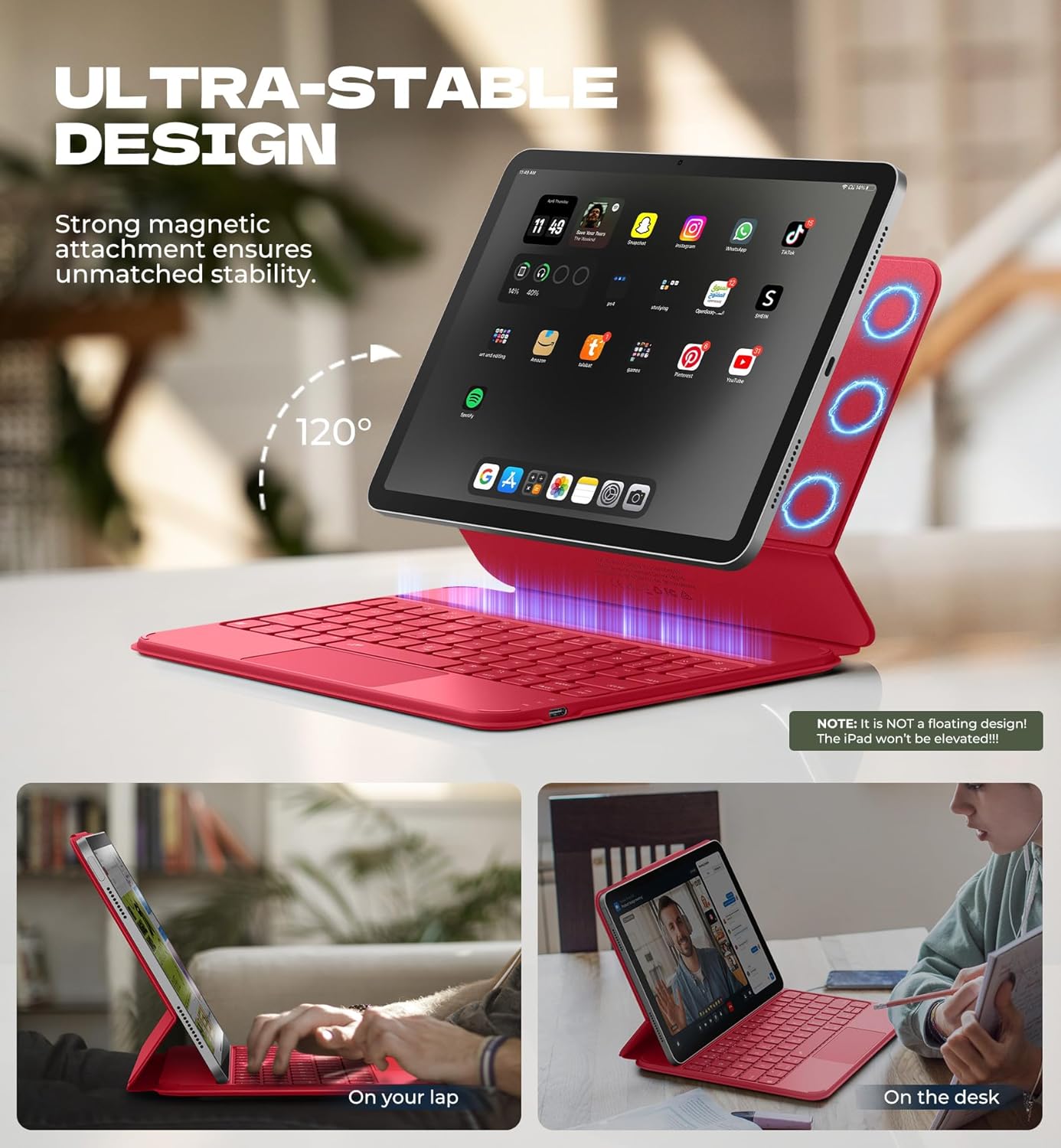
Image: iPad attached to the keyboard case, demonstrating the stable viewугао уласка.
2.2 Блуетоотх упаривање
- Ensure your keyboard case is charged.
- Turn on the keyboard using the side power button.
- На вашем iPad-у идите на Подешавања > Блуетоотх и укључите Bluetooth.
- Притисните тастер Fn кључ и Пар key (often indicated by a Bluetooth symbol) simultaneously on the keyboard. The Bluetooth indicator light on the keyboard will flash.
- On your iPad, locate "Dexnor Keyboard" in the "Other Devices" list and tap to connect. A pairing request pop-up will appear; tap "Pair".
- Once connected, the Bluetooth indicator light on the keyboard will stop flashing, and your iPad will show "Connected" next to "Dexnor Keyboard".
Video: Demonstrates the setup and magnetic attachment of the Dexnor Ultra-light Folio Keyboard Case with Trackpad.
Video: Shows the connection process for the Dexnor Keyboard Case for iPad Air 11/Pro 11/Air 5th/4th Gen.
3. Упутство за употребу
3.1 Карактеристике тастатуре
- Тастери са позадинским осветљењем: The keyboard features a single-color backlight with 3 adjustable brightness levels for comfortable typing in low-light conditions. Use the dedicated backlight keys (often Fn + light icon) to adjust brightness.
- Функцијски тастери: Utilize the function keys for quick access to iPad features such as media control, volume adjustment, and screen lock.
- Auto-Wake/Sleep: The case supports auto-wake/sleep functionality, preserving battery life by automatically turning your iPad screen on or off when the case is opened or closed.
3.2 Мулти-тач трекпад
The integrated multi-touch trackpad provides precise navigation and supports various gestures for a laptop-like experience on your iPad.
- Увећавање/умањивање: Use pinch gestures on the trackpad.
- Управљај Files: Utilize standard trackpad gestures for file навигацију и избор.
- Прегледај Webстранице: Scroll and navigate with ease.
- Пребаци апликације: Use multi-finger gestures to switch between applications.
- Disable Trackpad: To prevent accidental touches during typing, press Фн + размакница to disable or enable the trackpad.

Image: Multi-touch trackpad with gesture illustrations.

Image: Backlit keyboard keys.
4. Одржавање
4.1 Одржавање батерије
The keyboard case is equipped with a 650mAh lithium polymer battery. To maximize battery life:
- Charge the keyboard using the provided USB cable when the battery indicator is low.
- Избегавајте често потпуно пражњење батерије.
- Чувајте тастатуру на хладном и сувом месту када је не користите дуже време.
Expected battery performance:
- До 720 сати у стању приправности.
- Up to 200 hours of use without backlight.
- Up to 10 hours of continuous use with the brightest backlight setting.
4.2 Чишћење
To clean your keyboard case:
- Обришите спољашњост меком, дamp тканина.
- Избегавајте употребу јаких хемикалија или абразивних средстава за чишћење.
- Ensure no moisture enters the keyboard or charging port.
КСНУМКС. Решавање проблема
Тастатура се не повезује преко Блутут-а
- Проверите батерију: Уверите се да је тастатура довољно напуњена.
- Рестартујте тастатуру: Искључите тастатуру, а затим је поново укључите.
- Поново упарите Bluetooth: Go to your iPad's Bluetooth settings, forget the "Dexnor Keyboard" device if it appears, and then repeat the pairing steps in Section 2.2.
- Рестартујте iPad: Sometimes a simple iPad restart can resolve connectivity issues.
Trackpad Not Responding
- Check if Disabled: Ensure the trackpad is not disabled (press Фн + размакница to toggle).
- Очистите тракпад: Уверите се да је површина додирне табле чиста и без прљавштине.
- Restart Keyboard/iPad: Perform a restart of both devices.
Тастери не реагују
- Проверите батерију: A low battery can cause keys to become unresponsive.
- Поново упарите Bluetooth: Follow the steps to re-pair the keyboard.
- Чисти тастери: Уверите се да испод тастера нема остатака.
6. Спецификације
| Феатуре | Детаљ |
|---|---|
| Број модела | ДК015 |
| Тежина артикла | 1.06 лбс (482 грама) |
| Димензије пакета | 10.43 к 9.05 к 1.05 инча |
| Произвођач | Dexnor |
| Технологија повезивања | Блуетоотх |
| Опис тастатуре | Вишенаменски |
| Посебне карактеристике | Backlit keys, Long-lasting rechargeable battery, Auto-wake/sleep, High precision click-anywhere trackpad, Magnetic detachable, Magnetic clasp, Pencil Holder, Smart Magnetic Keyboard Folio with Rock-solid stability (NOTE: NOT Floating), Ultra-thin slim lightweight portable compact |
| Боја | Rose Red (Current Product Variant) |
| Позадинско осветљење тастатуре | Сингле Цолор |
| Материјал | Polycarbonate, Polyurethane (PU) |
| Батерија | 1 A battery required (included) - 650mAh Lithium Polymer |
7. Гаранција и подршка
Dexnor is committed to providing high-quality products and customer satisfaction. For any inquiries or support needs, please refer to the following:
- гаранција: This product comes with a 10-year warranty for phone/tablet cases.
- Политика враћања: Доступна је политика враћања у року од 60 дана.
- Customer Support Response: Expect a response within 24 hours on business days and 48 hours on weekends/holidays.
For further assistance, please visit the official Dexnor store or contact customer service through your purchase platform.