
1. Увод
Welcome to the user manual for your MAGIC-REFINER X68 HE Wired Magnetic Keyboard. This manual provides essential information for setting up, operating, maintaining, and troubleshooting your new device. Please read it thoroughly to ensure optimal performance and longevity of your keyboard.
The MAGIC-REFINER X68 HE is a high-performance 68-key TKL (Tenkeyless) keyboard designed for precision and speed, featuring Hall Effect magnetic switches, adjustable actuation, and dynamic RGB backlighting.
2. Производ је готовview
The MAGIC-REFINER X68 HE keyboard integrates advanced features for a superior typing and gaming experience. Key highlights include:
- Compact UK QWERTY Layout: A 68-key TKL design that retains essential keys while minimizing desk footprint, featuring an authentic UK layout.
- 0.01mm RT Sensitivity: Adjustable actuation points from 0.1mm to 3.4mm in 0.01mm increments for precise control and zero dead zone.
- Ultra-Fast Hall Effect Magnetic Switches: Delivers an 8000Hz polling rate and 128,000-point scan frequency for ultra-low latency of 0.125ms.
- Web Прилагођавање драјвера: Intuitive software for key remapping, advanced macros, and RGB lighting personalization.
- Dynamic Keystroke Features: Supports Snap Tap for faster direction changes, Rapid Trigger for fluid movements and instant resets, and Dynamic Keystroke for analog input and up to 4 actions per keypress.
- Динамичко RGB позадинско осветљење: South-facing RGB with customizable effects and colors via the driver software.
- Прекидачи који се могу брзо заменити: Supports North-Pole-Down magnetic switches for easy replacement and customization.

Figure 2.1: The MAGIC-REFINER X68 HE Wired Magnetic Keyboard, showcasinњегов компактни дизајн и RGB осветљење.

Слика 2.2: Завршеноview of the X68 HE highlighting its mechanical magnetic switches, essential for esports players.

Слика 2.3: Детаљно view of the Rapid Trigger Hall Effect Magnetic Switch, showing linear switch type, 40±5gf operation force, 100M click lifespan, 0.1-3.4mm actuation point, and zero dead zone.
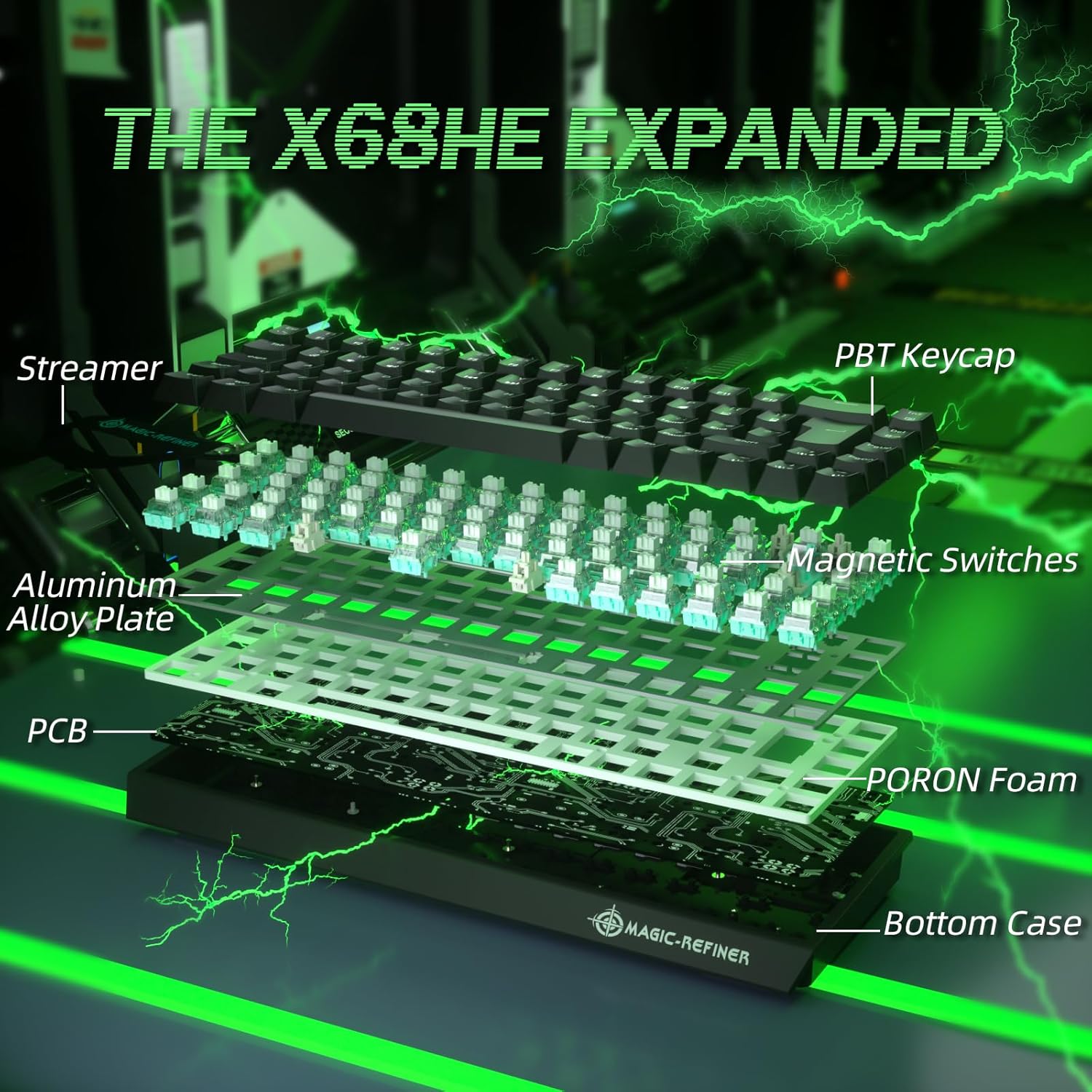
Figure 2.4: Exploded diagram illustrating the internal components of the X68 HE, including PBT keycaps, streamer, aluminum alloy plate, magnetic switches, PCB, and PORON foam.
3. Упутства за подешавање
- Распакујте тастатуру: Пажљиво извадите тастатуру и њену додатну опрему из паковања.
- Повежите се са рачунаром: Connect the provided USB-C cable to the keyboard's USB-C port and the other end to an available USB port on your computer. The keyboard is plug-and-play.
- Инсталација драјвера (опционо, али препоручено): For full customization, including key remapping, advanced macros, and RGB lighting effects, download and install the dedicated Web Driver. The link for the driver is typically provided on the manufacturer's official webсајту или у паковању производа.
- Пласман: Position the keyboard comfortably on your desk. You may adjust the keyboard's angle using the integrated risers on the underside.

Figure 3.1: The compact UK layout of the X68 HE keyboard, showing its dimensions (12.80in width, 4.53in depth, 1.57in height).
4. Упутство за употребу
4.1 Основне функције тастатуре
The X68 HE keyboard operates as a standard QWERTY keyboard. Due to its compact 68-key layout, some functions are accessed via the Function (Fn) key combinations.
- Fn + F1-F12: Access multimedia controls and system functions as indicated by the icons on the keycaps.
- Fn + тастери са стрелицама: May control backlight brightness or speed, depending on the specific model and driver settings.
- Фн + ДЕЛ: Switch RGB colors.
- Фн + ИНС: Switch RGB light modes.
4.2 Advanced Gaming Features
- Брзо окидање: This feature allows keys to reset instantly upon release, enabling faster repeated inputs and more fluid movements in games. The actuation point is dynamically adjusted, meaning a key press registers as soon as it passes the set actuation point, and deactivates as soon as it rises above it, without needing to return to the full reset position.
- Snap Tap: Designed for quick direction changes, Snap Tap optimizes the response for rapid key presses and releases, crucial for competitive gaming.
- Динамички притисак тастера (DKS): This feature allows for analog input, enabling up to four different actions to be assigned to a single keypress based on the depth of the press. This can be configured via the Web Возач.

Figure 4.1: Visual comparison demonstrating the 0.04mm RT accuracy of the X68 HE's rapid trigger mechanism compared to a regular switch, showing faster reset and activation points.

Figure 4.2: Illustration of the keyboard's 8000Hz polling rate, ultra-low latency of 0.125ms, and high scan rate of 128K, indicating up to 8 times faster performance.
5. Прилагођавање
The MAGIC-REFINER X68 HE keyboard offers extensive customization options through its dedicated Web Driver software.
- Adjustable Actuation Point: Fine-tune the actuation point of each key from 0.1mm to 3.4mm in 0.01mm increments to match your preferred typing or gaming style. This allows for extreme sensitivity or a more deliberate press.
- Key Remapping and Macros: Reassign key functions and create complex macros for enhanced productivity or in-game advantagес.
- Прилагођавање РГБ осветљења: Personalize the south-facing RGB backlighting with a wide array of colors, effects, and brightness levels. The software provides granular control over lighting zones and patterns.
- Напредне технологије: The driver supports technologies like SOCD (Simultaneous Opposite Cardinal Directions), TGL (Toggle), DKS (Dynamic Keystroke), MPT (Multi-Press Tap), and MT (Mod Tap) for advanced control.
For driver download and detailed instructions on customization, please visit the official MAGIC-REFINER website or refer to the link provided in your product documentation.
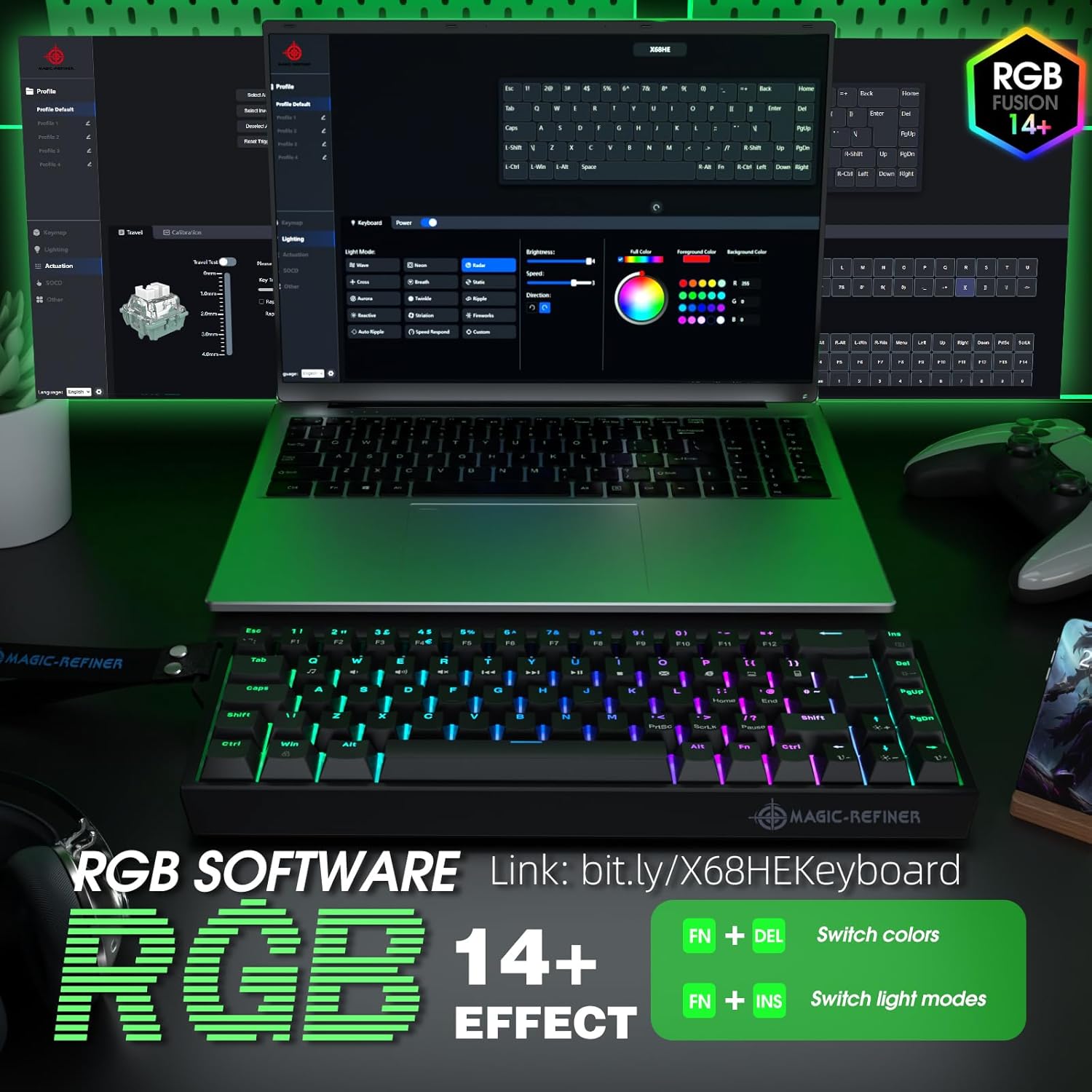
Figure 5.1: Screenshot of the RGB software interface, demonstrating options for profile management, lighting modes, brightness, color selection, and key assignments. Also shows quick RGB controls: Fn + DEL for color, Fn + INS for light modes.
6. Одржавање
6.1 Чишћење
- Генерално чишћење: Користите меку крпу која не оставља длачицеampводом или благим средством за чишћење обришите тастере и површину тастатуре. Избегавајте прекомерну влагу.
- Уклањање прашине: Користите компримовани ваздух да уклоните прашину и остатке између тастера.
- Дубинско прање: For thorough cleaning, keycaps can be carefully removed using a keycap puller. Clean the keycaps separately and wipe the switch stems. Ensure all parts are completely dry before reassembling.
6.2 Прекидачи са могућношћу замене током рада
The X68 HE features hot-swappable North-Pole-Down magnetic switches, allowing you to easily replace individual switches without soldering. This is useful for customizing the feel of specific keys or replacing a faulty switch.
- Уклоните капицу тастатуре: Use a keycap puller to gently remove the keycap from the desired switch.
- Уклоните прекидач: Користите алат за извлачење прекидача да пажљиво ухватите горњу и доњу копчу прекидача и повуците га право нагоре.
- Уметни нови прекидач: Align the pins of the new switch with the holes on the PCB. Press the switch firmly until it clicks into place. Ensure it is seated correctly and not bent.
- Замена тастера: Press the keycap onto the new switch stem.
Always handle switches and keycaps with care to avoid damage.

Figure 6.1: The X68 HE keyboard demonstrating its hot-swappable feature, allowing for easy removal and replacement of individual magnetic switches.
КСНУМКС. Решавање проблема
- Тастатура не реагује:
- Уверите се да је USB-C кабл безбедно повезан и са тастатуром и са рачунаром.
- Покушајте да повежете тастатуру са другим УСБ портом на рачунару.
- Тестирајте тастатуру на другом рачунару да бисте искључили проблеме специфичне за систем.
- Поново покрените рачунар.
- RGB осветљење не ради/нетачно:
- Уверите се да је тастатура правилно повезана.
- Use Fn + DEL and Fn + INS combinations to cycle through colors and modes.
- Проверите Web Driver software for lighting settings and ensure they are correctly configured.
- Поново инсталирајте Web Driver software if issues persist.
- Тастери се не региструју или се куцају двапут:
- Clean the affected key and switch area for any debris.
- If the switch is hot-swappable, try removing and reinserting the switch. If the problem continues, replace the switch with a spare one.
- Check the actuation settings in the Web Driver software; a very low actuation point might cause unintended triggers.
8. Спецификације
| Бранд | MAGIC-REFINER |
| Модел | Кс68 ХЕ |
| Технологија повезивања | Жични (USB-C) |
| Распоред тастатуре | UK QWERTY (68-key TKL) |
| Тип прекидача | Hall Effect Magnetic Switches (Hot-swappable) |
| Тачка активирања | Adjustable from 0.1mm to 3.4mm (0.01mm increments) |
| Поллинг Рате | 8000Хз |
| Латенција | 0.125мс |
| Позадинско осветљење | Dynamic RGB (South-facing) |
| Компатибилни уређаји | PC |
| Боја | Црно |
| Извор напајања | УСБ |
| Посебне карактеристике | Rapid Trigger, Snap Tap, Dynamic Keystroke, Web Driver Customization |
9. Гаранција и подршка
9.1 Информације о гаранцији
The MAGIC-REFINER X68 HE keyboard comes with a manufacturer's warranty of 6 месеци од датума куповине. Ова гаранција покрива недостатке у материјалу и изради при нормалној употреби. Не покрива штету насталу услед злоупотребе, незгода, неовлашћених модификација или нормалног хабања.
Сачувајте доказ о куповини за гаранцијске захтеве.
9.2 Корисничка подршка
For technical assistance, warranty claims, or any questions regarding your MAGIC-REFINER X68 HE keyboard, please contact the seller or manufacturer's customer support. Refer to the contact information provided with your product packaging or on the official MAGIC-REFINER webсајту.
When contacting support, please have your product model (X68 HE) and proof of purchase readily available.