
Увод
Thank you for choosing the Jedel WD154 Wireless Mouse. This manual provides essential information for setting up, operating, and maintaining your new mouse. Please read these instructions carefully before use to ensure optimal performance and longevity of your device.
Садржај пакета
- Jedel WD154 Wireless Mouse
- УСБ-Ц кабл за пуњење
- 2.4ГХз УСБ пријемник
- Упутство за употребу

Image: The retail packaging for the Jedel WD154 Wireless Mouse, displaying the mouse, its features, and technical specifications on the box.
Производ је завршенview
The Jedel WD154 features a transparent 6D design with RGB lighting and a digital LED battery display. It offers dual-mode connectivity for versatile use.
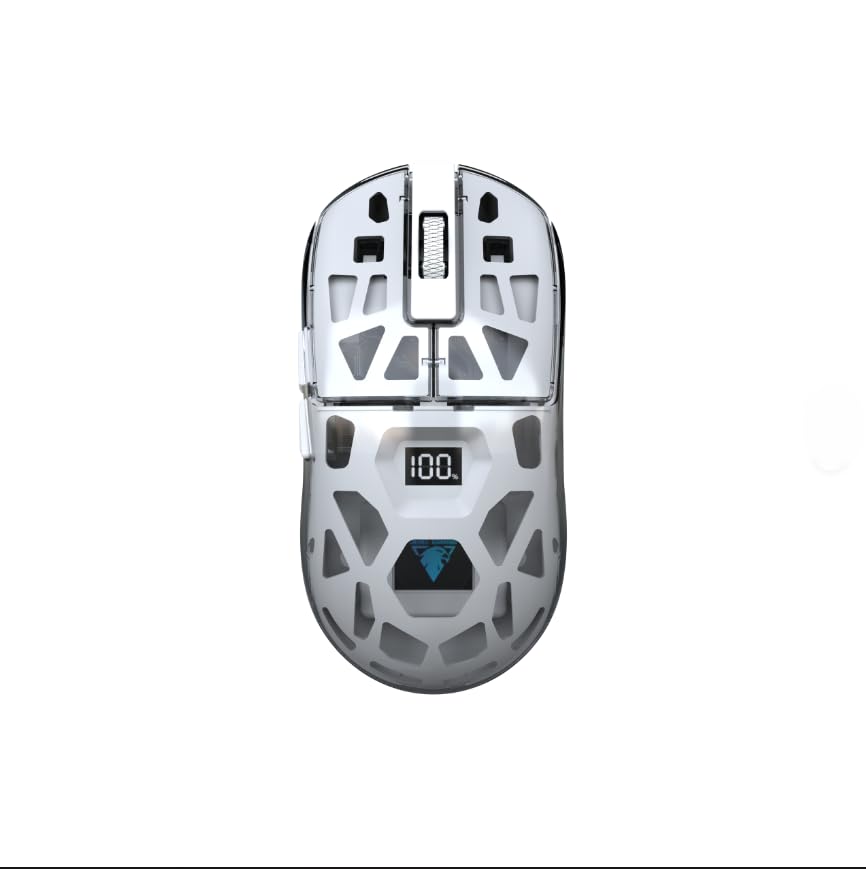
Слика: Крупни план стране view of the Jedel WD154 Wireless Mouse, showcasing its unique transparent shell and the integrated digital LED display indicating a 100% battery charge.
Функције дугмета:
- Леви клик: Стандардна функција левог клика.
- Десни клик: Стандардна функција десног клика.
- Точак за померање: Померање горе/доле, клик средњим тастером миша.
- Дугме ДПИ: Подешава осетљивост миша (DPI).
- Дугме за напред: Навигација напред у web прегледачи/апликације.
- Дугме за назад: Навигација уназад web прегледачи/апликације.
- Mode Switch Button (underneath): Toggles between 2.4GHz and Bluetooth modes.
Сетуп
1. Пуњење миша
Before first use, fully charge the mouse using the provided USB-C cable.
- Повежите USB-C крај кабла са портом за пуњење миша.
- Повежите USB-A крај са извором напајања (нпр. USB портом рачунара, USB адаптером за зид).
- The digital LED display will show the charging progress. A full charge is indicated by '100'.

Слика: Детаљна view of the front of the Jedel WD154 Wireless Mouse, illustrating the USB-C charging port with the charging cable securely connected.
2. Повезивање путем бежичне мреже од 2.4 GHz
- Locate the 2.4GHz USB receiver, usually stored in a compartment on the underside of the mouse.
- Прикључите УСБ пријемник у слободан УСБ порт на рачунару или уређају.
- Укључите миш помоћу прекидача за напајање на доњој страни.
- Press the Mode Switch button (if present) until the mouse is in 2.4GHz mode (often indicated by a specific LED color or pattern).
- Миш би требало аутоматски да се повеже.
3. Повезивање путем Bluetooth 5.1
- Укључите миш помоћу прекидача за напајање на доњој страни.
- Press the Mode Switch button (if present) until the mouse is in Bluetooth mode. The LED indicator will typically flash, indicating it's in pairing mode.
- On your device (PC, Mac, tablet, smartphone), go to Bluetooth settings.
- Тражи new devices and select "Jedel WD154" (or similar name) from the list.
- Пратите сва упутства на екрану да бисте довршили процес упаривања.
Упутство за употребу
ДПИ Адјустмент
The mouse features adjustable DPI settings (800/1200/1600) to control cursor sensitivity.
- Притисните тастер Дугме ДПИ (usually located behind the scroll wheel) to cycle through the available DPI settings.
- Each press will change the sensitivity, allowing you to find your preferred speed for different tasks or games.
РГБ контрола осветљења
The mouse features dynamic RGB lighting.
- The RGB lighting typically activates automatically when the mouse is powered on.
- Specific button combinations (e.g., DPI button + a side button) might cycle through different lighting modes or turn the RGB on/off. Refer to the quick start guide for specific controls if available.

Image: A compilation of images demonstrating the Jedel WD154 Wireless Mouse with its RGB lighting set to various colors, showcasing the customizable aesthetic.
Управљање напајањем
- The digital LED display shows the current battery percentagе (1-100%).
- When the battery is low, recharge the mouse using the USB-C cable.
- The mouse may enter an automatic sleep mode after a period of inactivity to conserve battery. Move the mouse or click a button to wake it up.
Одржавање
- Чишћење: Користите меку, суву крпу за чишћење миша. За тврдокорну прљавштину, благо дamp Може се користити крпа, али водите рачуна да влага не уђе у уређај.
- Складиштење: Чувајте миша на хладном и сувом месту, даље од директне сунчеве светлости и екстремних температура.
- Одржавање батерије: Avoid fully discharging the battery frequently. Charge it regularly to maintain battery health.
- Избегавајте капи: Protect the mouse from drops and impacts, which can damage internal components or the transparent casing.
Решавање проблема
| Проблем | Могуће решење |
|---|---|
| Миш не реагује |
|
| Покрет курсора је неправилан или спор |
|
| РГБ осветљење не ради |
|
| Повезивање преко Блуетоотх-а није могуће |
|
Спецификације
- Модел: ВД154
- Технологија повезивања: Bluetooth 5.1 + 2.4GHz (Dual Mode)
- ДПИ подешавања: 800 / 1200 / 1600 (Adjustable)
- Број дугмади: 6
- Детекција покрета: Оптицал
- Посебне карактеристике: Transparent Design, RGB Lighting, Digital Battery Percentagе Приказ
- Извор напајања: Пуњива батерија (USB-C)
- Компатибилни уређаји: PC, Laptop, Tablet, Smartphone
- Компатибилни оперативни системи: Виндовс, Мац ОС
- Тежина артикла: 96 грама
- Димензије производа (Д x Ш): 12.7 цм к 6.4 цм
Гаранција и подршка
Информације о гаранцији
Овај производ долази са а 14-дневна гаранција од датума куповине. Ова гаранција покрива производне недостатке при нормалној употреби. Не покрива штету насталу услед злоупотребе, незгода, неовлашћених модификација или нормалног хабања.
Корисничка подршка
For technical assistance, troubleshooting, or warranty claims, please contact your retailer or the point of purchase. Please have your proof of purchase and product model number (WD154) ready when contacting support.