
1. Увод
The FOXWELL NT201 is an On-Board Diagnostics II (OBDII) and European On-Board Diagnostics (EOBD) scanner designed to diagnose engine-related issues in vehicles. This device allows users to read and clear diagnostic trouble codes (DTCs), view live data streams, perform I/M readiness tests, and more. This manual provides detailed instructions for the proper use and maintenance of your NT201 scanner and its accompanying portable carrying case.
2. Безбедносне информације
Always observe safety precautions when working on a vehicle. Improper use of diagnostic tools can lead to personal injury or damage to the vehicle. Please read and follow these guidelines:
- Уверите се да је возило паркирано на равној површини са укљученом ручном кочницом.
- Носите одговарајућу заштиту за очи.
- Keep clothing, hair, hands, tools, and test equipment away from moving engine parts.
- Operate the vehicle in a well-ventilated area to prevent carbon monoxide poisoning.
- Немојте повезивати или искључивати опрему за тестирање док је контакт укључен или мотор ради.
- Keep the scanner dry and clean. Avoid exposure to extreme temperatures.
3. Садржај пакета
Проверите да ли су све ставке присутне у вашем пакету:
- FOXWELL NT201 OBD2 Scanner Unit
- Integrated OBDII Cable
- Преносива торбица за ношење
- Кориснички приручник (овај документ)
4. Производ је готовview
The NT201 scanner features a clear display and intuitive button layout for easy navigation and operation.

Слика 4.1: Фронт view of the FOXWELL NT201 OBD2 Scanner. This image displays the scanner's screen, which shows 'I/M Readiness' status indicators, and the control buttons including ESC, UP, DOWN, and ENTER, along with the I/M readiness hotkey.
4.1. Изглед уређаја
- ЛЦД екран: Shows test results, menu options, and operational information.
- ЕСЦ дугме: Exits current screen or returns to the previous menu.
- Тастери ГОРЕ/ДОЛЕ: Navigates through menu options or data.
- Дугме ЕНТЕР: Потврђује избор или улази у мени.
- I/M Readiness Hotkey: Provides quick access to the I/M Readiness status.
- OBDII конектор: Connects the scanner to the vehicle's Data Link Connector (DLC).
5. Подешавање
To begin using your NT201 scanner, follow these steps:
- Locate the vehicle's 16-pin Data Link Connector (DLC). This is typically located under the dashboard on the driver's side.
- Окрените кључ за паљење возила у положај „УКЉУЧЕНО“ (мотор искључен).
- Plug the NT201's OBDII connector into the vehicle's DLC. The scanner will power on automatically.
- The scanner will perform a system check and display the main menu.
6. Упутство за употребу
6.1. Read and Clear Fault Codes
This function allows you to retrieve Diagnostic Trouble Codes (DTCs) from the vehicle's engine control unit (ECU) and clear them after repairs.
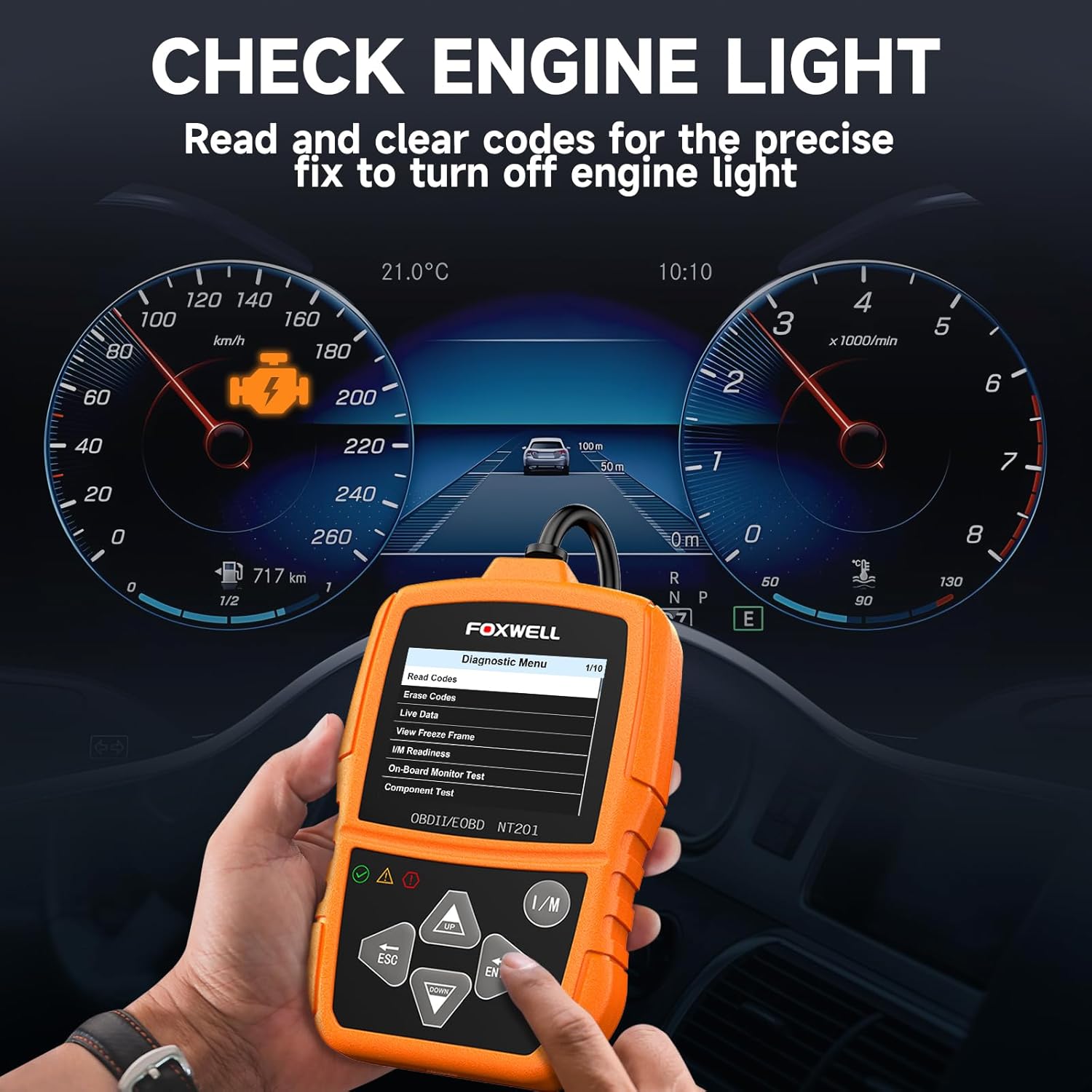
Слика 6.1: The FOXWELL NT201 scanner in use, displaying the diagnostic menu with 'Read Codes' highlighted. A vehicle dashboard is visible in the background, showing the check engine light illuminated.
- Из главног менија користите ГОРЕ/ДОЉЕ buttons to select "Diagnostic Menu" and press ЕНТЕР.
- Select "Read Codes" to view current, pending, and permanent DTCs. The scanner will display the codes and their definitions.
- After addressing the underlying issue, select "Erase Codes" from the Diagnostic Menu and press ЕНТЕР. Confirm the action when prompted. This will turn off the Malfunction Indicator Lamp (MIL) or 'Check Engine Light'.
6.2. Стримовање података уживо
View real-time operational parameters of the vehicle's engine, such as engine RPM, vehicle speed, coolant temperature, and more.

Слика 6.2: The FOXWELL NT201 scanner displaying a live data stream. The screen shows various parameters like Engine RPM and Vehicle Speed Sensor data, presented both numerically and graphically, with a car interior visible in the background.
- From the Diagnostic Menu, select "Live Data" and press ЕНТЕР.
- Можеш view data in text format or graphical format. Use the ГОРЕ/ДОЉЕ buttons to scroll through parameters.
- Притисните ЕНТЕР to select a parameter for detailed viewing or graphing.
6.3. One-Key I/M Readiness Test
Quickly check the vehicle's emission readiness status to determine if it's ready for an emissions test.

Слика 6.3: The FOXWELL NT201 scanner with its 'I/M' hotkey prominently displayed and highlighted, indicating its function for a quick smog check. An exhaust pipe is visible in the background, suggesting emissions testing.
- With the scanner connected and powered on, press the dedicated И/М хоткеи.
- The scanner will display the status of various emission-related monitors (e.g., MIL, MIS, FUE, CCM, CAT, O2S, EGR).
- Green indicates the monitor has completed its test, Yellow indicates pending, and Red indicates not ready or a fault.
6.4. Тест О2 сензора
This function retrieves O2 sensor monitor test results for the most recently completed tests from the vehicle's on-board computer. This helps in diagnosing fuel efficiency and emission-related issues.
- From the Diagnostic Menu, select "O2 Sensor Test" and press ЕНТЕР.
- Пратите упутства на екрану да бисте view резултате теста.
7. Одржавање
7.1. Чишћење скенера
Користите меку, дamp cloth to clean the scanner's exterior. Do not use abrasive cleaners or solvents. Keep the screen free of dust and smudges for optimal visibility.
7.2. Складиштење
When not in use, store the NT201 scanner in its portable carrying case to protect it from dust, moisture, and physical damage. Store in a cool, dry place away from direct sunlight.

Слика 7.1: An open portable carrying case designed for the FOXWELL NT201 scanner, showing the scanner and its cable neatly organized within the case's compartments. The case provides organized protection for the device.

Слика 7.2: A diagram illustrating the dimensions of the portable carrying case, showing its length, width, and height. This case is suitable for the FOXWELL NT201 and similar diagnostic tools.
КСНУМКС. Решавање проблема
If you encounter issues with your NT201 scanner, refer to the following common problems and solutions:
| Проблем | Могући узрок | Решење |
|---|---|---|
| Скенер се не укључује. | Лабава веза са DLC-ом; Паљење возила није укључено; Акумулатор возила је празан. | Ensure the OBDII cable is securely connected. Turn vehicle ignition to 'ON'. Check vehicle battery voltage. |
| Грешка у комуникацији са возилом. | Incorrect protocol; Faulty DLC; Vehicle not OBDII compliant. | Verify vehicle is OBDII compliant (1996 or newer for most regions). Check DLC for damage. Try on another compliant vehicle. |
| Screen display is dim or unreadable. | Environmental conditions; Screen damage. | Move to a better lit area. If damaged, contact support. |
9. Спецификације
- Приказ: ЛЦД са позадинским осветљењем
- Радна температура: 0 до 60°Ц (32 до 140°Ф)
- Температура складиштења: -20 до 70°Ц (-4 до 158°Ф)
- Спољно напајање: 8.0 to 18.0 V power provided via vehicle battery
- Подржани протоколи: KWP2000, J1850 VPW, ISO9141, J1850 PWM, CAN
- Компатибилност: Most 1996 and newer OBDII compliant vehicles (cars, light trucks, SUVs, minivans, hybrids). Does not support electric vehicles or 24V heavy-duty trucks.
10. Гаранција и подршка
For warranty information or technical support, please refer to the FOXWELL official webсајт или директно контактирајте њихову корисничку службу. Сачувајте рачун за куповину за потребе гаранције.
FOXWELL Official Webсајт: ввв.фоквеллтецх.цом