
1. Увод
Thank you for choosing the FINOTI F204 RC Drone. This manual provides essential information for the safe operation, setup, and maintenance of your drone. Please read this manual thoroughly before operating the aircraft to ensure proper function and to avoid damage or injury. Keep this manual for future reference.

Figure 1.1: The FINOTI F204 RC Drone in its folded, portable configuration.
2. Производ је готовview
2.1 Кључне карактеристике
- 4K професионална HD камера: Captures high-resolution photos and 1080p videos with a 1/1.28-inch sensor.
- 3-Axis Mechanical Stabilizing Gimbal: Обезбеђује глатко и стабилно стопалоtage during flight.
- Laser Obstacle Avoidance: Intelligently detects obstacles ahead for safer flight.
- ГПС позиционирање: Provides stable hovering, intelligent following, and precise return-to-home functions.
- Мотори без четкица: Offers powerful, quiet, and durable performance.
- Преклопни дизајн: Компактан и преносив за лак транспорт.
- Дуго време лета: Up to 25 minutes on a single charge.
- 5G WiFi Image Transmission: Real-time video feed to your smartphone.
- Контроле прилагођене кориснику: Features like one-key takeoff/landing and headless mode for ease of use.
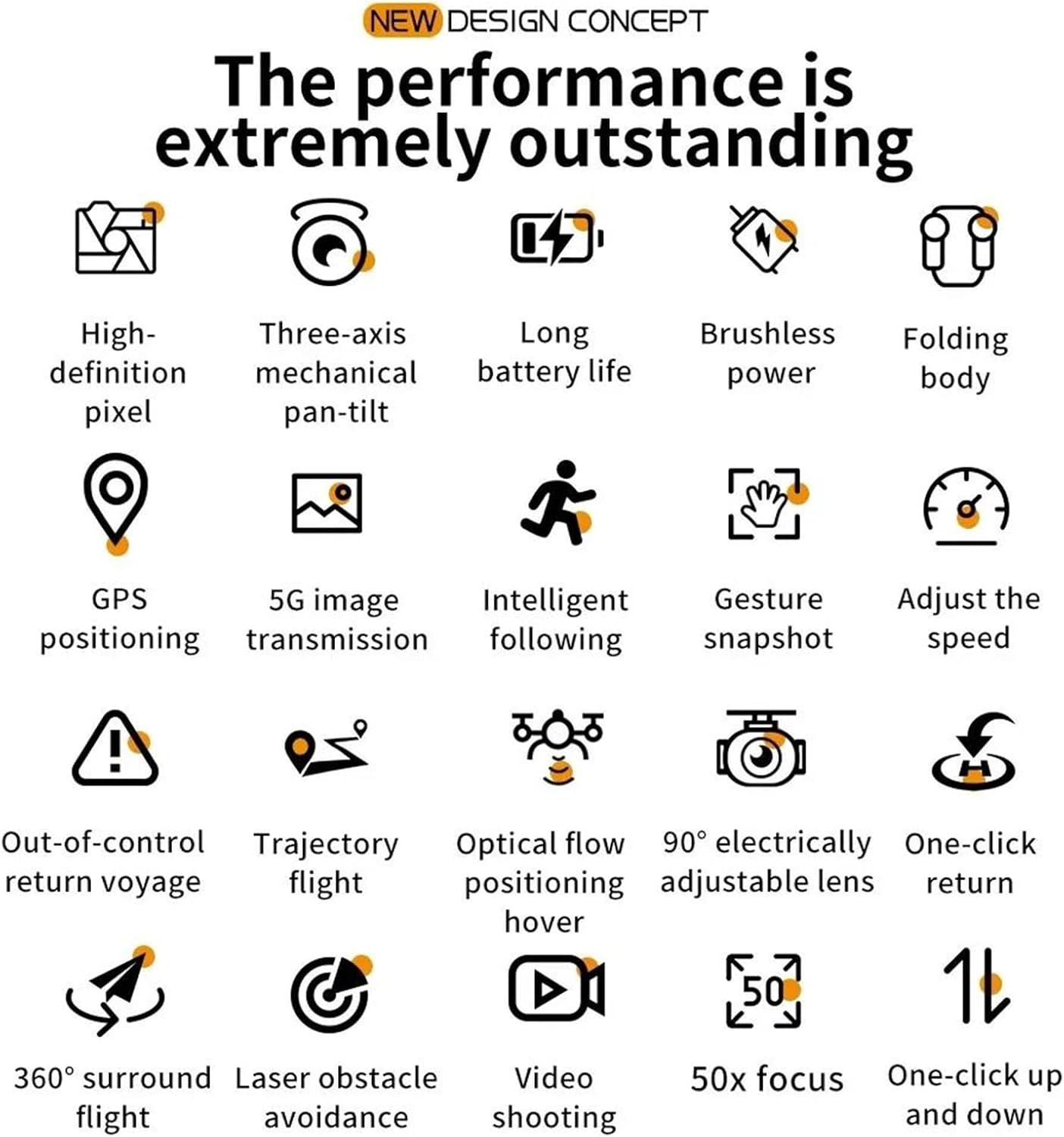
Figure 2.1: Visual representation of the drone's core features, including high-definition pixel, three-axis mechanical pan-tilt, long battery life, brushless power, folding body, GPS positioning, 5G image transmission, intelligent following, gesture snapshot, speed adjustment, out-of-control return, trajectory flight, optical flow positioning hover, 90° electrically adjustable lens, one-click return, 360° surround flight, laser obstacle avoidance, video shooting, 50x focus, and one-click up and down.
2.2 Садржај пакета
Молимо вас да проверите садржај пакета након распакивања. Ако неке ставке недостају или су оштећене, обратите се продавцу.
- FINOTI F204 RC Drone
- Даљински управљач
- Flight Battery (Single Battery variant)
- УСБ кабл за пуњење
- Резервни пропелери
- Шрафцигер
- Упутство за употребу
2.3 Компоненте дрона
Familiarize yourself with the drone's main parts:
- Foldable Arms with Motors and Propellers
- 4K HD Camera with 3-Axis Gimbal
- Laser Obstacle Avoidance Sensor
- ЛЕД индикаторска светла
- Одељак за батерије

Figure 2.2: The drone's three-axis mechanical stabilizing gimbal, capable of vertical, horizontal, and overhead shooting, with examples of 45° frontal, side 65°, and 110° vertical camera angles.
2.4 Компоненте даљинског управљача
The remote controller is your primary interface for controlling the drone. Refer to the diagram below for button functions.
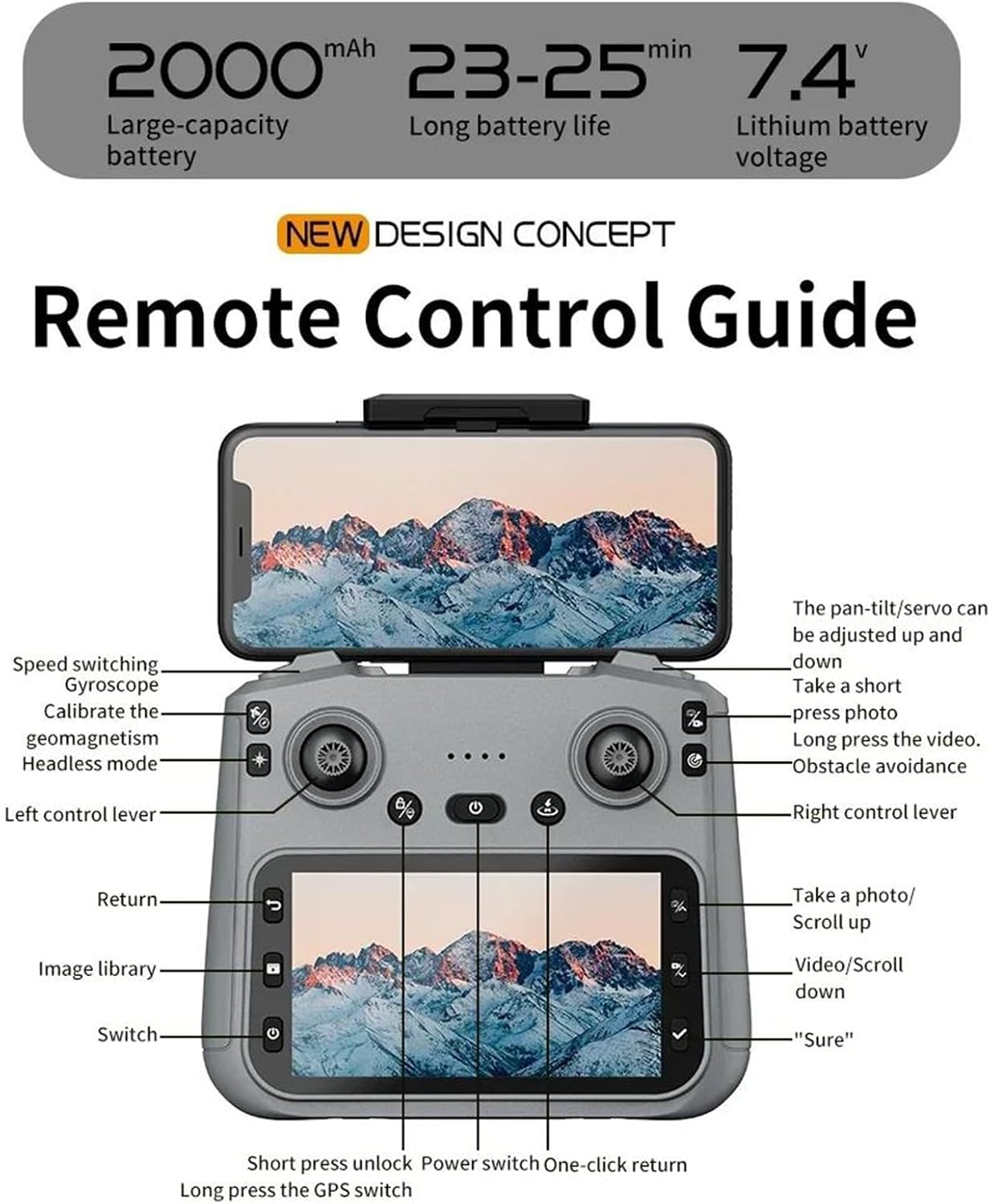
Figure 2.3: Remote Control Guide. Key controls include: Speed switching, Gyroscope, Calibrate geomagnetism, Headless mode, Left control lever, Return, Image library, Switch, Short press unlock, Power switch, One-click return, Long press GPS switch, Pan-tilt/servo adjustment, Take a short press photo, Long press video, Obstacle avoidance, Right control lever, Take a photo/Scroll up, Video/Scroll down, and 'Sure' button.
3. Водич за подешавање
3.1 Charging the Flight Battery
- Уклоните батерију за лет из дрона.
- Повежите батерију са приложеним УСБ каблом за пуњење.
- Plug the USB cable into a 5V/2A USB power adapter (not included).
- The charging indicator on the battery will show its status (e.g., red for charging, green for fully charged).
- Charging typically takes 120-150 minutes. Do not leave batteries unattended while charging.
3.2 Инсталирање пропелера
Ensure propellers are installed correctly according to their rotation direction (A and B). Match the propellers to the corresponding motor arms.
- Unfold the drone arms.
- Attach the propellers to the motor shafts, ensuring a secure fit. Use the provided screwdriver if necessary.
3.3 Припрема даљинског управљача
- Install 3x AA batteries (not included) into the remote controller.
- Extend the phone holder on the remote controller and securely mount your smartphone.
3.4 Downloading and Connecting the App
- Scan the QR code in the manual or search for the designated drone app (e.g., 'FINOTI Drone' or similar, check packaging) in your smartphone's app store.
- Инсталирајте апликацију.
- Укључите дрон и даљински управљач.
- On your smartphone, go to Wi-Fi settings and connect to the drone's Wi-Fi network (e.g., 'FINOTI-F204-XXXX').
- Open the drone app. The live video feed should appear, indicating a successful connection.
4. Операција лета
4.1 Контролна листа пре лета
- Ensure drone battery and remote controller batteries are fully charged.
- Propellers are correctly installed and free from damage.
- Choose an open area free from obstacles, people, and electromagnetic interference.
- Check weather conditions; avoid flying in strong winds (above 10 KM/H) or rain.
- Ensure the drone and app are connected and GPS signal is acquired (if applicable).

Figure 4.1: The drone utilizing GPS positioning for stable flight and to prevent loss of contact.
4.2 Упаривање дрона и контролера
- Поставите дрон на равну, равну површину.
- Укључите дрон.
- Укључите даљински управљач.
- Push the left joystick up then down. The drone's indicator lights will stop flashing and become solid, indicating successful pairing.
4.3 Полетање и слетање
- Полетање једним кључем: Press the one-key takeoff button on the remote controller (refer to Figure 2.3). The drone will automatically ascend to a safe height and hover.
- Ручно полетање: Push both joysticks down and outwards to unlock the motors. Then, slowly push the left joystick up to ascend.
- Слетање једним кључем: Притисните дугме за слетање једним тастером. Дрон ће се аутоматски спустити и слетети.
- Ручно слетање: Slowly pull the left joystick down to descend. Once landed, push both joysticks down and inwards to lock the motors.
4.4 Основне контроле лета
Refer to the Remote Control Guide (Figure 2.3) for joystick and button functions.
- Леви џојстик (гас/скретање): Горе/доле за висину, лево/десно за ротацију (скретање).
- Десни џојстик (нагиб/рот): Горе/доле за кретање напред/назад (нагиб), лево/десно за кретање лево/десно (котрљање).
- Пребацивање брзине: Adjust flight speed (e.g., low, medium, high) using the dedicated button.
4.5 Напредне функције лета
- ГПС режим: Provides stable hovering and precise positioning. Ensure sufficient GPS satellites are acquired before flight.
- Прати ме режим: The drone will automatically follow the remote controller or a designated subject (via app).
- Трајекторија лета: Draw a path on the app interface, and the drone will fly along the specified route.
- Laser Obstacle Avoidance: The drone uses its laser sensor to detect and avoid obstacles, enhancing flight safety. This feature is particularly useful in complex environments.

Figure 4.2: The drone equipped with a laser obstacle avoidance sensor to intelligently detect potential hazards, ensuring a safer flight experience.
- 360° Surround Flight: The drone can orbit a point of interest.
- Позиционирање оптичког тока: Assists with stable hovering indoors or in areas with weak GPS signals.
- One-Click Return: Press the return button, and the drone will automatically fly back to its takeoff point.
5. Рад камере
The F204 drone is equipped with a 4K professional HD camera for capturing aerial photos and videos.

Figure 5.1: The drone's anti-shake dual cameras, featuring a built-in Electronic Image Stabilization (EIS) chip for improved image quality. The image also contrasts self-stabilizing gimbal shooting effect with non-stabilized shooting.
5.1 Фотографисање
- Даљински управљач: Press the dedicated photo button (short press) on the remote controller (refer to Figure 2.3).
- Контрола апликације: Tap the photo icon in the drone app interface.
- Снимак геста: Perform the designated hand gesture (refer to app instructions) while facing the drone's camera to trigger a photo.
5.2 Снимање видео записа
- Даљински управљач: Press and hold the video button on the remote controller to start/stop recording.
- Контрола апликације: Tap the video icon in the drone app interface to start/stop recording.
5.3 Gimbal Adjustment
The drone features a 3-axis mechanical gimbal for camera stabilization. You can adjust the camera angle during flight:
- Use the pan-tilt/servo adjustment wheel/button on the remote controller (refer to Figure 2.3) to tilt the camera up or down.
- The camera supports 90° electrically adjustable lens movement.
6. Одржавање
6.1 Cleaning the Drone
- Always power off the drone and remove the battery before cleaning.
- Use a soft, dry cloth to wipe the drone's body.
- За објектив камере користите специјализовану крпу и раствор за чишћење објектива.
- Remove any debris from the motors and propellers.
6.2 Нега и складиштење батерије
- Store batteries in a cool, dry place, away from direct sunlight and heat sources.
- Немојте превише пунити или празнити батерије.
- За дуготрајно складиштење, напуните батерије до приближно 50-60% капацитета.
- Inspect batteries regularly for any signs of swelling or damage. Discontinue use if damaged.
6.3 Замена пропелера
- If a propeller is damaged, replace it immediately with a new one.
- Ensure you use the correct type of propeller (A or B) for the corresponding motor arm.
- Use the provided screwdriver to remove and install propellers.
КСНУМКС. Решавање проблема
Овај одељак се бави уобичајеним проблемима на које можете наићи.
| Проблем | Могући узрок | Решење |
|---|---|---|
| Дрон се не укључује | Батерија није напуњена или је неправилно инсталирана | Charge battery fully; ensure it is securely inserted. |
| Drone cannot pair with controller | Incorrect pairing sequence; low controller battery | Follow pairing steps (Section 4.2); replace controller batteries. |
| Нестабилан лет/Дрифтовање | Drone not calibrated; damaged propeller; strong wind | Calibrate gyroscope/geomagnetism (refer to Figure 2.3); replace damaged propellers; avoid flying in strong winds. |
| Нема преноса уживо у апликацији | Wi-Fi not connected; app not open; drone/phone too far | Ensure phone is connected to drone's Wi-Fi; restart app; keep drone and phone within range. |
| GPS функције не раде | Insufficient GPS signal; flying indoors | Fly in an open outdoor area; wait for sufficient GPS satellites to be acquired. |
8. Спецификације
| Феатуре | Спецификација |
|---|---|
| Модел | F204 (Model Number: 66655594-SINGLEBATTERY) |
| Бранд | FINOTI |
| Тип мотора | Мотор без четкица |
| Максимално време лета | 23-25 минута |
| Тежина дрона | 245г |
| Камера | 4K Professional HD Camera |
| Видео Ресолутион | 1080p HD Recording |
| Величина сензора | 1/1.28 инча |
| Гимбал | 3-Axis Mechanical Stabilizing Gimbal, 90° Electrically Adjustable Lens |
| Препрека препрека | Laser Barrier Avoidance |
| ГПС | Да |
| Ремоте Дистанце | До 1000 метара |
| Радна фреквенција | 2.4 GHz (Aircraft), 5G WiFi (Image Transmission) |
| Повезивање | Апликациони контролер, даљински управљач, Ви-Фи |
| Максимална полетна тежина | <1кг |
| Максимална брзина ветра | <10 КМ/х |
| Капацитет батерије | 2000mAh, 7.4V Lithium Battery |
9. Гаранција и подршка
Specific warranty information for the FINOTI F204 RC Drone is not provided in this manual. For details regarding warranty coverage, return policies, or technical support, please refer to the product packaging, the retailer's website, or contact FINOTI customer service directly.
Always ensure you purchase from authorized sellers to guarantee valid warranty and support services.