
1. Увод
The Reflexion HIF2082DAB is a versatile retro-style music system designed to combine nostalgic aesthetics with modern audio technology. This unit integrates a turntable, CD player, DAB+/FM radio, USB playback and recording capabilities, and Bluetooth 5.3 connectivity. It is equipped with external speakers to deliver clear and powerful sound, making it a comprehensive audio solution for various environments.
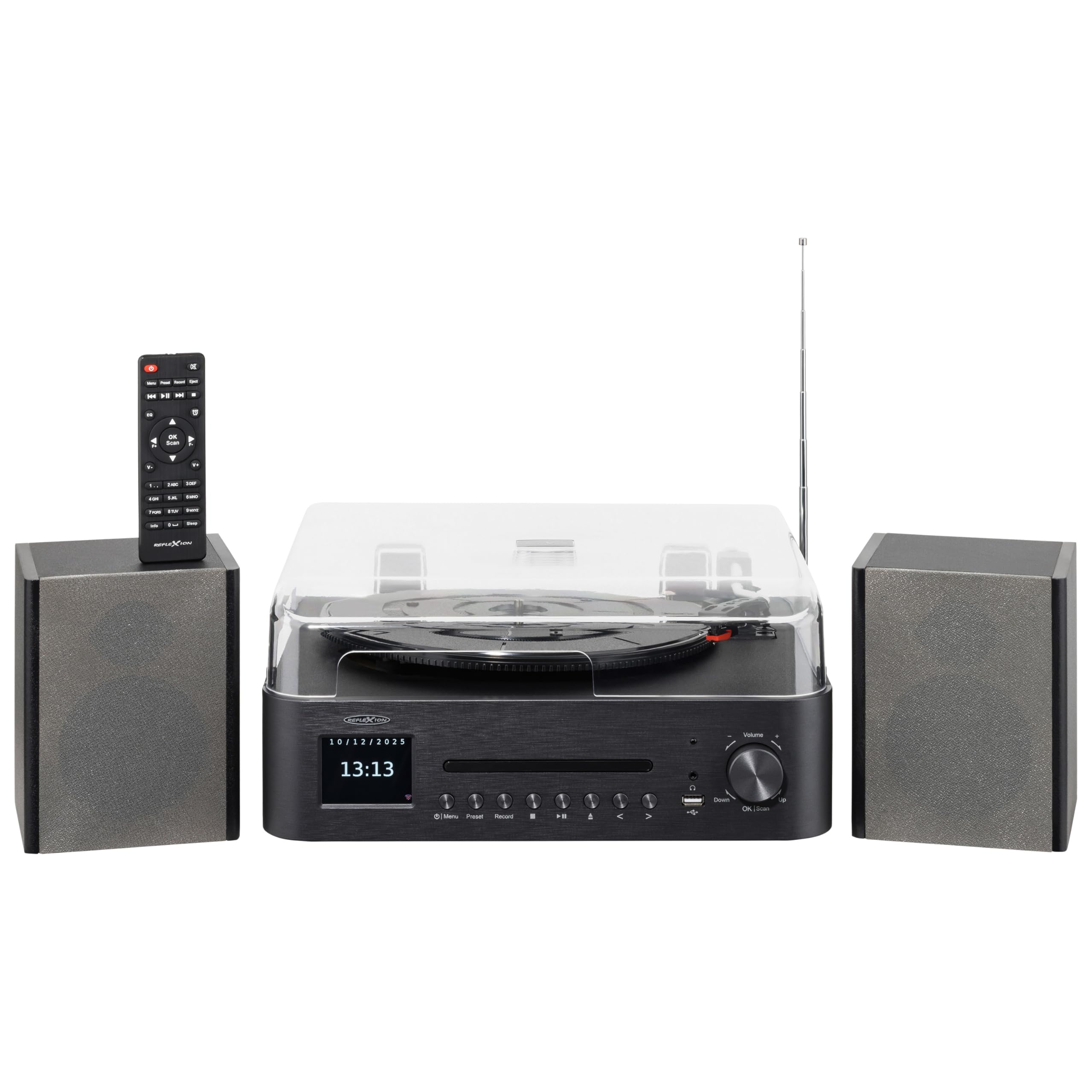
Image 1.1: The Reflexion HIF2082DAB Retro Turntable with included external speakers.
2. Безбедносна упутства
- Пажљиво прочитајте сва упутства пре употребе уређаја.
- Сачувајте упутство за будућу употребу.
- Не излажите уређај киши или влази како бисте спречили пожар или струјни удар.
- Обезбедите одговарајућу вентилацију; не блокирајте ниједан вентилациони отвор.
- Поставите јединицу на стабилну, равну површину.
- Користите само додатке/прибор које је навео произвођач.
- Искључите јединицу из струје током олуја са грмљавином или када се не користи дуже време.
- Све сервисирање препустите квалификованом сервисном особљу.
3. Садржај пакета
Молимо вас да проверите да ли су све ставке наведене у наставку укључене у ваш пакет:
- 1 x Reflexion HIF2082DAB Main Unit
- 2 x Stereo Speakers
- 1 к кабл за напајање
- 1 x Remote Control (2 AAA batteries not included)
- 1 к Упутство за употребу

Image 3.1: Included remote control and power cable.
4. Производ је готовview
4.1 Предња плоча и контроле
The front panel features the main display, control buttons for various functions, and the CD tray. The volume knob and USB port are also located here for easy access.
4.2 Top Panel (Turntable)
The top panel houses the semi-automatic turntable, including the platter, tonearm, and stylus. A protective dust cover is also provided.

Слика 4.1: Крупни план view of the turntable with auto-stop and tonearm return features highlighted.
4.3 Прикључци задње плоче
The rear panel includes connections for the external speakers, Line Out for connecting to an external amplifier, and Aux In for connecting external audio sources.

Image 4.2: Rear panel showing speaker terminals, Line Out, Aux In, and power input.
5. Подешавање
5.1 Распакивање и постављање
- Пажљиво уклоните све компоненте из паковања.
- Place the main unit and speakers on a stable, level surface, ensuring adequate ventilation around the unit.
- Држите уређај даље од директне сунчеве светлости, извора топлоте и влаге.
5.2 Повезивање звучника
- Connect the included stereo speakers to the speaker terminals on the rear of the main unit. Ensure correct polarity (red to red, black to black).
5.3 Прикључак за напајање
- Insert the power cable into the AC input on the rear of the unit.
- Plug the other end of the power cable into a suitable wall outlet (AC 100-240V).
5.4 Почетно подешавање
- Upon first power-on, the unit may prompt you to select a language and set the time/date. Follow the on-screen instructions using the navigation buttons and OK/Scan button.
6. Упутство за употребу
6.1 Руковање грамофоном
- Избор брзине: Choose the appropriate speed (33, 45, or 78 RPM) using the speed selector switch.
- Пусти плочу: Place a record on the platter. Remove the stylus protector. Gently lift the tonearm using the cueing lever and position it over the desired track. Lower the tonearm slowly onto the record.
- Функција аутоматског заустављања: The turntable features an auto-stop function that automatically stops the platter when a record finishes playing. The tonearm will also return to its rest position.
6.2 ЦД плејер
- Press the CD mode button.
- Press the Eject button to open the CD tray. Place a CD (audio CD or MP3 CD) with the label side up.
- Press Eject again to close the tray. Playback will begin automatically.
- Use the Skip/Search buttons to navigate tracks and Play/Pause for playback control.
6.3 DAB+/FM Radio
- Press the DAB+ or FM mode button.
- Аутоматско скенирање: For DAB+, the unit will automatically scan for available stations. For FM, press and hold the OK/Scan button to perform an auto scan.
- Ручно подешавање: Use the navigation buttons to manually tune to a frequency.
- Пресетс: Save your favorite stations by pressing and holding the Preset button, then selecting a preset number. Recall saved stations by pressing the Preset button and selecting the desired number.
6.4 Bluetooth повезивање
- Press the Bluetooth mode button. The display will show "Pairing" or similar.
- Омогућите Блутут на свом мобилном уређају (паметном телефону, таблету итд.).
- Тражи "Reflexion HIF2082DAB" in your device's Bluetooth list and select it to pair.
- Once paired, you can stream audio from your device to the HIF2082DAB.
6.5 USB Playback and Recording
- УСБ репродукција: Insert a USB flash drive (up to 32GB, FAT format) containing MP3 files into the USB port. Press the USB mode button. The unit will automatically detect and play MP3 files.
- USB Recording (from Vinyl): While playing a vinyl record, press the Record button. The unit will begin recording the audio directly to the connected USB drive as an MP3 file. Press Record again to stop.
6.6 Аларм и тајмер за спавање
- Аларм: The unit features two adjustable alarms. Access the alarm settings through the menu to set wake-up times and desired audio sources (e.g., radio, CD).
- Мерач спавања: Set the sleep timer (up to 90 minutes) to automatically turn off the unit after a specified duration. This is useful for falling asleep to music.
7. Одржавање
7.1 Чишћење јединице
- Обришите уређај меком, сувом крпом. Не користите абразивна средства за чишћење или раствараче.
- For the dust cover, use a soft, slightly damp крпу, а затим темељито осушите.
7.2 Нега оловке
- Regularly clean the stylus using a soft brush, brushing gently from back to front.
- Replace the stylus when sound quality deteriorates or after approximately 300-500 hours of use to prevent damage to your records.
КСНУМКС. Решавање проблема
| Проблем | Могући узрок | Решење |
|---|---|---|
| Нема струје | Кабл за напајање није повезан; утичница је неисправна | Ensure power cable is securely connected; Try a different outlet |
| Нема звука | Volume too low; Speakers not connected; Incorrect input mode | Increase volume; Check speaker connections; Select correct source mode |
| Грамофон се не окреће | Speed selector incorrect; Auto-stop engaged | Check speed setting; Ensure tonearm is over the record |
| Лош радио пријем | Антена није извучена; Слаб сигнал | Fully extend the telescopic antenna; Reposition the unit for better reception |
| Блуетоотх упаривање није успело | Уређај је предалеко; Блутут није омогућен на уређају; Уређај није у режиму упаривања | Move device closer; Enable Bluetooth; Ensure unit is in pairing mode |
9. Спецификације
- Бренд: Reflexion
- Модел: HIF2082DAB
- Боја: Црно
- Димензије (Д к Ш к В): КСНУМКС к КСНУМКС к КСНУМКС цм (КСНУМКС к КСНУМКС к КСНУМКС инча)
- Тежина производа: 6.5 килограма (14.33 лбс)
- Блуетоотх технологија: Да
- Број звучника: 2 (External Stereo Speakers)
- Max Speaker Power: 2 x 160 W (Peak Power)
- Брзине грамофона: 33, 45, 78 о/мин
- Приказ: 2.8" TFT екран у боји
- УСБ компатибилност: Up to 32GB, FAT format (for MP3 playback and recording)
- Радио: ДАБ+, ФМ
- Додатне карактеристике: CD Player (MP3/Audiobook compatible), USB Recording, Remote Control, Dual Alarms, Sleep Timer, Auto-Stop with Tonearm Return, Line Out, Aux In.
10. Гаранција и подршка
For warranty information and customer support, please refer to the warranty card included in your package or contact your local Reflexion dealer or service center. Keep your proof of purchase for any warranty claims.
For further assistance, you may also visit the official Reflexion website or consult the contact information provided in the original product documentation.