
1. Увод
The SONOFF AirGuard CO2 Smart Indoor Air Quality Monitor (Model: SAWF-08P) is designed to provide real-time monitoring of carbon dioxide (CO2) levels, temperature, and humidity in your indoor environment. This device supports Matter compatibility, allowing seamless integration with various smart home platforms. It features a high-accuracy NDIR sensor for reliable readings and a triple-alert system to notify you of significant changes in air quality. This manual provides detailed instructions for setup, operation, and maintenance of your AirGuard CO2 monitor.
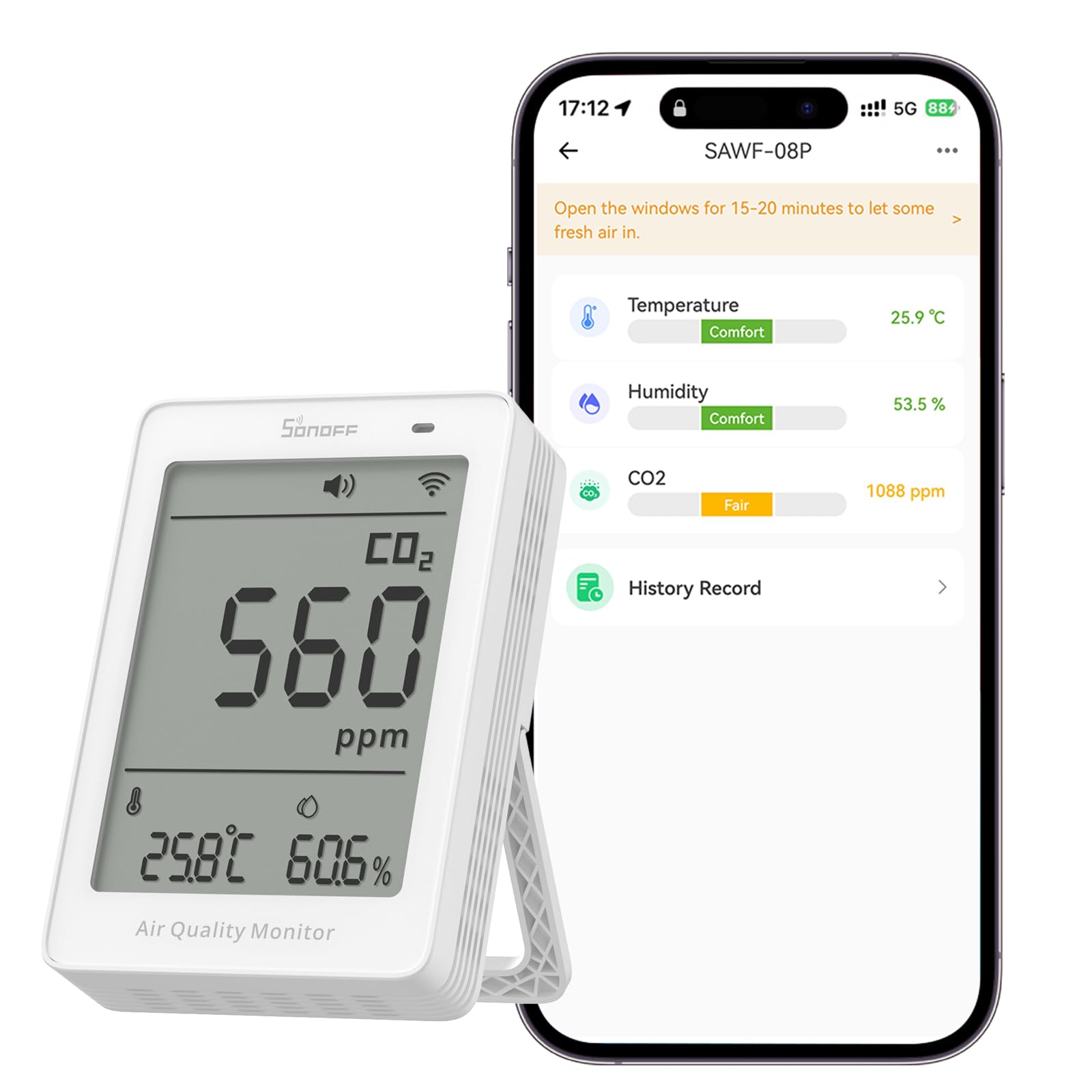
Image: The SONOFF AirGuard CO2 monitor showing its display with CO2, temperature, and humidity readings.
2. Шта је у кутији
Након отварања пакета, уверите се да су присутни сви следећи елементи:
- SONOFF AirGuard CO2 Monitor (SAWF-08P)
- УСБ-Ц кабл
- Упутство за употребу (Кратки водич)
Note: A USB-A power adapter is required but not included in the package.

Image: The SONOFF AirGuard CO2 monitor, USB-C cable, and user manual laid out from the box.
Видео за распакивање
Video: A detailed unboxing of the SONOFF AirGuard CO2 monitor, showing all included components and initial handling.
3. Производ је готовview
Кључне карактеристике
- Компатибилност материје: Seamlessly integrates with smart home platforms like Apple Home, Amazon Alexa, Google Home, SmartThings, and Home Assistant.
- Висока тачност и брз одзив: Equipped with a built-in NDIR sensor, providing ±(50ppm + 5%) accuracy for CO2 (400–5000ppm) with data updates every 5 seconds.
- All-in-One Air Quality Display: Monitors and displays CO2, temperature, and humidity simultaneously on a 3.73-inch screen.
- Triple-Alert System: Notifies users via sound alarm, multi-color LED indicator, and app alerts when CO2, temperature, or humidity thresholds are exceeded.
- Year-Long Data Tracking & Export: Access up to 12 months of historical data with graphical charts in the app, allowing for deeper analysis and informed decisions.
- Контрола гласом: Check CO2 levels using simple voice commands through Siri or Google Assistant.

Слика: Прекоview of the monitor's features including Matter compatibility, 3-in-1 monitoring, data logging, and alert systems.

Слика: Интерна view of the monitor emphasizing the NDIR sensor for high accuracy and fast response.

Image: The monitor's 3.73-inch display showing real-time CO2, temperature, and humidity readings.

Image: Visual representation of the three customizable alert methods: sound, LED indicator, and app notifications.

Image: A table summarizing the feature compatibility across different smart home platforms.
4. Подешавање
4.1 Укључивање
- Connect the provided USB-C cable to the port on the back of the AirGuard CO2 monitor.
- Plug the other end of the USB-C cable into a compatible USB-A power adapter (not included).
- The device will power on automatically and begin displaying readings.
4.2 App Pairing and Matter Integration
To integrate your AirGuard CO2 monitor with your smart home system, follow these steps:
- Уверите се да је ваш паметни телефон повезан на Wi-Fi мрежу од 2.4 GHz.
- Download and open the eWeLink app (or your preferred Matter-compatible smart home app like Apple Home, Google Home, Alexa, or SmartThings).
- On the AirGuard CO2 monitor, long-press the Wi-Fi button (labeled with a Wi-Fi icon) until the icon starts flashing, indicating pairing mode.
- In your smart home app, select the option to add a new device. You may need to scan the QR code located on the back of the AirGuard CO2 monitor.
- Follow the on-screen prompts in the app to complete the pairing process and connect the device to your Wi-Fi network.
How-to Video for Setup
Video: A step-by-step guide on how to set up and pair the SONOFF AirGuard CO2 monitor with your smart home system.
5. Упутство за употребу
5.1 Reading Values
The large display on the front of the AirGuard CO2 monitor shows the current CO2 concentration in parts per million (ppm), temperature in Celsius or Fahrenheit, and relative humidity percentage. The multi-color LED indicator on the top provides a quick visual cue of the air quality status (e.g., green for good, yellow for moderate, red for poor).
5.2 Menu Mode Operation (Local Control)
If you prefer not to use the app, or for quick adjustments, you can operate the device directly using the buttons on the top:
- Entering Menu Mode: Short-press the Setting button (middle button) until the "temperature unit" starts flashing. This indicates you have entered Menu Mode.
- Switching Editable Parameters: While in Menu Mode, short-press the Setting button to cycle through the available parameters for adjustment. The currently selected parameter will flash.
- Преклопна јединица температуре: When the temperature unit is flashing, short-press the "+" or "-" buttons to switch between Celsius (°C) and Fahrenheit (°F).
- Калибрација температуре: When the temperature value is flashing, short-press the "+" or "-" buttons to manually calibrate the temperature.
- Калибрација влажности: When the humidity value is flashing, short-press the "+" or "-" buttons to manually calibrate the humidity.
- Exiting Menu Mode: If there is no button operation for 3 seconds, the device will automatically save the current settings and exit Menu Mode. Alternatively, you can short-press the Setting button again after cycling through all available parameters to exit.
5.3 Подешавање аларма
The AirGuard CO2 monitor features an audible buzzer and an indicator light for alerts:
- Прекидач зујалице: When the buzzer is off, short-press the buzzer button (rightmost button) to turn it on or off. If the buzzer goes off, short-press once to silence it for 30 minutes. Short-press again to turn it off completely.
- Indicator Light Switch: Long-press the buzzer button for 3 seconds to turn the indicator light on or off.
6. Спецификације
| Феатуре | Детаљ |
|---|---|
| Модел | SAWF-08P |
| Димензије производа | 2.76 к 4.06 к 1.02 инча |
| Тежина артикла | 6.7 унци |
| Домет детекције CO2 | 400–5000 ппм |
| ЦО2 тачност | ±(50ppm + 5%) |
| Опсег детекције температуре | 0–50°Ц / 32–122°Ф |
| Прецизност температуре | ±0.5°C; ±1°F |
| Опсег детекције влажности | 5–95% РХ, без кондензације |
| Прецизност влажности | ±3% |
| Бежична веза | ИЕЕЕ 802.11 б / г / н 2.4 ГХз |
| Инпут | 5V === 1A (Type-C) |
| Компатибилност паметног дома | Matter, Apple Home, Amazon Alexa, Google Home, SmartThings, Home Assistant |
| Батерије су потребне | No (Powered via USB-C) |

Image: Detailed technical specifications and physical dimensions of the AirGuard CO2 monitor.
7. Одржавање
- Чишћење: Користите меку, суву крпу за чишћење уређаја. Не користите течна средства за чишћење или аеросоле.
- Пласман: Place the monitor in an area with good air circulation, away from direct sunlight, heat sources, or areas with high humidity to ensure accurate readings. Avoid placing it near vents or windows where drafts might affect readings.
- Ажурирања фирмвера: Regularly check the eWeLink app for firmware updates to ensure optimal performance and access to new features.
КСНУМКС. Решавање проблема
- Нетачна очитавања:
- Ensure the device is placed in an appropriate location, away from direct air currents, heat sources, or areas with concentrated CO2 (e.g., directly above a person's breathing zone).
- Perform a manual calibration for temperature and humidity via the Menu Mode if you suspect inaccuracies. For CO2, expose the device to fresh outdoor air (around 400ppm) for a period to allow for self-calibration.
- Уређај се не укључује:
- Verify the USB-C cable is securely connected to both the monitor and the power adapter.
- Ensure the USB-A power adapter is functional and providing 5V/1A output.
- Проблеми са Ви-Фи везом:
- Confirm your Wi-Fi network is 2.4GHz. The device does not support 5GHz networks.
- Уверите се да је уређај у домету вашег Wi-Fi рутера.
- Re-enter pairing mode on the device and attempt to pair again through the app.
- Апликација не приказује податке:
- Check if the device is connected to Wi-Fi (Wi-Fi icon on display should be solid).
- Уверите се да ваш паметни телефон има активну интернет везу.
- Restart the app or the device.
9. Гаранција и подршка
The SONOFF AirGuard CO2 Smart Indoor Air Quality Monitor comes with a Две године гаранције. For any technical assistance, product inquiries, or warranty claims, please contact SONOFF customer support:
- Е -пошта за корисничку подршку: суппорт@итеад.цц
- Политика враћања: Политика повраћаја/замене у року од 30 дана преко Амазона.
10. Безбедносне информације
- Не излажите уређај екстремним температурама, директној сунчевој светлости или високој влажности.
- Држите уређај даље од воде и других течности.
- Не покушавајте сами да растављате или поправљате уређај. За сервис се обратите квалификованом особљу.
- Use only the specified power input (5V/1A) to avoid damage.
- Овај уређај је намењен само за унутрашњу употребу.