
1. Производ је готовview
The BN-LINK WiFi Smart Plug (Model CP-J31WT) allows you to control your home appliances remotely, set schedules, and use voice commands for a smarter, more convenient lifestyle. This compact plug is designed for ease of use and integrates seamlessly with popular smart home platforms.

Image: BN-LINK WiFi Smart Plug overview with icons for WiFi, timer, app control, voice control, remote operation, and group control.
Кључне карактеристике:
- даљински управљач: Turn appliances ON/OFF from anywhere using your smartphone.
- Контрола гласом: Компатибилно са Алексом и Гугл Хоумом за рад без употребе руку.
- Функција тајмера: Schedule appliances to turn ON/OFF automatically, saving energy and preventing overcharging.
- Компактан дизајн: Small size ensures it doesn't block adjacent outlets.
- Сигурносне карактеристике: Equipped with high-temperature flame-retardant material, overload protection, electric shock prevention, and anti-tracking design.

Image: Diagram highlighting the smart plug's features: LED indicator, ON/OFF button, WiFi connection, timer function, remote operation, and voice control.
2. Безбедносне информације
Молимо вас да прочитате и разумете сва безбедносна упутства пре употребе овог производа. Непоштовање ових упутстава може довести до струјног удара, пожара или озбиљних повреда.
- Немојте растављати или модификовати уређај.
- Не користити у влажним срединама или близу воде.
- Уверите се да је утикач потпуно уметнут у утичницу.
- Do not exceed the maximum load rating of 15A / 1500W.
- Чувати ван домашаја деце.
- Unplug the device from the outlet before cleaning.
- Овај производ је дизајниран само за унутрашњу употребу.
Уграђене сигурносне карактеристике:
- High-Temperature Flame-Retardant Material: Reduces fire risk.
- Заштита од преоптерећења: Аутоматски искључује напајање како би спречио оштећења услед прекомерне струје.
- Electric Shock Prevention Design: Enhanced safety against accidental contact.
- Anti-Tracking Design: Prevents dust accumulation and potential short circuits.
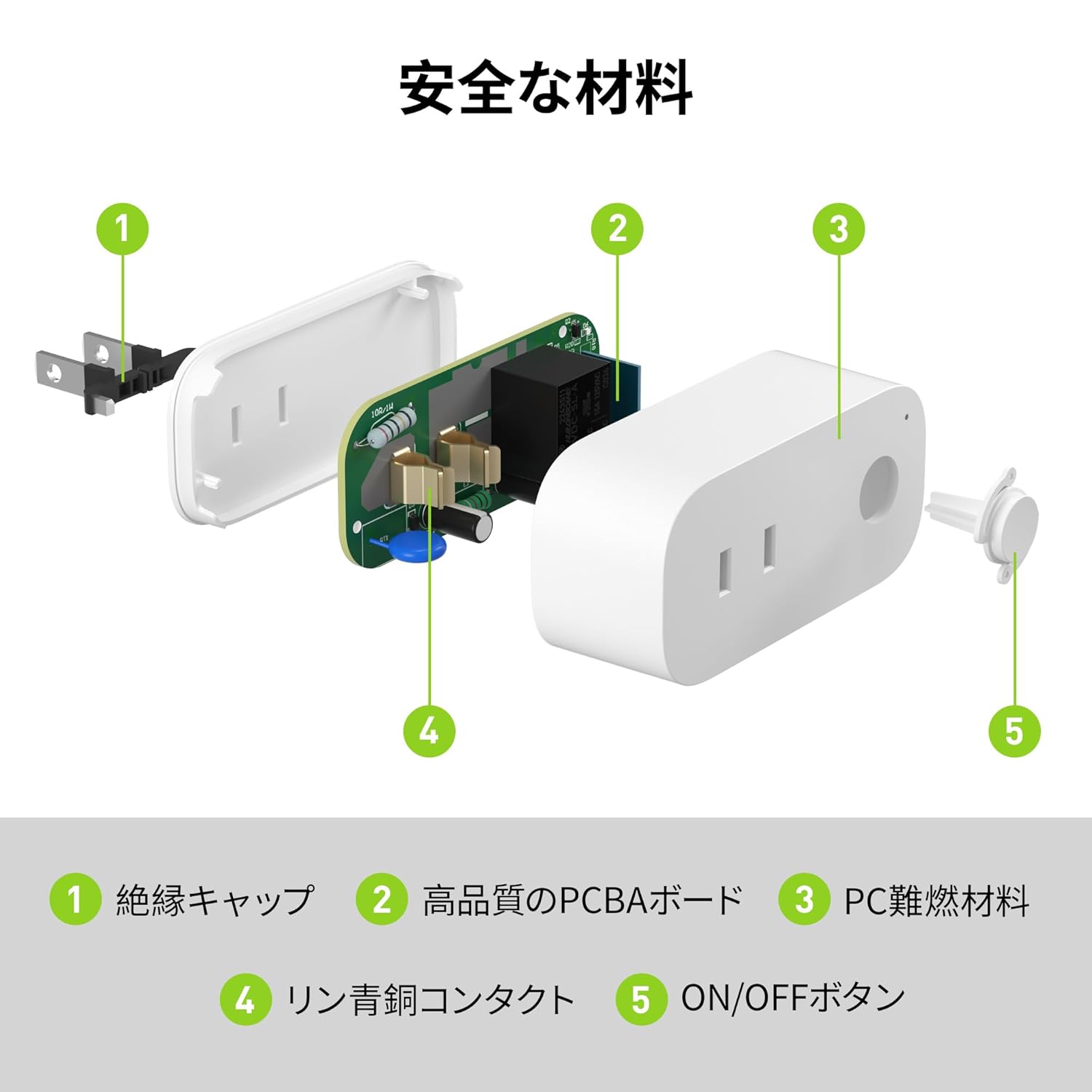
Image: Internal components of the smart plug, highlighting safety features such as the insulation cap, high-quality PCBA board, PC flame-retardant material, phosphor bronze contacts, and the ON/OFF button.
3. Упутства за подешавање
3.1. Почетно подешавање
- Unpack the BN-LINK Smart Plug from its packaging.
- Plug the smart plug into a standard wall outlet.
- Observe the indicator light on the plug. It should start blinking. If it does not blink, press and hold the ON/OFF button for approximately 5 seconds until it starts blinking rapidly.
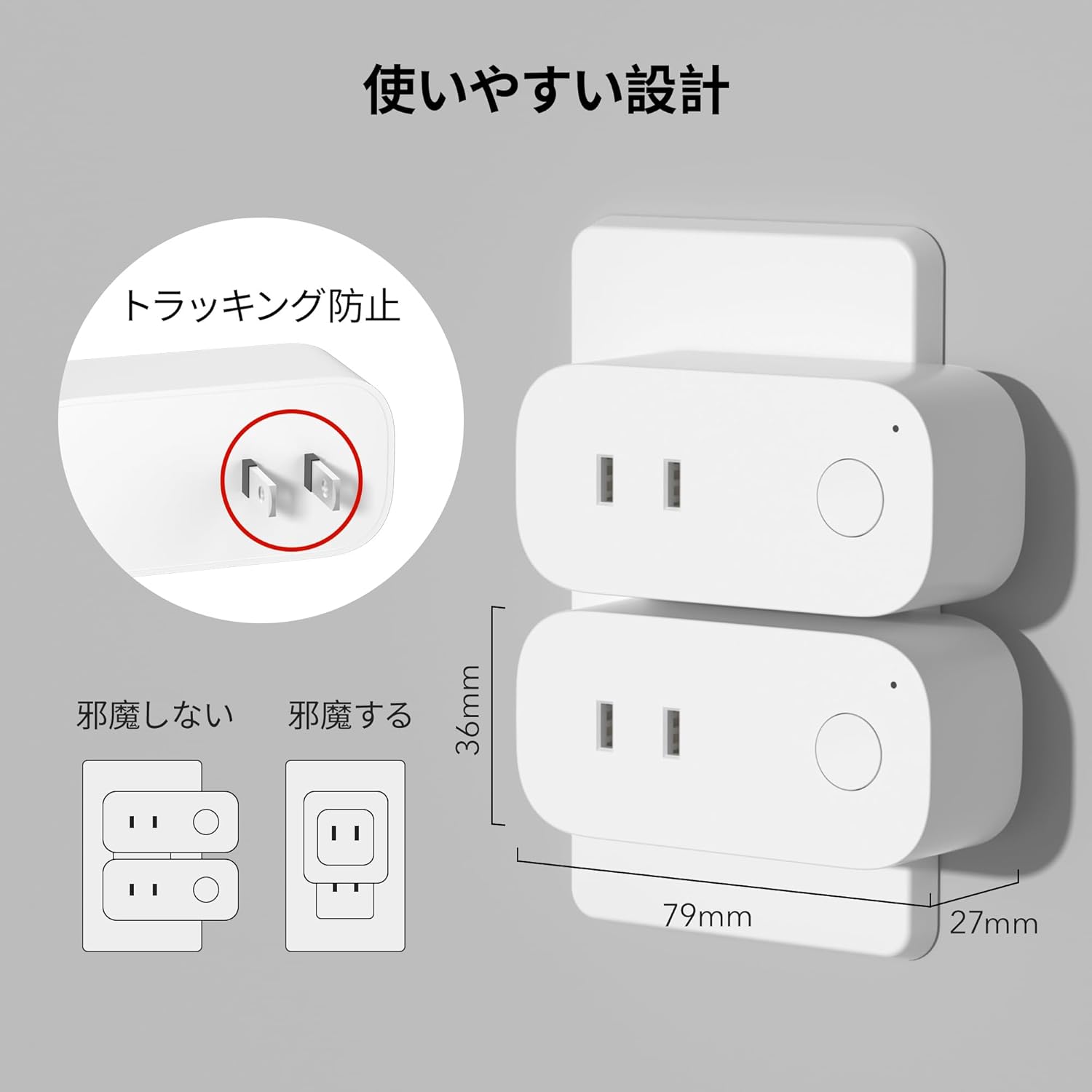
Image: The compact design of the smart plug, illustrating how it fits into an outlet without obstructing the adjacent one. Dimensions are also shown.
3.2. Инсталација апликације и Wi-Fi веза
To utilize all smart features, you need to install the BN-LINK app and connect the plug to your 2.4GHz Wi-Fi network. This device only supports 2.4GHz Wi-Fi.
- Download the "BN-LINK" app from your smartphone's app store (Google Play Store for Android or Apple App Store for iOS).
- Отворите апликацију и направите налог или се пријавите ако га већ имате.
- Додирните икону „+“ или „Додај уређај“ да бисте започели процес упаривања.
- Select "Smart Plug" from the device list.
- Follow the on-screen instructions to connect the smart plug to your 2.4GHz Wi-Fi network. Ensure your phone is also connected to the 2.4GHz network during setup.
- Once connected, you can rename your smart plug for easy identification (e.g., "Living Room Lamp," "Coffee Maker").
Video: This video demonstrates the process of connecting the smart plug to the BN-LINK app and your Wi-Fi network, including resetting the device and confirming indicator light status.
Video: This video provides a step-by-step guide on setting up the ePlugBT and connecting it to Wi-Fi, which is similar to the BN-LINK Smart Plug setup process.
4. Упутство за употребу
4.1. Даљинско управљање путем апликације
Once connected to Wi-Fi, you can control your appliances from anywhere with an internet connection.
- Open the BN-LINK app.
- Tap on the device name you wish to control.
- Use the ON/OFF toggle button within the app to switch your appliance on or off.

Image: Remote operation of the smart plug via the BN-LINK app on a smartphone. The image shows the app's ON/OFF control for a device connected to the smart plug, with a WiFi router in the background.

Image: A user controlling a smart plug remotely with their smartphone in a modern kitchen environment.
4.2. Управљање гласом
Integrate your smart plug with Amazon Alexa or Google Home for convenient voice commands.
- Ensure your smart plug is successfully connected to the BN-LINK app and your Wi-Fi network.
- Отворите апликацију Alexa или Google Home.
- Follow the app's instructions to add a new device or skill, searching for "BN-LINK" or "Smart Plug."
- Када се повежете, можете користити гласовне команде као што су:
- "Alexa, turn on [device name]."
- "Hey Google, turn off [device name]."

Image: A user in a living room controlling a lamp connected to a smart plug using voice commands with an Alexa device. The image also indicates Google Home compatibility.

Image: A smart plug connected to an outlet, being controlled by a Google Home device. A person is shown in bed, illustrating hands-free operation.
4.3. Timer Function and Scheduling
Set custom schedules to automate your appliances and manage energy consumption.
- In the BN-LINK app, select your smart plug.
- Идите до одељка „Тајмер“ или „Распоред“.
- Set specific ON/OFF times for your appliances. You can create daily, weekly, or one-time schedules.
- Use the countdown timer for temporary automation, such as turning off a charger after a set period to prevent overcharging.

Image: The BN-LINK app displaying timer and scheduling features. Examples show a coffee maker turning on at 7:15 AM and a lamp turning off at 10:00 PM, demonstrating automated control.

Image: A smart plug connected to a microwave, with the app interface showing a timer set to turn the device ON at 7:00.
5. Одржавање
To ensure optimal performance and longevity of your BN-LINK Smart Plug, follow these maintenance guidelines:
- Чишћење: Disconnect the smart plug from the power outlet before cleaning. Use a dry, soft cloth to wipe the surface. Do not use liquid cleaners or sprays.
- Складиштење: If not in use for an extended period, unplug the device and store it in a cool, dry place away from direct sunlight and moisture.
- инспекција: Periodically check the plug and outlet for any signs of damage, wear, or overheating. If any issues are found, discontinue use and contact customer support.
КСНУМКС. Решавање проблема
If you encounter issues with your BN-LINK Smart Plug, refer to the following common problems and solutions:
| Проблем | Могући узрок | Решење |
|---|---|---|
| Уређај не може да се повеже са Wi-Fi мрежом. | Incorrect Wi-Fi password, 5GHz Wi-Fi network, weak signal, or device not in pairing mode. |
|
| Даљински управљач не ради. | No internet connection on phone or smart plug, or app issue. |
|
| Гласовна контрола не реагује. | Incorrect device name, smart assistant not linked, or internet connection issue. |
|
| Plug is unresponsive. | Повер оуtage, device malfunction, or firmware issue. |
|
7. Спецификације
| Феатуре | Детаљ |
|---|---|
| Бранд | БН-ЛИНК |
| Број модела | CP-J31WT |
| Тежина артикла | 70 г |
| Димензије пакета | 8.2 к 4.7 к 4.3 цм |
| Величина | 1 Пацк |
| Тип прекидача | 1-ваи |
| Укључене компоненте | Smart Plug body, Instruction Manual |
| Batteries Used | бр |
| Оперативни режим | ОН-ОФФ |
| Цуррент Ратинг | 15 Amps |
| Оператинг Волtage | 100 Волтс |
| Тип конектора | Плуг-ин |
| Материјал | Пластика |
| Цирцуит Типе | 1-ваи |
8. Гаранција и подршка
BN-LINK products are designed for quality and reliability. For warranty information and customer support, please refer to the contact details provided in the product packaging or visit the official BN-LINK webсајту.
For further assistance, you may also contact the seller directly through the Amazon platform.
Онлине ресурси:
- Official BN-LINK Webсајт: ввв.бн-линк.цом (Напомена: Ово је резервисано место URL, replace with actual if available)
- Страница производа на Амазону: Amazon.co.jp Product Page