
1. Увод
Хвала вам на куповиниasing the ELEPHAS BL128MINI Mini Projector. This manual provides essential information for setting up, operating, and maintaining your projector. Please read it thoroughly before use to ensure optimal performance and longevity of the device.
2. Садржај пакета
Проверите да ли су све ставке наведене у наставку укључене у ваш пакет:
- 1 x ELEPHAS BL128MINI Projector
- 1 к даљински управљач
- 1 x Упутство за употребу (овај документ)
- 1 к ХДМИ кабл
- 1 x Detachable Tripod
3. Производ је готовview
3.1 Кључне карактеристике
- 1080П Фулл ХД резолуција: Supports 1920 x 1080 resolution for clear images.
- 24-bit True Color: Пружа живописне и прецизне боје.
- Пројекција на великом екрану: Capable of projecting up to a 200-inch screen.
- Detachable Tripod: Provides stable placement and flexible positioning.
- Built-in HIFI Speaker: Offers integrated audio output.
- Више опција повезивања: Includes USB, HDMI, AV, and Audio ports.

Image 3.1: The ELEPHAS BL128MINI Projector offers 1080P Full HD resolution with 24-bit true color, an 8000:1 contrast ratio, and enhanced brightness for a vivid viewинг искуство.
3.2 Projector Ports and Controls
Familiarize yourself with the various ports and controls on your projector for proper connection and operation.

Image 3.2: Rear panel of the ELEPHAS BL128MINI Projector, highlighting DC power input, USB ports, HDMI port, AV port, and audio output. Compatible devices include Xbox, TV Stick, PC, Smartphone, USB drives, speakers, and headphones.
4. Подешавање
4.1 Прикључак за напајање
- Прикључите адаптер за напајање на DC IN порт на пројектору.
- Укључите адаптер за напајање у зидну утичницу.
4.2 Tripod Installation
The included detachable tripod allows for stable placement on various surfaces.
- Locate the tripod mounting screw hole on the bottom of the projector.
- Screw the tripod securely into the mounting hole.
- Adjust the tripod legs to achieve the desired height and angle for projection.

Image 4.2: The detachable tripod provides stability for the projector, whether placed on a desktop or uneven outdoor surfaces.
4.3 Постављање и пројекциона удаљеност
Position the projector on a flat, stable surface. The optimal projection distance ranges from 3.3 to 9.8 feet for screen sizes between 50 and 200 inches.

Image 4.3: Recommended projection distances for achieving various screen sizes, from 50 to 200 inches.
5. Упутство за употребу
5.1 Укључивање/искључивање
- Укључено: Притисните дугме за напајање на пројектору или даљинском управљачу.
- Искључивање: Press the power button again. The projector will enter standby mode.
5.2 Подешавање фокуса
Rotate the focus ring on the projector lens until the projected image is clear and sharp.
5.3 Избор улазног извора
Use the 'Source' button on the remote control or the projector to select the desired input source (HDMI, USB, AV).
5.4 Повезивање екстерних уређаја
Пројектор подржава разне екстерне уређаје:
- ДВИ: Connect laptops, PCs, TV boxes, TV sticks, gaming consoles (e.g., Xbox), or other HDMI-enabled devices using the provided HDMI cable.
- УСБ: Уметните УСБ флеш диск у УСБ порт да бисте репродуковали медије fileс директно.
- АВ: Use the AV port for older devices with composite video output.
- Паметни телефони/таблети: For iOS and Android devices, an additional HDMI adapter (not included) is required for connection.
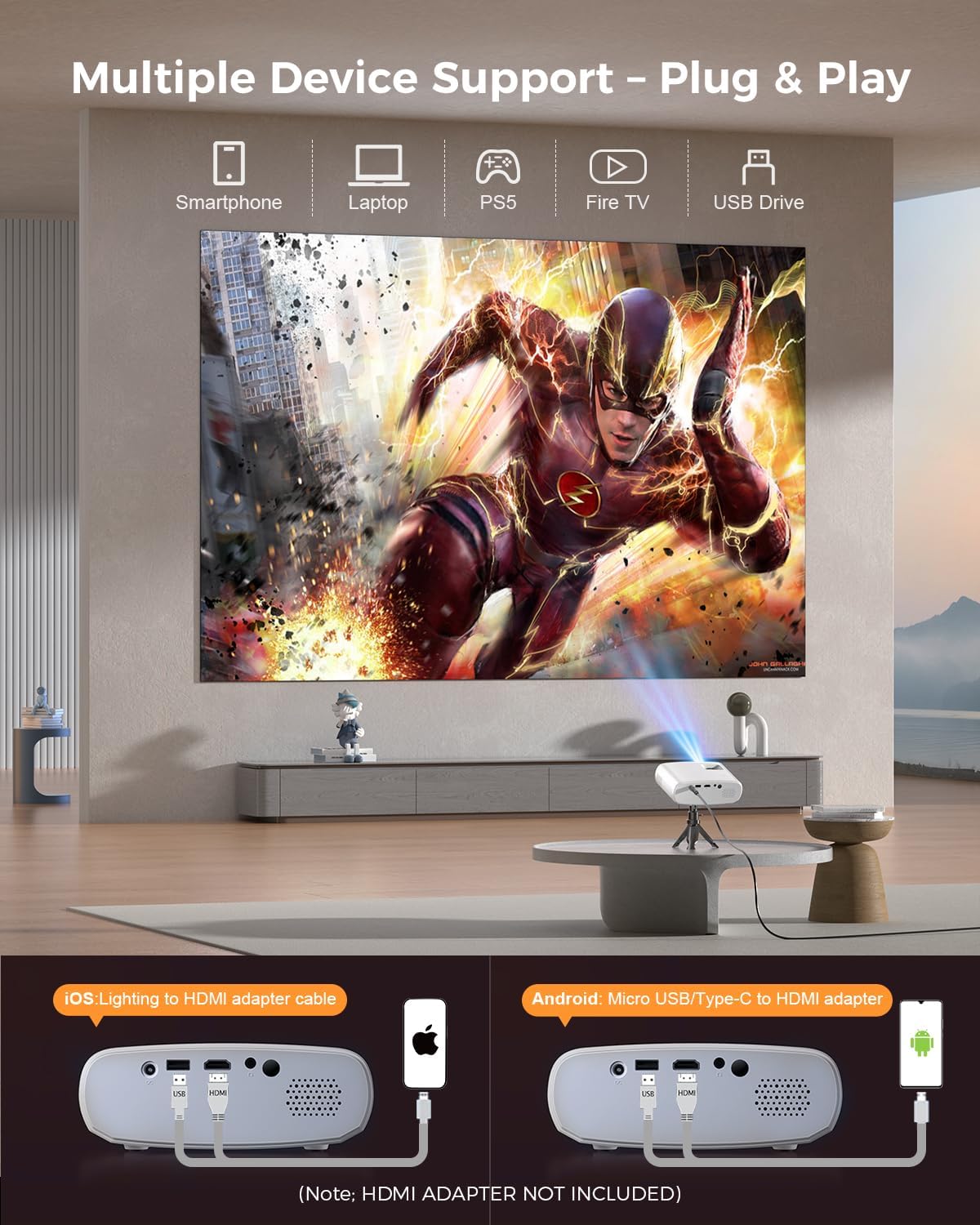
Image 5.4: The projector supports multiple devices via HDMI and USB. Note that an HDMI adapter is required for direct smartphone connection (not included).
5.5 Аудио излаз
The projector has a built-in HIFI speaker. For external audio, connect headphones or external speakers to the Audio Out port.
6. Одржавање
6.1 Чишћење
- Објектив: Use a soft, lint-free cloth or lens cleaning paper. Avoid abrasive materials.
- Casing: Обришите пројектор casing with a soft, dry cloth. Do not use liquid cleaners or solvents.
- вентилација: Ensure ventilation openings are clear of dust and obstructions to prevent overheating.
6.2 Складиштење
When not in use, store the projector in a cool, dry place, away from direct sunlight and extreme temperatures. Use the original packaging or a protective bag to prevent dust accumulation.
КСНУМКС. Решавање проблема
| Проблем | Могући узрок | Решење |
|---|---|---|
| Нема пројектоване слике | Power cable loose; Incorrect input source; Device not connected properly. | Check power connection; Select correct input source; Reconnect HDMI/USB cable. |
| Слика мутна | Фокус није подешен; Пројектор је преблизу/предалеко од платна. | Adjust focus ring; Adjust projection distance. |
| Нема звука | Volume too low; Muted; External audio device not connected. | Повећајте јачину звука; Укључите звук; Проверите спољне аудио везе. |
| Даљински управљач не ради | Батерије су празне/слабе; Препрека између даљинског управљача и пројектора. | Замените батерије; Обезбедите јасну линију вида са ИР пријемником. |
| Cannot play Netflix/Hulu/Prime Video | HDCP copyright protection. | Use an external streaming device like Amazon Fire Stick or Roku Stick (not included). |
8. Спецификације
| Феатуре | Детаљ |
|---|---|
| Модел | BL128MINI |
| Бранд | ЕЛЕПХАС |
| Резолуција екрана | 1920 x 1080 (1080P Full HD) |
| Технологија повезивања | HDMI, USB, AV, аудио излаз |
| Посебне карактеристике | HDMI Connectivity, Portable, Built-in Speakers, Detachable Tripod |
| Препоручена употреба | Индоор/Оутдоор |
| Тежина артикла | 1.96 фунти (приближно 0.89 кг) |
| Димензије производа | 6 x 4.4 x 2.4 инча (приближно 15.2 x 11.2 x 6.1 цм) |
9. Гаранција и подршка
ELEPHAS projectors are certified with CE, FCC, and RoHS standards.
- Factory Support: We provide 3-years factory support for this product.
- техничка подршка: Доступна је доживотна техничка подршка.
- Служба за кориснике: 24/7 professional service is provided.
- враћа: A 30-day return or exchange policy is in place.
For further assistance, please refer to the contact information provided on the product packaging or the official ELEPHAS webсајту.

Image 9.1: ELEPHAS offers comprehensive customer support, including 24/7 professional service, a 30-day return policy, and lifetime technical support.