
Увод
This manual provides comprehensive instructions for the setup, operation, and maintenance of your ASUS ROG Strix 27” 5K HDR Gaming Monitor (Model: XG27JCG). Please read this manual thoroughly before using the monitor to ensure proper functionality and to maximize your user experience.
The ROG Strix XG27JCG is a 27-inch 5K (5120 x 2880) Fast IPS display designed for high-performance gaming and detailed visual tasks. It features a 180Hz (overclocked) refresh rate, 0.3ms GTG response time, and a Dual Mode function allowing switching between 5K 180Hz and QHD 330Hz. Advanced features include G-SYNC Compatible technology, VESA DisplayHDR 600, and ROG Gaming A.I. Technology.
видео: Готовоview of the ASUS ROG Strix XG27JCG 27-inch 5K monitor, highlighting its key features and design.
Шта је у кутији
Пре него што наставите са подешавањем, проверите да ли су све компоненте присутне у паковању.
- ASUS ROG Strix XG27JCG Monitor
- ДисплаиПорт кабл
- Водич за брзи почетак
- РОГ торбица
- РОГ налепница
- ROG tripod stand
- Гарантни лист
- Повер Цорд
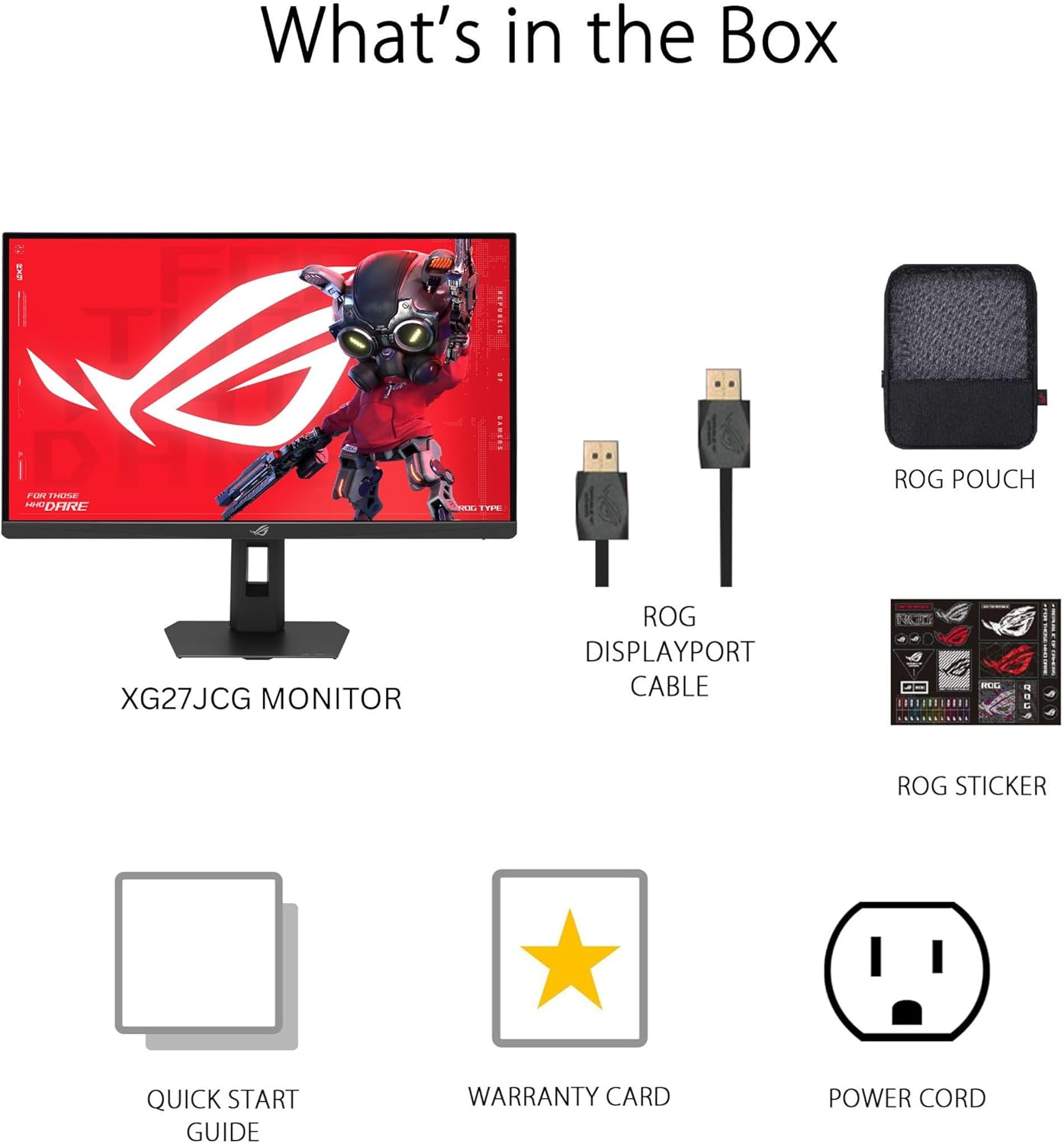
слика: Contents of the monitor packaging, showing the monitor, DisplayPort cable, ROG pouch, ROG sticker, Quick Start Guide, Warranty Card, and Power Cord.
Упутства за подешавање
1. Састављање постоља
Carefully remove the monitor from its packaging. Attach the stand base to the stand neck, securing it with the provided screw. Then, attach the assembled stand to the back of the monitor until it clicks into place. Ensure all connections are firm.
2. Повезивање са рачунаром
The monitor supports DisplayPort 1.4 (DSC), HDMI 2.1, and USB-C connectivity. Choose the appropriate cable for your system.
- ДисплаиПорт: Повежите један крај DisplayPort кабла са DisplayPort улазом монитора, а други крај са DisplayPort излазом рачунара.
- ДВИ: Connect one end of an HDMI 2.1 cable to the monitor's HDMI input and the other end to your computer's HDMI output.
- УСБ-Ц: Connect a USB-C cable to the monitor's USB-C port and to a compatible USB-C port on your computer. This connection also supports 15W power delivery.

слика: Позади view of the monitor's connectivity ports, including HDMI 2.1, DisplayPort 1.4, USB Type-C, and a Headphone Jack.
3. Прикључак за напајање
Прикључите кабл за напајање на улаз за напајање монитора, а затим други крај укључите у утичницу.
4. Прво укључивање
Press the power button located on the monitor to turn it on. The monitor will automatically detect the input source. If no image appears, ensure all cables are securely connected and the computer is powered on.
Упутство за употребу
Он-Сцреен Дисплаи (ОСД) мени
Use the joystick and buttons on the back of the monitor to navigate the OSD menu. The OSD allows you to adjust various settings such as brightness, contrast, color, input source, and gaming features.
Display Modes and Refresh Rate
The monitor features a Dual Mode function, allowing you to switch between two primary display configurations:
- 5K (5120 x 2880) at 180Hz (OC): Provides ultra-sharp, immersive visuals suitable for cinematic content and detailed work.
- QHD (2560 x 1440) at 330Hz: Offers extremely high frame rates and responsive gaming action, ideal for competitive esports.
Switching between modes can be done via the OSD menu or a dedicated hotkey, if configured.

слика: Visual representation of the monitor's Dual Mode, allowing users to switch between 5K 180Hz and QHD 330Hz for different gaming experiences.
ROG Gaming A.I. Technology
This monitor includes AI-powered features designed to enhance your gaming experience:
- Dynamic Shadow Boost: Automatically brightens dark areas of the game world without overexposing bright areas, improving visibility of hidden enemies or details.
- Dynamic Crosshair: Provides an on-screen crosshair that can adapt to the game environment, ensuring it remains visible against various backgrounds.
- Визуелни приказ вештачке интелигенције: Optimizes visual settings based on the game content for improved clarity and detail.

слика: Examples of Dynamic Crosshair and Dynamic Shadow Boost in action, showing how these features enhance visibility in games.
ДисплаиВидгет Центер
The DisplayWidget Center software provides seamless control over monitor settings directly from your Windows or macOS operating system. This utility allows for easy adjustment of GameVisual modes, MultiScreen configurations, and system settings without using the OSD buttons.

слика: Screenshot of the DisplayWidget Center software, demonstrating its user interface for adjusting monitor settings.
Ergonomics and Adjustments
The monitor stand offers multiple adjustment options to optimize your viewутеха:
- Нагиб: +20° до -5°
- Окретни: +40° до -40°
- Пивот: +90° to -90° (for portrait mode)
- Подешавање висине: 0 до 110 мм
Adjust the monitor to an ergonomic position that reduces strain on your neck and eyes. Ensure the top of the screen is at or slightly below eye level.

слика: Diagram illustrating the monitor's ergonomic adjustments, including tilt, swivel, pivot, and height.
Одржавање
Чишћење монитора
- Увек искључите монитор и извуците кабл за напајање пре чишћења.
- Користите меку крпу која не оставља длачицеampводом или благим, неабразивним средством за чишћење екрана.
- Не прскајте средство за чишћење директно на екран. Прво га нанесите на крпу.
- Avoid using alcohol-based cleaners, ammonia, or abrasive materials, as these can damage the screen surface.
Општа нега
- Држите монитор даље од директне сунчеве светлости, прекомерне топлоте и влаге.
- Обезбедите одговарајућу вентилацију око монитора како бисте спречили прегревање.
- Избегавајте стављање тешких предмета на монитор или његове каблове.
Решавање проблема
| Проблем | Могуће решење |
|---|---|
| Нема слике на екрану |
|
| Слика је мутна или искривљена |
|
| Screen flickers or shows artifacts |
|
| No sound from headphones (if connected to monitor) |
|
Спецификације
| Феатуре | Детаљ |
|---|---|
| Бранд | АСУС |
| Број модела | XG27JCG |
| Величина екрана | 27 инча |
| Резолуција | 5120 к 2880 (5К УХД) |
| Панел Типе | Скоро ИПС |
| Рефресх Рате | 180 Hz (OC) / QHD 330Hz (Dual Mode) |
| Време одговора | 0.3 мс (ГТГ) |
| Аспецт Ратио | 16:9 |
| Однос контраста | 600:1 |
| Viewинг Англе | 178 Degrees (H/V) |
| ХДР подршка | ВЕСА ДисплаиХДР 600 |
| Гамут боја | 97% ДЦИ-П3 |
| Адаптиве Синц | AMD FreeSync Premium Pro, G-SYNC Compatible |
| Повезивање | 1x DisplayPort 1.4 (DSC), 2x HDMI 2.1, 1x USB-C (with 15W PD), Headphone Jack |
| Потрошња енергије | 40 Ваттс |
| Димензије артикла (Д к Ш к В) | 8.59"Д к 24.2"Ш к 20.1"В |
| Тежина артикла | 6.9 фунти |
| Ергономска подешавања | Tilt (+20° ~ -5°), Swivel (+40° ~ -40°), Pivot (+90° ~ -90°), Height (0~110mm) |
Гаранција и подршка
This ASUS ROG Strix XG27JCG monitor comes with a 3 година гаранције. For warranty claims, technical support, or service inquiries, please contact ASUS customer support. Refer to the included Warranty Card for detailed terms and conditions.
You can find additional support resources, drivers, and FAQs on the official ASUS support webсајт: ввв.асус.цом/суппорт/