
1. Увод
Welcome to the user manual for your LOKLNEYK H610 S4 Motherboard. This guide provides detailed instructions for installation, operation, maintenance, and troubleshooting to ensure optimal performance and longevity of your system. Please read this manual thoroughly before beginning installation.
2. Подешавање
2.1. Садржај пакета
Verify that all components are present in your motherboard package:
- LOKLNEYK H610 S4 Motherboard
- И / О штит
- SATA Data Cables (quantity may vary)
- Кориснички приручник (овај документ)
- ЦД/УСБ са драјверима (или упутства за преузимање)
2.2. Распоред матичне плоче
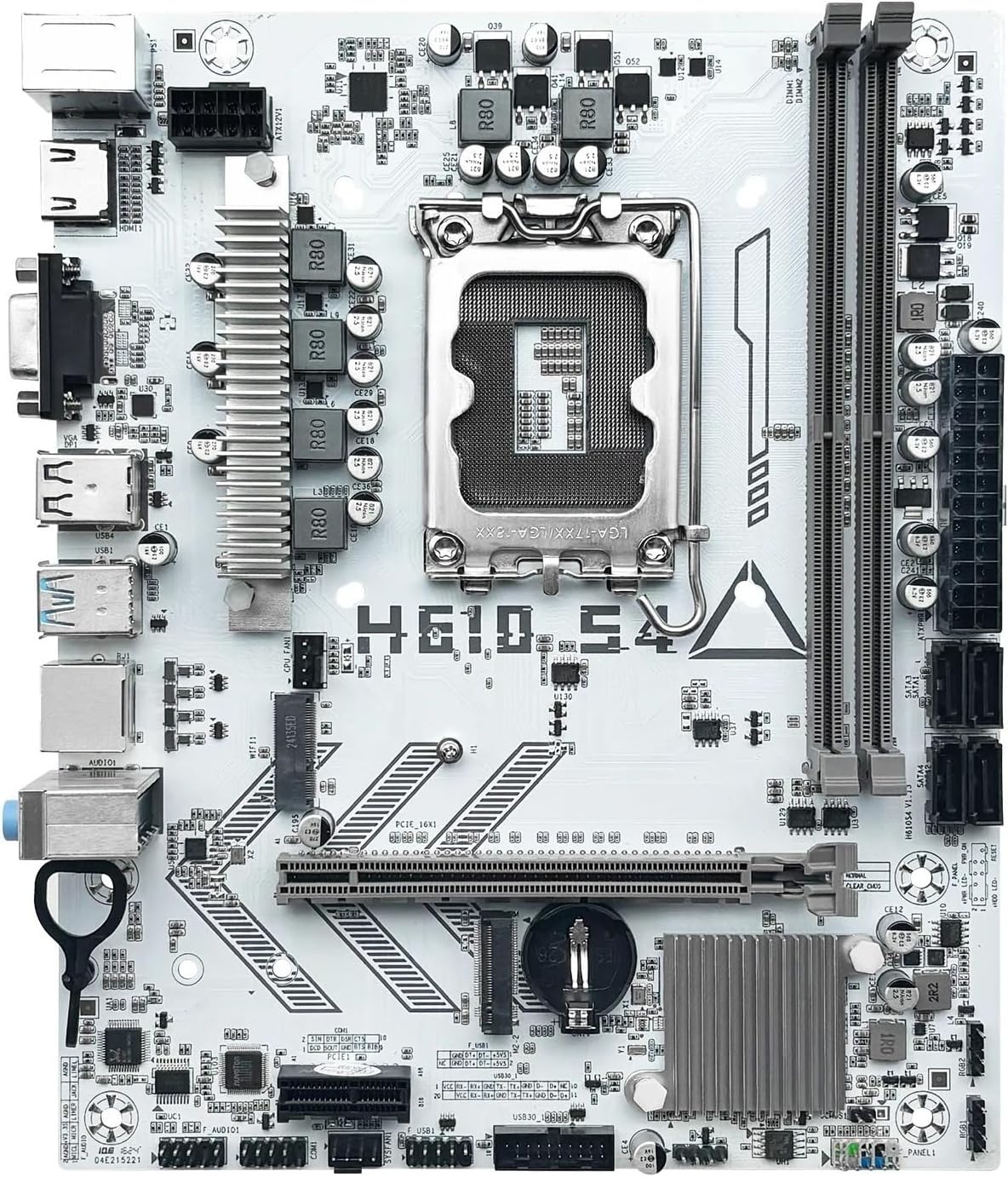
Familiarize yourself with the various components and connectors on the motherboard. Refer to the diagram below for a detailed overview of the H610 S4 motherboard's key areas.

Figure 1: Labeled diagram of the LOKLNEYK H610 S4 Motherboard, highlighting CPU socket, RAM slots, PCIe slots, M.2 slots, SATA ports, and various headers.
2.3. Кораци инсталације
Пратите ове кораке за исправну инсталацију матичне плочице и њених компоненти:
- Припремите шасију: Инсталирајте И/О штитник у задњи отвор кућишта рачунара.
- Инсталирајте матичну плочу: Carefully place the motherboard into the chassis, aligning it with the standoffs. Secure it with screws.
- Инсталација процесора (LGA 1700):
- Open the CPU socket lever and protective cover.
- Align the CPU's triangular mark with the mark on the socket.
- Пажљиво поставите процесор у подножје. Немојте га силом уметнути.
- Затворите полугу да бисте осигурали процесор.
- Инсталација хладњака процесора: Инсталирајте хладњак процесора према упутствима произвођача, водећи рачуна о правилном наношењу термалне пасте.
- RAM Installation (DDR4):
- Отворите клипове на оба краја DDR4 меморијских слотова.
- Align the memory module's notch with the slot's key.
- Чврсто притисните оба краја модула док се клипови не уклопе на своје место.
- Storage Installation (NVMe M.2 / SATA):
- For M.2 SSDs, insert the drive into the M.2 slot and secure it with the provided screw.
- For SATA drives, connect SATA data cables to the motherboard's SATA ports and to your drives. Connect power cables from your power supply to the drives.
- Инсталација PCIe картице: Insert your graphics card or other PCIe expansion cards into the appropriate PCIe slots and secure them.
- Прикључци за напајање: Повежите 24-пински ATX конектор за напајање и 8-пински конектор за напајање процесора са вашег напајања на матичну плочу.
- Прикључци предњег панела: Connect the front panel headers (power button, reset button, USB ports, audio jacks, LED indicators) to the corresponding pins on the motherboard. Refer to the motherboard layout diagram (Figure 1) for pin locations.
Слика 2: Завршеноview of the LOKLNEYK H610 S4 Motherboard, showing the general layout of components.
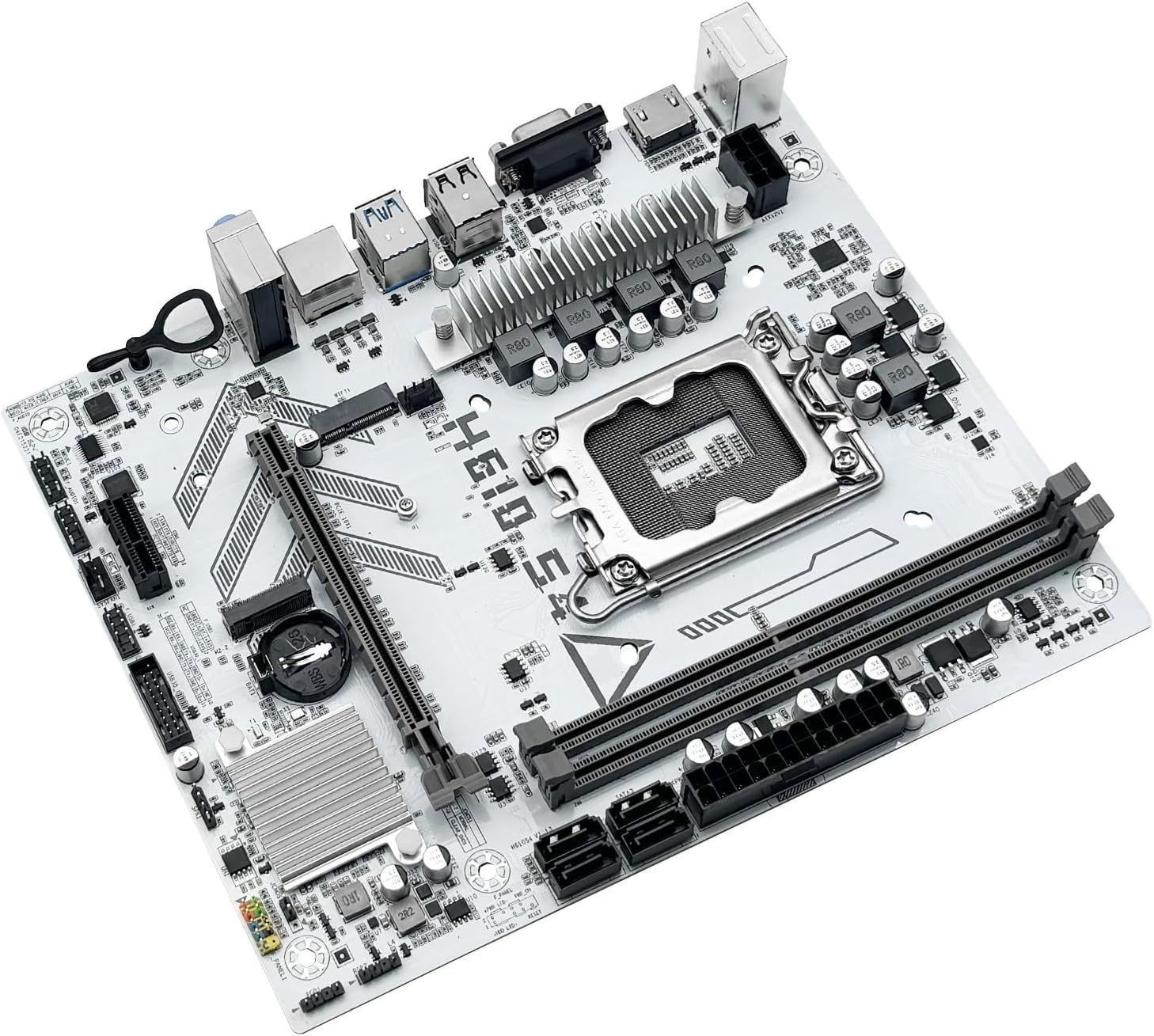
Figure 3: Rear I/O panel connectors and typical accessories like the I/O shield and SATA cables.
3. Упутство за употребу
3.1. Прво покретање
After completing all hardware installations, connect your monitor, keyboard, and mouse. Power on your system. The system should display the BIOS/UEFI splash screen. If not, check all power connections and component seating.
3.2. Конфигурација BIOS-а/UEFI-ја
Да бисте ушли у услужни програм за подешавање BIOS/UEFI-ја, притисните тастер ДЕЛ or F2 key during the initial boot sequence. Here you can configure:
- Boot order for your operating system drive.
- Подешавања датума и времена.
- Memory profiles (e.g., XMP for DDR4).
- Fan speed controls.
- SATA mode (AHCI/RAID).
3.3. Инсталација драјвера
Након инсталирања оперативног система, кључно је да инсталирате најновије драјвере за компоненте матичне плоче. То укључује:
- Драјвери за чипсет
- LAN (Ethernet) drivers
- Аудио драјвери
- Graphics drivers (for integrated graphics or discrete GPU)
Drivers can typically be found on the LOKLNEYK official website or on the provided driver media.
4. Одржавање
4.1. Чишћење
Regular cleaning helps maintain optimal performance and extends the lifespan of your motherboard. Use compressed air to remove dust from heatsinks, fans, and other components. Ensure the system is powered off and unplugged before cleaning.
4.2. Ажурирања BIOS-а/UEFI-ја
Periodically check the LOKLNEYK website for updated BIOS/UEFI versions. Updates can provide improved compatibility, stability, and new features. Follow the specific instructions provided by LOKLNEYK for updating the BIOS/UEFI to avoid system damage.
КСНУМКС. Решавање проблема
Овај одељак пружа решења за уобичајене проблеме на које можете наићи.
5.1. Уобичајени проблеми и решења
- Нема напајања:
- Check if the power supply is connected correctly to the motherboard (24-pin ATX and 8-pin CPU).
- Уверите се да је прекидач за напајање у положају „УКЉУЧЕНО“.
- Verify front panel power button connection.
- Без приказа:
- Ensure the monitor cable is securely connected to the graphics card or motherboard (if using integrated graphics).
- Поново инсталирајте графичку картицу и РАМ модуле.
- Покушајте да покренете систем само са једном РАМ меморијом.
- Нестабилност/падови система:
- Проверите температуру процесора и графичке картице.
- Уверите се да су сви драјвери ажурирани.
- Test RAM modules for errors.
- Уређај за покретање није пронађен:
- Verify that your storage drive (SSD/HDD) is properly connected.
- Check BIOS/UEFI settings for correct boot order and SATA mode.
- Уверите се да је оперативни систем правилно инсталиран на диску.
For more complex issues, consult the LOKLNEYK support webлокацију или квалификованог техничара.
6. Спецификације
Below are the technical specifications for the LOKLNEYK H610 S4 Motherboard:
| Феатуре | Спецификација |
|---|---|
| ЦПУ Соцкет | ЛГА 1700 |
| Компатибилни процесори | Intel Core 12th, 13th, 14th Generation i3, i5 Processors |
| Чипсет | Интел Х610 |
| меморијска слота | 2 x DDR4 DIMM |
| Максимални капацитет меморије | 64 ГБ |
| Интерфејси за складиштење | 2 x M.2 (NVMe 2280), 4 x SATA 3.0 |
| ПЦИе Слотс | 1 x PCIe 4.0 x16, 1 x PCIe x1 |
| ЛАН | 1 к РЈ45 Гигабит Етхернет |
| УСБ портови | USB 3.0, USB 3.1 Gen1, USB 2.0 (Front & Rear) |
| Видео излази | ХДМИ, ВГА |
| Аудио | Уграђени звук |
| Форм Фацтор | Compact (180mm x 220mm) |

Figure 4: LOKLNEYK H610 S4 Motherboard showing its physical dimensions.
7. Гаранција и подршка
7.1. Информације о гаранцији
Please refer to the warranty card included with your product or visit the official LOKLNEYK webсајт за детаљне услове гаранције. Сачувајте доказ о куповини за потребе подношења захтева за гаранцију.
7.2. Техничка подршка
If you encounter any issues that cannot be resolved using this manual, please visit the LOKLNEYK support website for FAQs, driver downloads, and contact information for technical assistance.