
Увод
Thank you for choosing the MACAP MI40 Luxe On-Demand Espresso Grinder. This manual provides essential information for the safe and efficient operation, maintenance, and care of your new grinder. Please read all instructions carefully before use and retain this manual for future reference.

The MACAP MI40 Luxe On-Demand Espresso Grinder, featuring a sleek black finish and integrated touchscreen display.
Безбедносне информације
Увек се придржавајте основних мера предострожности када користите електричне уређаје како бисте смањили ризик од пожара, струјног удара и повреда.
- Прочитајте сва упутства пре рада са млином.
- Do not immerse the grinder, cord, or plug in water or other liquids.
- Искључите утикач из утичнице када га не користите, пре склапања или расклапања делова и пре чишћења.
- Избегавајте контакт са покретним деловима.
- Немојте користити ниједан уређај са оштећеним каблом или утикачем, или након што уређај поквари или је на било који начин оштећен. Обратите се корисничкој подршци за помоћ.
- Употреба додатака које произвођач није препоручио или продао може изазвати пожар, струјни удар или повреду.
- Не користите на отвореном.
- Не дозволите да кабл виси преко ивице стола или пулта, нити да додирује вруће површине.
- Ensure the hopper lid is securely in place before operating.
- Only grind whole roasted coffee beans. Do not grind other substances such as nuts, spices, or instant coffee.
Сетуп
1. Распакивање
- Пажљиво уклоните све компоненте из паковања.
- Inspect the grinder for any signs of damage. If damaged, do not operate and contact your retailer.
- Уклоните све заштитне фолије и материјале за паковање.
2. Идентификација компоненте
Familiarize yourself with the main parts of your MI40 Luxe grinder:
- Хоппер: Садржи цела зрна кафе.
- Поклопац резервоара: Covers the hopper.
- Бројчаник за подешавање млевења: Located below the hopper, used to set grind fineness.
- Екран осетљив на додир: For programming and selecting dosing options.
- Dosing Spout: Где се сипа млевена кафа.
- Држач портафилтера: Supports the portafilter during grinding.
- Прекидач: Located on the side of the grinder.
3. Прва скупштина
- Install the Hopper: Place the hopper onto the grinder body, ensuring it seats correctly. Rotate it slightly until it locks into position.
- Install the Hopper Lid: Place the lid securely on top of the hopper.
КСНУМКС. Постављање
Поставите брусилицу на стабилну, равну и суву површину. Обезбедите одговарајућу вентилацију око уређаја.
5. Прикључак за напајање
Укључите кабл за напајање у уземљену електричну утичницу. Уверите се да је јачина звукаtage matches the specifications listed on the grinder's rating label.
Упутство за употребу
1. Filling the Hopper
Lift the hopper lid and pour whole roasted coffee beans into the hopper. Do not overfill. Replace the lid securely.
2. Grind Adjustment (Nice Grind Control Dial)
The MI40 Luxe features a stepless grind adjustment dial for precise control. To adjust the grind fineness:
- Turn the grinder ON using the power switch.
- Rotate the grind adjustment dial. Turning it clockwise results in a finer grind, and counter-clockwise results in a coarser grind.
- For espresso, start with a fine setting and adjust incrementally based on extraction time and taste. It is recommended to adjust the grind while the burrs are running to prevent jamming.

Детаљно view of the Nice Grind Control Dial for precise grind fineness adjustment.
3. Touchscreen Dosing
The touchscreen allows for programmable dosing for single and double shots.
- Укључено: Ensure the grinder is powered on. The touchscreen will illuminate.
- Select Dose: On the main screen, you will see icons for single and double shot doses. Tap the desired dose icon.
- Adjust Dose Time (if needed): To program the dose time, press and hold the desired dose icon until it enters programming mode. Use the '+' and '-' buttons on the screen to adjust the grinding time in seconds. Tap the icon again to save.
- Place Portafilter: Position your portafilter securely in the portafilter holder beneath the dosing spout.
- Започните млевење: Tap the selected dose icon once to start grinding. The grinder will automatically stop after the programmed time.
- Manual Grinding: Some models may offer a manual grind option, typically by pressing a dedicated button or holding a dose icon briefly. Refer to the on-screen prompts.
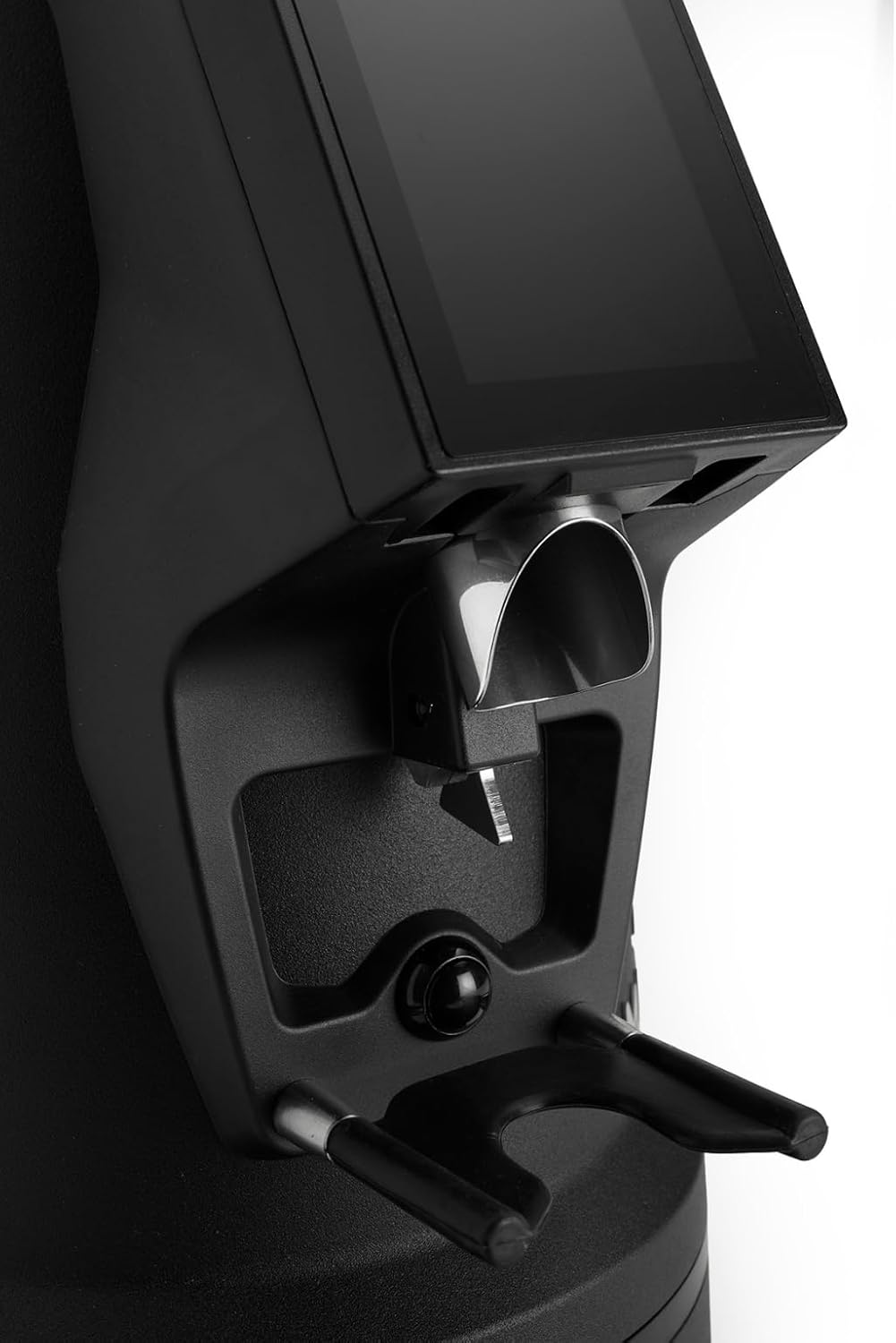
The dosing spout and portafilter holder, designed for efficient and clean coffee dispensing.
Одржавање
Редовно чишћење и одржавање осигуравају оптималне перформансе и дуготрајност ваше брусилице.
1. Дневно чишћење
- Хоппер: Empty any remaining beans and wipe the inside of the hopper with a dry cloth.
- Dosing Spout: Use a brush or vacuum cleaner to remove any residual coffee grounds from the dosing spout and portafilter holder area.
- Екстеријер: Обришите спољашњост брусилице са огласомamp крпа. Не користите абразивна средства за чишћење нити потапајте уређај у воду.
2. Burrs Cleaning (Weekly/Bi-weekly)
To maintain grind consistency, the burrs should be cleaned regularly.
- Искључите брусилицу из струје: Always disconnect the power before cleaning the burrs.
- Remove Hopper: Empty the hopper and remove it from the grinder body.
- Access Burrs: Depending on the model, you may need to unscrew the top burr carrier. Refer to the specific instructions for your MI40 Luxe model.
- Чисти неравнине: Use a stiff brush or a vacuum cleaner to remove all coffee grounds from both the stationary and rotating burrs. Do not use water.
- Поново саставите: Carefully reassemble the burr carrier and hopper, ensuring all parts are securely in place.
3. Општа нега
- Чувајте млин на хладном и сувом месту.
- Avoid exposing the grinder to direct sunlight or extreme temperatures.
Решавање проблема
Ако наиђете на проблеме са млином за млевење, погледајте следеће уобичајене проблеме и решења:
| Проблем | Могући узрок | Решење |
|---|---|---|
| Гриндер се не укључује | No power, power switch off, or safety interlock not engaged. | Check power cord connection, ensure power switch is ON, verify hopper is correctly seated. |
| No coffee grinding / Grinder jams | Beans not feeding, burrs clogged, or grind setting too fine. | Ensure hopper has beans. Unplug, remove hopper, clean burrs. Adjust to a coarser setting. |
| Inconsistent grind | Burrs are dirty or worn. | Clean burrs thoroughly. If problem persists, burrs may need replacement. |
| Гриндер је бучан | Foreign object in burrs or loose components. | Unplug and inspect burrs for foreign objects. Ensure all parts are securely fastened. |
If the problem persists after attempting these solutions, please contact MACAP customer support or your retailer.
Спецификације
| Феатуре | Детаљ |
|---|---|
| Модел | MI40 Luxe |
| Бранд | Macap |
| Тип жрвњака | Flat Burrs |
| Бурр Сизе | 65 мм |
| Гринд Адјустмент | Stepless (Nice Grind Control Dial) |
| Дозирање | Touchscreen Programmable On-Demand |
| Капацитет резервоара | 2.6 фунте (приближно 1.2 кг) |
| Материјал | нерђајући челик |
| Тежина артикла | 19.6 фунти (приближно 8.9 кг) |
| Димензије (Д к Ш к В) | 12" x 7.6" x 22" (приближно 30.5 цм x 19.3 цм x 55.9 цм) |
| Мотор | High-Torque |
Гаранција и подршка
Your MACAP MI40 Luxe Grinder is covered by a manufacturer's warranty. For specific warranty terms and conditions, please refer to the warranty card included with your product or visit the official Macap website. For technical support, spare parts, or service inquiries, please contact your authorized Macap dealer or the customer support team.
Контакт информације:
- Refer to your purchase documentation for retailer contact details.
- Visit the official Macap webсајт за информације о глобалној подршци.