
Увод
Хвала вам на куповиниasing the Donner HHCB-12 Electronic Drum Hi-Hat Pad with Stand. This product is designed to enhance your electronic drumming experience by providing a realistic hi-hat feel with a dedicated stand. This manual provides essential information for the proper setup, operation, and maintenance of your new hi-hat pad and stand. Please read this manual thoroughly before use to ensure optimal performance and longevity of the product.
Важне информације о безбедности
- Always place the hi-hat stand on a stable, level surface to prevent tipping.
- Ensure all screws and clamps are securely tightened before playing to prevent components from shifting or falling.
- Држите производ даље од воде, влаге и екстремних температура.
- Do not attempt to disassemble or modify the product. Refer all servicing to qualified personnel.
- Држите мале делове ван домашаја деце како бисте спречили опасност од гушења.
- Use only the power adapter specified for your electronic drum module, if applicable, when connecting the hi-hat pad.
Садржај пакета
Молимо вас да проверите да ли су све следеће ставке укључене у ваш пакет:
- Donner HHCB-12 Electronic Hi-Hat Pad (12-inch)
- Hi-Hat Stand
- Hi-Hat Clutch
- Цоннецтион Цабле
- Кориснички приручник (овај документ)
Упутства за подешавање
Follow these steps to assemble and set up your Donner HHCB-12 Hi-Hat Pad and Stand:
1. Assemble the Hi-Hat Stand
- Unfold the tripod base of the hi-hat stand and ensure it is stable.
- Extend the lower tube of the stand to your desired height and secure it with the wing nut.
- Insert the upper tube into the lower tube. Do not tighten yet.
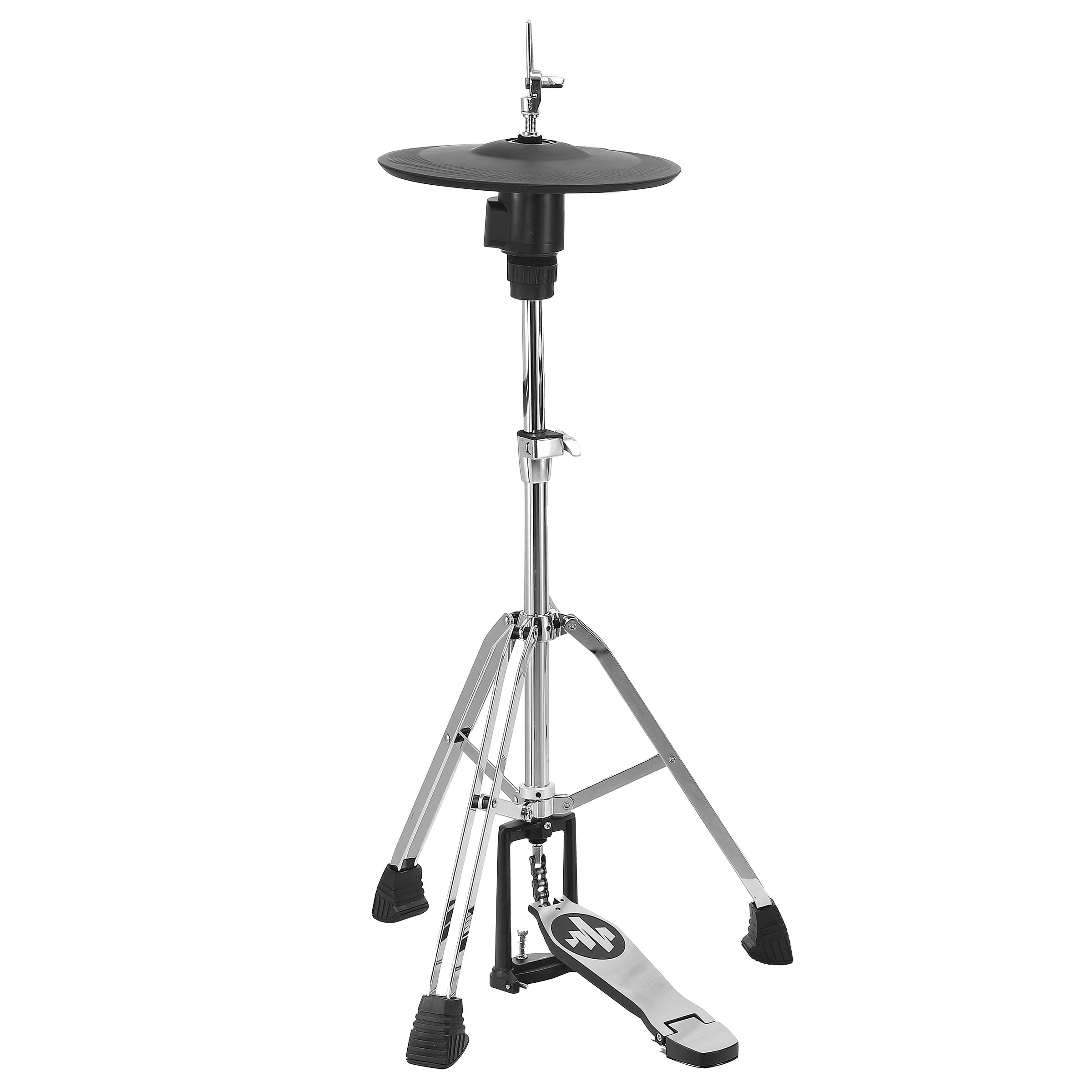
Image: The Donner HHCB-12 Electronic Hi-Hat Pad mounted on its stand, ready for connection to an electronic drum module. The stand features a sturdy tripod base and a foot pedal.
2. Attach the Hi-Hat Pad
- Place the bottom hi-hat pad onto the stand's clutch rod.
- Attach the hi-hat clutch to the top hi-hat pad. Ensure the clutch is securely fastened to the pad.
- Slide the top hi-hat pad (with clutch) onto the stand's rod, above the bottom pad. Adjust the height and angle for comfortable playing.
- Tighten the wing nut on the upper tube to secure the hi-hat pads at the desired height.

Слика: Детаљна view of the Donner HHCB-12 electronic hi-hat pad, showing its black surface and the chrome stand components. The hi-hat clutch mechanism is visible, securing the pad to the stand rod.
3. Connect to Electronic Drum Module
- Locate the hi-hat input on your electronic drum module. This is typically labeled "HH" or "Hi-Hat".
- Connect one end of the provided connection cable to the output jack on the hi-hat pad.
- Connect the other end of the cable to the hi-hat input on your drum module.
- Power on your electronic drum module and select the appropriate hi-hat settings according to your module's manual.
Упутство за употребу
The Donner HHCB-12 Hi-Hat Pad is designed to replicate the feel and response of an acoustic hi-hat. Its operation is straightforward once connected to your electronic drum module.
- Отвори хај-хат: Strike the pad when the foot pedal is not pressed down.
- Затворени хај-хат: Strike the pad while pressing the foot pedal down completely.
- Foot Splash/Chick: Press the foot pedal down quickly without striking the pad to produce a "chick" sound, or release it quickly for a "splash" sound, depending on your module's settings.
- Полуотворени хај-хат: Partially press the foot pedal down and strike the pad. The sensitivity and sound variation for half-open states can usually be adjusted in your drum module's settings.
For detailed sound adjustments and sensitivity calibration, refer to the user manual of your specific electronic drum module.
Одржавање и њега
- Чишћење: Wipe the hi-hat pad and stand with a soft, dry cloth. For stubborn dirt, a slightly damp Може се користити крпа, а затим сува крпа. Избегавајте абразивна средства за чишћење или раствараче.
- Складиштење: When not in use for extended periods, store the hi-hat pad and stand in a clean, dry environment, away from direct sunlight and extreme temperatures.
- Инспекције: Periodically check all screws, nuts, and clamps for tightness. Re-tighten as necessary to ensure stability and prevent wear.
- Нега каблова: Avoid bending or kinking the connection cable excessively. Store it neatly to prevent damage.
Решавање проблема
| Проблем | Могући узрок | Решење |
|---|---|---|
| No sound from hi-hat pad. |
|
|
| Hi-hat sound is always open or always closed. |
|
|
| Pad feels unstable or wobbly. |
|
|
Спецификације
| Модел: | HHCB-12 |
| Тип: | Electronic Hi-Hat Pad with Stand |
| Величина подлоге: | 12 инча |
| Компатибилност: | Compatible with most electronic drum modules (check module specifications for input requirements) |
| Укључена додатна опрема: | Hi-Hat Stand, Hi-Hat Clutch, Connection Cable |
Гаранција и подршка
Donner products are designed for reliability and performance. For information regarding warranty coverage, technical support, or service, please refer to the warranty card included with your product or visit the official Donner webсајту.
Donner Official Webсајт: ввв.доннердеал.цом
When contacting support, please have your product model (HHCB-12) and purchase date available.