
1. Увод
Хвала вам на куповиниasing the ULTIMEA Aura A60 U2621 7.1ch Dolby Atmos Soundbar System. This manual provides essential information for setting up, operating, and maintaining your new sound system. Please read this manual thoroughly before use to ensure proper functionality and to maximize your audio experience.

Figure 1.1: Immersive audio experience with the ULTIMEA Aura A60 system.
2. Безбедносне информације
To reduce the risk of electric shock, fire, or damage to your device, please observe the following safety precautions:
- Не излажите овај уређај киши или влази.
- Не стављајте предмете напуњене течношћу, као што су вазе, на апарат.
- Обезбедите одговарајућу вентилацију. Не блокирајте вентилационе отворе.
- Не постављајте у близини извора топлоте као што су радијатори, грејни регистри, пећи или други уређаји (укључујући ampлифиерс) који производе топлоту.
- Заштитите кабл за напајање од гажења или прикљештења, посебно на утикачима, утичницама и на месту где излазе из уређаја.
- Користите само додатке/прибор које је навео произвођач.
- Искључите овај апарат из струје током олуја са грмљавином или када га не користите дуже време.
- Све сервисирање препустите квалификованом сервисном особљу.
3. Садржај пакета
Молимо вас да проверите да ли су сви предмети присутни и у добром стању:
- ULTIMEA Aura A60 Soundbar
- Wireless Subwoofer (4-inch, BassMX Technology)
- 4 x Surround Speakers (2 front, 2 rear)
- Ремоте Цонтрол
- ХДМИ кабл
- Power Adapter/Cables
- Кориснички приручник (овај документ)
4. Производ је готовview
The ULTIMEA Aura A60 U2621 is a 7.1ch Dolby Atmos soundbar system designed to deliver an immersive home theater audio experience. It features a main soundbar unit, a powerful wireless subwoofer with BassMX technology, and four surround speakers.
4.1 Main Soundbar Unit
The main soundbar unit houses 3 main channels for clear dialogue and primary audio. It serves as the central hub for all audio connections.

Figure 4.1: Main soundbar unit with front surround speakers.
4.2 Бежични сабвуфер
The dedicated 4-inch wireless subwoofer incorporates BassMX technology to enhance low frequencies, providing deep and resonant bass for a more impactful audio experience.

Figure 4.2: Wireless subwoofer with BassMX technology.
4.3 сурроунд звучника
The system includes four surround speakers: two front and two rear. The rear speakers connect wirelessly to the soundbar, minimizing cable clutter and allowing flexible placement to create an expansive acoustic space.

Figure 4.3: Diagram of 7.1ch sound distribution.
4.4 Улазно/излазни портови
The soundbar features multiple input options for versatile connectivity:
- ХДМИ еАРЦ: For high-quality audio transmission and seamless TV integration.
- Оптички: Дигитални аудио улаз.
- АУКС: Аналогни аудио улаз.
- УСБ: For media playback.
- Блуетоотх: Бежични аудио стриминг.

Figure 4.4: Rear panel connections, including HDMI eARC.
5. Подешавање
5.1 Физичко постављање
Оптимално постављање компоненти вашег звучног система је кључно за најбоље аудио искуство.
- Соундбар: Place the soundbar centrally below your television. Ensure it is not obstructed.
- Субвоофер: Position the wireless subwoofer on the floor near the soundbar. Experiment with placement to find the best bass response for your room.
- Предњи сурроунд звучници: Place the two wired front surround speakers to the left and right of your TV, ideally at ear level when seated.
- Задњи сурроунд звучници: Position the two wireless rear surround speakers behind your primary listening position, to the left and right. These speakers will automatically connect wirelessly to the soundbar once powered on.

Figure 5.1: Recommended speaker placement for Dolby Atmos.
5.2 Везе
Follow these steps to connect your soundbar system:
- Прикључак за напајање: Connect the power cables to the soundbar, subwoofer, and surround speakers, then plug them into a power outlet.
- HDMI eARC (препоручено): Connect one end of the provided HDMI cable to the HDMI eARC port on your soundbar and the other end to the HDMI eARC/ARC port on your TV. This connection supports Dolby Atmos and allows for TV remote control of the soundbar.
- Оптичка веза (алтернатива): If your TV does not have an HDMI eARC/ARC port, connect an optical cable (not included) from your TV's optical output to the OPTICAL input on the soundbar.
- AUX Connection (Alternative): For analog audio sources, connect a 3.5mm AUX cable (not included) from your device's audio output to the AUX input on the soundbar.
- УСБ веза: Insert a USB drive into the USB port on the soundbar for direct media playback.
- Блуетоотх упаривање: To connect a Bluetooth device, select the Bluetooth input on the soundbar. On your device, search for 'ULTIMEA Aura A60' and pair.
6. Упутство за употребу
6.1 Укључивање/искључивање
Притисните дугме за напајање на саундбару или даљинском управљачу да бисте укључили или искључили систем.
6.2 Избор улаза
Use the 'Input' button on the remote control or the soundbar to cycle through available input sources: HDMI eARC, Optical, AUX, USB, and Bluetooth.

Слика 6.1: Даљински управљач за једноставно руковање.
6.3 Контрола јачине звука
Adjust the master volume using the 'Volume Up' and 'Volume Down' buttons on the remote control or the soundbar. You can also adjust subwoofer and surround speaker levels independently.
6.4 Sound Modes and EQ Presets
The Aura A60 offers various sound modes and EQ presets to optimize audio for different content and preferences.
- Dedicated Modes: Select from 6 specialized modes: Movie, Music, Voice, Sports, Game, and Night.
- ЕК унапред подешавања: Access 121 professional EQ presets for genres like Bass, Pop, Classical, and Rock via the ULTIMEA app.

Figure 6.2: 121 preset EQ matrix for customized audio.
6.5 Контрола апликација
Download the ULTIMEA app to your smartphone for advanced control and customization options, including a 10-band EQ and access to all EQ presets.
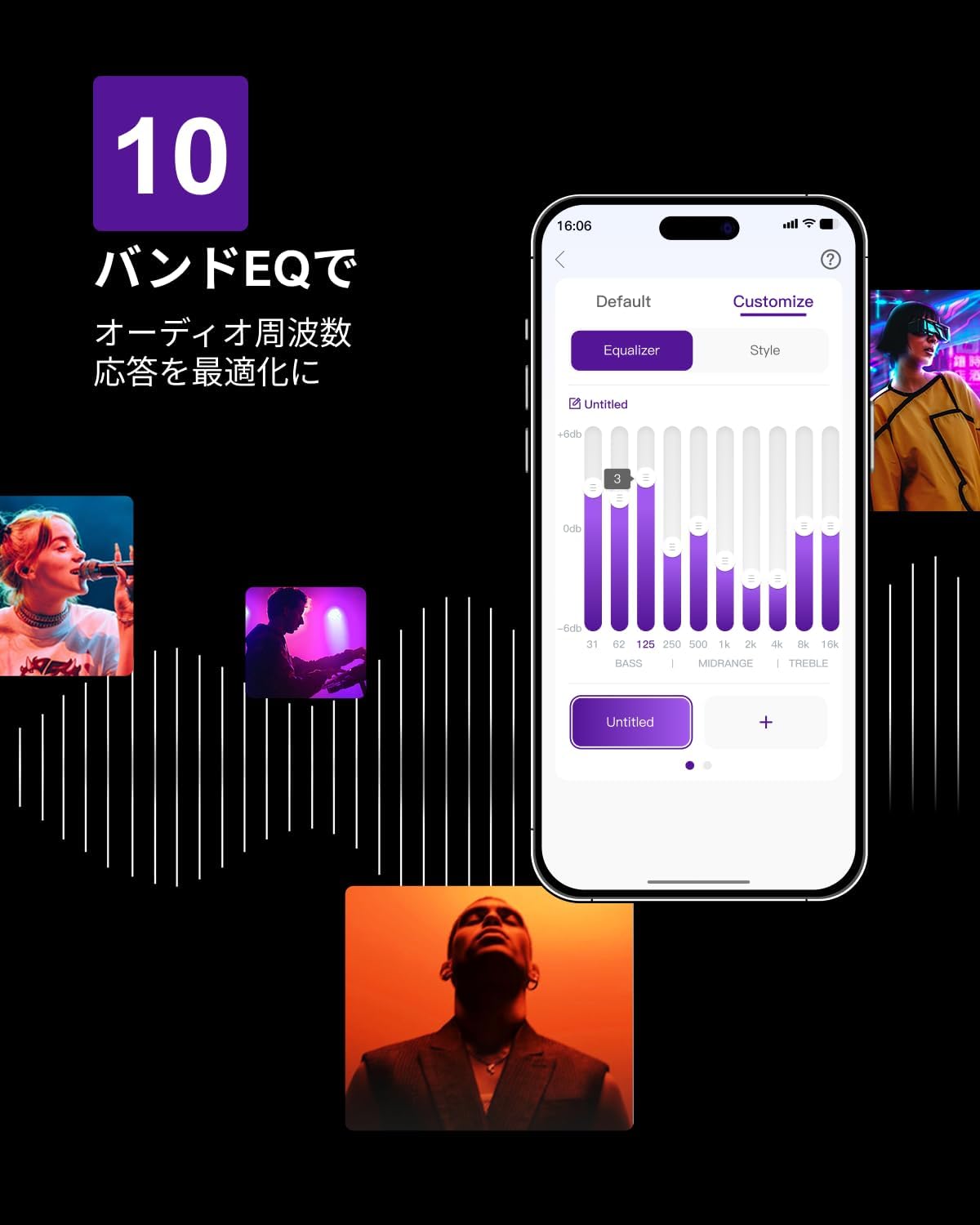
Figure 6.3: ULTIMEA mobile application interface.
7. Одржавање
To ensure the longevity and optimal performance of your ULTIMEA Aura A60 soundbar system, follow these simple maintenance guidelines:
- Чишћење: Use a soft, dry cloth to wipe the surfaces of the soundbar, subwoofer, and speakers. Do not use liquid cleaners or abrasive materials, as they may damage the finish.
- вентилација: Уверите се да сви отвори за вентилацију остају чисти и неометани како бисте спречили прегревање.
- Складиштење: Ако складиштите систем дуже време, искључите га из струје и чувајте га на хладном и сувом месту, даље од директне сунчеве светлости и екстремних температура.
КСНУМКС. Решавање проблема
Ако наиђете на проблеме са вашим звучним системом, погледајте следеће уобичајене проблеме и решења:
| Проблем | Могући узрок | Решење |
|---|---|---|
| Нема звука са звучне траке. | Изабран је погрешан улаз, јачина звука је прениска, каблови нису правилно повезани. | Verify the correct input source. Increase volume. Check all cable connections (HDMI, Optical, AUX). Ensure the soundbar is powered on. |
| No sound from subwoofer/surround speakers. | Subwoofer/speakers not paired or powered on, volume too low. | Ensure subwoofer and surround speakers are powered on. They should automatically pair. If not, refer to the pairing instructions in the full manual (if available) or contact support. Increase their individual volume levels. |
| Изобличен или лош квалитет звука. | Incorrect audio settings, poor source quality, interference. | Adjust EQ settings or try different sound modes. Ensure the audio source is high quality. Check for nearby electronic devices causing interference. |
| Проблеми са Bluetooth везом. | Device out of range, not in pairing mode, interference. | Уверите се да је саундбар у режиму упаривања преко Bluetooth-а. Приближите уређај саундбару. Искључите га и поново упарите уређај. |
If the problem persists after trying these solutions, please contact ULTIMEA customer support.
9. Спецификације
| Феатуре | Детаљ |
|---|---|
| Бранд | УЛТИМЕА |
| Назив модела | Аура А60 |
| Број модела | У2621 |
| Спеакер Типе | Soundbar with 7.1ch Surround Sound |
| Аудио технологија | Dolby Atmos, BassMX Technology |
| Повезивање | HDMI eARC, Bluetooth, Optical, AUX, USB |
| Субвоофер | 4-inch Wired Subwoofer (integrated BassMX) |
| Сурроунд Спеакерс | 4 (2 wired front, 2 wireless rear) |
| Контрола | Remote Control, ULTIMEA App |
| Боја | Црно |
| Димензије (Д к Ш к В) | 9 cm x 40 cm x 7 cm (Soundbar, approximate) |
| Земља порекла | Кина |
10. Гаранција и подршка
ULTIMEA is committed to providing high-quality products and customer satisfaction. Your Aura A60 U2621 soundbar system comes with comprehensive support.
10.1 Информације о гаранцији
Specific warranty details may vary by region. Please refer to the warranty card included with your product or visit the official ULTIMEA webсајт за најновије услове гаранције.
10.2 Корисничка подршка
For any questions, technical assistance, or troubleshooting not covered in this manual, please contact our dedicated support team:
- 365-Day Support: Our expert staff is available year-round to assist you.
- Ћаскање уживо: Instant responses are available via live chat on our webсајту.
- враћа: We offer a 30-day return policy with free shipping for your peace of mind.

365-Day Expert Support

Instant Live Chat

30-дневно бесплатно враћање
За додатну помоћ, посетите ULTIMEA Brand Store.