
1. Производ је готовview
The HONOR Magic8 Lite 5G is a robust and feature-rich smartphone designed for durability and high performance. It boasts industry-leading resistance to drops, water, and dust, a long-lasting battery, a high-resolution camera, and an immersive display, all powered by an efficient processor with advanced AI capabilities.
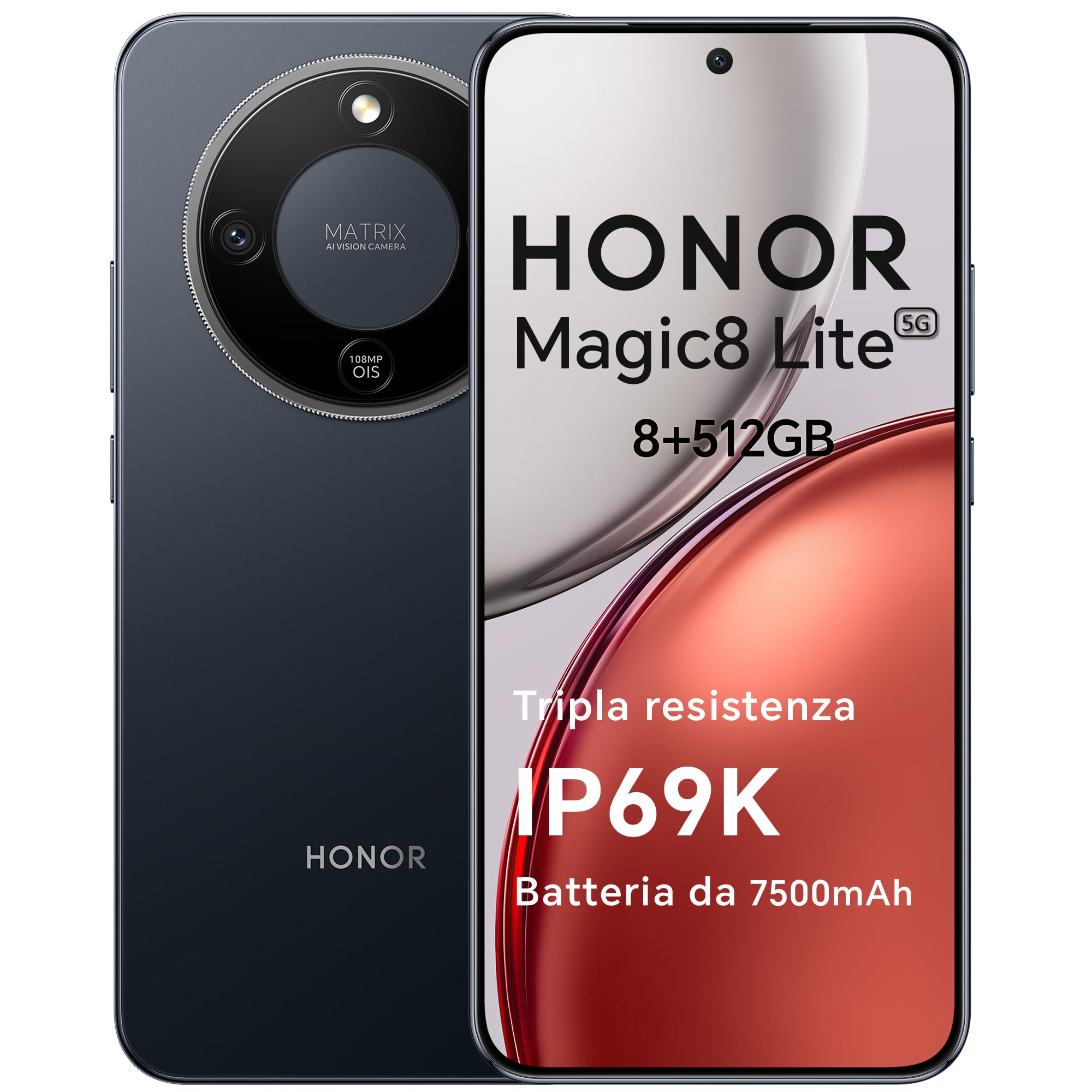
Figure 1: HONOR Magic8 Lite 5G Smartphone, Midnight Black variant.
Кључне карактеристике:
- Triple Resistance: SGS Five-Star Overall Drop Resistance (up to 2.5 meters), IP69K and IP68 water and dust resistance.
- Дуготрајна батерија: 7500 mAh silicon-carbon battery with up to 3 days of autonomy and 66W SuperCharge. Functions as a portable power bank.
- Напредни систем камера: 108 MP Ultra-Sensing Camera with Optical Image Stabilization (OIS) and Electronic Image Stabilization (EIS) for clear photos and stable 4K videos. Includes AI photography features.
- Имерзивни екран: 6.79-inch 1.5K OLED display with 6000 nits peak brightness, 120 Hz refresh rate, and HONOR Eye Comfort Display technology.
- Моћне перформансе: Snapdragon 6 Gen 4 (4nm) mobile platform for smooth multitasking and gaming, integrated with Google Gemini and other AI functionalities.
2. Подешавање уређаја
2.1 Садржај пакета
Проверите да ли ваш пакет садржи следеће ставке:
- ХОНОР Магиц8 Лите 5Г паметни телефон
- УСБ-Ц кабл
- Power Adapter (66W SuperCharge)
- Алат за избацивање СИМ картице
- Водич за брзи почетак
- Гарантни лист
2.2 Уметање SIM картица
- Пронађите лежиште за СИМ картицу са стране уређаја.
- Уметните алат за избацивање СИМ картице у мали отвор поред лежишта и чврсто притисните док лежиште не искочи.
- Place your Nano-SIM card(s) into the designated slots on the tray. Ensure the gold contacts face downwards. The device supports Dual SIM functionality.
- Пажљиво поново уметните лежиште СИМ картице у телефон.
The device also supports eSIM functionality. Refer to your carrier for activation details.
2.3 Почетно пуњење и укључивање
- Connect the USB-C cable to the phone's charging port and the other end to the 66W power adapter. Plug the adapter into a power outlet.
- Allow the phone to charge for at least 15 minutes before initial use.
- To power on, press and hold the Power button (located on the side) until the HONOR logo appears on the screen.
- Пратите упутства на екрану да бисте завршили почетно подешавање, укључујући избор језика, Wi-Fi везу и подешавање Google налога.

Figure 2: The 7500mAh silicon-carbon battery provides extended usage.
3. Упутство за употребу
3.1 Основна навигација
- Екран на додир: Додирните да бисте изабрали, превуците прстом да бисте се померали, уштипните да бисте зумирали.
- Почетни екран: Приступите апликацијама, виџетима и обавештењима.
- Гестови: Customize navigation gestures in Settings for a fluid experience.
3.2 Употреба камере
The HONOR Magic8 Lite 5G features a 108 MP Ultra-Sensing Camera with OIS and EIS for superior image and video capture.
- Open the Camera app from your home screen or lock screen.
- Select your desired mode (Photo, Video, Portrait, Night, Pro, etc.).
- Додирните дугме затварача да бисте снимили фотографију или покренули/зауставили снимање видеа.
- Utilize AI features like AI Eraser, AI Cutout, and AI Outpainting for enhanced photo editing.
- For underwater photography, ensure the device is properly sealed and use the dedicated underwater mode.

Слика 3: Прamples of high-quality images captured by the 108 MP camera.
3.3 Управљање батеријом
The 7500 mAh battery is designed for extended use. To optimize battery life:
- Enable power-saving modes when battery is low.
- Подесите осветљеност екрана и подешавања времена затварања екрана.
- Close background apps not in use.
- The device supports reverse charging, allowing it to act as a power bank for other devices. Connect the devices using a compatible USB-C cable.

Figure 4: The device can charge other accessories, acting as a power bank.
3.4 Карактеристике екрана
The 6.79-inch 1.5K OLED display offers vibrant visuals and eye comfort features.
- Режим удобности очију: Reduces blue light to prevent eye strain. Activate it in Display Settings.
- Динамичка брзина освежавања: The 120 Hz adaptive refresh rate adjusts automatically for smooth scrolling and power efficiency.
- Висока осветљеност: With 6000 nits peak brightness, the display remains clear even in direct sunlight.

Figure 5: The 1.5K OLED display offers exceptional clarity and color.
3.5 AI Features and Google Gemini
The device integrates advanced AI functionalities and Google Gemini for enhanced user experience.
- Гугл Џемини: Interact with Gemini for real-time translation, information retrieval, and more.
- AI Writing Tools: Utilize AI to assist with text composition and productivity tasks.
- Magic Portal: A shortcut for AI-powered tasks.

Figure 6: Google Gemini integration for intelligent assistance.
3.6 NFC функционалност
The HONOR Magic8 Lite 5G supports Near Field Communication (NFC) for quick and secure transactions and data exchange.
- Enable NFC in your phone's Settings.
- Tap your phone to compatible NFC readers for mobile payments or to share content with other NFC-enabled devices.
4. Одржавање
4.1 Чишћење уређаја
Despite its IP69K and IP68 ratings for water and dust resistance, proper cleaning helps maintain your device's longevity.
- Користите меку крпу која не оставља влакна да обришете екран и кућиште.
- Избегавајте употребу јаких хемикалија, абразивних материјала или компримованог ваздуха.
- If the device gets wet, wipe it dry with a clean cloth before charging or opening any ports.
4.2 Ажурирања софтвера
Regular software updates provide security patches, new features, and performance improvements. Ensure your device is connected to Wi-Fi and has sufficient battery before initiating an update.
- Дођите до Подешавања > Систем и ажурирања > Ажурирање софтвера да проверите доступна ажурирања.
4.3 Одржавање батерије
The 7500 mAh battery is designed for a long lifespan. To maximize its performance:
- Avoid extreme temperatures (below -30°C or above 55°C) as they can degrade battery performance.
- Use only HONOR-approved chargers and cables.
- Избегавајте често потпуно пражњење батерије.

Figure 7: The device is designed to operate in a wide range of temperatures.
КСНУМКС. Решавање проблема
This section addresses common issues you might encounter with your HONOR Magic8 Lite 5G.
5.1 Уређај се не укључује
- Уверите се да је батерија напуњена. Прикључите пуњач и сачекајте неколико минута пре него што поново покушате да је укључите.
- Притисните и држите дугме за напајање најмање 10-15 секунди да бисте поново покренули рачунар.
5.2 Проблеми са наплатом
- Check if the charging cable and adapter are securely connected.
- Try using a different HONOR-approved charger and cable.
- Прегледајте прикључак за пуњење да ли постоје остаци или оштећења.
5.3 Камера не ради
- Поново покрените уређај.
- Clear the cache and data of the Camera app in Подешавања > Апликације > Камера > Меморија.
- Ensure no other apps are currently using the camera.
5.4 Изложеност води/прашини
While the device is highly resistant, prolonged exposure or exposure to high-pressure jets (beyond IP69K/IP68 limits) can cause damage.
- If the device gets wet, dry it thoroughly before charging.
- Немојте намерно потапати уређај у воду преко прописане дубине или на дуже време.
- If you suspect water damage, contact customer support.

Figure 8: The device is designed with advanced water resistance.
For other issues, refer to the official HONOR support webсајту или контактирајте корисничку подршку.
6. Спецификације
| Феатуре | Спецификација |
|---|---|
| Бранд | ХОНОР |
| Модел | Магиц8 Лите |
| РАМ | 8 ГБ |
| Интерна меморија | 512 ГБ |
| Боја | Миднигхт Блацк |
| Капацитет батерије | 7500 мАх |
| Дисплаи | 6.79-inch 1.5K AMOLED, 120Hz, 6000 nits peak brightness |
| Задња камера | 108 MP са оптичком стабилизацијом слике |
| Процесор | Snapdragon 6 Gen 4 (4nm) |
| Отпорност на воду и прашину | ИП69К, ИП68 |
| Отпор на пад | SGS Five-Star Overall Drop Resistance (up to 2.5m) |
| Повезивање | 5G, Dual SIM, NFC |
| Порекло | Кина |
| ASIN | B0G43TWKGS |

Figure 9: Detailed product information sheet.
For more detailed energy efficiency information, please refer to the EPREL database: https://eprel.ec.europa.eu/qr/2515767
7. Гаранција и подршка
7.1 Информације о гаранцији
Warranty terms and conditions are typically provided with your purchase documentation. Please retain your proof of purchase for warranty claims. For specific warranty details, refer to the warranty card included in your product package or visit the official HONOR webсајт за ваш регион.
7.2 Корисничка подршка
For technical assistance, service, or further inquiries, please contact HONOR customer support:
- Службено Webсајт: https://www.honor.com/de/
- Self-Repair Support: https://www.honor.com/de/support/self-repair/
- Подршка путем е-поште: support@honor.com