
Увод
Thank you for choosing the KAMRUI Hyper H2 Mini PC. This compact and powerful desktop computer is designed for a wide range of applications, from demanding office tasks and creative projects to home entertainment and light gaming. Equipped with an Intel Core i5-14450HX processor, 16GB DDR4 RAM, and a 512GB NVMe SSD, it offers robust performance and seamless multitasking capabilities. Its versatile connectivity options and triple 4K display support ensure a flexible and immersive user experience.
This manual provides essential information on setting up, operating, maintaining, and troubleshooting your KAMRUI Hyper H2 Mini PC. Please read it thoroughly to ensure optimal performance and longevity of your device.
Шта је у кутији
Upon opening your KAMRUI Hyper H2 Mini PC package, please verify that all the following items are included:
- 1 x KAMRUI Hyper H2 Mini PC
- КСНУМКС к ХДМИ кабл
- 1 x VESA Mount with Screws
- 1 к адаптер за напајање
- 1 к Упутство за употребу

Производ је завршенview
The KAMRUI Hyper H2 Mini PC is engineered for efficiency and connectivity. Its compact chassis houses a powerful Intel Core i5-14450HX processor, supported by a robust cooling system to ensure stable performance even under heavy workloads.
Портови на предњој плочи
- 1 x USB 3.2 Gen2 Type-C port (10Gbps data transfer, DisplayPort Alt Mode, 15W power delivery)
- 2 x USB 3.2 Gen2 Type-A ports (10Gbps)
- 1 x Audio Jack (3.5mm for headphones/microphone)
- 1 к дугме за напајање
Портови на задњој плочи
- 1 к ХДМИ 2.0 порт
- 1 x DisplayPort 1.4b
- 1 x RJ45 гигабитни етернет порт
- 4 x USB 3.2 Gen1 Type-A ports (5Gbps)
- 1 x DC Power Input

Водич за подешавање
Follow these steps for initial setup of your KAMRUI Hyper H2 Mini PC:
- Повежи екран: Connect your monitor(s) to the Mini PC using the HDMI, DisplayPort, or USB-C port. For triple display setup, utilize all three available video outputs.
- Повежите периферне уређаје: Прикључите тастатуру, миш и све остале УСБ уређаје у доступне УСБ портове.
- Повежите се на мрежу: For wired internet, connect an Ethernet cable to the RJ45 Gigabit Ethernet port. For wireless, ensure your Wi-Fi 6 network is available after initial boot.
- Прикључите напајање: Plug the power adapter into the DC input port on the Mini PC, then connect the adapter to a power outlet.
- Укључено: Press the power button on the front panel to turn on your Mini PC.
- Почетна конфигурација: Follow the on-screen instructions to complete the Windows 11 Pro setup, including language, network, and user account settings.
Инсталација ВЕСА носача
The included VESA mount allows you to attach the Mini PC to the back of a compatible monitor or TV, saving desk space and creating a clean setup.
- Причврстите VESA носач на задњу страну монитора помоћу приложених вијака.
- Slide the KAMRUI Hyper H2 Mini PC onto the mounted bracket until it clicks securely into place.
Упутство за употребу
Основна операција
- Укључивање/искључивање: Press the power button once to turn the device on or off. For a forced shutdown, press and hold the power button for 5-7 seconds.
- Поново покрени: Use the operating system's restart option for proper system reboots.
- Режим спавања: The system will enter sleep mode after a period of inactivity or by selecting the sleep option in the OS.
Multi-Display Setup
The KAMRUI Hyper H2 supports up to three 4K@60Hz displays simultaneously, enhancing productivity and entertainment. Connect your displays to the HDMI, DisplayPort, and full-featured USB-C ports. Once connected, configure your display settings within the operating system (e.g., Extend, Duplicate, or Second screen only).

Одржавање и надоградње
Систем за хлађење
The KAMRUI Hyper H2 features a premium thermal design with a dual-fan cooling system, full copper heat pipes, and a dedicated aluminum SSD heatsink. This ensures the CPU and storage remain cool, even under sustained heavy workloads. To maintain optimal cooling performance:
- Обезбедите правилан проток ваздуха тако што ћете вентилационе отворе држати чистим од препрека.
- Regularly clean dust from the vents using compressed air.

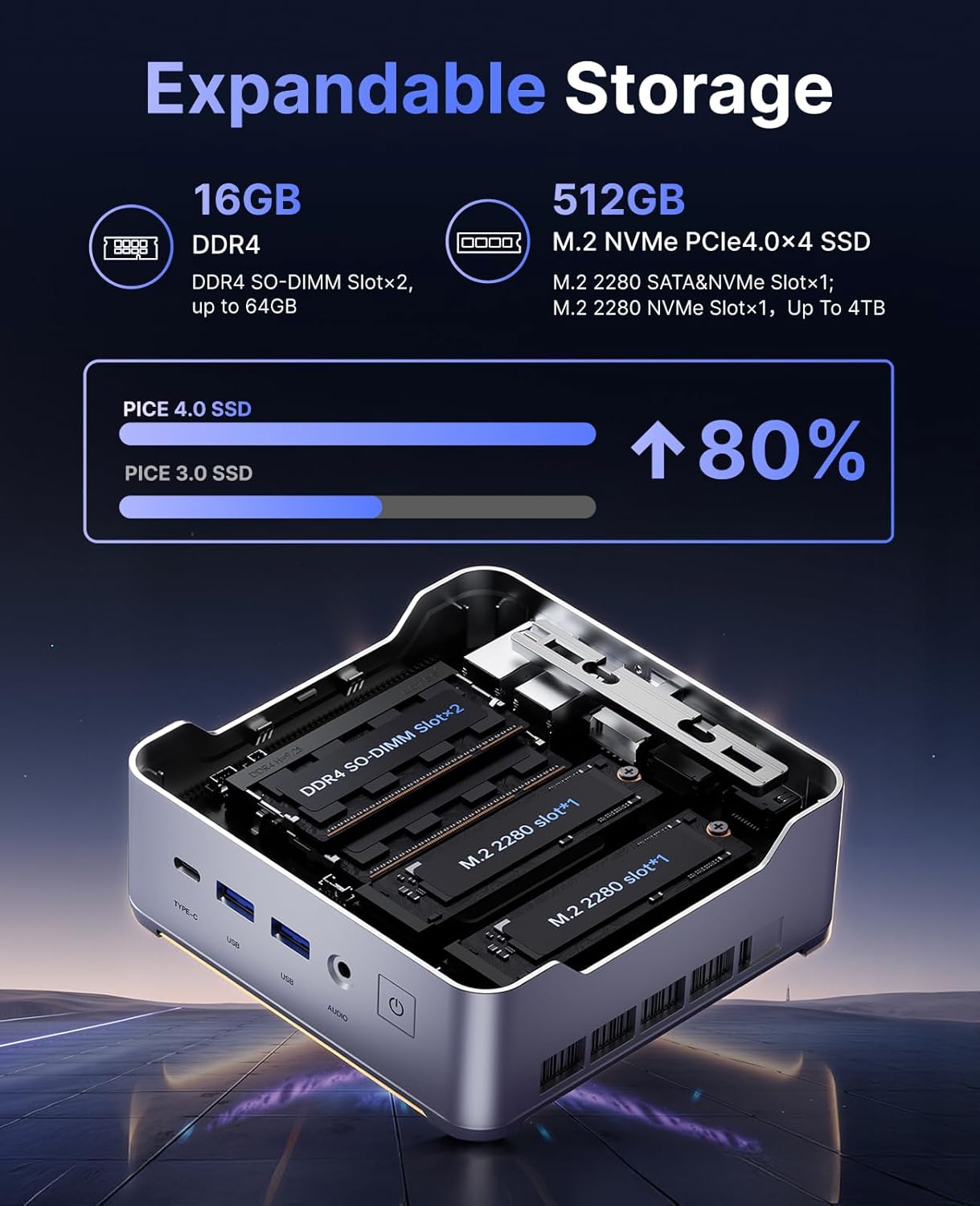
RAM and SSD Upgrades
The KAMRUI Hyper H2 is designed for easy upgrades, allowing you to expand its memory and storage capacity. The Mini PC supports:
- РАМ: Up to 2x 32GB DDR4 3200MHz/s SO-DIMM (total 64GB).
- ССД: Up to 2x 2TB NVMe SSD (M.2 2280 PCIe Gen4x4).
To access the RAM and SSD slots:
- Ensure the Mini PC is powered off and disconnected from all cables.
- Locate the small Phillips screw on the rear panel next to the lock/unlock switch. Remove this screw.
- Slide the lock switch to the unlock position. The top cover will lift slightly.
- Пажљиво уклоните горњи поклопац.
- Unscrew the four Phillips screws holding the metal plate/cover.
- Gently lift the metal plate to reveal the RAM and NVMe SSD slots.
- Install or replace your RAM modules or NVMe SSDs as needed.
- Reassemble the Mini PC by reversing these steps, ensuring all screws are tightened and the cover is securely locked.
Решавање проблема
If you encounter any issues with your KAMRUI Hyper H2 Mini PC, please refer to the following common solutions:
- Нема напајања:
- Уверите се да је адаптер за напајање безбедно повезан и са Мини рачунаром и са исправном утичницом.
- Проверите да ли је утичница функционална тако што ћете укључити други уређај.
- Без приказа:
- Check all video cable connections (HDMI, DP, USB-C) between the Mini PC and your monitor(s).
- Ensure your monitor is powered on and set to the correct input source.
- Try connecting to a different display or using a different video cable.
- Нема интернет везе:
- For wired connection, ensure the Ethernet cable is properly connected and your router/modem is working.
- For Wi-Fi, check if Wi-Fi is enabled in Windows settings and ensure you are connected to the correct network with the right password.
- Restart your router/modem and the Mini PC.
- Споре перформансе:
- Затворите непотребне апликације које раде у позадини.
- Уверите се да су ваш оперативни систем и драјвери ажурирани.
- Проверите да ли постоји злонамерни софтвер или вируси користећи реномирани антивирусни софтвер.
- Consider upgrading RAM or SSD if performance issues persist, especially with demanding tasks.
Спецификације
| Феатуре | Спецификација |
|---|---|
| Процесор | Intel Core i5-14450HX (10 Cores/16 Threads, up to 4.8GHz) |
| Графика | Integrated UHD Graphics for 14th Gen Processors (max frequency 1.5GHz) |
| РАМ | 16GB DDR4 (Expandable up to 64GB, 2x SO-DIMM slots) |
| Складиштење | 512GB NVMe PCIe 4.0 SSD (Expandable up to 2x 2TB NVMe SSD) |
| Видео Оутпут | Triple 4K@60Hz (HDMI 2.0, DP 1.4b, USB-C with DisplayPort Alt Mode) |
| Бежично повезивање | Wi-Fi 6 (802.11ax), Bluetooth 5.2 |
| Жичано повезивање | 1 x RJ45 гигабитни етернет порт |
| УСБ портови | 1 x USB 3.2 Gen2 Type-C (10Gbps, DP Alt Mode, 15W PD) 2 x USB 3.2 Gen2 Type-A (10Gbps) 4 x USB 3.2 Gen1 Type-A (5Gbps) |
| Аудио | 1 к 3.5 мм аудио прикључак |
| Оперативни систем | OS PRO |
| Димензије | 6.46 x 6.42 x 4.53 инча (паковање) |
| Тежина артикла | 2.99 фунти |
Гаранција и подршка
Your KAMRUI Hyper H2 Mini PC comes with a 12-месечна гаранција from the date of purchase, covering manufacturing defects and hardware malfunctions under normal use. For any technical assistance, troubleshooting, or warranty claims, please contact KAMRUI customer support.
KAMRUI offers 24-часовна корисничка подршка to assist you with any queries or issues you may encounter. Please refer to the contact information provided in your product packaging or visit the official KAMRUI webсајт за детаље подршке.
За додатне ресурсе и информације о производу, посетите KAMRUI Store on Amazon.