
1. Увод
This manual provides essential information for setting up, operating, maintaining, and troubleshooting your CHUWI Hi10 X2 2-in-1 Laptop Tablet. Please read it thoroughly before using your device.
Шта је у кутији
- Hi10 X2 Tablet
- Магнетна тастатура
- Кућиште са постољем
- Цхаргер Сет
- Кориснички приручник (овај документ)

Image 1.1: CHUWI Hi10 X2 Tablet with Magnetic Keyboard and Case.
2. Подешавање
2.1 Почетно пуњење
Before first use, fully charge your CHUWI Hi10 X2 tablet using the provided charger set. Connect the charger to the Type-C port on the tablet and plug it into a power outlet. The charging indicator light will illuminate.
2.2 Attaching the Magnetic Keyboard and Case
Align the tablet with the magnetic connectors on the keyboard. The magnets will secure the tablet in place. The case with stand can be adjusted to your preferred viewугао уласка.
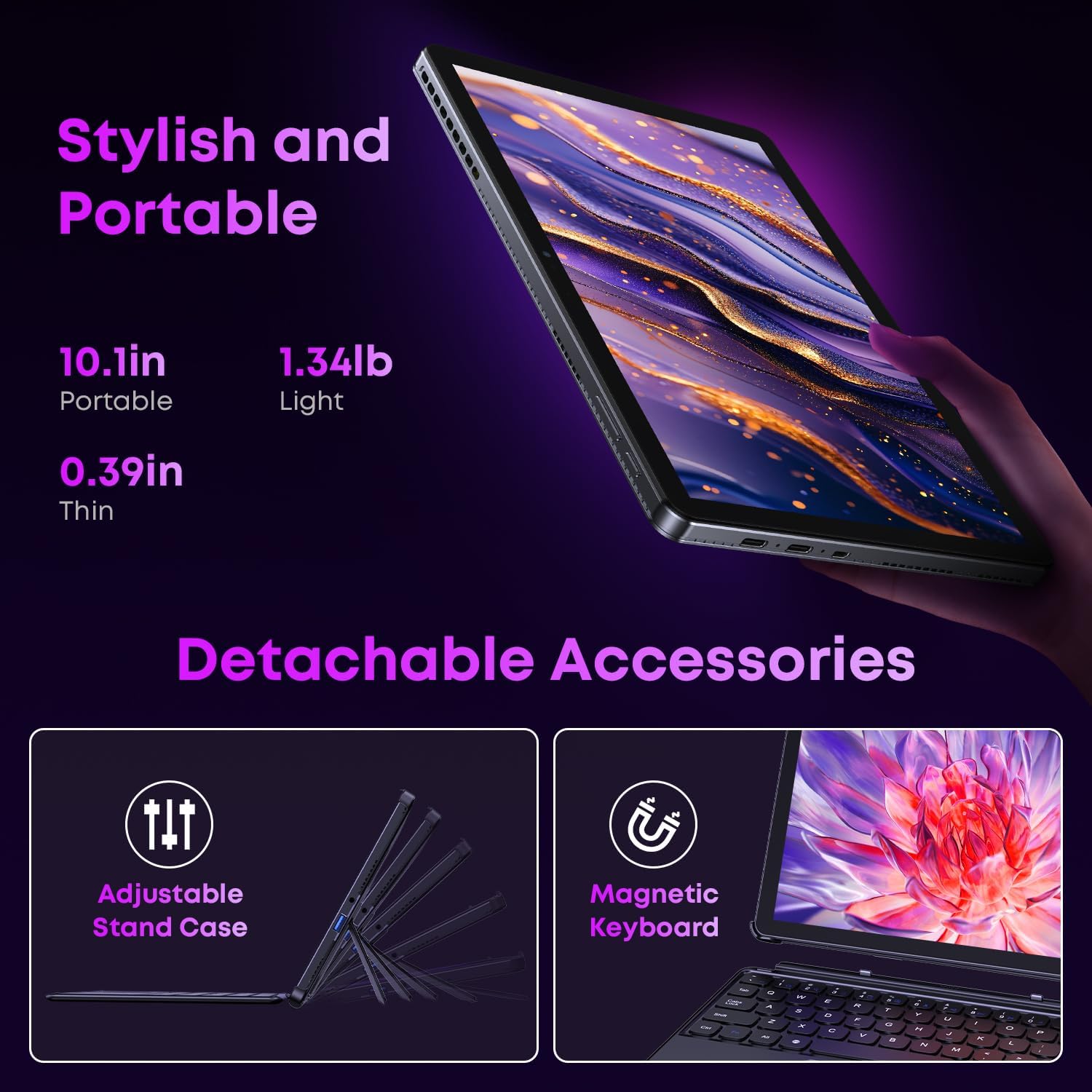
Image 2.1: Detachable accessories including the magnetic keyboard and adjustable stand case.
2.3 First Boot-Up and Windows Activation
Press and hold the power button until the screen turns on. Follow the on-screen instructions to complete the initial Windows 11 setup. If your Windows system arrives unactivated, please send the serial number (located on the back of the device) to CHUWI support via Amazon for your activation key.
2.4 Повезивање на Ви-Фи
During setup, you will be prompted to connect to a Wi-Fi network. Select your network and enter the password. The device supports Wi-Fi 6 for fast and stable connections.
3. Упутство за употребу
3.1 Укључивање/искључивање и режим спавања
- Укључено: Притисните и држите дугме за напајање док се екран не осветли.
- Искључивање: From the Windows Start menu, select Power > Shut down.
- Режим спавања: Briefly press the power button to enter or exit sleep mode.
3.2 Коришћење екрана осетљивог на додир
The 10.1-inch HD touchscreen supports 10-point multi-touch gestures. Use taps, swipes, and pinches for navigation and interaction with applications.

Image 3.1: The 10.1-inch HD touchscreen display.
3.3 Режими лаптопа и таблета
The magnetic keyboard allows for seamless switching between laptop and tablet modes. Attach the keyboard for typing and productivity, or detach it for a pure tablet experience.
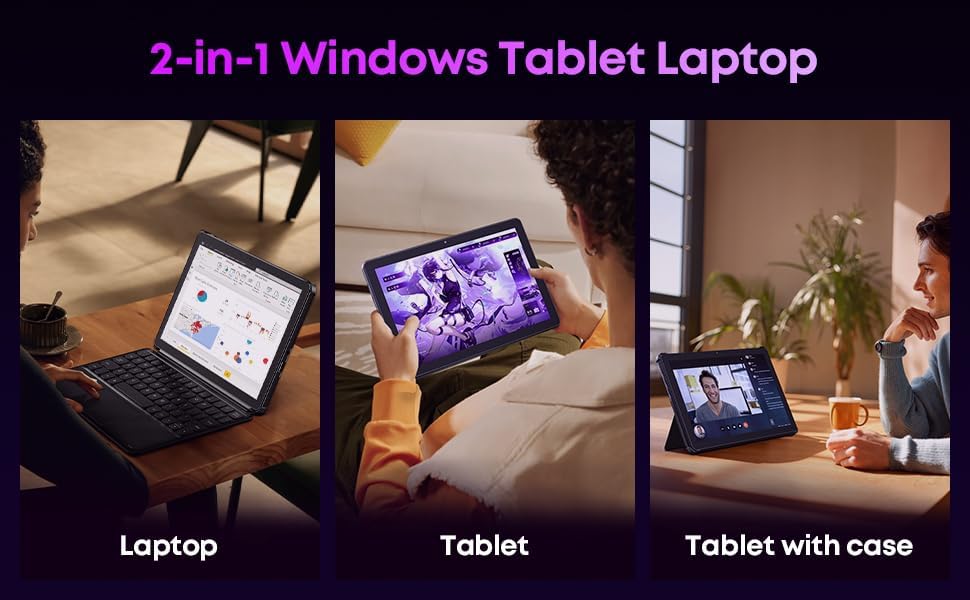
Image 3.2: Usage scenarios demonstrating laptop, tablet, and tablet with case modes.
3.4 Повезивање
- УСБ портови: The tablet features a full-featured Type-C port and a USB 3.2 Gen1 port for data transfer and connecting peripherals.
- Микро ХДМИ: Connect to external monitors or TVs using the Micro HDMI port for extended display options, supporting up to 4K video output.
- Блуетоотх КСНУМКС: Pair with wireless headphones, mice, and other Bluetooth accessories.
- Ви-Фи 6: Enjoy high-speed internet connectivity for streaming and browsing.
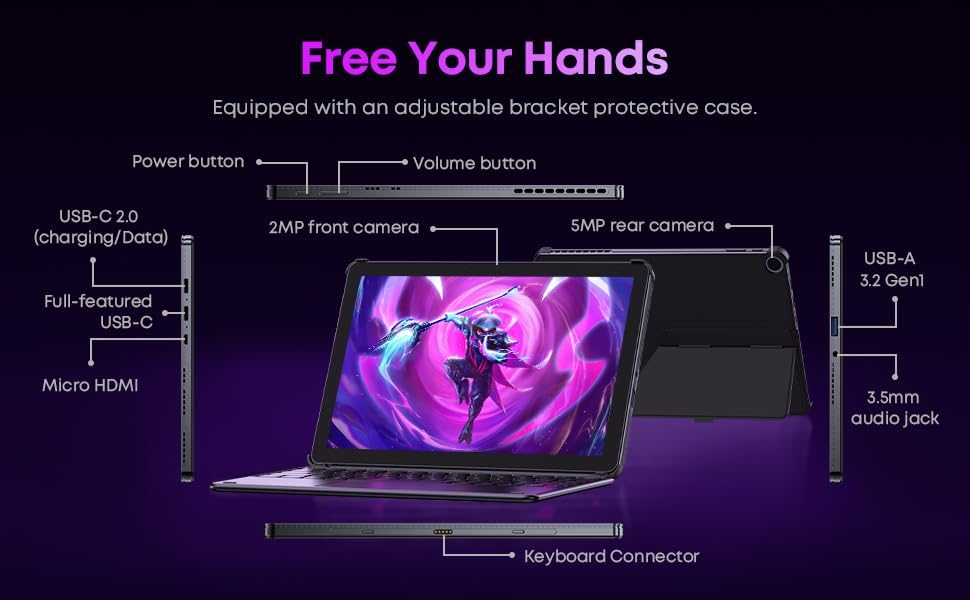
Слика 3.3: Детаљно view of the tablet's ports and connectors.
3.5 Употреба камере
The tablet is equipped with a 5MP autofocus rear camera for capturing photos and videos, and a 2MP front camera for video calls and selfies.

Image 3.4: Camera and wireless connectivity features.
3.6 Processor and Storage
Powered by a 10th Gen Intel Core i3 processor (up to 3.9GHz) and 8GB RAM, the tablet handles multitasking efficiently. The 256GB SSD provides ample storage and fast access to your files.

Image 3.5: Intel 10th Gen Core i3 Processor details.
3.7 Производ завршенview Видео
Видео 3.6: Оверview of the CHUWI Hi10 X2 2-in-1 Laptop Tablet, highlighting its features and functionality.
4. Одржавање
4.1 Чишћење уређаја
Користите меку крпу која не оставља влакна да бисте очистили екран и кућиште таблета. За тврдокорне мрље, благо обришитеampОперите крпу водом или раствором за чишћење екрана. Избегавајте јаке хемикалије или абразивне материјале.
4.2 Одржавање батерије
To prolong battery life, avoid exposing the tablet to extreme temperatures. It is recommended to keep the battery charge between 20% and 80% for optimal longevity. Avoid fully discharging the battery frequently.
4.3 Ажурирања софтвера
Редовно проверавајте и инсталирајте ажурирања за Windows како бисте били сигурни да ваш систем има најновије безбедносне закрпе и побољшања перформанси. Идите на Подешавања > Windows Update.
4.4 Управљање складиштем
Периодично реview и обришите непотребне files and applications to free up storage space on the 256GB SSD. This helps maintain optimal device performance.
КСНУМКС. Решавање проблема
5.1 Уређај се не укључује
- Ensure the device is fully charged. Connect the charger and wait a few minutes before attempting to power on.
- Притисните и држите дугме за напајање 10-15 секунди да бисте извршили хард ресетовање.
5.2 Проблеми са Wi-Fi повезивањем
- Поново покрените Wi-Fi рутер и таблет.
- Проверите да ли се други уређаји могу повезати на исту Wi-Fi мрежу.
- Заборавите мрежу у подешавањима система Windows и поново се повежите.
5.3 Екран не реагује на додир
- Поново покрените таблет.
- Уверите се да је екран чист и без прљавштине.
5.4 Keyboard Not Working
- Ensure the tablet is correctly aligned and securely connected to the magnetic keyboard.
- Поново покрените таблет.
За додатну помоћ, погледајте одељак Подршка.
6. Спецификације
| Феатуре | Спецификација |
|---|---|
| Бранд | ЦХУВИ |
| Назив модела | Hi10 X2 |
| Процесор | Intel Core i3 (10th Gen, up to 3.9 GHz) |
| Оперативни систем | Виндовс 11 Хоме |
| РАМ | 8 ГБ |
| Складиштење | 256 ГБ ССД |
| Величина екрана | 10.1 инча |
| Резолуција екрана | 1280x800 пиксела |
| Повезивање | Wi-Fi 6, Bluetooth 5.3 |
| Портс | Full-featured Type-C, USB 3.2 Gen 1, Micro HDMI, 3.5mm Audio Jack |
| камере | 5MP Autofocus Rear, 2MP Front |
| Тежина | 1.3 фунти (приближно 0.59 кг) |
| Димензије (Д x Ш x Дебљина) | 9.6 cm x 6.49 cm x 0.39 cm |
| Капацитет батерије | 3400 мАх |
7. Информације о гаранцији
The CHUWI Hi10 X2 2-in-1 Laptop Tablet comes with a 1-годишња ограничена гаранцијаОва гаранција покрива производне недостатке и кварове при нормалној употреби. Молимо вас да сачувате доказ о куповини за потребе подношења захтева за гаранцију.
For detailed warranty terms and conditions, please refer to the official CHUWI webсајту или контактирајте корисничку подршку.
8. Подршка
If you encounter any issues not covered in the Troubleshooting section, or require assistance with Windows activation, please contact CHUWI customer support. You can typically find support contact information on the official CHUWI website or through your purchase platform (e.g., Amazon seller messaging).
Када контактирате подршку, припремите серијски број уређаја и доказ о куповини.