
Увод
This manual provides detailed instructions for the installation, operation, and maintenance of your Soundstream VRCA1-72W 6.7-inch Wireless Car Stereo. Please read this manual thoroughly before using the product to ensure proper function and safety. Keep this manual for future reference.
Садржај пакета
Пре почетка инсталације проверите да ли су све ставке присутне у пакету.
- VRCA1-72W Stereo Head Unit
- Кабелски свежањ
- Installation Accessories (Mounting Kit)
- Упутство за употребу

Image: The product box for the Soundstream VRCA1-72W car stereo.

Image: Included wiring harness, mounting kit, and GPS antenna for the VRCA1-72W stereo.
Подешавање и инсталација
The VRCA1-72W is designed for universal single DIN dash openings. Professional installation is recommended, but if you choose to install it yourself, follow these guidelines carefully.
1. Мере предострожности
- Искључите негативни терминал акумулатора возила пре инсталације како бисте спречили кратке спојеве.
- Ensure proper insulation for all wiring connections.
- Do not block air vents or safety features during installation.
2. Ожичење
Refer to the wiring diagram provided with your unit and the image below for correct connections. Improper wiring can damage the unit or your vehicle's electrical system.

Слика: Позади view of the VRCA1-72W stereo showing various input/output ports including RCA, camera, and power harness connector.
- Појас за напајање: Connect the yellow wire to constant 12V, red to accessory 12V, and black to ground.
- Жице за звучнике: Повежите се са звучницима вашег возила, водећи рачуна о исправном поларитету.
- Улаз за камеру за вожњу уназад: Connect the camera's video output to the 'R CAM' RCA input. Connect the camera's power to the reverse light circuit.
- Контрола на волану (SWC): Connect SWC wires to your vehicle's steering wheel control interface (if applicable).
3. Монтажа јединице
Slide the head unit into the single DIN dash opening until it clicks into place. Secure it using the provided mounting brackets and screws.

Image: The VRCA1-72W car stereo seamlessly integrated into a vehicle's dashboard, displaying the Apple CarPlay interface.
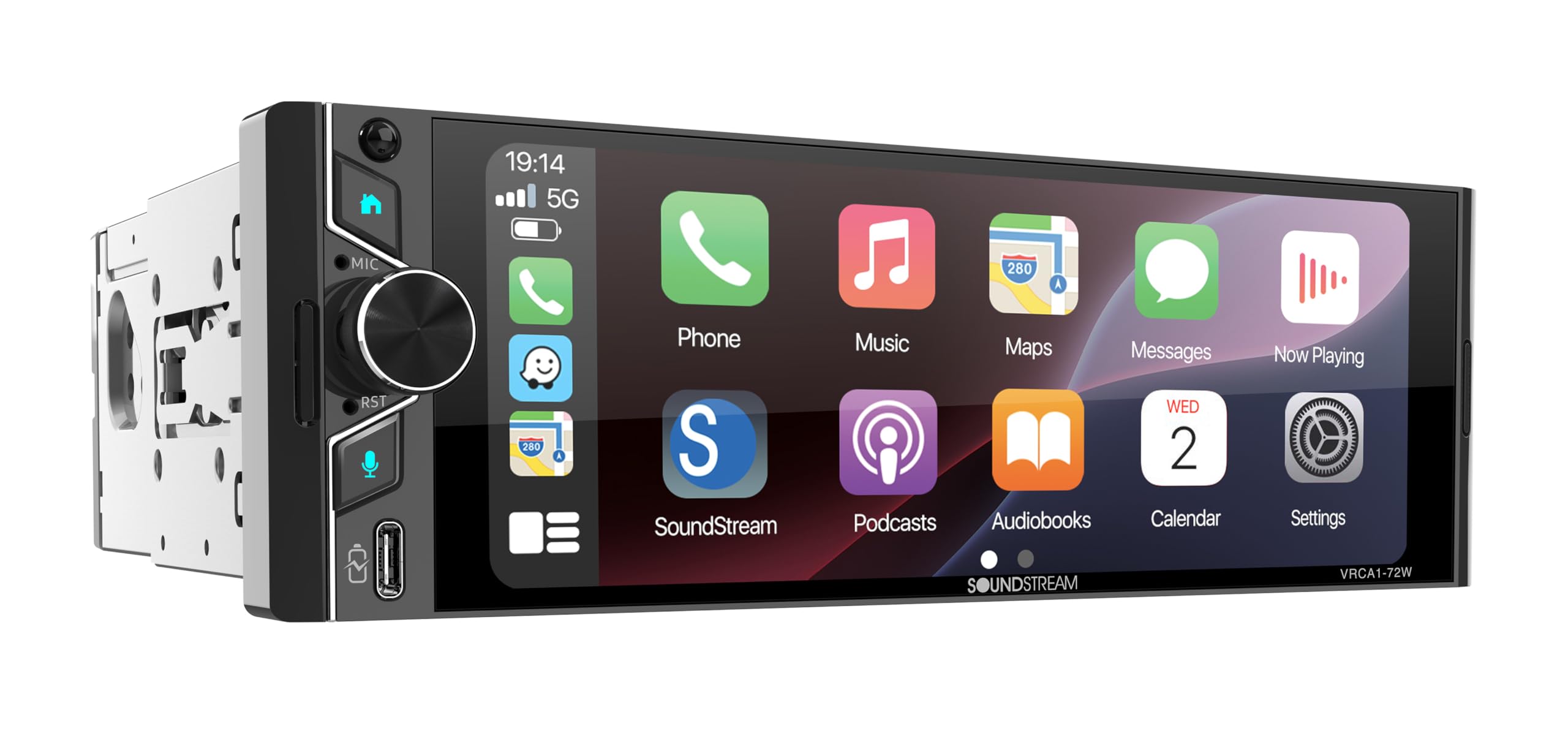
Image: The VRCA1-72W car stereo installed in a classic car's dashboard, showing the Apple CarPlay interface.
Упутство за употребу
The VRCA1-72W features a capacitive touchscreen for intuitive control. Most functions are accessed via the main menu icons.
1. Укључивање/искључивање и јачина звука
- Press the power button (usually on the left side) to turn the unit on or off.
- Rotate the volume knob or use the on-screen controls to adjust audio levels.
2. Навигација на почетном екрану
The home screen provides access to all primary functions. Tap an icon to open the corresponding application or feature.

Image: The VRCA1-72W home screen displaying icons for Bluetooth Music, Apple CarPlay, USB, Android Auto, Radio, Settings, Front Camera, and Rear Camera.
3. Бежични Apple CarPlay и Android Auto
Connect your compatible smartphone wirelessly for seamless integration of navigation, music, calls, and messages.
- Уверите се да су Блуетоотх и Ви-Фи омогућени на вашем паметном телефону.
- On the stereo, select the 'Apple CarPlay' or 'Android Auto' icon.
- Пратите упутства на екрану да бисте упарили свој уређај.
- Once connected, your phone's interface will appear on the stereo display.

Image: The VRCA1-72W stereo displaying the Apple CarPlay interface with various app icons like Phone, Music, Maps, Messages, and Now Playing.
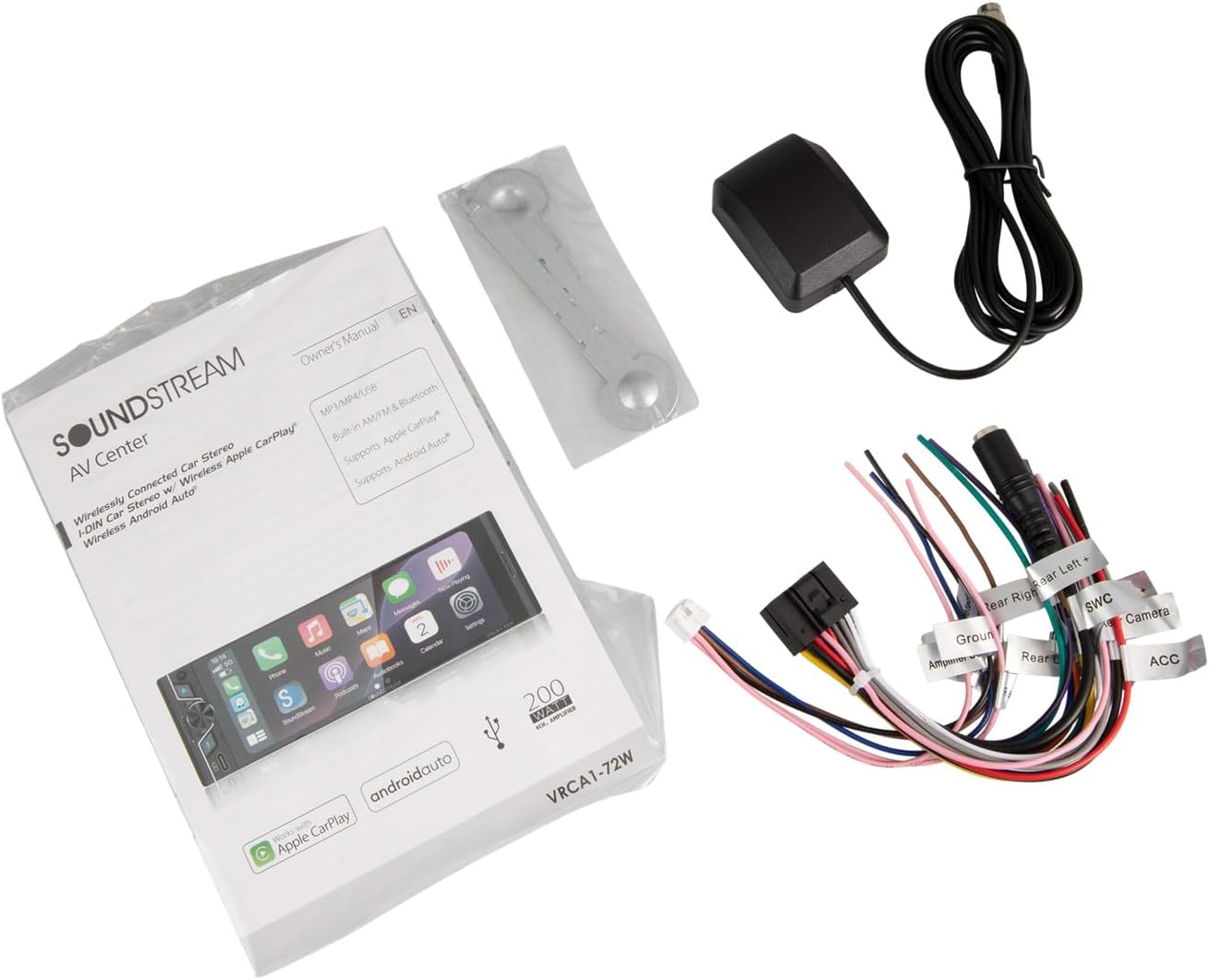
Image: The VRCA1-72W stereo displaying the Android Auto interface with app icons such as Google Maps, Spotify Music, Phone, and YouTube Music.
4. Блуетоотх 5.0
For audio streaming and hands-free calling without CarPlay/Android Auto.
- Go to the 'Bluetooth' menu on the stereo.
- Омогућите Блутут на телефону и потражите доступне уређаје.
- Select 'VRCA1-72W' from the list and confirm pairing.
- You can now stream audio or make/receive calls through the stereo.
5. УСБ улаз
Connect a USB drive for media playback or a smartphone for wired CarPlay/Android Auto (if wireless connection is not preferred).
- Уметните УСБ уређај у УСБ порт.
- Select the 'USB' icon on the home screen to access media files.
6. ФМ радио
- Select the 'Radio' icon from the home screen.
- Користите контроле на екрану да бисте скенирали станице или их ручно подесили.
- Save your favorite stations as presets.
7. Огледалска веза
Mirror your smartphone screen directly onto the stereo display.
- Select the 'Mirror Link' option (if available on your unit's firmware).
- Follow the specific instructions for your phone's operating system (iOS/Android) to establish the connection.
8. Улаз резервне камере
The stereo automatically displays the rear camera feed when the vehicle is shifted into reverse, provided the camera is correctly wired.
9. Управљање гласом
Activate voice control through Apple CarPlay or Android Auto by pressing the voice assistant button on the stereo or steering wheel (if connected) or by saying the wake word (e.g., "Hey Siri" or "Ok Google").
Одржавање
- Чишћење: Користите меку, суву крпу за чишћење екрана осетљивог на додир и спољашњости уређаја. Избегавајте абразивна средства за чишћење или раствараче.
- Ажурирања софтвера: Периодично проверавајте произвођачеве webсајт за ажурирања фирмвера како би се осигурале оптималне перформансе и компатибилност.
- Замена осигурача: If the unit loses power, check the fuse located on the rear of the unit or in the power harness. Replace with a fuse of the same rating.
Решавање проблема
Ако наиђете на проблеме, погледајте следеће уобичајене проблеме и решења:
| Проблем | Могући узрок | Решење |
|---|---|---|
| Нема струје | Прегорели осигурач, неисправно ожичење, лабава веза | Check fuse, verify power and ground connections, ensure harness is securely plugged in. |
| Нема звука | Muted, incorrect speaker wiring, ampпитање лифиера | Check volume and mute settings, verify speaker connections, ensure external ampУређај за спасавање (ако се користи) је укључен. |
| Блуетоотх се често прекида | Interference, outdated firmware, phone compatibility | Ensure no other devices are interfering. Try updating stereo firmware. Test with a different phone. Re-pair the device. |
| CarPlay/Android Auto се не повезује | Incorrect phone settings, cable issue (for wired), Wi-Fi/Bluetooth issue (for wireless) | Ensure phone is compatible and settings are correct (e.g., Wi-Fi/Bluetooth on). Try a different USB cable if using wired. Restart both phone and stereo. |
| Екран на додир не реагује | Замрзавање система, прљавштина на екрану | Restart the unit. Clean the screen. If issue persists, contact support. |
Спецификације
| Феатуре | Спецификација |
|---|---|
| Број модела | VRCA1-72W |
| Величина екрана | 6.7 инча |
| Дисплаи Типе | Екран осетљив на додир |
| Повезивање | Wireless Apple CarPlay, Wireless Android Auto, Bluetooth 5.0, USB |
| Режим аудио излаза | Стерео |
| Излазна снага | 300 вати (врх) |
| Компатибилни уређаји | Паметни телефон (iOS, Android) |
| Посебне карактеристике | Backup Camera Input, Mirror Link, Voice Control, FM Radio |
| Димензије производа (Д x Ш x В) | 4"Д к 6"Ш к 2.4"В |
| Тежина артикла | 2.6 фунти |
Гаранција и подршка
Информације о гаранцији
This Soundstream VRCA1-72W car stereo comes with a 1 године гаранције произвођачаМолимо вас да сачувате доказ о куповини за потребе гаранције. Гаранција покрива недостатке у материјалу и изради при нормалној употреби.
Корисничка подршка
For technical assistance, troubleshooting beyond this manual, or warranty inquiries, please contact Soundstream customer support. Refer to the official Soundstream webсајт за најновије контакт информације.