
1. Увод
Thank you for choosing the UGREEN 11-inch Keyboard Case. This product is designed to enhance your iPad experience by providing a comfortable typing solution and versatile viewing angles, transforming your tablet into a portable workstation. This manual provides essential information for setup, operation, maintenance, and troubleshooting to ensure optimal performance.
2. Компатибилност
Ова футрола са тастатуром је компатибилна са следећим моделима iPad-а:
- iPad Air 11-inch (M4/M3/M2, 2026/2025/2024)
- iPad Pro 11-inch (4th/3rd/2nd/1st Gen)
- iPad Air 5. генерације (2022)
- iPad Air 4. генерације (2020)
Compatible Model Numbers: A3459, A2902, A3266, A1980, A2228, A2759, A2377, A2316, A2588.
Напомена: This case is не compatible with iPad Pro 11-inch (M4) 2024.

Figure 2.1: Detailed compatibility chart for UGREEN 11-inch Keyboard Case.
3. Садржај пакета
Молимо вас да се уверите да су све ставке присутне у вашем пакету:
- UGREEN 11-inch Keyboard Case
- УСБ-Ц кабл за пуњење (3 стопа)
- Упутство за употребу
4. Производ је готовview
The UGREEN Keyboard Case features a robust design with several key functionalities:
- Precision Magnetic Back Plate: Ensures a secure and stable attachment for your iPad.
- 125° подесиво Viewугао угла: Allows for flexible positioning for typing, browsing, or viewинг.
- Тастери са маказицама за пребацивање: Provides a smooth, quiet, and consistent typing experience.
- 3-Level Adjustable Backlight: Offers illumination for comfortable use in various lighting conditions.
- Реактивна тачпед: Enables precise cursor control and supports multi-gesture navigation.
- Dual Orientation Viewинг: Supports both portrait and landscape modes.
- 650мАх батерија: Provides extended usage and standby times.

Figure 4.1: Powerful magnetic hold for stable iPad attachment.

Figure 4.2: Quick-set magnetic stand with 125° adjustable viewугао уласка.

Figure 4.3: Scissor-switch keyboard design and 3-level adjustable backlighting.

Figure 4.4: Responsive touchpad with multi-gesture support.
5. Упутства за подешавање
5.1 Повезивање iPad-а
- Align your compatible iPad with the magnetic back plate of the case.
- The iPad will securely snap into place due to the strong magnetic connection.
5.2 Powering On the Keyboard
- Locate the power switch on the right side of the keyboard.
- Slide the switch to the 'ON' position. The indicator light will briefly illuminate.
5.3 Блуетоотх упаривање
- Уверите се да је тастатура укључена.
- На вашем iPad-у идите на Подешавања > Блуетоотх.
- Turn on Bluetooth. Your iPad will search for nearby devices.
- Select "UGREEN Keyboard" (or similar name) from the list of available devices.
- Пратите сва упутства на екрану да бисте довршили процес упаривања.
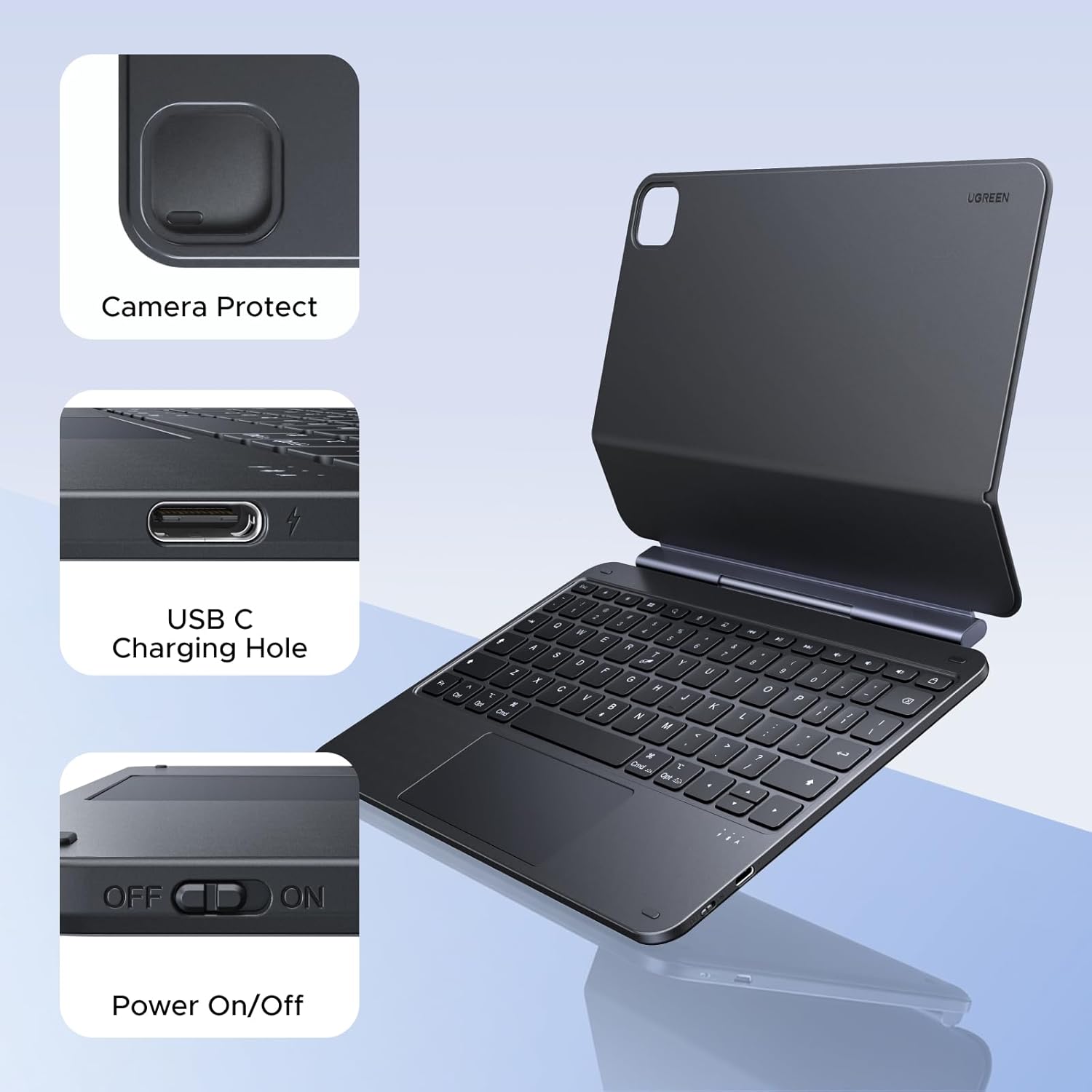
Figure 5.1: Location of the power switch and USB-C charging port.
6. Упутство за употребу
6.1 Подешавање Viewинг Англе
The magnetic stand allows for a 125° adjustable viewing angle. Gently tilt your iPad to achieve your desired position for typing, drawing, or media consumption.
6.2 Коришћење тачпеда
The integrated touchpad supports various multi-touch gestures for intuitive navigation:
- Додир једним прстом: Click/Select
- Померање са два прста: Померање горе/доле или лево/десно
- Стисните прсте за зумирање: Увећајте/умањите
- Превлачење нагоре са три прста: Отвори пребацивач апликација
- Превлачење надоле са три прста: Вратите се на почетни екран
- Превлачење са три прста лево/десно: Пребацивање између отворених апликација
6.3 Подешавање позадинског осветљења
Притисните тастер light icon key (usually next to the function keys) to cycle through the 3 levels of backlight brightness or to turn it off.
6.4 Dual Orientation Viewинг
The case supports both portrait and landscape orientations. Simply rotate your iPad while it is magnetically attached to switch modes. This allows for flexible viewing during video calls, streaming, or browsing without compromising stability.

Figure 6.1: Versatile usage modes including typing, viewing, sketching, and reading.
7. Пуњење тастатуре
The keyboard is equipped with a 650mAh battery for extended use.
- Трајање батерије: Up to 6 months standby time, or 5 months of regular use with the backlight off.
- Време пуњења: Приближно 2 сата за потпуно пуњење.
- Начин пуњења: Use the included USB-C cable to connect the keyboard's USB-C port to a power source.

Слика 7.1: Перформансе батерије токомview.
8. Одржавање
To ensure the longevity and optimal performance of your UGREEN Keyboard Case, follow these maintenance guidelines:
- Чишћење: Користите меку, дamp cloth to wipe the exterior of the case. Avoid harsh chemicals or abrasive materials. For the keyboard keys, use a soft brush or compressed air to remove dust and debris.
- Складиштење: When not in use, store the keyboard case in a clean, dry environment away from extreme temperatures and direct sunlight.
- Руковање: Avoid dropping the case or subjecting it to strong impacts, which could damage internal components or the magnetic mechanism.
КСНУМКС. Решавање проблема
If you encounter issues with your UGREEN Keyboard Case, refer to the following common problems and solutions:
9.1 Keyboard Not Pairing or Connecting
- Проверите снагу: Ensure the keyboard's power switch is in the 'ON' position.
- Ниво батерије: Verify that the keyboard has sufficient battery charge. Charge it if necessary.
- Bluetooth on iPad: Confirm that Bluetooth is enabled on your iPad (Подешавања > Блуетоотх).
- Поново упарите уређај: If the keyboard was previously paired, try forgetting the device on your iPad's Bluetooth settings and then re-pairing it.
- Поново покрените уређаје: Поново покрените и iPad и тастатуру.
9.2 Inconsistent Touchpad Response
- Clean Touchpad: Ensure the touchpad surface is clean and free of dirt or moisture.
- Ажурирање фирмвера: Check the UGREEN website for any available firmware updates for the keyboard.
- iPad Settings: Review your iPad's touchpad settings under Подешавања > генерал > Trackpad & Mouse.
9.3 iPad Feels Top-Heavy or Unstable
- Површинска стабилност: Ensure the keyboard case is placed on a flat, stable surface.
- Подешавање угла: Подесите viewing angle to a more balanced position. Extreme angles may reduce stability.
- Magnetic Connection: Confirm the iPad is fully and securely attached to the magnetic back plate.
10. Спецификације
| Феатуре | Детаљ |
|---|---|
| Бранд | УГРЕЕН |
| Број модела | и711 |
| Компатибилни уређаји | Tablet (Specific iPad models listed in Compatibility section) |
| Технологија повезивања | Блуетоотх |
| Опис тастатуре | Flexible, Scissor-switch |
| Распоред тастатуре | КВЕРТИ |
| Материјал | Plastic, Steel (Keyboard Plate) |
| Извор напајања | Battery Powered (650mAh Lithium Battery) |
| Посебне карактеристике | Magnetic Case, Adjustable Backlight, Touchpad |
11. Гаранција и подршка
11.1 Информације о гаранцији
This UGREEN product is covered by a 2-годишња гаранција произвођача од дана куповине. Ова гаранција покрива недостатке у материјалу и изради при нормалној употреби.
Гаранција не покрива:
- Штета узрокована несрећом, злоупотребом, злоупотребом, поплавом, пожаром, земљотресом или другим спољним узроцима.
- Damage caused by operating the product outside the permitted or intended uses described by UGREEN.
- Damage caused by service performed by anyone who is not a representative of UGREEN.
11.2 Корисничка подршка
For technical support, warranty claims, or general inquiries, please contact UGREEN customer service through the following channels:
- Webсајт: Посетите званични УГРЕЕН webсајт за ресурсе подршке и контакт информације.
- Емаил: Refer to your product packaging or the UGREEN website for the appropriate support email address.
- Онлајн продавац: If purchased from an online retailer, you may also contact their customer service for assistance.
Please have your product model number (i711) and proof of purchase ready when contacting support.