
Ulefone RugKing Pad Pro
Ulefone RugKing Pad Pro Android 16 Rugged Tablet User Manual
Model: RugKing Pad Pro | Brand: Ulefone
1. Увод
This manual provides essential instructions for setting up, operating, and maintaining your Ulefone RugKing Pad Pro rugged tablet. Please read this manual thoroughly before using the device to ensure proper function and longevity.
2. Садржај пакета
Проверите да ли су све ставке присутне у паковању вашег производа:
- Ulefone RugKing Pad Pro Tablet x 1
- AC Charger (100~240V) x 1
- Type-C Data Cable (100 cm) x 1
- Protective Film (Pre-installed) x 1
- Metal Pry Opener x 1
- Portable Strap x 1
- Вијци к 2
- Multilingual User Manual x 1
- Charging Instruction Card x 1
- Safety Warning Declaration x 1

Figure 2.1: Contents of the Ulefone RugKing Pad Pro package.
3. Производ је готовview
The Ulefone RugKing Pad Pro is a rugged tablet designed for durability and performance. Familiarize yourself with its physical components.
3.1 Физичке компоненте
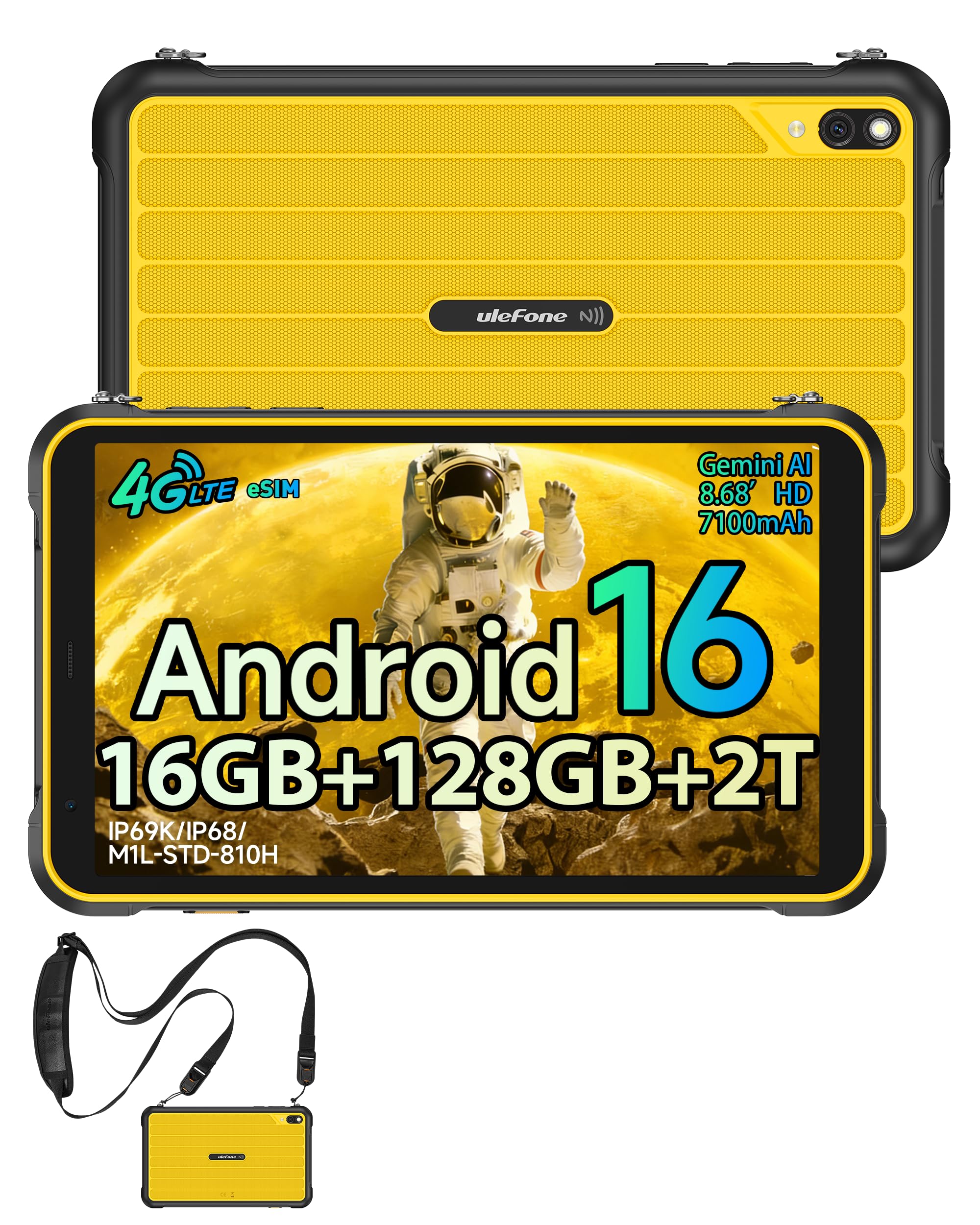
Слика 3.1: Предња страна view of the Ulefone RugKing Pad Pro.

Слика 3.2: Страна view with buttons and ports.
- Приказ: 8.68-inch, 90Hz refresh rate, Corning Gorilla Glass.
- Дугме за напајање: Located on the side, used to power on/off or wake/sleep the device.
- Дугмад за јачину звука: Подесите нивое звука.
- УСБ Типе-Ц порт: За пуњење и пренос података.
- Решетке звучника: Два стерео звучника за аудио излаз.
- камера: 16MP rear camera, 8MP front camera.
- Лампа: Integrated 133 lumen Super Torch.
- Слот за SIM/MicroSD картицу: Supports dual SIM and up to 2TB microSD expansion.
- uSmart Expansion Connector: For compatible peripherals like endoscopes.
- 3.5 мм прикључак за слушалице: For audio accessories.
4. Подешавање
4.1 Почетно укључивање
- Притисните и држите Дугме за напајање until the Ulefone logo appears.
- Пратите упутства на екрану да бисте изабрали језик, регион и повезали се са Wi-Fi мрежом.
- Пријавите се помоћу свог Google налога или креирајте нови да бисте приступили Google Play продавници и другим услугама.
4.2 Подешавање SIM картице и eSIM картице
The RugKing Pad Pro supports dual physical SIM cards and eSIM functionality for 4G LTE connectivity.

Figure 4.1: Triple card slot for SIM and MicroSD.
4.2.1 Physical SIM Card Installation
- Пронађите лежиште за СИМ картицу са стране таблета.
- Use the provided metal pry opener to eject the tray.
- Place your Nano-SIM cards into the designated slots.
- Пажљиво поново уметните лежиште у таблет.
4.2.2 eSIM Activation
To activate eSIM, navigate to Подешавања > Мрежа и интернет > СИМ картице and follow the instructions to add a new mobile plan. You will typically need a QR code or activation code from your network provider.

Figure 4.2: eSIM connectivity feature.
5. Упутство за употребу
5.1 Андроид 16 оперативни систем
The RugKing Pad Pro runs on Android 16, offering a dynamic and fluid user interface with enhanced security and usability features. Enjoy desktop-like window views for multitasking and smarter notification management.

Figure 5.1: Android 16 user interface.
5.2 Приказ и интеракција
The 8.68-inch display with a 90Hz refresh rate provides smooth navigation and streaming. With 860 nits peak brightness, the screen is readable even in bright sunlight. Corning Gorilla Glass offers enhanced scratch resistance.

Figure 5.2: Display features including 90Hz refresh rate and Gorilla Glass.
5.2.1 Glove Mode
For use in cold environments or industrial settings, enable Glove Mode in settings to allow touch input while wearing gloves. Note that some leather gloves may not be compatible due to material differences.

Figure 5.3: Tablet operation with gloves enabled.
5.3 Camera and Flashlight
The tablet features a 16MP rear camera for clear photos and document scanning, and an 8MP front camera for video calls. The integrated 133 lumen Super Torch provides bright illumination in low-light conditions.

Figure 5.4: Camera and Super Torch features.
5.4 Повезивање и навигација
- 4Г ЛТЕ: Stay connected with dual SIM or eSIM.
- НФЦ: Supports Google Pay and other NFC functions for identification and authentication.
- ГПС: Integrated GPS, GLONASS, BeiDou, and Galileo for accurate navigation.
- Ви-Фи: Supports 802.11b/g/n standards.
- Блуетоотх: За повезивање бежичних додатака.

Figure 5.5: NFC enabled device for various applications.

Figure 5.6: GPS navigation in a vehicle.
5.5 посебних карактеристика
- Прилагођени кључ: Assign specific functions to a programmable key for quick access.
- ИД лица: Откључајте уређај помоћу препознавања лица.
- ФМ радио: Listen to FM radio without headphones.
- uSmart Expansion Connector: Connect compatible external peripherals such as endoscopes (uSmart E01, E02) or digital microscopes (uSmart C01).

Figure 5.7: uSmart expansion connector and peripherals.
6. Карактеристике издржљивости
The RugKing Pad Pro is built to withstand extreme conditions, certified with IP68, IP69K, and MIL-STD-810H standards.
- ИП68: Dustproof and resistant to continuous immersion in water up to 2 meters for 30 minutes.
- ИП69К: Protected against high-pressure, high-temperature jet sprays.
- MIL-STD-810H: Military-grade standard ensuring reliable resistance to shocks, vibrations, and extreme temperatures.

Figure 6.1: Rugged design and certifications.

Figure 6.2: Dust, water, and drop resistance tests.
7. Управљање батеријом
The RugKing Pad Pro is equipped with a 7100 mAh battery, offering extended usage. It supports 492 hours of standby time or 10 hours of video playback on a single charge.
7.1 Пуњење
- Стандардно пуњење: Connect the provided Type-C cable and AC charger to the tablet.
- Пого Пин пуњење: The tablet is compatible with Pogo Pin charging docks (sold separately) for convenient charging.
- Обрнуто пуњење (OTG): Use the tablet as a power bank to charge other devices via an OTG cable (sold separately).

Figure 7.1: Battery capacity and charging methods.
8. Складиштење и перформансе
Powered by an Unisoc T7250 Octa-core processor, the RugKing Pad Pro handles complex applications and demanding tasks efficiently. It comes with 16GB RAM (8GB physical + 8GB virtual) and 128GB internal storage, expandable up to 2TB via microSD card.

Figure 8.1: Octa-core processor for uninterrupted flow.

Figure 8.2: Memory and storage specifications.
*MicroSD card is sold separately for storage expansion. Dynamic RAM activation is user-configurable in Settings.
9. Одржавање
9.1 Чишћење уређаја
- Користите меку крпу која не оставља влакна за чишћење екрана и кућишта.
- За тврдокорну прљавштину, благо дampНатопите крпу водом. Избегавајте јаке хемикалије или абразивне материјале.
- Ensure all port covers are securely closed before cleaning with liquids to maintain water resistance.
9.2 Ажурирања софтвера
Regularly check for software updates to ensure optimal performance, security, and access to new features. Navigate to Подешавања > Систем > Ажурирање система да провери и инсталира доступна ажурирања.
9.3 Управљање складиштем
Периодично реview ваше сачувано files and applications. Delete unnecessary data to free up space and maintain device speed. Utilize the microSD card slot for large media files.
КСНУМКС. Решавање проблема
| Проблем | Решење |
|---|---|
| Уређај се не укључује. | Уверите се да је батерија напуњена. Прикључите пуњач и сачекајте неколико минута пре него што поново покушате да је укључите. |
| Екран не реагује. | Perform a forced restart by holding the Power button for 10-15 seconds. If the issue persists, ensure Glove Mode is not causing interference if not needed. |
| Повезивање на Ви-Фи није могуће. | Check if Wi-Fi is enabled in settings. Restart your router and the tablet. Verify the Wi-Fi password. |
| СИМ картица није откривена. | Уверите се да је СИМ картица правилно уметнута у лежиште. Поново покрените таблет. Проверите да ли је СИМ картица активна код вашег оператера. |
| Батерија се брзо празни. | Reduce screen brightness, close unused apps, disable unnecessary connectivity features (Bluetooth, GPS, Wi-Fi) when not in use. Check for background app activity. |
11. Спецификације
| Феатуре | Детаљ |
|---|---|
| Назив модела | Ulefone RugKing Pad Pro |
| Оперативни систем | Андроид 16 |
| Процесор | Unisoc T7250 осмојезгарни |
| РАМ | 16 GB (8 GB physical + 8 GB virtual) |
| Интерна меморија | 128 ГБ |
| Екпандабле Стораге | До 2 ТБ преко microSD картице |
| Величина екрана | 8.68 инча |
| Резолуција екрана | 1400x800 пиксела (HD+) |
| Рефресх Рате | 90 Хз |
| Заштита екрана | Цорнинг Горилла Гласс |
| Задња камера | 16 МП |
| Предња камера | 8 МП |
| Видео Рецординг | ФХД 1080п |
| Капацитет батерије | 7100 mAh (литијум-полимер) |
| Трајање батерије (просечно) | 13 Days (standby), 10 Hours (video playback) |
| Повезивање | 4G LTE (Dual SIM, eSIM), Wi-Fi (802.11b/g/n), Bluetooth, NFC |
| Навигација | ГПС, ГЛОНАСС, БеиДоу, Галилео |
| Оцене издржљивости | IP68, IP69K, MIL-STD-810H |
| Сигурносне карактеристике | Фаце ИД |
| Димензије (Д x Ш x В) | 20 к 10 к 1 цм |
| Тежина | 450 грама |
12. Гаранција и подршка
12.1 Информације о гаранцији
The Ulefone RugKing Pad Pro comes with a Двогодишња гаранција произвођачаОва гаранција покрива недостатке у материјалу и изради при нормалној употреби. Молимо вас да сачувате доказ о куповини за потребе подношења захтева за гаранцију.


Figure 12.1: Ulefone brand and 2-year warranty indication.
12.2 Корисничка подршка
For technical assistance, warranty claims, or further inquiries, please contact Ulefone customer support. A service center is available in Europe.
- Refer to the official Ulefone webсајт за контакт детаље.
- Consult the "Multilingual User Manual" included in your package for additional information.
- The tablet includes a "Service Center 2.0" application for intelligent support.
Ask a question about this manual
Ask about setup, troubleshooting, compatibility, parts, safety, or missing instructions. Manuals+ will review the question and use this page’s manual context to help answer it.