
BOSGAME P4 Ultra
BOSGAME P4 Ultra Mini PC Ryzen 7 7730U Instruction Manual
Модел: P4 Ultra
1. Увод
This manual provides detailed instructions for setting up, operating, and maintaining your BOSGAME P4 Ultra Mini PC. Please read this manual thoroughly before using the device to ensure optimal performance and longevity.
2. Шта је у кутији
Upon unboxing your BOSGAME P4 Ultra Mini PC, you should find the following items:
- 1 × P4 Ultra Mini PC
- 1 × ХДМИ кабл
- 1 × адаптер за напајање
- 1 × VESA Mount & Screws
- 1 × Упутство за употребу (овај документ)


3. Водич за подешавање
3.1 Почетно повезивање
- Place the Mini PC on a stable surface or mount it using the provided VESA mount.
- Connect your monitor(s) to the Mini PC using the HDMI, DisplayPort, or USB Type-C ports.
- Повежите тастатуру и миш са доступним УСБ портовима.
- Plug the power adapter into the Mini PC and then into a power outlet.
- Press the power button on the front of the Mini PC to turn it on.
3.2 Подешавање оперативног система (Windows 11 Pro)
Your BOSGAME P4 Ultra Mini PC comes with Windows 11 Pro pre-installed. Follow the on-screen instructions to complete the initial setup.
- Select your country, region, and language.
- For the fastest and cleanest first-time setup, it is recommended to skip connecting to Wi-Fi during the initial setup. To do this, press Схифт + Ф10 on your keyboard to open a command window. Type
oobe\bypassnroи притисните Ентер. The PC will restart. - Once restarted, you can proceed with the offline setup by selecting "I don't have internet" when prompted.
- Креирајте кориснички налог и лозинку.
- Adjust privacy settings as desired.
The system is 100% clean, fast, and secure, with no bloatware.
4. Упутство за употребу
4.1 Укључивање/искључивање
- To power on, press the red power button on the front panel.
- To power off, click the Start menu in Windows and select "Power" then "Shut down." Alternatively, press and hold the power button for 5 seconds.
4.2 Triple Display Setup
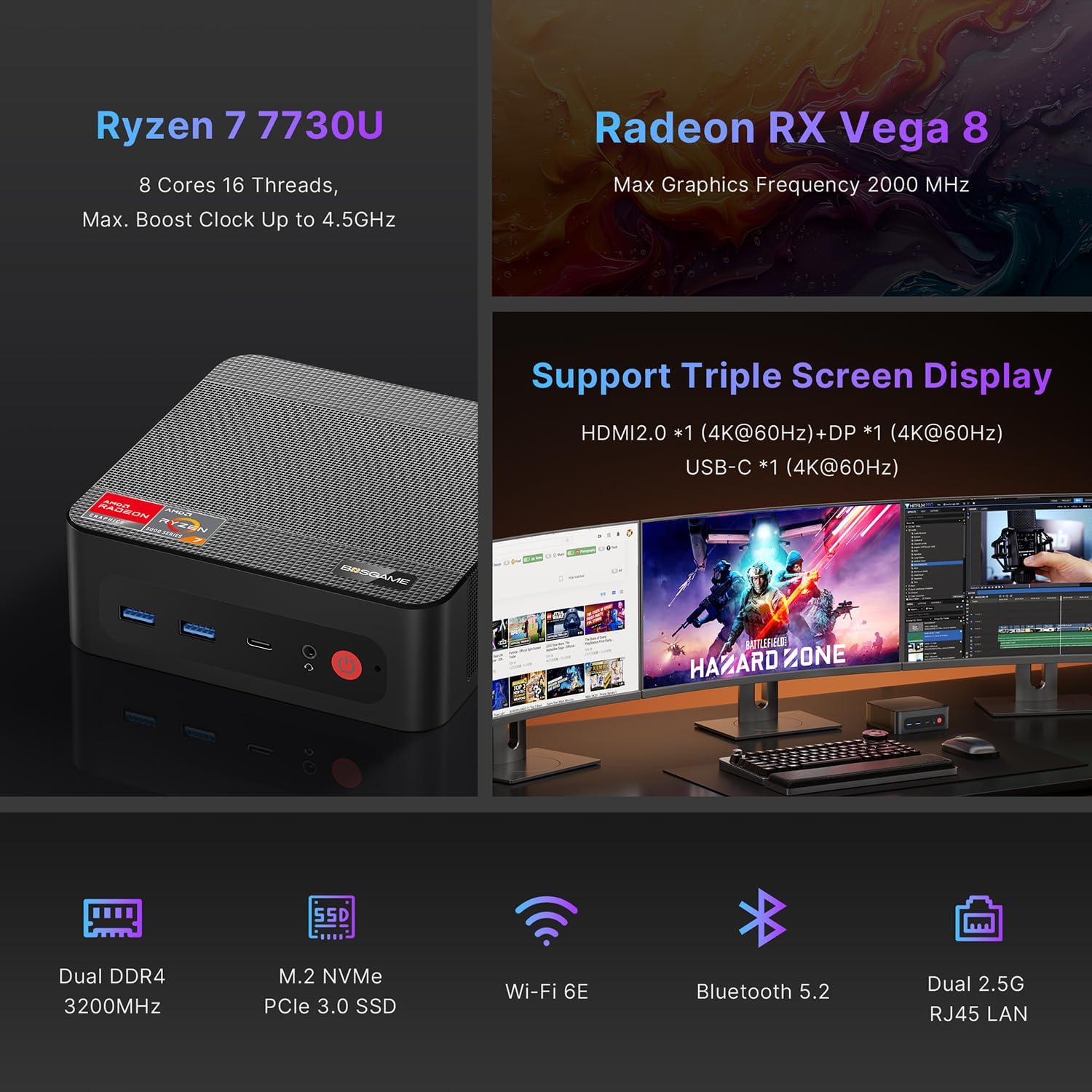
The BOSGAME P4 Ultra supports simultaneous output to three 4K monitors via HDMI 2.0, DisplayPort, and Full-Function USB Type-C.
- Connect the DisplayPort cable to the first monitor.
- Connect the HDMI cable to the second monitor.
- Connect the USB Type-C cable to the third monitor.
- Ensure all monitors are powered on and set to the correct input source.


5. Повезивање
5.1 Портови су завршениview
| Интерфејс | Количина | Опис |
|---|---|---|
| USB3.2 Gen2 (4K 60Hz) | 1 | Full-function USB Type-C for data, 4K video, and Power Delivery 3.0 |
| HDMI (2.0 @4K 60Hz) | 1 | Видео излаз за монитор |
| УСБ3.2 Ген1 | 2 | Брзи пренос података |
| 5.5*2.5mm DC Jack | 1 | Улазна снага |
| УСБ2.0 | 2 | Standard USB ports |
| Комбиновани прикључак од 3.5 мм | 1 | Аудио улаз/излаз |
| DP (4K 60Hz) | 1 | ДисплаиПорт видео излаз |
| 2.5G RJ45 LAN | 2 | Dual 2.5 Gigabit Ethernet ports |

5.2 Бежично повезивање
- Ви-Фи 6Е: For high-speed, lag-free wireless internet.
- Блуетоотх КСНУМКС: For instant pairing with peripherals like keyboards, mice, and headphones.

6. Performance & Expansion
The BOSGAME P4 Ultra Mini PC is powered by an AMD Ryzen 7 7730U processor, offering robust performance for various tasks.
- процесор: AMD Ryzen 7 7730U (8 Cores, 16 Threads, Max. Boost Clock up to 4.5GHz)
- Графика: Radeon RX Vega 8 (Max Graphics Frequency 2000 MHz)
- Меморија: 16GB DDR4 3200MHz SODIMM (expandable up to 32GB)
- Складиштење: 1TB NVMe PCIe 3.0 x4 SSD (expandable up to 4TB via additional M.2 2280 slot)

6.1 Storage and RAM Upgrade
You can upgrade the RAM and SSD to enhance performance or storage capacity.
- Remove the screws from the base plate.
- Carefully open the base plate.
- Move the system fan to access the RAM and SSD slots.
- Replace the RAM and/or SSD as needed.

6.2 Graphics Dock Expansion
The Mini PC supports graphics dock expansion via its full-featured USB Type-C port, allowing for enhanced graphics performance for demanding applications or gaming.
7. Одржавање
7.1 Систем хлађења
The Mini PC features an advanced thermal design and a low-noise fan system to ensure stable operation and efficient heat dissipation, even under load.


КСНУМКС. Решавање проблема
8.1 БИОС подешавања
To access and modify BIOS settings, press the Избриши key repeatedly during boot-up.
- Аутоматско укључивање: Дођите до Напредно → Аутоматско укључивање. Притисните Ентер, изаберите Повер Он, а затим притисните F4 да спасе.
- Ваке Он ЛАН: Дођите до Напредно → Ваке Он ЛАН. Притисните Ентер, изаберите Омогућено, а затим притисните F4 да спасе.
- UMA Frame Buffer Size: Дођите до Напредно → Величина бафера оквира УМА. Притисните Ентер, select the desired size (e.g., 8G), а затим притисните F4 to save. This allocates system memory to graphics for higher-level tasks.
- S5 RTC Wake Settings: Дођите до Напредно → С5 РТЦ Ваке Сеттингс. Притисните Ентер, изаберите Фикед Тиме or Динамичко време, а затим притисните F4 to save. This allows the system to wake from S5 (soft off) at a scheduled time.
Важно: The BIOS is locked by default, and overclocking is not recommended as it may damage the computer. Please be aware.
9. Спецификације
| Феатуре | Детаљ |
|---|---|
| Бранд | БОСГАМЕ |
| Назив модела | П4 Ултра |
| Оперативни систем | Windows 11 Pro (pre-installed), compatible with Linux |
| ЦПУ модел | Ризен 7 7730У |
| Брзина процесора | 2 GHz (Base), 4.5 GHz (Max Boost) |
| Језгра/нити процесора | 8 језгара, 16 нити |
| Цацхе Сизе | 16 МБ |
| графичка картица | Integrated Radeon Graphics (Radeon RX Vega 8) |
| Graphics Frequency | 2000 МХз (макс.) |
| Меморија (РАМ) | 16 GB DDR4 3200MHz SODIMM (Max 32 GB) |
| Складиштење | 1 TB NVMe PCIe 3.0 x4 SSD (Max 4 TB, 2x M.2 2280 slots) |
| Видео Оутпут | HDMI (4K@60Hz), DisplayPort (4K@60Hz), USB Type-C (4K@60Hz) |
| ЛАН | Dual 2.5G RJ45 Ethernet |
| Бежично повезивање | Ви-Фи 6Е, Блутут 5.2 |
| УСБ портови | 2x USB 3.2 Gen1, 2x USB 2.0, 1x USB 3.2 Gen2 Type-C (Full-function) |
| Аудио | Комбиновани прикључак од 3.5 мм |
| Потрошња енергије | 15 Watts (Default TDP) |
| Димензије | 5.12 к 4.72 к 1.73 инча (129 к 123 к 44 мм) |
| Тежина | 514 грама (1.13 фунте) |
| Метод хлађења | Фан |
| ВЕСА Моунт | Укључено |

10. Гаранција и подршка
BOSGAME is committed to quality and customer satisfaction.
- гаранција: The BOSGAME P4 Ultra Mini PC comes with a 12-month warranty for the entire machine and a 3-year warranty for parts.
- Служба за кориснике: For any questions or support regarding your purchase, please contact BOSGAME customer service.
Како да контактирате подршку:
- Контактирајте нас на Амазону: Log in to your Amazon buyer's account, find your order, click 'Get help'.
- Send E-mail to After-sales Support Team: You can also reach out via email for assistance.


Ask a question about this manual
Ask about setup, troubleshooting, compatibility, parts, safety, or missing instructions. Manuals+ will review the question and use this page’s manual context to help answer it.