
1. Увод
Хвала вам на куповиниasing the Sharp PS-916 Bluetooth Party Speaker System. This system includes two identical portable Bluetooth speakers designed to deliver powerful audio with versatile connectivity options. Please read this manual carefully before using the product to ensure proper operation and to maximize your listening experience.
Садржај пакета:
- 2 x Sharp PS-916 Party Speakers
- 1 к кабл за пуњење
- 1 к даљински управљач
- 1 к Упутство за употребу

Image: The Sharp PS-916 system includes two speakers for a complete stereo experience.
2. Подешавање
2.1 Пуњење звучника
The PS-916 speakers are equipped with rechargeable batteries, providing up to 12 hours of playback. Before initial use, fully charge both speakers.
- Connect the charging cable to the DC IN port on the rear of each speaker.
- Plug the other end of the charging cable into a suitable power adapter (not included) or USB power source.
- The charging indicator light will illuminate. It will change color or turn off once charging is complete.
2.2 Укључивање/искључивање
To power on or off each speaker, press and hold the ON/STAND BY INPUT дугме које се налази на контролној табли.
2.3 Упаривање путем Bluetooth-а (један звучник)
- Ensure the speaker is powered on and in Bluetooth mode. The Bluetooth indicator will flash, indicating it is ready for pairing.
- На свом мобилном уређају омогућите Блуетоотх и потражите доступне уређаје.
- Select "Sharp PS-916" from the list of devices.
- Once connected, the Bluetooth indicator will stop flashing and remain solid.
2.4 Право бежично стерео (TWS) упаривање (два звучника)
TWS allows you to connect two PS-916 speakers wirelessly for a stereo sound experience.
- Power on both PS-916 speakers.
- Ensure neither speaker is currently connected to a Bluetooth device.
- On one of the speakers (this will be the primary speaker), press the ТВС button. The speaker will enter TWS pairing mode.
- The primary speaker will automatically search for the secondary speaker. Once connected, you will hear an audible confirmation, and the TWS indicator lights on both speakers will illuminate.
- Сада повежите свој мобилни уређај са примарним звучником путем Bluetooth-а као што је описано у одељку 2.3. Звук ће се репродуковати преко оба звучника у стерео режиму.
3. Оперативни
3.1 Контролна табла прекоview

Image: Main control panel for the Sharp PS-916 speaker.
- ON/STAND BY INPUT: Power on/off, switch input modes (Bluetooth, USB, TF, AUX, FM).
- PLAY/PAUSE (►/∕∕): Репродукција или паузирање репродукције звука.
- PREVIOUS (◀◀): Пређи на претходну нумеру.
- NEXT (▶▶): Пређите на следећу нумеру.
- ЗВУЧНИЦА: Окрените да бисте подесили главну јачину звука.
- ТВС: Initiate or disconnect True Wireless Stereo pairing.
- ЕКУАЛИЗЕР: Cycle through preset equalizer modes.
- БАСС: Activate or deactivate bass boost.
- СВЕТЛО: Change or turn off the LED light effects.
- MIC CONTROL: Adjust microphone volume or echo (if applicable).
3.2 Улазни портови
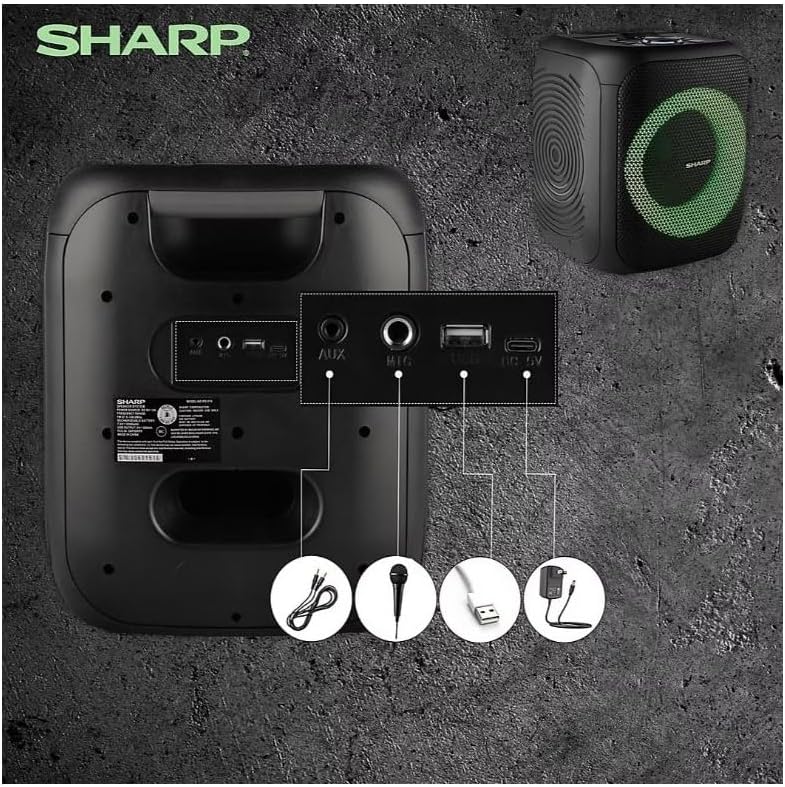
Image: Rear panel with various input and charging ports.
- АУКС ИН: Повежите екстерне аудио уређаје помоћу 3.5 мм аудио кабла.
- МИЦ ИН: Connect a microphone (sold separately) for karaoke or announcements.
- УСБ: Уметните УСБ флеш диск за репродукцију звука.
- ТФ КАРТИЦА: Insert a TF (microSD) card for audio playback.
- ДЦ ИН: Connect the charging cable to power and charge the speaker.
3.3 Playing Audio from USB/TF Card
- Insert a USB flash drive or TF card into the corresponding port.
- Притисните тастер ON/STAND BY INPUT button repeatedly until the display shows the USB or TF mode.
- Репродукција ће почети аутоматски. Користите ПЛАИ/ПАУСЕ, ПРЕТХОДНА, и НЕКСТ дугмад за контролу репродукције.
3.4 Коришћење AUX улаза
- Connect one end of a 3.5mm audio cable to the AUX IN port on the speaker.
- Повежите други крај са прикључком за слушалице или аудио излазом вашег екстерног уређаја.
- Притисните тастер ON/STAND BY INPUT button repeatedly until the display shows AUX mode.
- Контролишите репродукцију и јачину звука са свог екстерног уређаја.
Рад са 3.5 FM радиом

Image: The PS-916 features an integrated FM Tuner.
- Притисните тастер ON/STAND BY INPUT button repeatedly until the display shows FM mode.
- Притисните и држите ПЛАИ/ПАУСЕ дугме за аутоматско скенирање и чување доступних ФМ станица.
- Користите ПРЕТХОДНА и НЕКСТ дугмад за навигацију кроз сачуване станице.
3.6 ЛЕД светлосни ефекти
Притисните тастер ЛИГХТ button to cycle through different LED light modes or to turn the lights off.
4. Одржавање
4.1 Чишћење
- Увек искључите звучник и искључите га из извора напајања пре чишћења.
- Користите меку, суву крпу за брисање спољашњих површина.
- Не користите течна средства за чишћење, аеросоле или раствараче, јер могу оштетити завршну обраду или унутрашње компоненте.
4.2 Складиштење
- Чувајте звучнике на хладном и сувом месту, даље од директне сунчеве светлости и екстремних температура.
- If storing for an extended period, charge the battery to approximately 50% every few months to maintain battery health.
КСНУМКС. Решавање проблема
If you encounter issues with your Sharp PS-916 speakers, please refer to the following common problems and solutions:
| Проблем | Могуће решење |
|---|---|
| Звучник се не укључује. | Уверите се да је батерија напуњена. Прикључите кабл за пуњење и покушајте поново. |
| Нема звука из звучника. | Check the volume level on both the speaker and your connected device. Ensure the correct input mode is selected. |
| Блутут уређај не може да се упари. | Ensure the speaker is in Bluetooth pairing mode (indicator flashing). Move your device closer to the speaker. Disconnect from other Bluetooth devices. |
| Упаривање TWS-а не успева. | Ensure both speakers are powered on and not connected to any other Bluetooth devices. Try initiating TWS pairing again. |
| Изобличен звук. | Reduce the volume on both the speaker and your connected device. Ensure the audio source is not distorted. |
6. Спецификације
| Феатуре | Детаљ |
|---|---|
| Бранд | Схарп |
| Назив модела | ПС-916 |
| Конфигурација звучника | 8" Woofer, 1" Tweeter (per speaker) |
| Вршна излазна снага | 400 Watts (per speaker) |
| РМС излазна снага | 40 Watts (per speaker) |
| Технологија повезивања | Блуетоотх |
| Додатни улази | USB, TF Card, 3.5mm AUX, Microphone Input |
| Трајање батерије | До 12 сати |
| Посебне карактеристике | True Wireless Stereo (TWS) Pairing, Bass Boost, LED Light Effects, FM Tuner |
| Боја | Црно |
| Тежина артикла | 6.5 фунти (по звучнику) |
| УПЦ | 728434122111 |
| ГТИН | 728434122111 |
7. Гаранција и подршка
7.1 Информације о гаранцији
This Sharp PS-916 product comes with a 90-day limited warranty. This warranty covers manufacturing defects under normal use. It does not cover damage caused by misuse, accidents, unauthorized modifications, or normal wear and tear.
7.2 Корисничка подршка
For technical assistance, warranty claims, or further inquiries, please refer to the contact information provided with your purchase documentation or visit the official Sharp support webсајту.