
1. Увод
The SKYKING TA532A Digital Differential Manometer is a professional-grade instrument designed for precise differential pressure diagnostics and data logging. This device is suitable for HVAC technicians, service engineers, industrial maintenance teams, and quality control professionals. It provides reliable pressure readings in multiple units and supports real-time data storage and analysis. The integrated data logging capabilities and PC software facilitate capturing, storing, and analyzing pressure values over time, exporting data reports, and optimizing system performance. This makes the TA532A ideal for commissioning, troubleshooting, and compliance reporting in various environments, including air duct and filter diagnostics, cleanroom pressure monitoring, and industrial airflow testing.
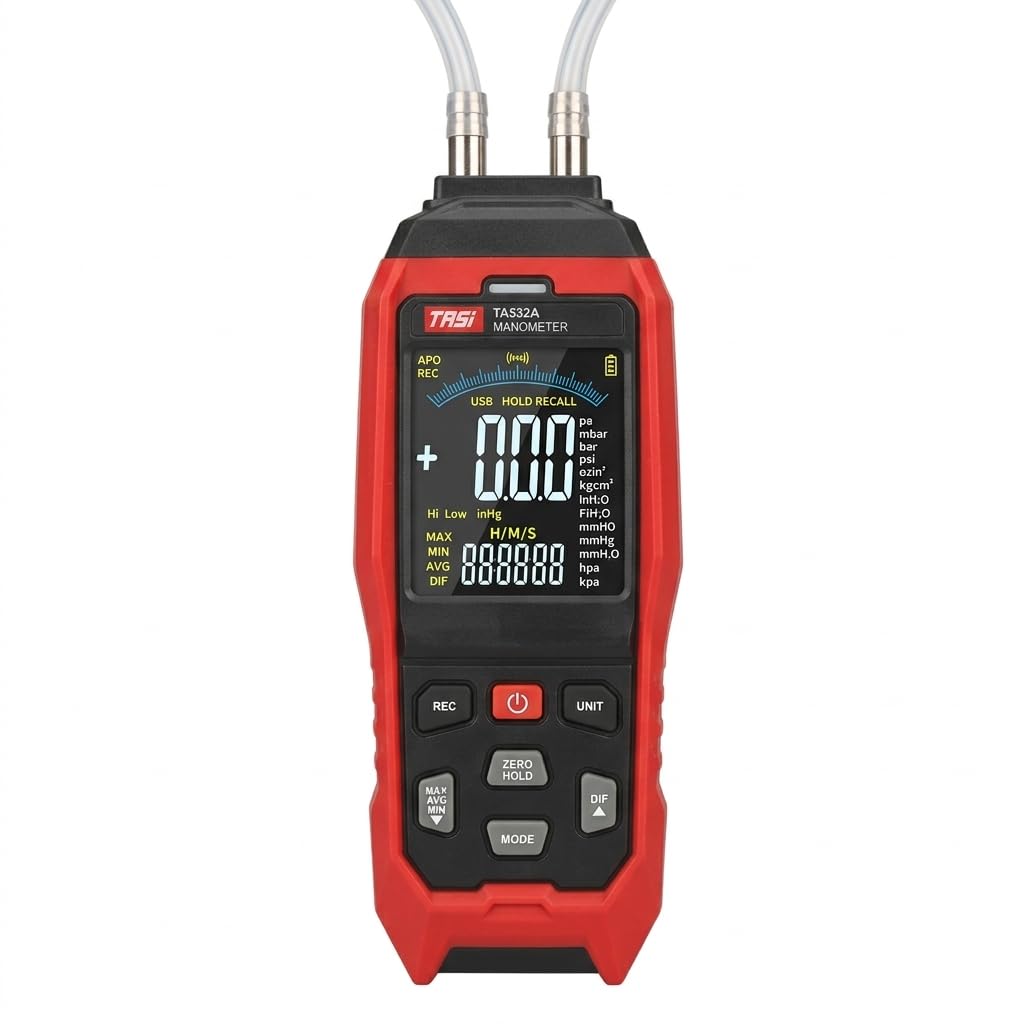
Слика 1: Предња страна view of the SKYKING TA532A Digital Differential Manometer.
2. Безбедносне информације
Молимо вас да прочитате и разумете сва безбедносна упутства пре руковања уређајем. Непоштовање ових упутстава може довести до повреда или оштећења инструмента.
- Do not attempt to measure pressures exceeding the specified range of ±40.00 kPa.
- Ensure proper connection of pressure tubes to avoid leaks or incorrect readings.
- Не излажите уређај екстремним температурама, влази или корозивним срединама.
- Извадите батерије ако уређај неће бити коришћен дуже време како бисте спречили цурење.
- Користите само наведене изворе напајања и додатну опрему.
- Do not disassemble or modify the instrument. Refer servicing to qualified personnel.
3. Садржај пакета
Проверите да ли су све ставке присутне у пакету:
- SKYKING TA532A Manometer
- Pressure Tubes (2 pieces, silicone, 500mm length)
- Batteries (3 x 1.5V AA/LR06)
- USB Micro Interface Cable (for PC connection)
- Кориснички приручник (овај документ)
4. Карактеристике производа
The TA532A Manometer includes the following key features:
- High-Precision Differential Pressure Measurement: Provides accurate readings for HVAC systems, ductwork, filter diagnostics, cleanrooms, and industrial applications.
- Integrated Data Logging & PC Software Support: Records and stores pressure readings over time; allows data export and analysis on a PC via USB.
- Wide Pressure Unit Selection: Supports multiple units including psi, kPa, mbar, inH₂O, mmH₂O, mmHg, inHg, FTH₂O, kgcm², ozin², hpa, pa.
- Large Backlit VA Color LCD Display: Clear, easy-to-read screen shows simultaneous high/low differential pressure values and stored readings.
- Двоструки улазни портови: For high (P1) and low (P2) pressure, enabling accurate differential value determination.
- Max/Min & Data Hold Functions: Captures peak pressure values and freezes readings for analysis.
- Portable & Rugged Handheld Design: Lightweight, ergonomic build with durable housing for field use.
- nulta kalibracija: Обезбеђује тачност мерења.
- High/Low Alarms: User-configurable alerts for pressure thresholds.

Figure 2: Displaying advanced functionalities of the TA532A Manometer, including alarms, data hold, Min/Max/Avg, zero calibration, and differential mode.
5. Подешавање
5.1 Инсталација батерије
- Пронађите одељак за батерију на задњој страни уређаја.
- Отворите поклопац батерије.
- Insert three 1.5V AA/LR06 batteries, observing the correct polarity (+/-).
- Добро затворите поклопац батерије.
5.2 Connecting Pressure Tubes
The manometer features two input ports: P1 (High) and P2 (Low).
- Connect the silicone pressure tubes to the P1 and P2 ports as required for your measurement application.
- Ensure a snug fit to prevent pressure leaks.

Figure 3: Illustration of P1 (High) and P2 (Low) input ports for differential pressure measurement.
6. Упутство за употребу
6.1 Укључивање/искључивање
- Притисните тастер ПОВЕР дугме за укључивање уређаја.
- Притисните и држите ПОВЕР дугме да искључите уређај.
- The device has an auto-power-off function (15 minutes, can be disabled).
6.2 Калибрација нуле
Before each measurement, especially for differential pressure, it is recommended to perform a zero calibration.
- Ensure both P1 and P2 ports are open to atmospheric pressure (not connected to any pressure source).
- Притисните тастер НУЛТА ЗАДРЖАВАЊЕ button to calibrate the device to zero. The display should show "0.00" or very close to it.
6.3 Избор јединице
The TA532A supports 11 selectable pressure units.
- Притисните тастер УНИТ button repeatedly to cycle through the available pressure units (pa, mbar, bar, psi, ozin², kgcm², inH₂O, mmH₂O, mmHg, inHg, FTH₂O, hpa, kpa).
- Изабрана јединица ће бити приказана на екрану.

Figure 4: The display indicating the wide range of 11 selectable pressure units available on the TA532A Manometer.
6.4 Differential Pressure Measurement (DIF Mode)
To measure the pressure difference between two points:
- Connect the higher pressure source to the P1 (Hi) port and the lower pressure source to the P2 (Lo) port.
- Притисните тастер ДИФ button to activate differential pressure mode. The display will show the real-time difference between P1 and P2.
- Ensure zero calibration is performed before connecting to pressure sources for accurate differential readings.

Figure 5: A technician measuring pressure drop (ΔP) across an HVAC air filter using the TA532A Differential Manometer.
6.5 Функција задржавања података
Да бисте замрзнули тренутно очитавање на екрану:
- Притисните тастер ХОЛД button (often combined with ZERO). The reading will be held.
- Притисните тастер ХОЛД button again to release and resume real-time measurement.
6.6 Max/Min/Avg Mode
To track maximum, minimum, and average pressure values:
- Притисните тастер МАКС/МИН/АВГ дугме (често означено МОДЕ or similar, then cycle).
- The display will show the maximum, minimum, or average reading recorded since the mode was activated.
- Press again to cycle through MAX, MIN, AVG, and exit.
7. Напредни режими мерења
7.1 Data Recording (Data Logging)
The TA532A can record up to 10,000 groups of data.
- Притисните тастер РЕЦ button to start data recording. An indicator (e.g., "REC") will appear on the display.
- The device will automatically store readings at a set interval (refer to the full manual for interval settings).
- Притисните тастер РЕЦ дугме поново да бисте зауставили снимање.
7.2 Повезивање са ПЦ софтвером
To transfer recorded data to a computer for analysis:
- Install the provided PC software on your computer (software typically included on a mini-CD or available for download).
- Connect the manometer to your PC using the supplied USB micro interface cable.
- Launch the PC software and follow the on-screen instructions to download, view, and analyze the recorded data.
- The software allows for data export in various formats for reporting.
8. Одржавање
8.1 Чишћење
- Обришите уређај меком, дamp тканина. Немојте користити абразивна средства за чишћење или раствараче.
- Ensure no moisture enters the pressure ports or other openings.
8.2 Складиштење
- Store the manometer in a cool, dry place, away from direct sunlight and extreme temperatures.
- Ако складиштите уређај дуже време, извадите батерије како бисте спречили цурење и могуће оштећење.
- Storage conditions: -10°C to 50°C, max 70% RH.
8.3 Замена батерије
Replace batteries when the low battery indicator appears on the display to ensure accurate measurements and proper device function.
- Пратите кораке за инсталацију батерије у одељку 5.1.
- Одложите старе батерије у складу са локалним прописима.
КСНУМКС. Решавање проблема
| Проблем | Могући узрок | Решење |
|---|---|---|
| Уређај се не укључује. | Мртве или неправилно инсталиране батерије. | Check battery polarity, replace with new batteries. |
| Нетачна очитавања. | No zero calibration, leaky connections, exceeding pressure range. | Perform zero calibration, check tube connections, ensure pressure is within range. |
| Display shows "OL" or "Err". | Overload or out of range measurement. | Disconnect from pressure source, ensure pressure is within specified limits. |
| PC software not detecting device. | Incorrect USB connection, driver issues, software not running. | Ensure USB cable is securely connected, install necessary drivers, restart software and device. |
10. Спецификације
| Модел | ТА532А |
| Домет | ±40.00 кПа |
| Прецизност | ±1% FS (Full Scale) |
| Избор јединице | pa, mbar, bar, psi, ozin², kgcm², inH₂O, mmH₂O, mmHg, inHg, FTH₂O, hpa, kpa |
| Дисплаи | VA color screen display, 4 digits, max 9999 |
| Сензор | Integrated low-pressure and high-precision pressure sensor |
| Задржавање података | Да |
| Макс. / Мин. / Прос | Да |
| Difference (DIF) | Да |
| Нулта калибрација | Да |
| Снимање података | 10,000 група |
| ПЦ Цоннецтион | Yes (USB micro interface) |
| Аутоматско искључивање | 15 mins (can be disabled) |
| Услови рада | 0°C ~ 40°C, max 80% RH, indoor altitude < 2000m |
| Услови складиштења | -10°C ~ 50°C, max 70% RH (remove battery) |
| Повер Суппли | 3 x 1.5V AA (LR06) / USB micro interface 5V |
| Величина производа | 203 к 67 к 35 мм |
| Тежина производа | Approx. 209g (not including battery) |
| Силиконске цеви | Inner diameter: 8mm; Outer diameter: 12mm; Wall thickness: 2mm; Length: 500mm x 2 pieces |

Figure 6: Detailed technical specifications for the TA532A Manometer.
11. Подршка
For technical assistance, troubleshooting beyond this manual, or inquiries regarding your SKYKING TA532A Digital Differential Manometer, please contact your local distributor or the manufacturer's customer support. Refer to your purchase documentation for specific contact details.
Manufacturer: Shenzen Electrical Techno Co
Importer: Skyking Instruments, Mumbai, India