
1. Производ је готовview
The ATK N9 Tri-Mode Gaming Headset is designed for gamers requiring flexible connectivity, clear audio, and reliable communication across multiple devices. It supports 3.5 mm wired, 2.4G wireless, and Bluetooth connections, allowing seamless switching between gaming consoles, PC, and mobile devices. Stereo-tuned dynamic drivers deliver balanced sound, enhancing in-game audio cues such as footsteps, gunfire, and environmental effects. The detachable noise-canceling microphone improves voice clarity for team communication, online gaming, and voice calls. Its over-ear design, with soft ear cushions and an adjustable headband, ensures a comfortable fit for extended gaming sessions. The headset is compatible with PS5, PS4, PC, Nintendo Switch, and mobile devices. For Xbox Series X|S, audio and microphone functions are supported via the 3.5 mm wired connection.

2. Садржај пакета
Проверите да ли су све ставке наведене у наставку укључене у ваш пакет:
- ATK N9 Pro/White Gaming Headset
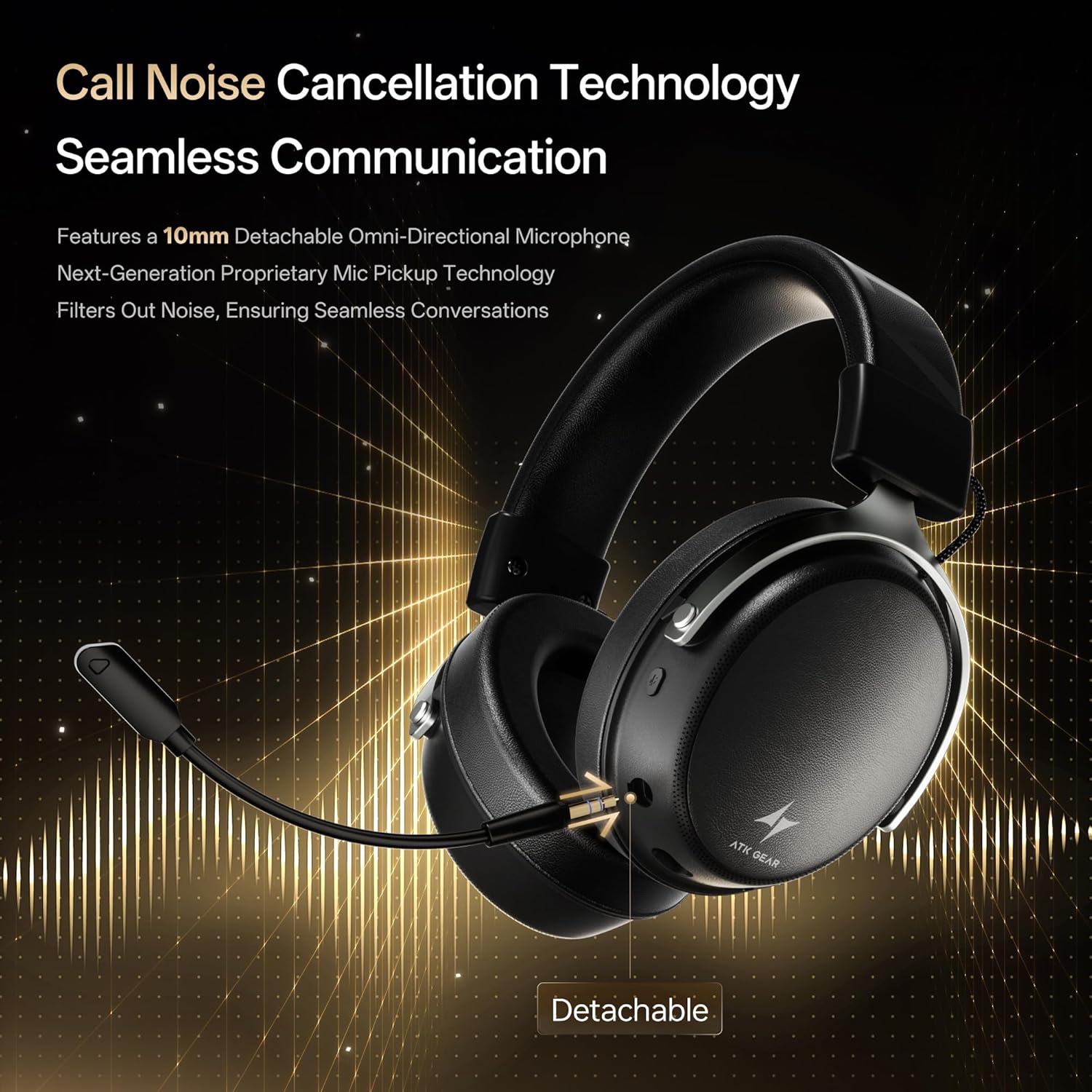
- Detachable Noise-Canceling Microphone
- УСБ-Ц кабл за пуњење
- 3.5 мм аудио кабл
- 2.4G Wireless USB Adapter
- Кориснички приручник (овај документ)

3. Почетно подешавање
3.1. Пуњење слушалица
Before first use, fully charge the headset using the provided USB-C charging cable. Connect the USB-C end to the headset's charging port and the USB-A end to a compatible USB power source (e.g., PC, wall adapter). The LED indicator will show charging status.
3.2. Причвршћивање микрофона
Insert the detachable boom microphone into the microphone port on the left earcup until it clicks into place. Ensure it is securely connected for optimal voice pickup.
3.3. Опције повезивања
The ATK N9 Pro/White headset offers three connectivity modes:
- 2.4Г бежични режим: For PC, PS4, PS5, and Nintendo Switch (docked mode).
- Plug the 2.4G wireless USB adapter into an available USB port on your device.
- Укључите слушалице.
- Switch the headset to 2.4G mode using the mode switch. The headset will automatically pair with the adapter.
- Adjust audio output settings on your device if necessary to select the headset.
- Блуетоотх режим: For mobile devices, PC, and Nintendo Switch (handheld mode).
- Power on the headset and switch to Bluetooth mode. The LED indicator will flash, indicating pairing mode.
- On your device, go to Bluetooth settings and select "ATK N9 Pro" from the list of available devices.
- Once connected, the LED indicator will show a steady light.
- 3.5 мм жичани режим: For Xbox Series X|S, PS4, PS5, PC, Nintendo Switch, and mobile devices.
- Connect one end of the 3.5mm audio cable to the headset's 3.5mm jack.
- Connect the other end to the 3.5mm audio port on your device (e.g., controller, PC audio jack).
- Слушалице ће радити у жичном режиму, заобилазећи бежичне функције.

4. Упутство за употребу
4.1. Контроле слушалица
The ATK N9 Pro/White headset features intuitive controls located on the earcups:
- Дугме за напајање: Press and hold to power on/off. Short press for play/pause (in 2.4G/Bluetooth mode).
- Прекидач режима: Toggle between 2.4G wireless, Bluetooth, and wired modes.
- Volume Up/Down Wheel: Окрените да бисте подесили јачину звука.
- Дугме за искључивање микрофона: Притисните да бисте искључили/укључили микрофон.
- Spatial Audio Button: Press to activate/deactivate 3D Spatial Audio.
- Mic Monitoring Button: Press to enable/disable microphone monitoring (sidetone).
4.2. Употреба микрофона
The detachable noise-canceling microphone is designed for clear communication. Position the microphone approximately 1-2 inches from your mouth for optimal voice pickup. Use the microphone mute button on the headset to quickly mute your voice when needed.
4.3. Подешавање Фит
The headset features an adjustable headband and soft ear cushions for comfort. Extend or retract the headband to achieve a snug yet comfortable fit. The earcups are designed to fully enclose your ears for passive noise isolation and comfort during long gaming sessions.
5. Техничке спецификације
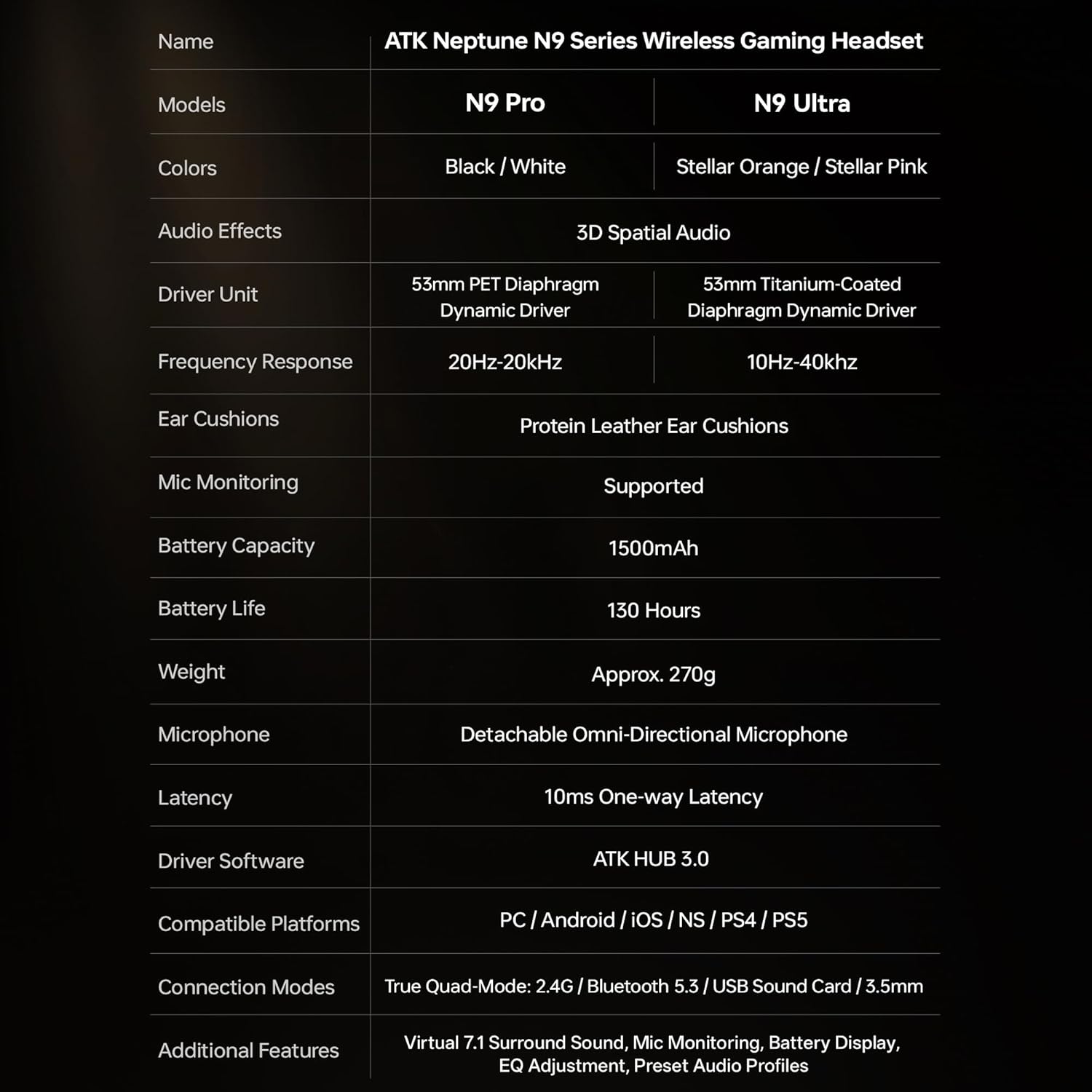
| Феатуре | Спецификација |
|---|---|
| Назив модела | ATK N9 Pro |
| Повезивање | 3.5mm Wired, 2.4G Wireless, Bluetooth 5.3 |
| Дривер Типе | Динамички возач |
| Дривер Сизе | 53 мм |
| Фреквенцијски опсег | 20 Hz - 20,000 Hz |
| Импеданса | 64 Охмс |
| Микрофон | Detachable Noise-Canceling Omni-Directional |
| Капацитет батерије | 1500 мАх |
| Трајање батерије | До 130 сати |
| Latency (2.4G) | 10 Milliseconds (one-way) |
| Тежина | 270 грама |
| Постављање уха | Преко уха |
| Компатибилни уређаји | PS5, PS4, PC, Nintendo Switch, Mobile Devices, Xbox Series X|S (wired) |
| Додатне карактеристике | 3D Spatial Audio, Mic Monitoring, Volume Control |

6. Нега и одржавање
- Чишћење: Користите меку, суву крпу за чишћење слушалица. Избегавајте употребу јаких хемикалија или абразивних материјала.
- Складиштење: Чувајте слушалице на хладном и сувом месту, даље од директне сунчеве светлости и екстремних температура.
- Одржавање батерије: Да бисте продужили век трајања батерије, избегавајте често потпуно пражњење слушалица. Редовно их пуните, чак и ако их не користите дуже време.
- Отпорност на воду: The headset is not water-resistant. Avoid exposure to liquids.
КСНУМКС. Решавање проблема
7.1. No Audio / Low Volume
- Ensure the headset is powered on and connected in the correct mode (2.4G, Bluetooth, or 3.5mm wired).
- Check the volume wheel on the headset and your device's volume settings.
- For wireless modes, ensure the headset is paired correctly and selected as the audio output device in your system settings.
- If using 3.5mm wired, ensure the cable is fully inserted into both the headset and the device.
7.2. Микрофон не ради
- Уверите се да је микрофон безбедно причвршћен за слушалице.
- Проверите да ли је дугме за искључивање микрофона на слушалицама активирано.
- Verify that the headset microphone is selected as the input device in your device's sound settings.
- For Xbox Series X|S, ensure you are using the 3.5mm wired connection for microphone support.
7.3. Проблеми са повезивањем
- 2.4G бежична мрежа: Ensure the USB adapter is firmly plugged in. Try a different USB port.
- Блуетоотх: Ensure the headset is in pairing mode. Forget the device on your phone/PC and re-pair. Keep the headset within the 5-meter Bluetooth range.
- генерално: Power cycle both the headset and your connected device.
8. Гаранција и подршка
8.1. Информације о гаранцији
The ATK N9 Pro/White Gaming Headset comes with a 6-месечна гаранција од датума куповине. Ова гаранција покрива производне недостатке и недостатке у изради при нормалној употреби. Не покрива штету насталу услед злоупотребе, несрећа, неовлашћених модификација или нормалног хабања.
8.2. Корисничка подршка
For further assistance, technical support, or warranty claims, please contact ATK customer service through the retailer where the product was purchased or visit the official ATK webсајт за контакт информације за подршку.