
1. Производ је готовview
The Hunter ZenTech 52 Inch Smart Ceiling Fan (Model 53638) is designed for both indoor and covered outdoor spaces, offering quiet, efficient performance with advanced smart home integration. This 5-blade fan features a slim DC motor, adjustable LED lighting with TrueLight technology, and Wi-Fi connectivity for control via the HunterSMART app, Amazon Alexa, Google Assistant, and Apple HomeKit. It is ENERGY STAR certified and damp-rated for versatile use.
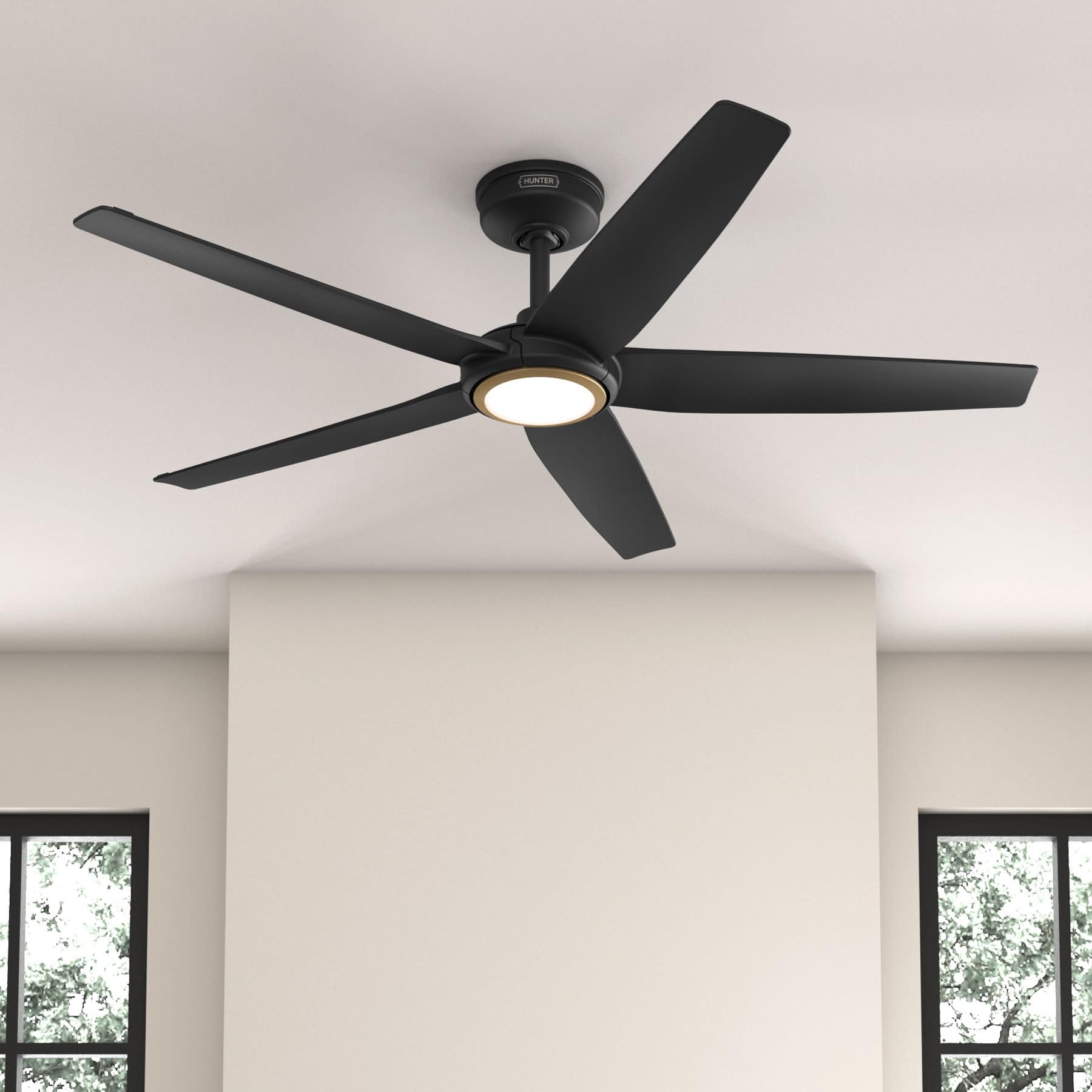
Figure 1: Hunter ZenTech 52 Inch Smart Ceiling Fan (Matte Black)
Кључне карактеристике:
- Напредни дизајн: Ultra-slim DC motor for powerful, quiet airflow and a modern aesthetic.
- Интеграција паметне куће: HunterSMART technology for app and voice control via Amazon Alexa, Google Assistant, and Apple HomeKit.
- Подесиво ЛЕД осветљење: TrueLight LED offers 10 brightness levels and 10 color temperatures, protected by a durable Duralight lens.
- SureSpeed Guarantee: Delivers strong, consistent airflow with quiet, wobble-free performance.
- Енергетски ефикасан: ENERGY STAR certified reversible 6-speed DC motor.
- Damp Оцењено: Suitable for indoor and covered outdoor areas.
2. Важна безбедносна упутства
Пажљиво прочитајте сва упутства пре почетка инсталације. Непоштовање ових упутстава може довести до струјног удара, пожара или телесних повреда.
- Увек искључите напајање на главном прекидачу пре инсталације или сервисирања.
- Ensure all electrical connections comply with local codes and ordinances. If you are unfamiliar with electrical wiring, consult a qualified electrician.
- Монтажна конструкција мора бити способна да издржи тежину вентилатора (приближно 14.11 фунти).
- Do not bend blade brackets during installation or cleaning.
- Држите руке даље од лопатица вентилатора док вентилатор ради.
- Овај вентилатор је дamp-rated for use in covered outdoor areas but should not be exposed directly to water.
3. Садржај пакета
Пре почетка инсталације проверите да ли су све компоненте наведене у наставку присутне у вашем паковању.
- Кућиште мотора плафонског вентилатора
- КСНУМКС Фан Лопатице
- Light Kit with Duralight Lens
- Доња шипка од 6 инча
- Надстрешница и носач за монтажу
- Ручни даљински управљач
- Пакет хардвера (шрафови, подлошке, навртке)

Figure 2: ZenTech 52 Inch Fan Components
4. Водич за инсталацију
Professional installation is recommended. Ensure the power is OFF at the circuit breaker before starting.
4.1 Монтажа вентилатора
- Причврстите носач за монтажу на разводну кутију на плафону. Разводна кутија мора бити наведена за подршку вентилатора.
- Assemble the downrod (6-inch included, compatible with up to 24-inch downrods) to the fan motor housing.
- Hang the fan assembly from the mounting bracket.
- Complete electrical wiring connections as per the wiring diagram provided in the full manual.
- Причврстите лопатице вентилатора на кућиште мотора.
- Install the light kit and Duralight lens.

Figure 3: ZenTech Fan installed in a covered outdoor space
5. Упутство за употребу
The ZenTech fan can be operated using the included handheld remote control or through the HunterSMART app.
5.1 Рад на даљинском управљачу
- Укључивање/искључивање вентилатора: Притисните дугме вентилатора да бисте укључили или искључили вентилатор.
- Брзина вентилатора: Use the speed buttons to cycle through 6 fan speeds.
- Укључено/искључено светло: Притисните дугме за светло да бисте укључили или искључили светло.
- Затамњивање светла: Hold the light button to dim or brighten the light.
- Температура боје: Press the color temperature button to cycle through different color temperatures (warm to cool).
- Реверзна функција: Press the reverse button to change the fan's direction for seasonal use.
5.2 LED Light Control (TrueLight Technology)
The TrueLight LED system allows for precise control over your lighting environment. You can select from 10 brightness levels and 10 color temperatures to match your preference.

Figure 4: TrueLight LED Technology for adjustable lighting
6. Интеграција паметног дома
The ZenTech fan features HunterSMART technology, enabling seamless integration with popular smart home ecosystems.
6.1 Connecting to HunterSMART App
- Download the HunterSMART app from your device's app store.
- Follow the in-app instructions to create an account and add your ZenTech fan.
- Ensure your fan is powered on and your mobile device is connected to a 2.4 GHz Wi-Fi network during setup.
6.2 Voice Control Compatibility
Once connected to the HunterSMART app, you can link your fan to:
- Амазон Алека
- Гоогле помоћник
- Аппле ХомеКит
Refer to the respective smart home platform's instructions for linking smart devices.

Figure 5: HunterSMART Control Options
7. Нега и одржавање
Редовно одржавање осигурава оптималне перформансе и дуготрајност вашег плафонског вентилатора.
- Чишћење: Dust the fan blades and motor housing periodically with a soft, lint-free cloth. For damp-rated areas, wipe down with a slightly damp cloth, then dry thoroughly. Do not use abrasive cleaners or solvents.
- Провера заптивности: Annually, check all screws and connections for tightness. Vibrations can cause them to loosen over time.
- Лигхт Кит: The LED light source is designed for long life and is not user-serviceable.
8. Водич за решавање проблема
If you encounter issues with your ZenTech ceiling fan, refer to the table below for common problems and solutions.
| Проблем | Могући узрок | Решење |
|---|---|---|
| Вентилатор се не покреће | Нема напајања вентилатора; Лабаве жице; Батерија даљинског управљача је празна. | Проверите осигурач; Проверите да ли су сви прикључци жица безбедни; Замените батерију даљинског управљача. |
| Светло не ради | No power to the light kit; Loose wire connection; Light kit malfunction. | Check circuit breaker; Verify light kit wiring; Contact customer support if LED is faulty. |
| Вентилатор се љуља | Loose blades or blade holders; Improperly balanced blades; Loose mounting bracket. | Ensure all blade screws are tight; Use a blade balancing kit (not included); Tighten mounting bracket screws. |
| Smart features not connecting | Incorrect Wi-Fi network (not 2.4 GHz); Incorrect app setup; Router issues. | Ensure connection to 2.4 GHz Wi-Fi; Re-attempt app setup; Restart router and fan. |
9. Техничке спецификације
| Спецификација | Детаљ |
|---|---|
| Бранд | Хунтер |
| Назив модела | ZenTech |
| Број модела | 53638 |
| Величина | 52 инча |
| Боја | Мат црна |
| Димензије производа | 52"Д к 52"Ш к 11.78"В |
| Тежина артикла | 14.11 фунти |
| Број оштрица | 5 |
| Тип мотора | DC |
| Број брзина | 6 |
| Капацитет протока ваздуха | 5443.94 кубних стопа у минути |
| Ватtage | 17 вати |
| Волtage | 120 Волтс |
| Унутрашња/спољна употреба | Indoor, Covered Outdoor (Damp Оцењено) |
| Посебне карактеристике | LED Light, Quiet Operation, Water Resistant, Wi-Fi Enabled |
| Тип контролера | Контрола апликација, даљинско управљање |
| Цертификати | ЕТЛ, Енерги Стар, ФЦЦ |
| Дужина Довнрод | 6 Inches (included) |
10. Информације о гаранцији
The Hunter ZenTech 52 Inch Smart Ceiling Fan is backed by Hunter's commitment to quality. It includes a limited lifetime motor warranty, ensuring long-term confidence in your product. For full warranty details and terms, please refer to the documentation included with your fan or visit the official Hunter Fan Company webсајту.
11. Корисничка подршка
If you require further assistance, have questions about installation, operation, or troubleshooting that are not covered in this manual, please contact Hunter Fan Company customer support. You can typically find contact information on the official Hunter Fan Company webсајту или унутар паковања производа.