
Увод
This manual provides essential information for setting up, operating, maintaining, and troubleshooting your new OPPO A6 5G smartphone. Please read this guide thoroughly to ensure optimal performance and longevity of your device.
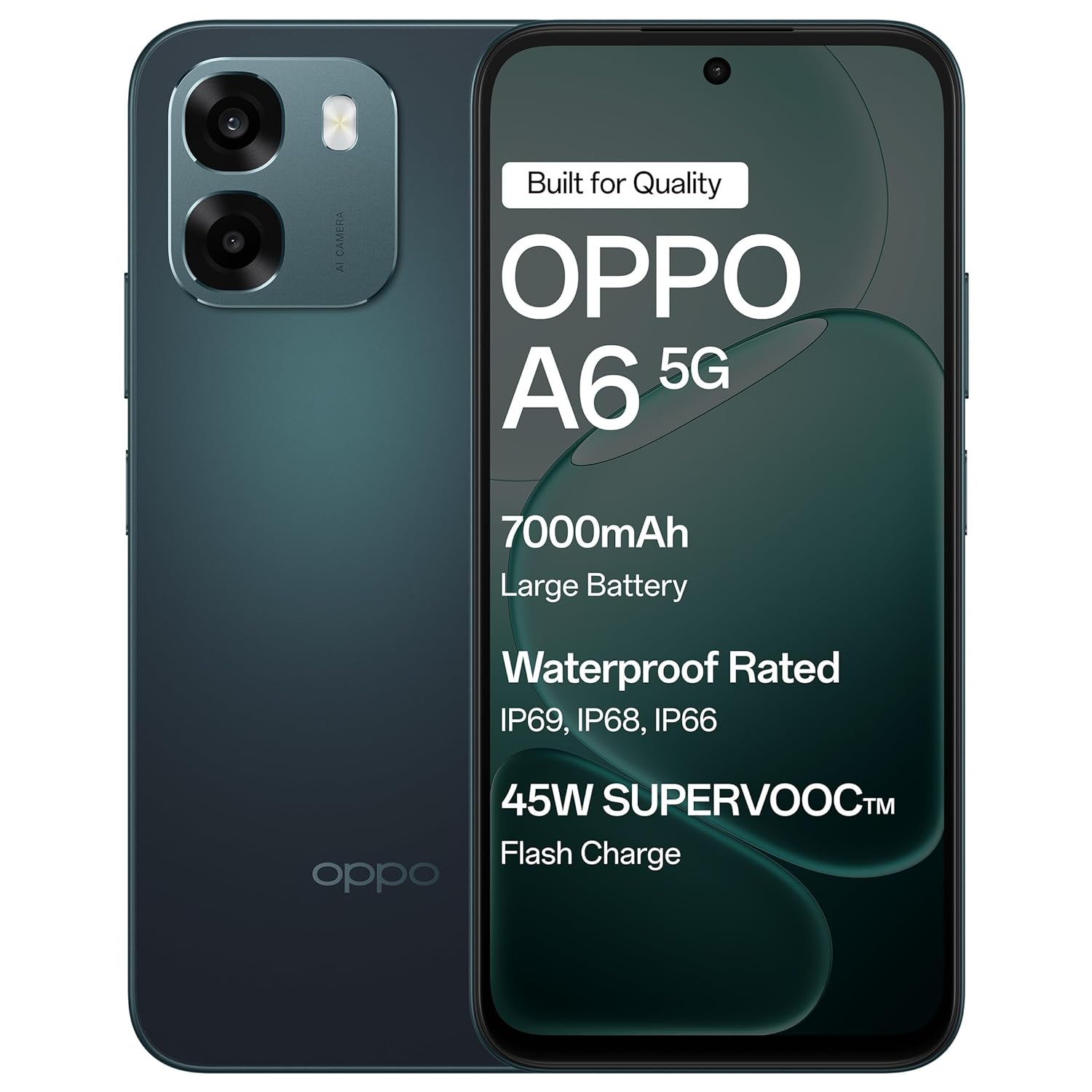
The OPPO A6 5G smartphone in Sapphire Blue, featuring its sleek design.
Сетуп
1. Распакивање и први преглед
Carefully remove all items from the packaging. Verify that all components are present and undamaged.
Садржај кутије:
- ОППО А6 5Г паметни телефон
- Навлака за телефон
- Повер Адаптер
- УСБ кабл
- Избацивач СИМ лежишта
- Заштитна фолија за екран (унапред постављена или у кутији)
2. Уметање СИМ картице
- Пронађите лежиште за СИМ картицу са стране уређаја.
- Уметните алат за избацивање лежишта СИМ картице у мали отвор поред лежишта и лагано притисните док лежиште не искочи.
- Place your Nano-SIM card(s) into the designated slots on the tray. Ensure the gold contacts face downwards. This device supports Dual SIM.
- Пажљиво вратите лежиште за СИМ картицу у телефон док не кликне на своје место.
3. Почетно пуњење и укључивање
- Connect the USB cable to the power adapter and then to the phone's USB Type-C port. Plug the power adapter into a wall outlet.
- Оставите телефон да се пуни најмање 30 минута пре прве употребе или док индикатор батерије не покаже довољно напуњености.
- Press and hold the Power button (usually on the right side) until the OPPO logo appears.
- Пратите упутства на екрану да бисте завршили почетно подешавање, укључујући избор језика, Wi-Fi везу и подешавање Google налога.

The OPPO A6 5G supports 45W SUPERVOOC Flash Charge, allowing for rapid battery replenishment.
Управљање вашим уређајем
1. Основна навигација
- Гестови на екрану осетљивом на додир: Додирните да бисте изабрали, превуците прстом да бисте се померали, уштипните да бисте зумирали.
- Дугме за напајање: Press to lock/unlock the screen. Press and hold to power off or restart.
- Дугмад за јачину звука: Подесите јачину звука медија, јачину звука позива или јачину звука обавештења.
2. Карактеристике екрана
The OPPO A6 5G features a large 6.75-inch LCD display with a 120Hz adaptive refresh rate, providing smooth visuals and enhanced readability even in sunlight.

The 120Hz Ultra Bright Display ensures smooth and vibrant visuals.
3. Употреба камере
Your device is equipped with a 50MP AI Dual Camera system for capturing high-quality photos and videos.
- Главна камера: 50MP sensor for detailed everyday photos.
- Сензор дубине: 2MP for enhanced portrait shots.
- Предња камера: 8MP за јасне селфије.
- Режими: Utilize Night mode for low-light conditions, Portrait mode for artistic depth effects, and Dual-View Video for simultaneous front and rear camera recording.

The 50MP Ultra-Clear Camera captures every detail effortlessly.

Explore various camera modes such as Underwater Photography, AI Night Mode, and Portrait Mode.
4. Audio and Speakers
Experience enhanced audio with dual stereo speakers and an Ultra Volume Mode, providing louder and clearer sound for media consumption and calls.

Dual Stereo Speakers with Ultra Volume Mode deliver immersive sound.
5. Перформансе и игре
The MediaTek Dimensity 6300 5G processor ensures smooth performance for daily tasks, streaming, and gaming. AI GameBoost 2.0 optimizes your gaming experience.

AI GameBoost 2.0 provides a smooth and confident gaming experience.

The MediaTek Dimensity 6300 Mobile Platform ensures better and smoother performance.
6. Управљање батеријом
The device is equipped with a massive 7000mAh battery for extended usage. Utilize 45W SUPERVOOC charging for quick power-ups. The phone also supports reverse wired charging to share power with other devices.

The 7000mAh large battery provides power throughout your day.

Reverse Wired Charging allows you to share power with other devices when needed.
7. Мрежна повезаност
The OPPO A6 5G supports 5G cellular technology, Wi-Fi, and Bluetooth. AI LinkBoost 3.0 enhances network stability and reduces lag.

AI LinkBoost 3.0 provides a levelled-up network with zero lag.
Одржавање
1. Чишћење уређаја
- Користите меку крпу која не оставља влакна да обришете екран и задњу плочу.
- Избегавајте употребу јаких хемикалија или абразивних материјала.
- За тврдокорне мрље, благо дampОперите крпу водом или средством за чишћење екрана намењеним за електронику.
2. Ажурирања софтвера
Редовно проверавајте и инсталирајте ажурирања софтвера како бисте били сигурни да ваш уређај има најновије функције, безбедносне закрпе и побољшања перформанси. Идите на Подешавања > О уређају > Ажурирано да проверите ажурирања.
3. Брига о батерији
- Избегавајте екстремне температуре, јер могу скратити век трајања батерије.
- Не остављајте телефон да се пуни предуго након што достигне 100%.
- Use only the provided charger and cable for optimal charging performance and safety.
4. Управљање складиштем
Периодично чистите непотребне files, apps, and media to maintain optimal performance. Your device has 128GB of internal storage, with support for external flash memory up to 128GB.
5. Отпорност на воду и прашину
The OPPO A6 5G features IP69 water and dust resistance. This means it is protected against high-pressure, high-temperature water jets and can withstand immersion in water at 1.5 meters for 30 minutes. While resistant, it is not waterproof. Avoid intentional submersion and exposure to saltwater or other liquids.
The OPPO A6 5G offers IP69 Water and Dust Resistance, making it a durable device.
6. Fluency Protection
The device is designed with 60-Month Fluency Protection, ensuring sustained smooth performance over an extended period.

Enjoy 5 years of flawless flow with 60-Month Fluency Protection.
Решавање проблема
Уобичајени проблеми и решења
- Уређај се не укључује: Ensure the battery is charged. Connect to the charger and wait a few minutes before attempting to power on again. If unresponsive, press and hold the Power button and Volume Up button simultaneously for about 10-15 seconds to force a restart.
- Проблеми са пуњењем: Check if the charger and USB cable are securely connected. Try a different power outlet. Inspect the charging port for any debris.
- Проблеми са мрежном повезивањем: Verify that your SIM card is correctly inserted and active. Check if Airplane Mode is off. Restart the device. If issues persist, contact your mobile network provider.
- Рушење или замрзавање апликација: Close and reopen the app. Clear the app's cache (Settings > Apps > [App Name] > Storage > Clear cache). If the problem continues, uninstall and reinstall the app.
- Споре перформансе: Close unused background apps. Clear cache and temporary files. Restart the device regularly. Ensure sufficient storage space is available.
Фабричко ресетовање (последње средство)
If severe software issues persist, a factory reset may be necessary. This will erase all data on your phone. Направите резервну копију свих важних података пре него што наставите.
- Иди на Settings > System settings > Backup and reset > Reset phone.
- Изаберите Обришите све податке.
- Потврдите своју одлуку и унесите лозинку за закључавање екрана ако се то од вас затражи.
Спецификације
| Феатуре | Детаљ |
|---|---|
| Бранд | ОППО |
| Модел | А6 5Г |
| Оперативни систем | Андроид 15 |
| РАМ | 6 ГБ |
| Интерна меморија | 128 ГБ |
| Проширива меморија | Up to 128 GB (Flash Memory Supported Size Maximum) |
| Величина екрана | 6.75 инча |
| Дисплаи Типе | ЛЦД |
| Рефресх Рате | 120 Хз |
| Задња камера | 50 MP (Main) + 2 MP (Depth) |
| Предња камера | 8 МП |
| Капацитет батерије | 7000 мАх |
| Пуњење | 45W SUPERVOOC Fast Charging, Reverse Wired Charging |
| Утор за СИМ картицу | Дуал СИМ |
| Тип конектора | УСБ тип Ц |
| Јацк за слушалице | 3.5 мм |
| Ниво отпорности на воду | ИП69 водоотпоран |
| Целлулар Тецхнологи | 5G |
| Бежично повезивање | Блуетоотх, Ви-Фи |
| Тежина артикла | 216 грама |
| Димензије артикла | 16.7 к 7.9 к 0.9 центиметара |
| Модел Иеар | 2026 |
| Земља порекла | Индија |
Информације о гаранцији
Your OPPO A6 5G smartphone comes with a limited warranty:
- Слушалица: 12 месеци од датума куповине.
- Adapter & Cable: 6 месеци од датума куповине.
Please retain your proof of purchase for warranty claims. The warranty covers manufacturing defects and does not cover damage caused by misuse, accidents, unauthorized repairs, or normal wear and tear.
Подршка
For further assistance, technical support, or service inquiries, please contact OPPO customer service:
- Произвођач: OPPO MOBILES INDIA PVT LTD.
- Адреса: 5th FLOOR, Tower B, BUILDING, N-8, DLF Cyber City, DLF Phase 2, Gurugram, Haryana 122002, India.
- Служба за кориснике Тел: 18001032777
- Подршка на мрежи: Visit the official OPPO website for FAQs, support articles, and service center locations.