
1. Увод
This manual provides essential information for the safe and efficient operation of your THKFMSRC GD3024EMH High Frequency Off-Grid MPPT Solar Inverter. Please read this manual thoroughly before installation and use, and retain it for future reference.
The GD3024EMH is a high-frequency off-grid solar inverter designed to convert DC power from solar panels into AC power for household appliances. It features Maximum Power Point Tracking (MPPT) technology for optimized solar energy harvesting and operates as a hybrid system.
2. Безбедносне информације
УПОЗОРЕЊЕ: Непоштовање ових безбедносних упутстава може довести до струјног удара, пожара, озбиљних повреда или смрти.
- Инсталацију мора извршити квалификовано особље.
- Ensure all wiring is correctly polarized and securely connected.
- Do not operate the inverter if it is damaged or appears to be malfunctioning.
- Keep the inverter away from flammable materials, moisture, and direct sunlight.
- Обезбедите одговарајућу вентилацију око инвертора како бисте спречили прегревање.
- Disconnect all power sources (solar, battery, utility) before performing any maintenance or wiring.
3. Садржај пакета
Проверите да ли су све ставке наведене у наставку укључене у ваш пакет. Ако неке ставке недостају или су оштећене, обратите се свом добављачу.
- THKFMSRC GD3024EMH Solar Inverter Unit
- Кориснички приручник (овај документ)
- Монтажни прибор (вијци, анкери)
- Комуникациони кабл (ако је применљиво)
4. Производ је готовview
The THKFMSRC GD3024EMH inverter integrates a solar charge controller, inverter, and battery charger into one unit. It is designed to provide uninterrupted power support.
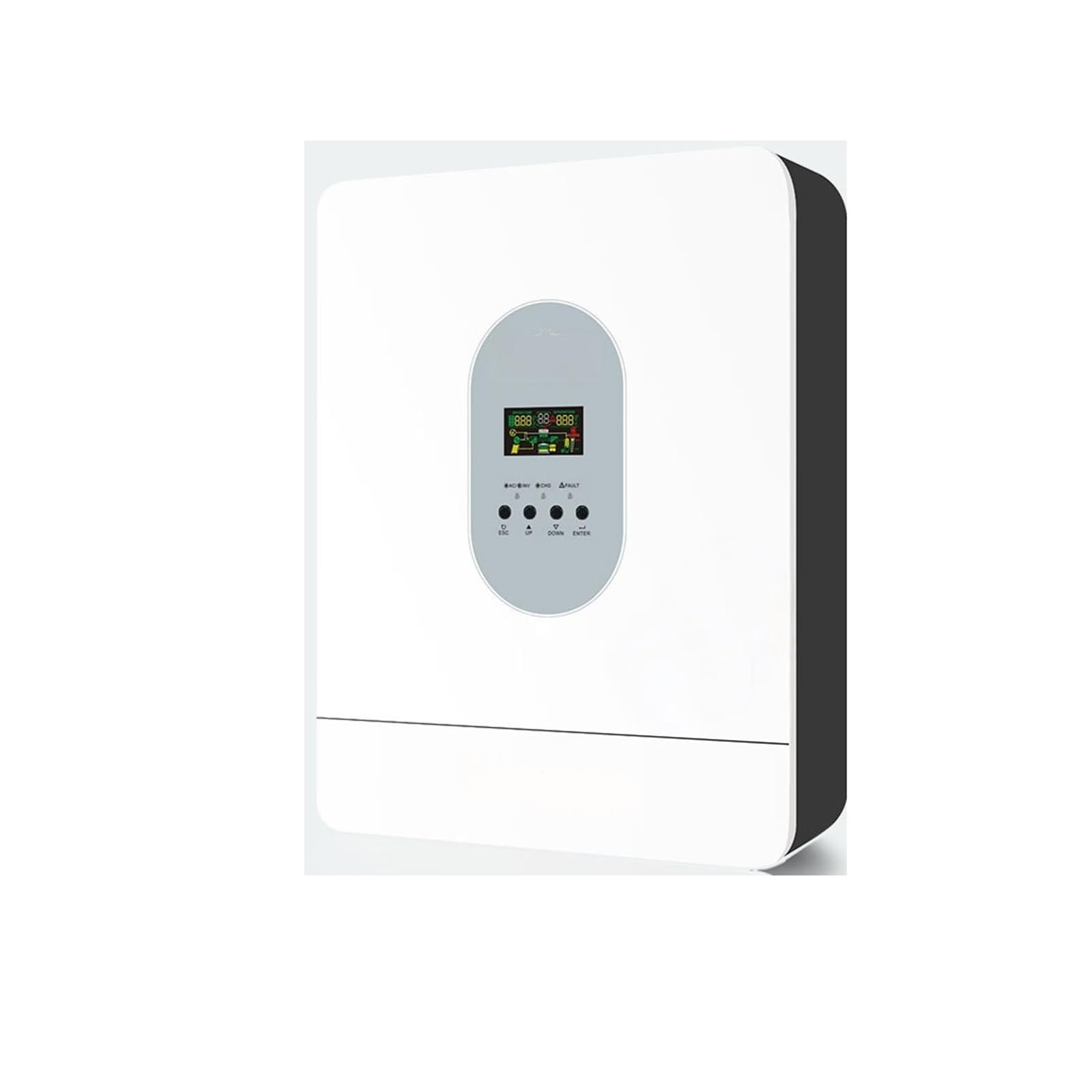
Слика 4.1: Предња страна view of the THKFMSRC GD3024EMH solar inverter. This image displays the main unit with its control panel and various connection points for solar input, battery, and AC output.
4.1. Карактеристике
- Чисти синусни инвертер
- Уграђени МППТ соларни регулатор пуњења
- Конфигурабилна улазна волtagАсортиман за кућне апарате и персоналне рачунаре преко ЛЦД подешавања
- Подесива струја пуњења батерије на основу апликација путем ЛЦД подешавања
- Подесиви приоритет АЦ / соларног пуњача путем ЛЦД подешавања
- Компатибилан са маинс волtagе или снаге генератора
- Аутоматско поновно покретање док се АЦ опоравља
- Заштита од преоптерећења/прегревања/кратког споја
- Паметни дизајн пуњача батерија за оптимизоване перформансе батерије
- Функција хладног старта
5. Подешавање
5.1. Монтажа инвертора
- Choose a suitable mounting location:
- Indoors, protected from direct sunlight, rain, and dust.
- Vertical wall mounting is recommended.
- Ensure sufficient clearance (at least 20 cm) around the unit for proper heat dissipation.
- Температура околине треба да буде између 0°C и 55°C.
- Mark the positions for the mounting screws on the wall using the inverter as a template.
- Drill holes and insert wall anchors (if necessary).
- Securely mount the inverter to the wall using the provided screws.
5.2. Ожичење
CAUTION: Before making any connections, ensure all power sources (solar panels, batteries, AC input) are disconnected and turned off.
- Повезивање батерије: Connect the battery cables to the inverter's battery terminals. Ensure correct polarity (+ to + and - to -). The GD3024EMH requires a 24V battery bank.
- Повезивање соларне плоче: Connect the solar panel cables to the inverter's PV input terminals. Observe correct polarity. Ensure the open-circuit voltage of your solar array does not exceed the inverter's maximum PV input voltage.
- АЦ улазна веза: If connecting to a utility grid or generator, connect the AC input cable to the designated AC input terminal.
- Прикључак на излаз наизменичне струје: Connect your loads (appliances) to the AC output terminals.
- уземљење: Connect the inverter to an earth ground using a suitable grounding wire.
Refer to the wiring diagram provided in the full product manual for detailed connection points.
6. Упутство за употребу
6.1. Почетно укључивање
- Уверите се да су сви прикључци ожичења безбедни и исправни.
- Turn on the battery breaker/switch.
- Turn on the solar panel breaker/switch.
- If using AC input, turn on the AC input breaker.
- Press and hold the ON/OFF button on the inverter for a few seconds to power it on. The LCD display will illuminate.
6.2. ЛЦД екран и дугмад
The inverter features an LCD display and several buttons for monitoring and configuration.
- ЛЦД екран: Shows real-time system status, input/output voltages, battery charge, and error codes.
- Функционална дугмад: Typically include UP, DOWN, ENTER, and ESCAPE for navigating menus and adjusting settings.
6.3. Основна подешавања
Access the settings menu via the function buttons to configure parameters such as:
- Оутпут Волtagе/фреквенција: (e.g., 110V/60Hz for this model)
- Струја пуњења: Adjust based on battery capacity.
- АЦ Инпут Волtagе Распон: For appliance or UPS mode.
- Charger Priority: Solar first, AC first, or Solar and AC.
- Приоритет излазног извора: Solar first, Utility first, or SBU (Solar-Battery-Utility).
Consult the detailed settings section in the complete manual for specific parameter adjustments.
7. Одржавање
Редовно одржавање осигурава оптималне перформансе и дуготрајност вашег инвертора.
- Чишћење: Периодично чистите спољашњост инвертора сувом крпом. Уверите се да су вентилациони отвори без прашине и остатака.
- Везе: Annually check all electrical connections for tightness and corrosion. Re-tighten if necessary.
- Инспекција батерије: Regularly inspect battery terminals for corrosion and ensure battery fluid levels (if applicable) are correct.
- Окружење: Уверите се да радно окружење остаје у прописаним опсезима температуре и влажности.
WARNING: Disconnect all power sources before performing any cleaning or inspection.
КСНУМКС. Решавање проблема
This section provides solutions to common issues. For problems not listed here, contact technical support.
| Проблем | Могући узрок | Решење |
|---|---|---|
| Инвертор се не укључује | Нема везе са батеријом; Напуњеност батеријеtage too low; ON/OFF button not pressed correctly. | Check battery connections; Charge battery; Press and hold ON/OFF button. |
| Нема излаза наизменичне струје | Overload; Short circuit; Inverter in fault mode. | Reduce load; Check for short circuits in wiring; Restart inverter. |
| Solar panels not charging battery | Incorrect PV connection; Insufficient sunlight; PV voltage too low/high. | Check PV wiring polarity; Ensure panels are in direct sunlight; Verify PV array voltagе је у оквиру спецификација. |
| Приказан је код грешке | Специфична системска грешка. | Refer to the full manual's error code section for detailed explanations and solutions. |
9. Спецификације
Key technical specifications for the THKFMSRC GD3024EMH (24V-110V) model:
- Модел: GD3024EMH
- Систем Волtage: 24В ДЦ
- АЦ Оутпут Волtage: 110В АЦ
- Inverter Efficiency: 98% (as per product description)
- Извор напајања: Battery Powered (Hybrid with Solar/AC)
- Ватtage: 1 kWh (as per product specifications, likely refers to energy capacity or rated power)
- Тип: High Frequency Off-Grid MPPT Solar Inverter
- ASIN: B0GHF554WP
Note: Detailed specifications, including maximum PV input, charge current, and surge power, are available in the complete product datasheet.
10. Гаранција и подршка
For warranty information, please refer to the warranty card included with your product or contact your point of purchase. THKFMSRC products are designed for reliability and performance.
For technical support, troubleshooting assistance, or spare parts, please contact THKFMSRC customer service through the retailer where the product was purchased or visit the official THKFMSRC webсајт за контакт детаље.
When contacting support, please have your model number (GD3024EMH) and ASIN (B0GHF554WP) ready.