
Увод
Thank you for choosing the Prechen 21.5 Inch Portable Touchscreen Monitor. This monitor is designed to provide a responsive multi-touch experience with a Full HD 1080p display, 75Hz refresh rate, and versatile connectivity options. This manual provides essential information for setting up, operating, and maintaining your monitor. Please read it thoroughly before use.
Садржај пакета
Молимо вас да проверите пакет за следеће ставке:
- Prechen 21.5 Inch Portable Touchscreen Monitor
- Повер Адаптер
- ХДМИ кабл
- УСБ-Ц на УСБ-Ц кабл
- УСБ-А на УСБ-Ц кабл
- Упутство за употребу
Производ је завршенview
Familiarize yourself with the ports and buttons on your monitor.
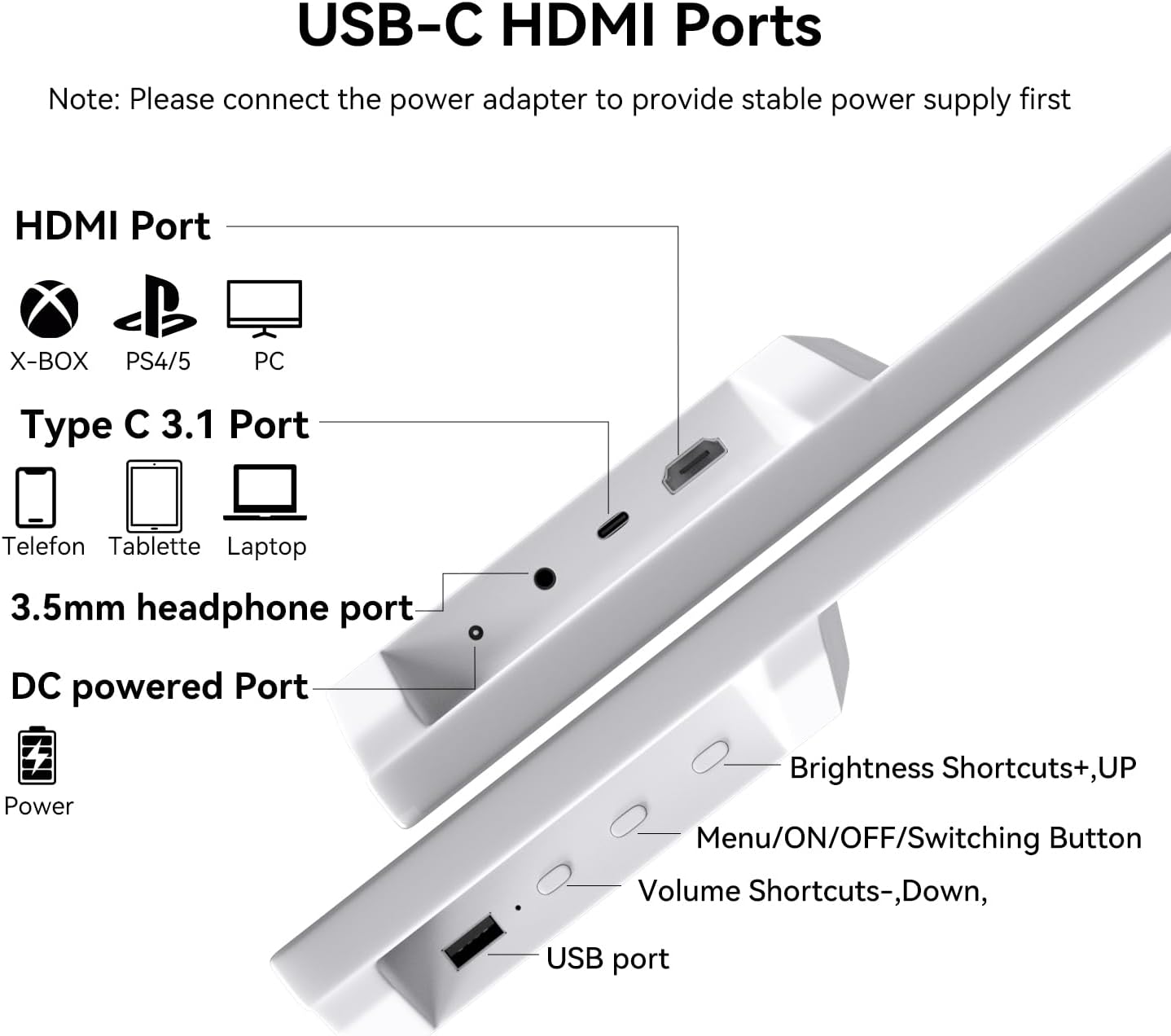
слика: Сиде view of the monitor detailing the HDMI Port, Type C 3.1 Port, 3.5mm headphone port, DC powered Port, Brightness Shortcuts (+UP), Menu/ON/OFF/Switching Button, Volume Shortcuts (-Down), and USB port.
- ХДМИ порт: Connects to devices like X-BOX, PS4/5, and PCs for video and audio input.
- Type C 3.1 Port: Connects to phones, tablets, and laptops for video, audio, and touch signal transmission. Requires a full-featured USB-C port on the connected device.
- 3.5 мм прикључак за слушалице: За повезивање спољних аудио уређаја.
- DC Powered Port: Connects to the power adapter for stable power supply. Always connect power here first.
- УСБ порт: За повезивање УСБ уређаја.
- Brightness Shortcuts (+UP): Подешава осветљеност екрана.
- Menu/ON/OFF/Switching Button: Accesses the OSD menu, powers the monitor on/off, and switches input sources.
- Volume Shortcuts (-Down): Подешава јачину звука.
Упутства за подешавање
Follow these steps to set up your Prechen portable touchscreen monitor.
1. Power Connection (Important)
Due to the touchscreen's power requirements, it is crucial to connect the monitor to a power source via the DC input first, before connecting any signal cables (HDMI or USB-C). This ensures stable power delivery for full multi-touch functionality.
2. Повезивање са уређајима
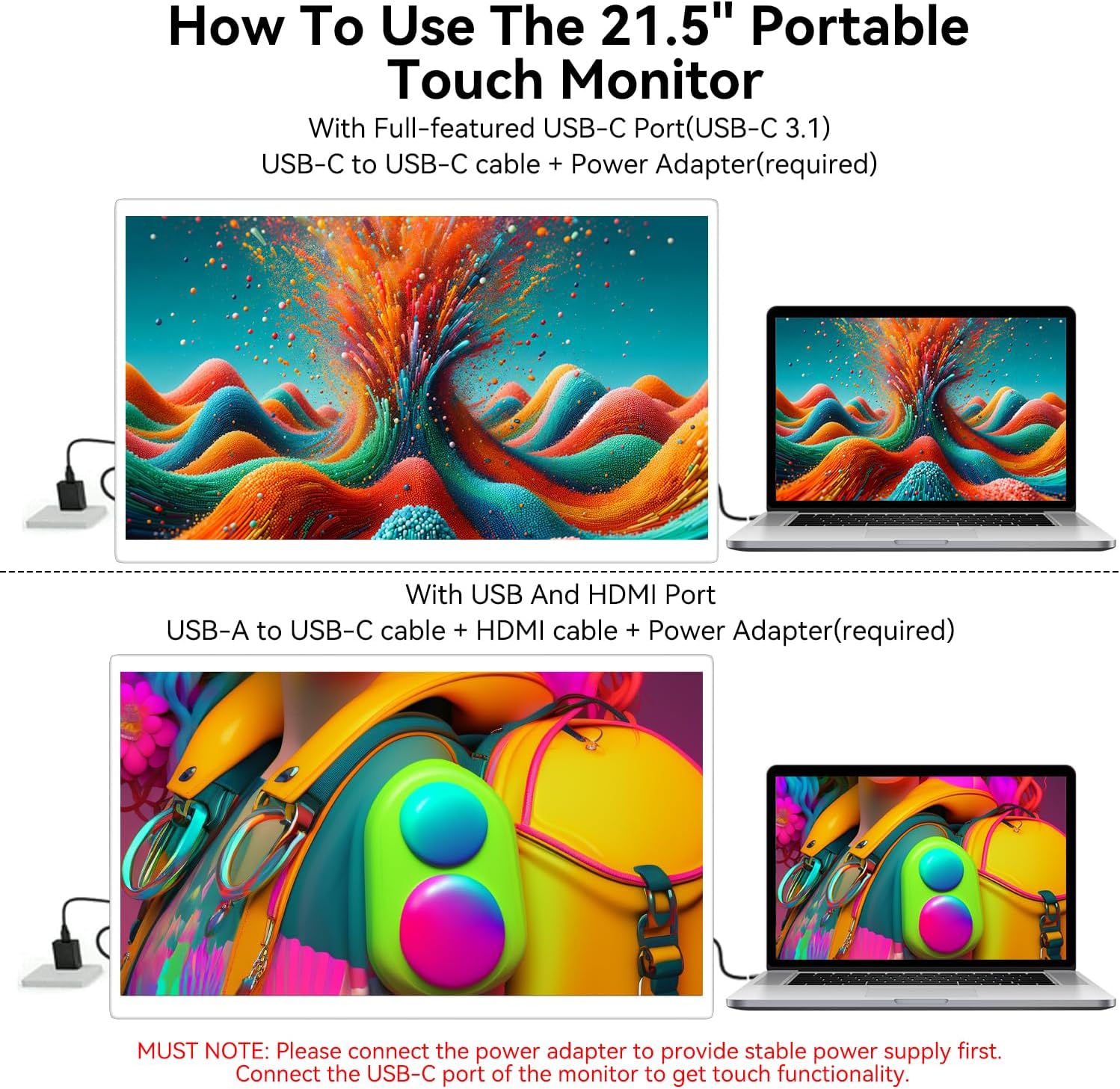
слика: Connection methods for the monitor. Top: USB-C to USB-C with power adapter. Bottom: USB-A to USB-C, HDMI, and power adapter.
Option A: Full-featured USB-C Port (USB-C 3.1)
- Connect the power adapter to the monitor's DC powered port.
- Connect one end of the USB-C to USB-C cable to the monitor's Type C 3.1 Port.
- Connect the other end of the USB-C to USB-C cable to your device's full-featured USB-C port. This single cable will transmit video, audio, and touch signals.
Option B: HDMI and USB-A Port
- Connect the power adapter to the monitor's DC powered port.
- Connect one end of the HDMI cable to the monitor's HDMI Port.
- Connect the other end of the HDMI cable to your device's HDMI output.
- Connect one end of the USB-A to USB-C cable to the monitor's Type C 3.1 Port.
- Connect the USB-A end of the cable to your device's USB-A port to enable touch functionality.
3. Adjusting the Stand and VESA Mounting

слика: The monitor's integrated stand allows for 0-90 degree adjustment, providing flexible viewинг углова.
The monitor features an integrated stand that can be adjusted up to 90 degrees for optimal viewing angles. For alternative setups, the monitor is compatible with standard VESA mounts (75x75mm), allowing for wall or arm mounting.
Упутство за употребу
1. Укључивање/искључивање
Притисните тастер Menu/ON/OFF/Switching Button located on the back of the monitor to power it on or off.
2. Функционалност екрана осетљивог на додир
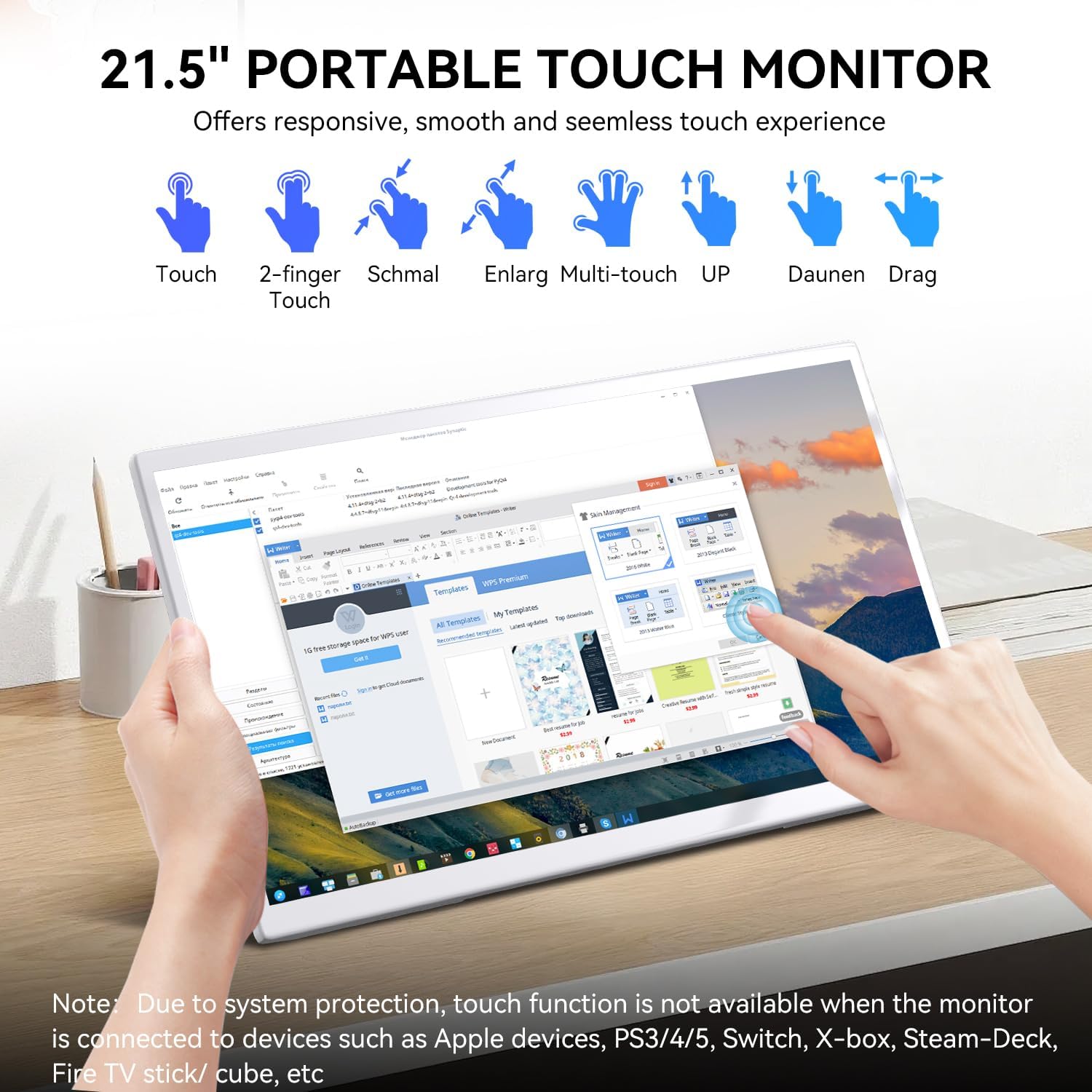
слика: The monitor supports various touch gestures including single touch, two-finger touch, multi-touch, and drag operations.
The monitor supports responsive capacitive multi-touch. Use gestures such as touch, two-finger touch, and drag for interaction.
Важне напомене о компатибилности:
- The touchscreen is није компатибилан with Linux-based and gaming devices (e.g., PS3/4/5, Switch, X-box, Steam-Deck).
- Apple devices (iOS/macOS) support single-point touch only due to system protection and operating system limitations.
3. Он-Сцреен Дисплаи (ОСД) мени
Притисните тастер Menu/ON/OFF/Switching Button to access the OSD menu. Use the Brightness Shortcuts (+UP) and Volume Shortcuts (-Down) buttons to navigate and adjust settings within the menu.
4. Аудио излаз

слика: The monitor features dual built-in speakers for clear and vivid sound.
The monitor includes dual built-in speakers for audio output. You can also connect external headphones or speakers via the 3.5mm headphone port.
Одржавање
Правилна нега осигурава дуготрајност вашег монитора.
- Чишћење екрана: Нежно обришите екран меком крпом која не оставља влакна. За тврдокорне мрље, дampБлаго навлажите крпу водом или средством за чишћење екрана. Избегавајте јаке хемикалије или абразивне материјале.
- Чишћење Цasing: Користите меку, суву крпу да обришете монитор casing.
- Складиштење: Када се монитор не користи дуже време, чувајте га на хладном и сувом месту, даље од директне сунчеве светлости и екстремних температура.
- Избегавајте течности: Do not spray liquids directly onto the monitor or allow them to drip into openings.
Решавање проблема
Ако наиђете на проблеме, погледајте следеће уобичајене проблеме и решења.
| Проблем | Могући узрок | Решење |
|---|---|---|
| Нема дисплеја/порука „Нема сигнала“ | Loose cable connection, incorrect input source, device not outputting signal. | Ensure all cables (HDMI/USB-C) are securely connected. Press the Menu/ON/OFF/Switching Button to cycle through input sources. Verify your connected device is powered on and configured to output video. |
| Екран осетљив на додир не реагује | Insufficient power, incorrect cable connection, device incompatibility. | Always ensure the monitor is connected to its power adapter via the DC input first. For USB-C connections, ensure your device's USB-C port is full-featured (supports video, audio, and touch). If using HDMI, ensure the USB-A to USB-C cable is connected for touch. Remember, touchscreen is not compatible with Linux/gaming devices, and Apple devices support single-point touch only. |
| Нема звука из звучника | Volume too low, mute enabled, audio source issue. | Increase volume using the Volume Shortcuts (-Down) button. Check your connected device's audio settings. Ensure no headphones are plugged into the 3.5mm jack if you want sound from the built-in speakers. |
| Buttons on back control brightness/volume inconsistently | Context-sensitive button functionality. | The Brightness Shortcuts (+UP) and Volume Shortcuts (-Down) buttons may have different functions depending on whether the OSD menu is active or not. When the OSD menu is not active, they typically control brightness and volume directly. When the OSD menu is open, they are used for navigation. |
| Слика је мутна или искривљена | Incorrect resolution, cable quality. | Ensure your device's display settings are set to the monitor's native resolution (1920x1080). Try using a different HDMI or USB-C cable if available. |
Спецификације
Detailed technical specifications for the Prechen 21.5 Inch Portable Touchscreen Monitor.
| Феатуре | Детаљ |
|---|---|
| Бранд | Прецхен |
| Број модела | ХД-215 |
| Величина екрана | 21.5 инча |
| Резолуција | FHD 1080p (1920 x 1080 pixels) |
| Рефресх Рате | 75 херца |
| Дисплаи Тецхнологи | ИПС ЛЕД |
| Осветљеност | 300 цд/м² |
| Однос контраста | 1000:1 |
| Време одговора | 3 милисекунди |
| Опис површине екрана | Глосси |
| Додатне карактеристике | Touchscreen, Built-in Speakers, VESA Mount Compatible |
| Технологија повезивања | ХДМИ, УСБ Типе-Ц |
| Димензије артикла (Д к Ш к В) | 19.68"Д к 1.18"Ш к 11.81"В |
| Боја | Бела |
| УПЦ | 753018887438 |
Гаранција и подршка
Информације о гаранцији
This Prechen monitor comes with a 1-year limited warranty from the date of purchase. This warranty covers manufacturing defects and workmanship under normal use. It does not cover damage caused by misuse, accidents, unauthorized modifications, or external causes.
Корисничка подршка
For technical assistance, warranty claims, or any questions regarding your Prechen monitor, please contact our customer support team. Refer to the contact information provided on the product packaging or the official Prechen webсајт за најновије информације о подршци.
When contacting support, please have your model number (HD-215) and proof of purchase readily available.