
1. Увод
This manual provides detailed instructions for the installation, operation, and maintenance of your Blütezeit MJ-400 Sliding Gate Opener, including the integrated WiFi module and 433MHz push button. Please read this manual thoroughly before installation and use to ensure proper function and safety.
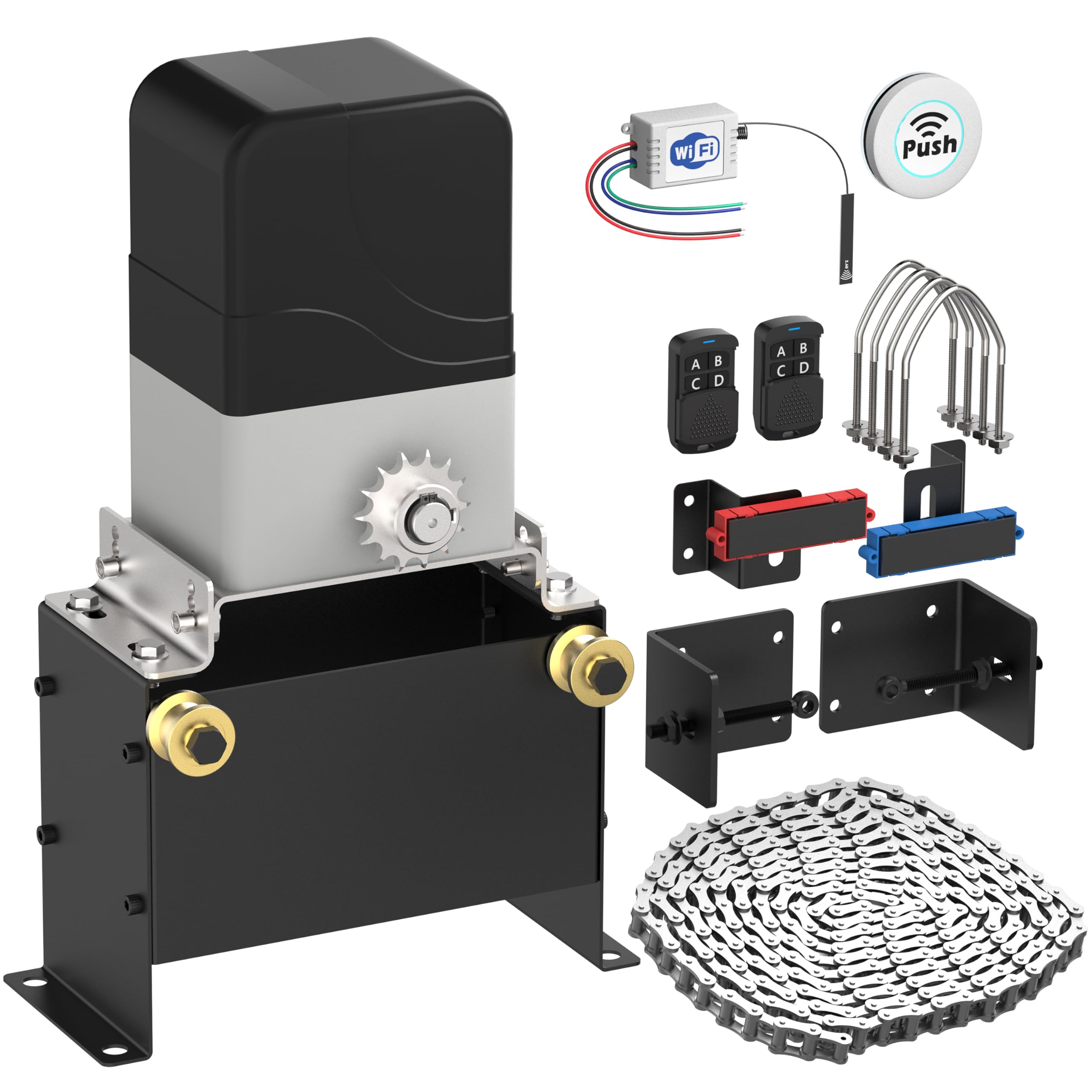
Image 1.1: Blütezeit MJ-400 Sliding Gate Opener with WiFi Module and Push Button components.
2. Безбедносне информације
УПОЗОРЕЊЕ: Непоштовање ових безбедносних упутстава може довести до озбиљних повреда или смрти.
- Always keep the gate area clear of people, pets, and objects while the gate is in motion.
- Do not allow children to operate or play with the gate opener controls.
- Уверите се да све електричне везе обавља квалификовани електричар и да су у складу са локалним прописима.
- Install safety devices such as photo-electric sensors to prevent the gate from closing on obstructions.
- Редовно проверавајте капију и отварач да ли имају знаке хабања, оштећења или неправилног поравнања.
- Искључите напајање пре обављања било каквог одржавања или поправке.
3. Садржај пакета
Проверите да ли се у вашем пакету налазе све ставке наведене у наставку:
- Blütezeit MJ-400 Sliding Gate Opener Motor Unit
- 16.4 ft (5 meters) Heavy-Duty Drive Chain
- MJ-series WiFi Module (MWF30)
- 433MHz Wireless Push Button Transmitter
- Mounting Hardware and Brackets
- Remote Controls (Quantity may vary, typically 2)
- Упутство за инсталацију

Слика 3.1: Готовоview of the Blütezeit MJ-400 Sliding Gate Opener and included accessories.
4. Спецификације
| Феатуре | Спецификација |
|---|---|
| Модел | МЈ-400 |
| Тип мотора | AC Chain-Drive |
| Повер Суппли | АЦ110В/60Хз |
| Снага мотора | 130W (Copper Motor) |
| Максимална тежина капије | 1100 лб (500 кг) |
| Максимална дужина капије | КСНУМКС фт (КСНУМКС метара) |
| Брзина капије | 0.7 ft/s (21 cm/s) |
| WiFi Module Input | ДЦ КСНУМКС-КСНУМКСВ |
| ВиФи фреквенција | 2.4GHz (5GHz not supported) |
| Даљинска фреквенција | 433.92MHz (Original MJ rolling-code) & 433MHz (Expanded accessory support) |
5. Подешавање и инсталација
5.1 Gate Opener Installation
- Монтажа моторне јединице: Securely mount the MJ-400 motor unit on a stable, level concrete pad or equivalent foundation next to your sliding gate. Ensure proper alignment with the gate's path.
- Инсталација ланца: Attach the provided 16.4 ft heavy-duty chain to the gate and route it through the motor unit's sprocket. Adjust chain tension to allow for smooth movement without excessive slack or tightness.
- Подешавање граничног прекидача: Install and adjust the magnetic limit switches at the desired open and closed positions of your gate. These switches signal the motor to stop.
- Електрични прикључак: Connect the AC110V/60Hz power supply to the motor unit according to the wiring diagram in the main gate opener manual. Ensure all connections are secure and insulated.
5.2 WiFi Module (MWF30) Installation
The WiFi module integrates with the gate opener's control board for smart control.
- Access Control Box: Open the control box of your MJ-400 gate opener.
- Жична веза: The WiFi module features pre-wired leads. Connect these leads to the corresponding terminals on the gate opener's control board. The module supports DC 7-32V input. Refer to the module's labels for correct wiring (e.g., N.C., Com, V+, GND).

Image 5.1: Blütezeit MWF30 WiFi Module showing pre-wired leads for easy connection.

Image 5.2: The compact Blütezeit MWF30 WiFi Module designed for seamless integration within the MJ-series gate opener.
- Положај антене: Position the 5-inch external antenna for optimal signal reception.

Image 5.3: The 5-inch external antenna for the WiFi module, designed to enhance signal strength and connectivity.
5.3 433MHz Push Button Setup
The included 433MHz push button is pre-paired with the WiFi module and operates in a single-button loop mode (Open-Stop-Close).
- Монтажа: The wireless push button can be mounted anywhere in your home for convenient access.
- Операција: Pressing the button will cycle the gate through Open, Stop, and Close states.

Image 5.4: The wireless push button, offering one-touch control for the gate opener.
6. Упутство за употребу
6.1 Standard Remote Control Operation
Use the original MJ 433.92MHz rolling-code remotes to operate the gate. Each button typically corresponds to Open, Stop, or Close functions, or a single button may cycle through these states depending on programming.
6.2 Smart App Control via eWeLink (WiFi Module)
The WiFi module enables remote control and smart features through the eWeLink app.
- Преузмите апликацију eWeLink: Download and install the eWeLink app on your smartphone from your device's app store.
- Pairing the Module: Follow the in-app instructions to add and pair your Blütezeit WiFi module. Ensure your smartphone is connected to a 2.4GHz WiFi network during pairing (5GHz networks are not supported).
- даљински управљач: Once paired, you can remotely Open, Stop, or Close your gate using the app. The app typically operates in a loop mode for gate control.
- Паметне интеграције: The eWeLink app supports integration with platforms like Amazon Alexa, Google Home, Siri Shortcuts, and IFTTT for voice control, automation, scheduling, and smart routines.

Image 6.1: The eWeLink app interface demonstrating smart control and compatibility with various smart home platforms.
6.3 433MHz Accessory Operation
The system supports additional 433MHz accessories (e.g., wireless keypads, remotes) which operate independently of the original MJ rolling-code remotes. These accessories will typically function in a single-button loop mode (Open-Stop-Close).
7. Одржавање
Regular maintenance ensures the longevity and reliable operation of your gate opener.
- Преглед ланца: Periodically check the drive chain for proper tension, rust, or damage. Lubricate the chain as needed with appropriate chain lubricant.
- Покретних делова: Inspect all moving parts for wear and tear. Ensure rollers and hinges on the gate are clean and lubricated.
- Сигурносни уређаји: Test photo-electric sensors and other safety devices regularly to ensure they are functioning correctly.
- чистоћа: Keep the motor unit and control box free from dirt, debris, and insects.
- Напајање: Check electrical connections for corrosion or loose wiring.
КСНУМКС. Решавање проблема
| Проблем | Могући узрок | Решење |
|---|---|---|
| Gate does not move | No power; Remote battery low; Limit switch issue; Obstruction | Check power supply; Replace remote battery; Adjust limit switches; Remove obstruction. |
| Даљински управљач не ради | Battery dead; Remote not paired; Interference | Replace battery; Re-pair remote (refer to main manual); Check for signal interference. |
| WiFi app control not working | WiFi module not powered; Incorrect WiFi network (5GHz); App not paired; Router issues | Check module power; Ensure 2.4GHz WiFi; Re-pair module in app; Restart router. |
| Gate stops unexpectedly | Obstruction detected; Safety sensor triggered; Limit switch fault | Clear obstruction; Check safety sensors for alignment/damage; Inspect limit switches. |
9. Гаранција и подршка
For warranty information and technical support, please refer to the documentation included with your original purchase or contact Blütezeit customer service through the retailer where the product was purchased. Keep your purchase receipt as proof of purchase.