
1. Увод
Thank you for choosing the ACEMAGIC LX16PRO Gaming Laptop. This manual provides essential information for setting up, operating, maintaining, and troubleshooting your new device. The LX16PRO is designed for performance and productivity, featuring an AMD Ryzen 7 7730U processor, a 16-inch IPS display, 16GB DDR4 RAM, and a 512GB NVMe SSD, running on Windows 11 Pro.

Слика: Прекоview of the ACEMAGIC LX16PRO laptop, highlighting its AMD Ryzen 7 7730U processor, AMD Radeon Graphics, 16-inch FHD IPS display, up to 64GB DDR4 RAM, up to 4TB NVMe SSD, WiFi 6, and backlit keyboard.
2. Подешавање
2.1 Почетно укључивање
- Raspakujte: Пажљиво извадите лаптоп и сву додатну опрему из паковања.
- Прикључите напајање: Plug the power adapter into the DC jack on the laptop and then into a power outlet.
- Укључено: Open the laptop lid and press the power button, usually located on the keyboard deck.
- Виндовс подешавање: Пратите упутства на екрану да бисте завршили почетно подешавање система Windows 11 Pro, укључујући језик, регион, мрежну везу и креирање корисничког налога.
2.2 Повезивање периферних уређаја
The LX16PRO offers various ports for connecting external devices:
- УСБ 3.2: Connect USB devices such as mice, keyboards, or external storage drives.
- Type-C (Full Function): Use for data transfer, video output, or charging compatible devices.
- ДВИ: Повежите се са екстерним мониторима или телевизорима за проширени приказ.
- 3.5 мм прикључак за слушалице: Повежите слушалице или спољне звучнике.
- Утичница за ТФ картицу: Insert a TF (microSD) card for additional storage or data transfer.

Слика: Десна страна view of the laptop, displaying the DC power input, a full-function Type-C port, an HDMI port, and a USB 3.2 port.
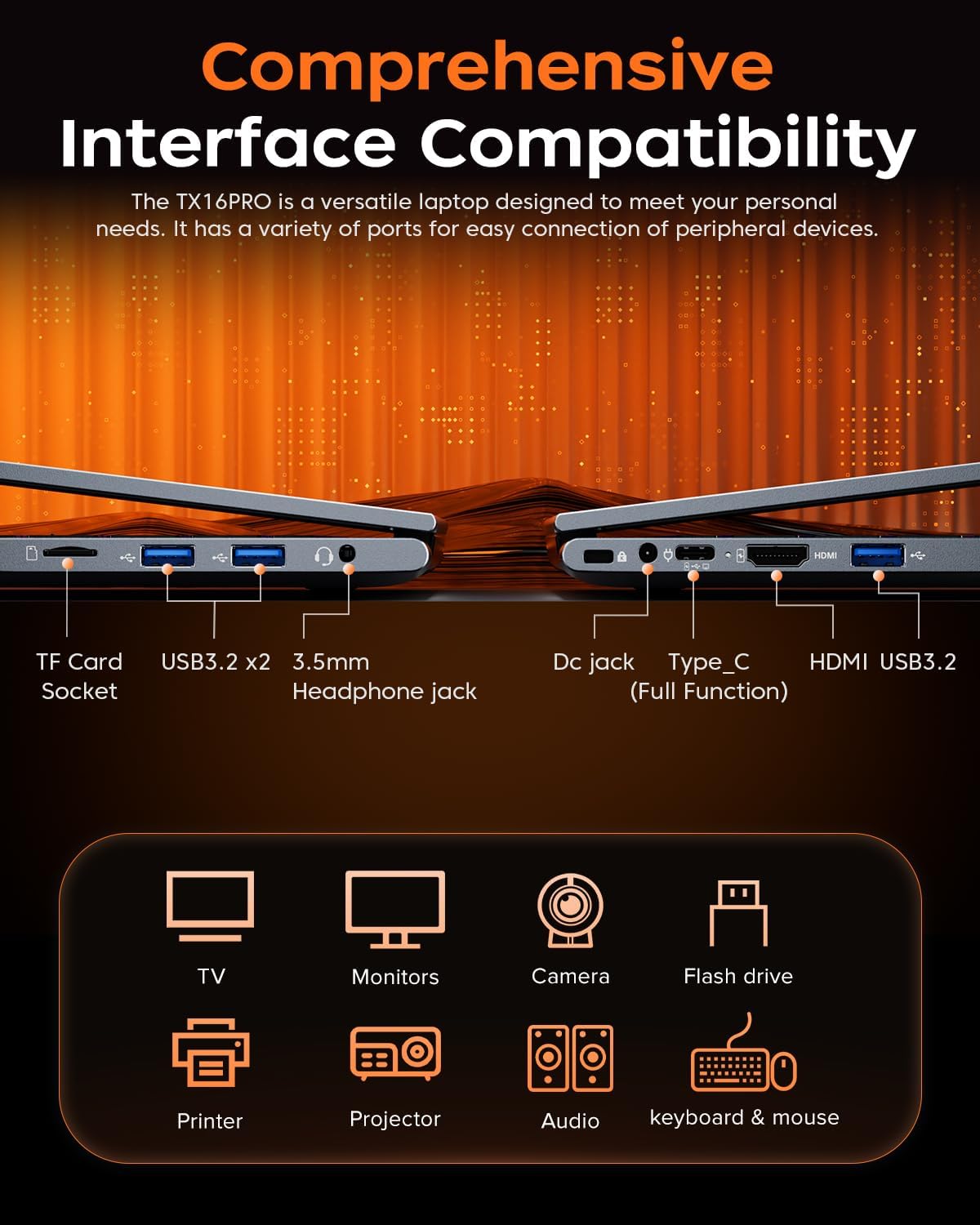
Слика: Лева страна view of the laptop, showing the TF card socket, two USB 3.2 ports, and the 3.5mm headphone jack.
3. Упутство за употребу
3.1 Тастатура и тачпед
The laptop features a backlit keyboard and a responsive touchpad with multi-touch capabilities. The backlit keyboard enhances visibility in low-light conditions, and the numeric keypad provides convenience for data entry.
- Контрола позадинског осветљења: Use the dedicated function keys (e.g., Fn + Fx) to adjust keyboard backlight brightness or toggle it on/off.
- Покрети додирне табле: Utilize multi-touch gestures for navigation, zooming, and other functions within Windows 11 Pro.

Image: Close-up of the laptop's backlit keyboard and large touchpad, illustrating its design and functionality.
3.2 Дисплеј
The 16-inch IPS display offers Full HD (1920x1200) resolution for clear and vibrant visuals. Adjust display settings through Windows settings for optimal viewинг искуство.

Image: The laptop screen showcasing vivid graphics, emphasizing the 16-inch display with Full HD (1920x1200) resolution and IPS technology.
3.3 Бежично повезивање
The LX16PRO supports WiFi 6 and Bluetooth 5.2 for fast and reliable wireless connections.
- ВиФи 6: Connect to high-speed wireless networks for internet access and online activities.
- Блуетоотх КСНУМКС: Pair with Bluetooth-enabled devices such as headphones, speakers, or other peripherals.

Image: A visual comparison demonstrating the improved transfer speeds and reduced latency of WiFi 6 over WiFi 5, beneficial for gaming and streaming.
3.4 Режими напајања
Optimize performance and battery life by adjusting power modes in Windows settings (Settings > System > Power & battery).
- Најбоље перформансе: Maximizes system speed for demanding tasks like gaming.
- избалансирано: Offers a good compromise between performance and power efficiency for everyday use.
- Best Power Efficiency: Conserves battery life for extended usage, suitable for light tasks.

Image: The laptop displayed alongside three power modes, indicating their respective performance levels and recommended uses for gaming, work, and extended battery life.
4. Одржавање
4.1 Одржавање батерије
- Избегавајте често потпуно пражњење батерије.
- Чувајте лаптоп на хладном и сувом месту када га не користите дуже време.
- За оптималан век трајања батерије, избегавајте излагање лаптопа екстремним температурама.

Слика: Интерна view of the laptop highlighting the 54Wh battery, indicating its capacity for extended use.
4.2 Управљање складиштем
- Редовно чистите непотребно files and applications to maintain optimal performance of the 512GB NVMe SSD.
- Consider external storage or cloud services for large files to free up internal drive space.

Image: A visual representation of the laptop's memory (16GB DDR4 RAM, upgradable to 64GB) and storage (512GB NVMe SSD, upgradable to 4TB) capabilities.
4.3 Чишћење
- Користите меку крпу која не оставља влакна за чишћење екрана и спољашњих површина.
- Избегавајте јаке хемикалије или абразивне материјале.
- Periodically clean the cooling vents to ensure proper airflow and prevent overheating.

Image: An illustration of the laptop's internal cooling system, featuring dual copper pipes and a dedicated fan designed to maintain low temperatures during operation.
КСНУМКС. Решавање проблема
If you encounter issues with your ACEMAGIC LX16PRO laptop, refer to the following common solutions:
- Нема напајања: Уверите се да је адаптер за напајање безбедно повезан и са лаптопом и са исправном утичницом. Проверите индикаторску лампицу напајања.
- Проблеми са приказом: If the screen is blank, try connecting an external monitor via HDMI to check if the issue is with the laptop's display or graphics output. Adjust display settings in Windows.
- Проблеми са повезивањем: For WiFi issues, restart your router and the laptop. For Bluetooth, ensure the device is discoverable and within range.
- Споре перформансе: Close unnecessary applications, check for background processes, and ensure your system is up to date. Consider running a disk cleanup.
- Замрзавање система: Ако систем престане да реагује, притисните и држите дугме за напајање 10-15 секунди да бисте га присилно искључили. Поново покрените лаптоп.
For further assistance, please contact ACEMAGIC customer support.
6. Спецификације
Below are the detailed specifications for the ACEMAGIC LX16PRO Gaming Laptop:
| Феатуре | Детаљ |
|---|---|
| Назив модела | LX16PRO |
| Процесор | AMD Ryzen 7 7730U (8 језгара, 16 нити, до 4.5 GHz) |
| Графика | AMD Radeon™ grafika |
| РАМ | 16GB DDR4 (2666 MHz), Max 64GB |
| Складиштење | 512GB NVMe SSD (PCIE x 4), Max 4TB |
| Дисплаи | 16-inch IPS, 1920x1200 (FHD), 60 Hz |
| Оперативни систем | Виндовс 11 Про |
| Повезивање | WiFi 6 (802.11ax), Bluetooth 5.2 |
| Портс | 1x HDMI, 1x Type-C (Full Function), 3x USB 3.2, 1x 3.5mm Audio Jack, 1x TF Card Socket, 1x DC Jack |
| Тастатура | Backlit Keypad, QWERTY Layout |
| Тоуцхпад | Мулти-тоуцх |
| Webцам | Yes (Front) |
| Батерија | 1 Lithium Ion, 55 Watt Hours (approx. 4 hours life) |
| Димензије | 35.73 к 22.86 к 1.67 цм |
| Тежина | 1.78 кг |
7. Гаранција и подршка
ACEMAGIC provides customers with a one-year limited warranty and 30-day returns. Lifetime technical support and offline maintenance are also available. For any issues or inquiries, please feel free to contact ACEMAGIC customer support.
8. Производ је готовview Видео
Видео: Кратак прегледview of the ACEMAGIC TX16PRO Laptop, showcasing its 16-inch FHD display, 180-degree hinge, backlit keyboard, and various connectivity ports including DC jack, Type-C, HDMI, USB 3.2, TF card socket, and 3.5mm headphone jack. This video highlights the physical features and design of the laptop.